
README file from
GithubUsage
You can add custom classes to :
`class: fancy-list`
- Lorem ipsum
- Dolor
- Amet consectetur
<div class="fancy-list">
  <ul>
    <li>Lorem ipsum</li>
    <li>Dolor sit</li>
    <li>Amet consectetur</li>
  </ul>
</div>
- Lorem ipsum
- Dolor sit `class: fancy-item`
- Amet consectetur
<div>
  <ul>
    <li>Lorem ipsum</li>
    <li class="fancy-item">Dolor sit</li>
    <li>Amet consectetur</li>
  </ul>
</div>
`class: fancy-list`
- Lorem ipsum
- Dolor `class: fancy-item` sit
- Amet consectetur
<div class="fancy-list">
  <ul>
    <li>Lorem ipsum</li>
    <li class="fancy-item">Dolor sit</li>
    <li>Amet consectetur</li>
  </ul>
</div>
ℹ️ For advanced usages and/or informations see the FAQ section.
Demonstrations
Here are some ways to use this plugin that may inspire you for your workflows.
Add a class to :
`class: mytable`
| AAA | BBB | CCC |
| --- | --- | --- |
| 111 | 222 | 333 |
<div class="mytable">
<table>
  <thead>
    <tr>
      <th>AAA</th>
      <th>BBB</th>
      <th>CCC</th>
    </tr>
  </thead>
  <tbody>
    <tr>
      <td>111</td>
      <td>222</td>
      <td>333</td>
    </tr>
  </tbody>
</table>
</div>
| AAA | BBB                  | CCC |
| --- | -------------------- | --- |
| 111 | 222 `class: my-cell` | 333 |
<div>
<table>
  <thead>
    <tr>
      <th>AAA</th>
      <th>BBB</th>
      <th>CCC</th>
    </tr>
  </thead>
  <tbody>
    <tr>
      <td>111</td>
      <td class="my-cell">222</td>
      <td>333</td>
    </tr>
  </tbody>
</table>
</div>
`class: my-dv-list`
```dataview
LIST
WHERE creation
```
<div class="my-dv-list">
  <div class="block-language-dataview">
    <ul class="dataview list-view-ul">
      // The results of your query
      // <li>...</li>
      // ...
    </ul>
  </div>
</div>
`class: important-title`
### My super heading
<div class="important-title">
  <h3>My super heading</h3>
</div>
`class: interesting-quote`
> Lorem ipsum dolor sit amet
<div class="interesting-quote">
  <blockquote>
    <p>Lorem ipsum dolor sit amet</p>
  </blockquote>
</div>
I'm a **bold text `class: big`** and _`.small` me an italic one_
<p>I'm a <strong class="big">bold text</strong> and <em class="small">me an italic one</em></p>
Showcase / Integrations
That section displays some example of how people have integrated the Custom Classes plugin in their workflows. Feel free to share yours by opening an issue.
Here the Custom Classes plugin is used to render a Markdown unordered list (ul) as a clean frontmatter block.
→ Source: https://forum.obsidian.md/t/a-frontmatter-that-finally-supports-links-lilas-frontmatter/53087
`class:meta`
- creation:: 2023-01-21T18:55:12
- author:: [[John Doe]]
- parents:: [[Note]], [[Another note]]
- status:: #MayBePartial
| Theme | |
|---|---|
| Dark | 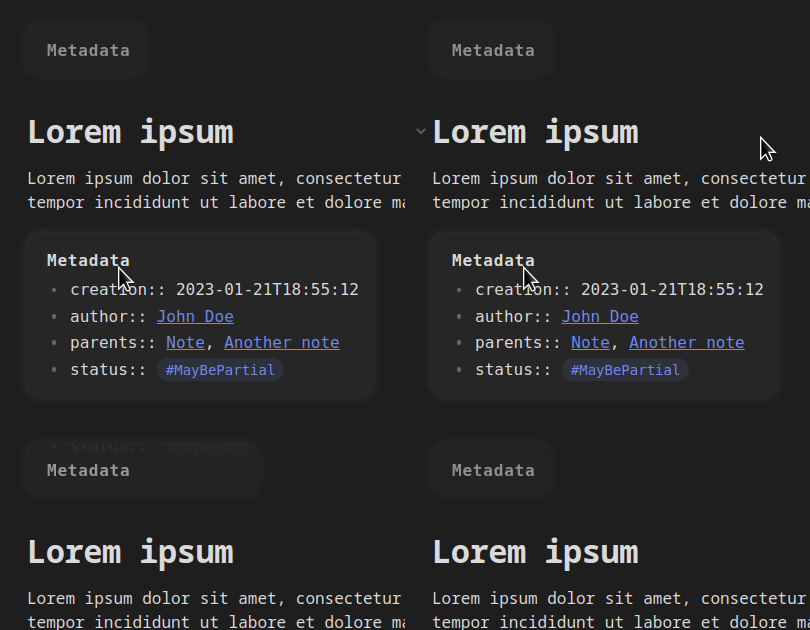 |
| Light | 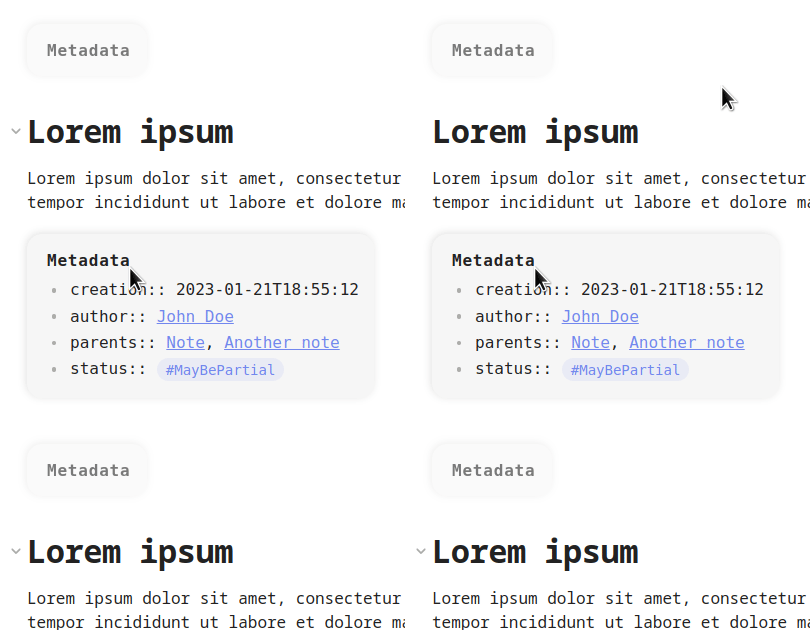 |
❔ FAQ
In Obsidian, wrapping a Markdown element in a div will break its render in Live Preview and Read modes, and prevent links from being clicked in Edit mode. Also, writing HTML into your notes makes them less readable.
Thanks to the Custom Classes plugin you're able to add a custom classes to Markdown elements without breaking anything and using plain-markdown format ! :tada:
Since this plugin is exclusive to Obsidian, the custom classes will not be applied in other editors.
However since the custom classes blocks (`class: ...`) are simple Markdown inline code-blocks, they will properly render as code blocks in other Markdown editors.
Yes, just separate each class by a comma :
`class: first, second, third-one`
I'm the paragraph and you ?
<div class="first second third-one">
  <p>I'm the paragraph and you ?</p>
</div>
Yes the Live Preview mode is fully supported by this plugin.
By the way, elements targetted by a Custom Classes block are rendered in the exact same way in both Read and LP modes, allowing you to write CSS that will work everywhere.
Yes the Custom Classes plugin will also consider as custom classes block every inline code-block that starts with cls:or with .
So `cls: wow` and `.wow` are equivalent to `class: wow`.
Installation
- Go to Community Plugins section of your Obsidian's settings
- Click on Browse and search for "Custom classes"
- Select the Custom Classes plugin and click on Install
- Once installed, click on Enable
- Enjoy !
Inspiration
This plugin is originally inspired by the Obsidian Stylist plugin but has been entirely rewritten to :
- focus exclusively on adding custom HTML classes,
- support the Live Preview mode,
- fix some majors bugs (e.g. classes were not properly appended if the targetted block was modified and then re-rendered).
Contributing
See CONTRIBUTING.md.