

README file from
GithubPlugin Groups for Obsidian
A plugin that allows you to easily group and manage your other plugins in Obsidian.
Features
- Grouping: Organize your plugins into logical groups to make it easier to manage them.
- Bulk actions: Enable or disable the plugins in a group with a single click or command.
- Delayed Group Loading: You can set your groups to load after a custom delay following Obsidian's startup. This can be useful for reducing the load on your system during startup, resulting in shorter loading times.
- Group Nesting: Manage your groups with groups. E.g. you have a group for style related plugin and one for Plugins you use often but don't need immediately on start up. Create both of them and add them To a parent group that loads these delayed on start up, so you can get to work quickly without having to wait for all of them to load.
Limitations
Some plugins don't work with delayed loading, as they need to load before the workspace is loaded. In the future, I hope it will be possible to load those delayed as well. Until then here's a list of plugins that don't work with delayed loading:
Some plugins will also have minor issues (proper view not loading). This can be resolved by closing and reopening the affected pane. E.g.:
Sometimes the pane will automatically reload, however this will only happen after the plugin has loaded that is the case for e.g.:
If you notice a plugin that has issues with delayed loading, please let me know or open a PR with the Plugin added to the list in this README.md
Unfortunately it is not possible yet to set the order of starting plugins within a group. Therefore if plugins depend on one another and a plugin needs to be loaded before another one, I advise putting them in different groups and loading those accordingly. Though it might work without doing that I'd advise against it just to be safe.
Installation
Keep in mind this is an early version of this plugin so there might be some kinks left to iron out. If you encounter any, please do let me know!
To install Plugin Groups, follow these steps:
- Head to the releases tab and download the latest version.
- Open your plugins folder in the
.obsidianfolder of your vault. - Create a new folder named
obsidian-plugin-groupsand paste themanifest.json,style.cssandmain.jsinto it. Or directly copy the whole folder from the zipped file. - Done
Note: As soon as this plugin is available on the public obsidian plugin repository it will also be available from the Community plugin list directly.
Usage
To use Obsidian Groups, enable it from the Community Plugins Menu and start organizing and managing your plugins by creating groups.
Creating a Group
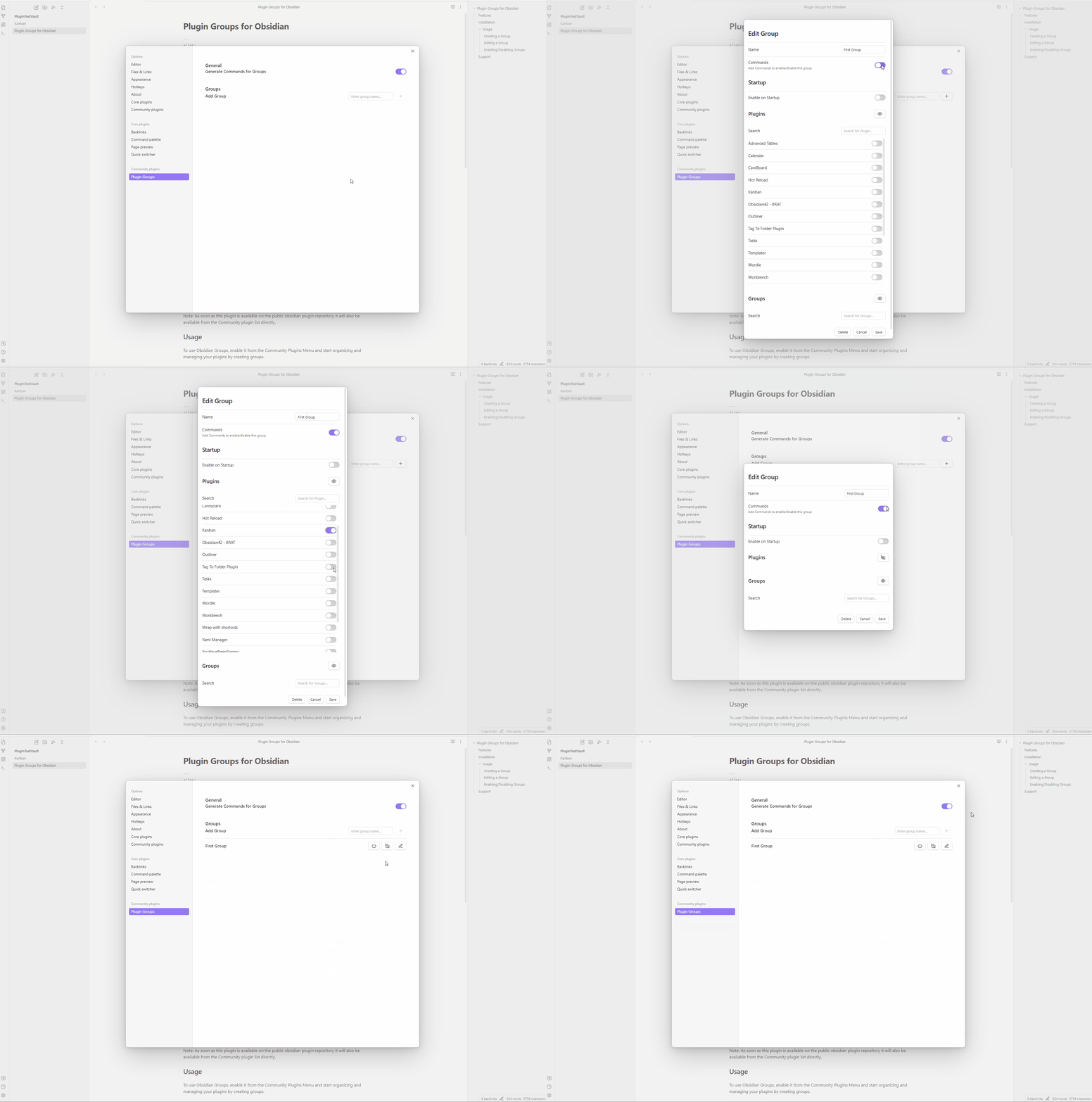
To create a new group head to the plugin settings, Enter a name for the group and click the "+" button. You can then;
- Toggle your plugins on/off for the group to in- or exclude them from the group.
- Choose whether commands should be generated for the group.
- Set the group to launch on Obsidian's startup (with or without delay).
- Include other groups to be controlled by this group. Click "Save" to finish the creation process.
Editing a Group
To edit an existing group, click on the pen icon next to the group name in the plugin settings. From here, you can edit the group the same way you created it. Alternatively you can choose which groups a plugin should belong to from the plugins list within the Settings.
Enabling/Disabling Groups
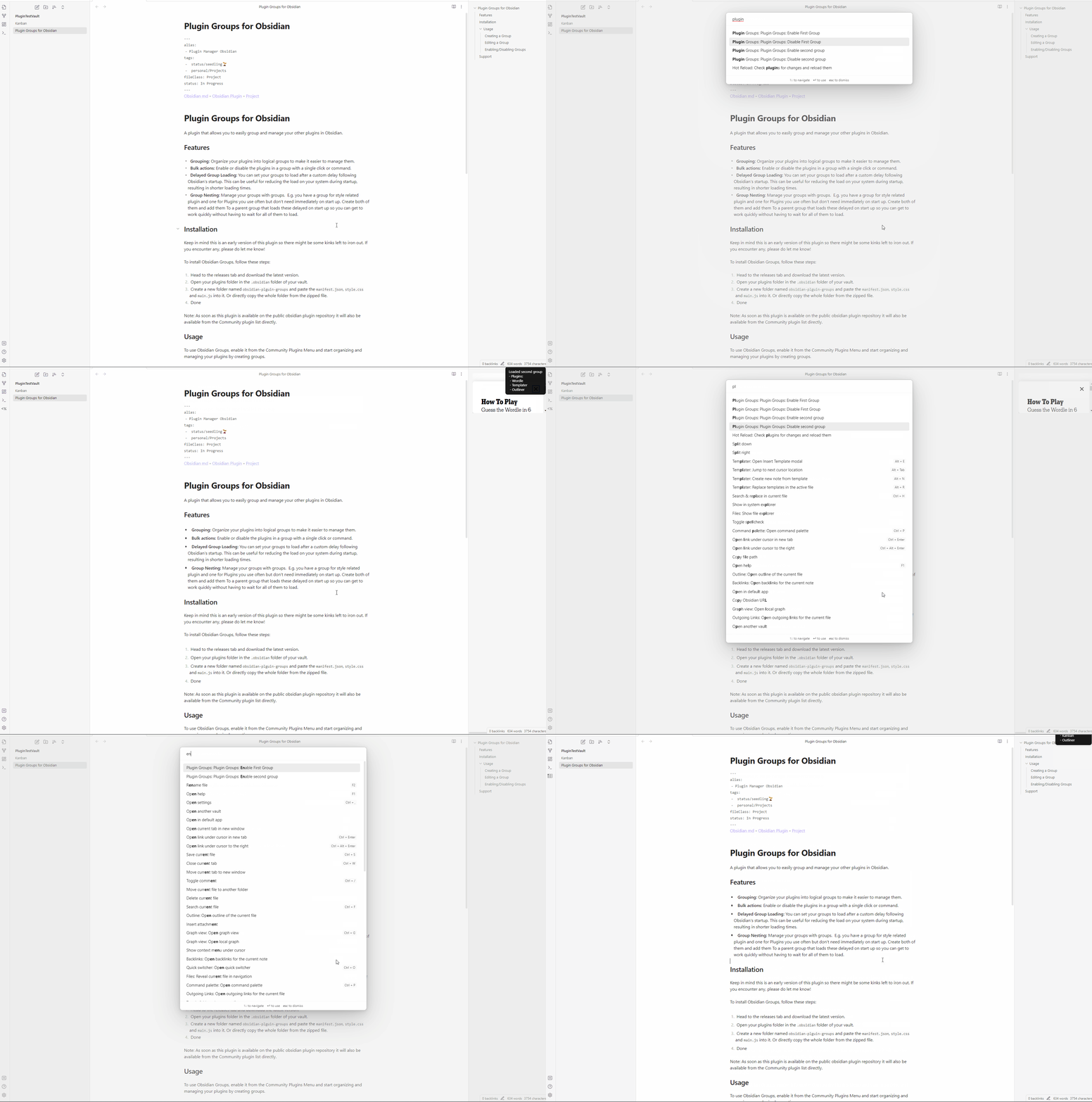
You can enable or disable a group by clicking the "On" & "Off" buttons next to the group name in the plugin settings. If enabled, sou can also use the following commands in the command panel to enable or disable your groups:
- Plugin Groups Enable: "Your Group Name"
- Plugin Groups Disable: "Your Group Name"
Lazy Loading (Delayed loading on Obsidians Startup)
To enable loading your plugins delayed you'll need to do the following:
- Manually disable the plugins you want to load through lazy load in the community plugins tab. Or, even better delete the id's of the plugins in the file:
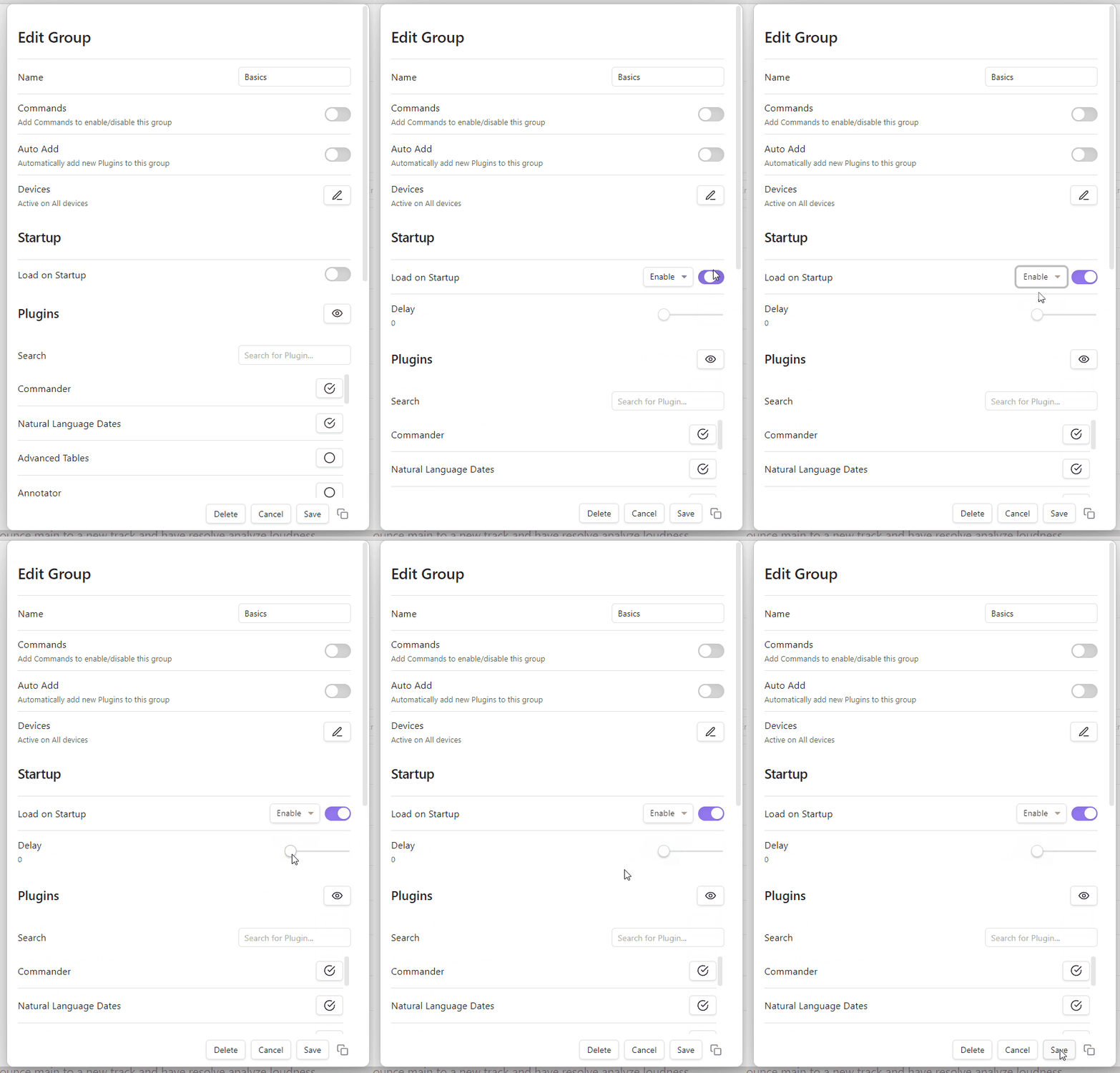
.obsidian/community-plugins.json. Explanation: When the plugins are enabled in manually they are written in the file and therefore load on obsidian's startup (not through plugin groups). - In the groups that contain the plugins you want to load delayed, toggle the "Load on Startup" button.
- Choose the desired behaviour (Enable or Disable).
- Set the delay for the plugins
- Done! On your next startup you should see an improvement in your startup time.
Support
If you find the Plugin Groups to be a useful tool, please consider supporting me through a donation via Buy Me a Coffee or starring this project on GitHub. Alternatively consider Donating to the Internet Archive an awesome project, preserving and providing access to digital media and information, now and for future generations! Your support helps me to continue developing and maintaining this plugin.
If you have any questions, feedback, issues or bugs, please don't hesitate to contact me or create an issue in this Repository.
Thank you for using Plugin Groups I hope it makes your life easier!
Help me with the documentation:
Even though I try my best to keep the documentation up to date in the Readme, there may be things that I miss, such as spelling mistakes or features that could be explained more clearly. If you notice any of these issues, please let me know. Or, even better, if you are able to fix the mistakes or write clearer explanations, you can create a pull request with your changes. This helps me focus more on development and allows other users to benefit from improved usage documentation!
If you do end up helping me like that, thank you so much! If you make use of Images, put them into the images folder. The theme used is the light version of the obsidian standard theme.
Also if you've got any usages or tips you think might benefit other don't hesitate to create a pullrequest for those as well.