SQLSeal Charts

by hypersphere
5
4
3
2
1
Score: 40/100

Description

The SQLSeal Charts plugin extends SQLSeal by enabling data visualization through a variety of chart types. It integrates with ECharts, allowing users to transform SQL query results into line, bar, pie, scatter, and heatmap charts within Obsidian. By leveraging SQLSeal's querying capabilities, users can structure and manipulate data before displaying it graphically. The plugin provides built-in functions to process and refine datasets, making it suitable for users who want to analyze structured information directly in their notes.

Reviews

No reviews yet.

Stats

19
stars
2,668
downloads
1
forks
541
days
367
days
367
days
12
total PRs
1
open PRs
0
closed PRs
11
merged PRs
5
total issues
3
open issues
2
closed issues
0
commits

Latest Version

README file from

Github

SQLSeal Charts

SQLSeal Charts is an extension for SQLSeal Obsidian Plugin allowing to visualise your data using charts!

Powered by ECharts. Check their documentation for more examples of usage.

Features

  • Support for basic charts: line, bar, pie charts
  • Support for compex charts like scatterplot, heatmap, etc.

Getting started

Install the plugin by downloading latest release and unpacking it in .obsidian/plugins/sqlseal-charts. Make sure you have SQLSeal plugin already installed.

Example query

Pie Chart

Query below takes the first table in your current markdown tile and displays it as a piechart.

Category Amount
Rent 1500
Groceries 200
Entertainment 150
Repairs 200
TABLE finances = table(0)

CHART {
	series: [{
		type: 'pie'
	}]
}
SELECT * FROM finances
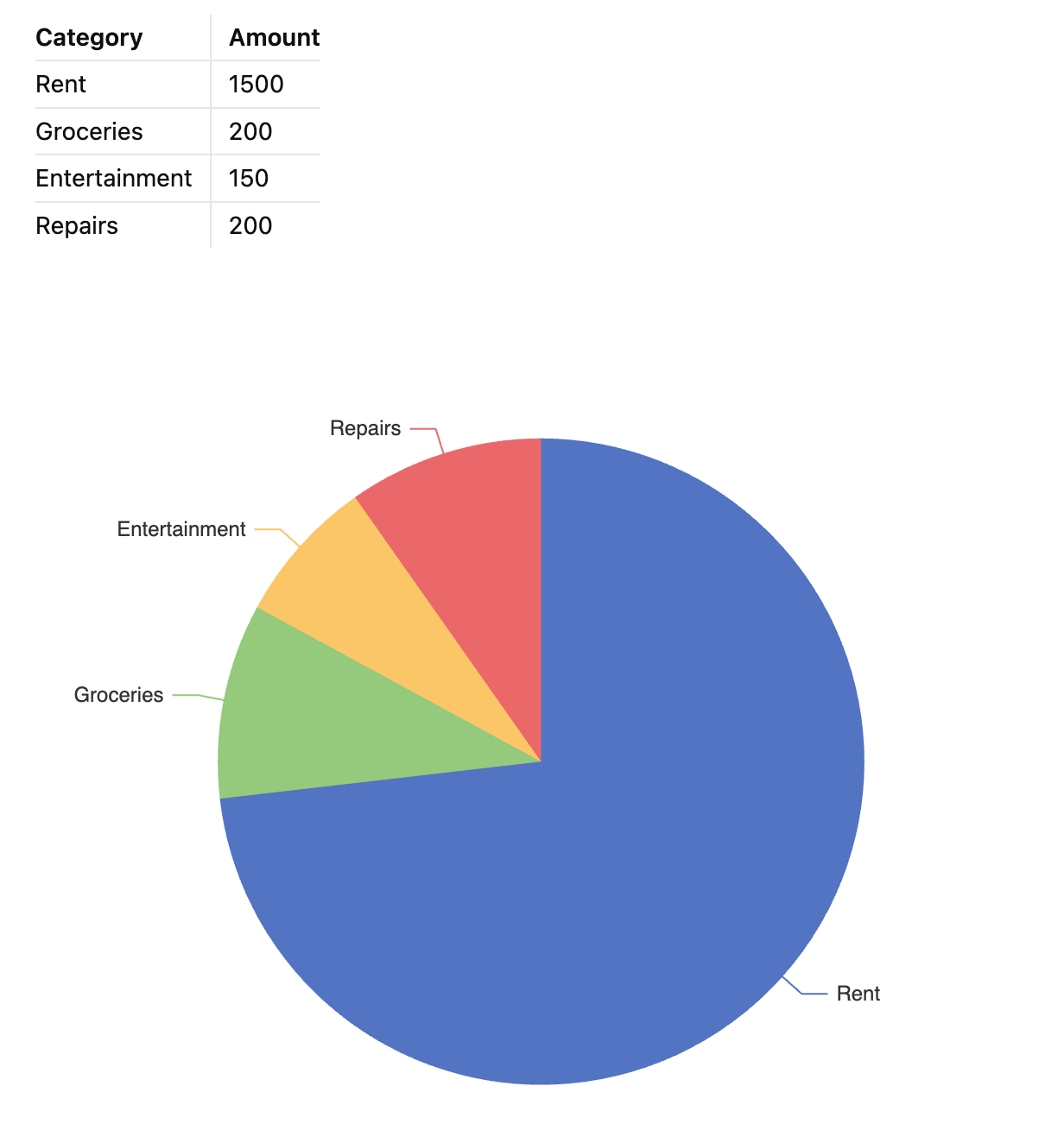
Pie Chart Example

Line Chart

CHART {
	xAxis: {
		type: 'category'
	},
	yAxis: {},
		series: [{
		type: 'bar',
		}]
}
SELECT
	strftime("%Y-%m-%d", created_at) as created_date,
	COUNT(*) as count
FROM files
GROUP BY created_date
ORDER BY created_date
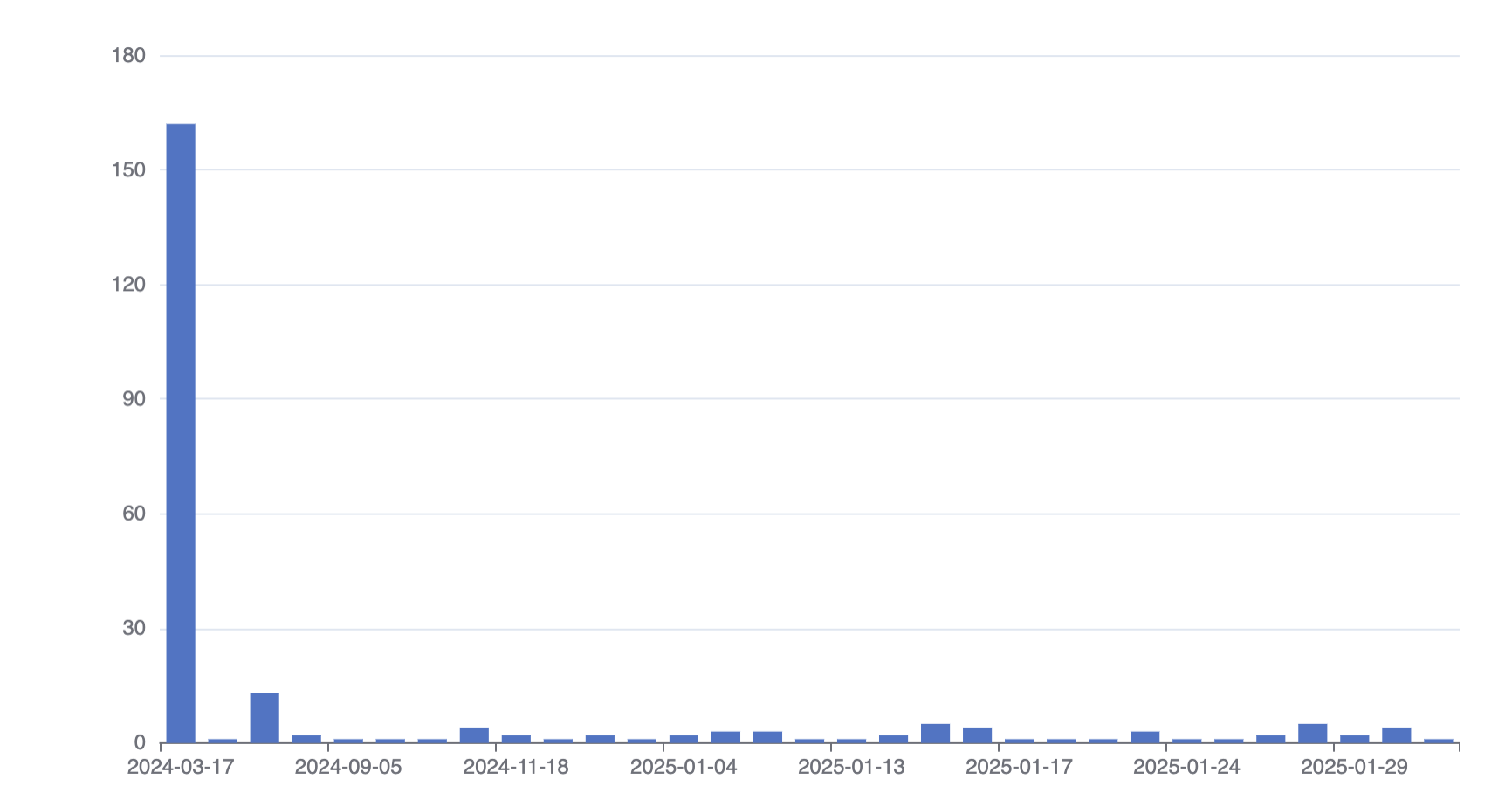
Line Chart Example

Syntax

SQLSeal Charts uses ECharts under the hood. It automatically exposes data returned by your SQL query as a data dataset in ECharts. This means you can generate plenty of charts without worrying too much about how the data is being passed down. For more complex use-cases, you can always refer to the data by column name, it's index or even filter it down to create separate data-sets for different series. To read more about datasets, check out ECharts documentation.

For more advanced transformations, SQLSeal Charts exposes the following data and functions to be used to transform data further.

Data

Variable Name Description
data Array of objects containing raw data
columns array of column names
Object for each column You can refer to each of the column data by their name, i.e. for SELECT category, amount FROM data you can use category and amount columns

Functions

The following functions are exposed in your query to allow you to further process data.

Function Description
column(name: string) Returns array of the values for a specified column
mean, max, min, uniq, uniqBy Lodash functions to help with data processing
array(...arrays) creates subarrays from arrays, i.e. array([1,2], [3,4 ]) == [[1,3], [2,4]]. Useful when grouping multiple columns together when reshaping the data
assembleObjects(...definitions: { key: string, values: array }[]) Assembles multiple arrays into array of objects using provided key values
assemble(definition: Record<string, array>) Assembles multiple arrays into array of objects using a key=>value map

Similar Plugins

info
• Similar plugins are suggested based on the common tags between the plugins.
Barcode Generator
3 years ago by noxonad
A barcode generator for obsidian.
Bases Charts
3 months ago by Moritz Jung
Byte Field Diagrams
a year ago by natri0
Byte-field diagrams for Obsidian.
Charted Roots
2 months ago by John Banister
Professional genealogical tools for Obsidian. Interactive family charts, geographic maps, PDF reports, GEDCOM/Gramps import-export, evidence tracking, and fictional calendar support. Built for genealogists, historians, and worldbuilders.
Charts
6 years ago by phibr0
Charts - Obsidian Plugin | Create editable, interactive and animated Charts in Obsidian via Chart.js
Charts View
5 years ago by caronchen
Data visualization solution in Obsidian, support plots and graphs.
Crackboard
2 years ago by Franklin
Obsidian plugin for crackboard.dev
Daily Note Metrics
a year ago by Andre-Diamond
Obsidian Plugin that parses Daily Notes and uses data to create charts
Datacore
a year ago by Michael Brenan
Work-in-progress successor to Dataview with a focus on UX and speed.
Financial Doc
3 years ago by Studio Webux
Financial Documentation and Tracking using CSV format and Chart.js directly in Obsidian
Habitify
20 days ago by justrelaxdc
Journalit
a month ago by Cursive
Obsidian Trading Journal Plugin | Local-first trade tracker with CSV import, MT4 & Tradovate sync, analytics dashboard & review templates
Life Tracker
2 months ago by Sébastien Dubois
Capture and visualize the data that matters in your life
Notion Bases
a month ago by bgarciamoura
Turn any folder into a Notion-style database — 7 views, 17 column types, formulas, relations, rollups, and subtasks. All stored in plain Markdown frontmatter.
Plotly
5 years ago by Dmitriy Shulha
Obsidian plugin to embed Plotly charts into markdown notes.
QueryDash
a year ago by lwx
Reactive Notes
a year ago by Elias Noesis
Role Switch
6 months ago by Zafrem
This program is a tool that recognizes and makes task switching easier, even though multitasking is difficult.
Sankey
a year ago by Finn Romaneessen
An Obsidian plugin to create sankey diagrams
Sheet Plus
a month ago by ljcoder
obsidian spreadsheets solutions
Siteswap
5 years ago by Tim Dresser
Size History
3 years ago by Piotr Borowski
Graph with vault size over time
SQLite DB
a year ago by Stefano Frigerio
SQLSeal
2 years ago by hypersphere
Query your files using SQL directly from your Obsidian Vault
Tag Timer
8 months ago by quantavil
The Tag Timer is a versatile plugin for Obsidian that allows you to seamlessly track the time you spend on specific tasks or sections within your notes.
Timeline
5 years ago by George Butco
Obisdian.md plugin for creating timelines
TinyChart
2 years ago by Alin Coop
Dead simple ASCII charts for Obsidian.
Vega Visualizations
4 years ago by Justin Kim
Create Vega and Vega-Lite visualizations in https://obsidian.md/.
View Count
2 years ago by Trey Wallis
Add view count tracking to your Obsidian vault
Workout Planner
7 months ago by Rares Spatariu