Antigravity

by ke yongcheng
5
4
3
2
1
Score: 50/100

Description

The Antigravity plugin connects your vault to Google Antigravity's agy CLI and exposes that agent as task driven actions plus an optional embedded hub view. It can run refactoring, wikilink audits, frontmatter cleanup and folder MOC generation from the command palette, while passing the active note, selection or folder context automatically. The hub tab runs agy --hub inside Obsidian and the status bar shows progress with a cancel control for the current task. It can create an AGENTS.md rules file so the agent follows vault conventions like wikilinks and YAML frontmatter. Tasks stay in restricted approval mode by default and unrestricted execution needs separate confirmations for background tasks and hub sessions. The plugin is desktop only and depends on an installed, authenticated agy CLI.

Reviews

No reviews yet.

Stats

1
stars
119
downloads
0
forks
5
days
2
days
2
days
0
total PRs
0
open PRs
0
closed PRs
0
merged PRs
0
total issues
0
open issues
0
closed issues
29
commits

RequirementsExperimental

  • Google Antigravity agy CLI installed and authenticated

README file from

Github

Obsidian Antigravity

An Obsidian plugin that connects your vault to Google Antigravity's agy CLI, letting an agent read, reorganize, and maintain your notes.

Rather than wrapping Antigravity in a chat interface, this plugin exposes it as discrete vault tasks and an optional embedded web view. It builds on Antigravity's agentic filesystem access instead of a multi-provider chat framework.

English | 简体中文
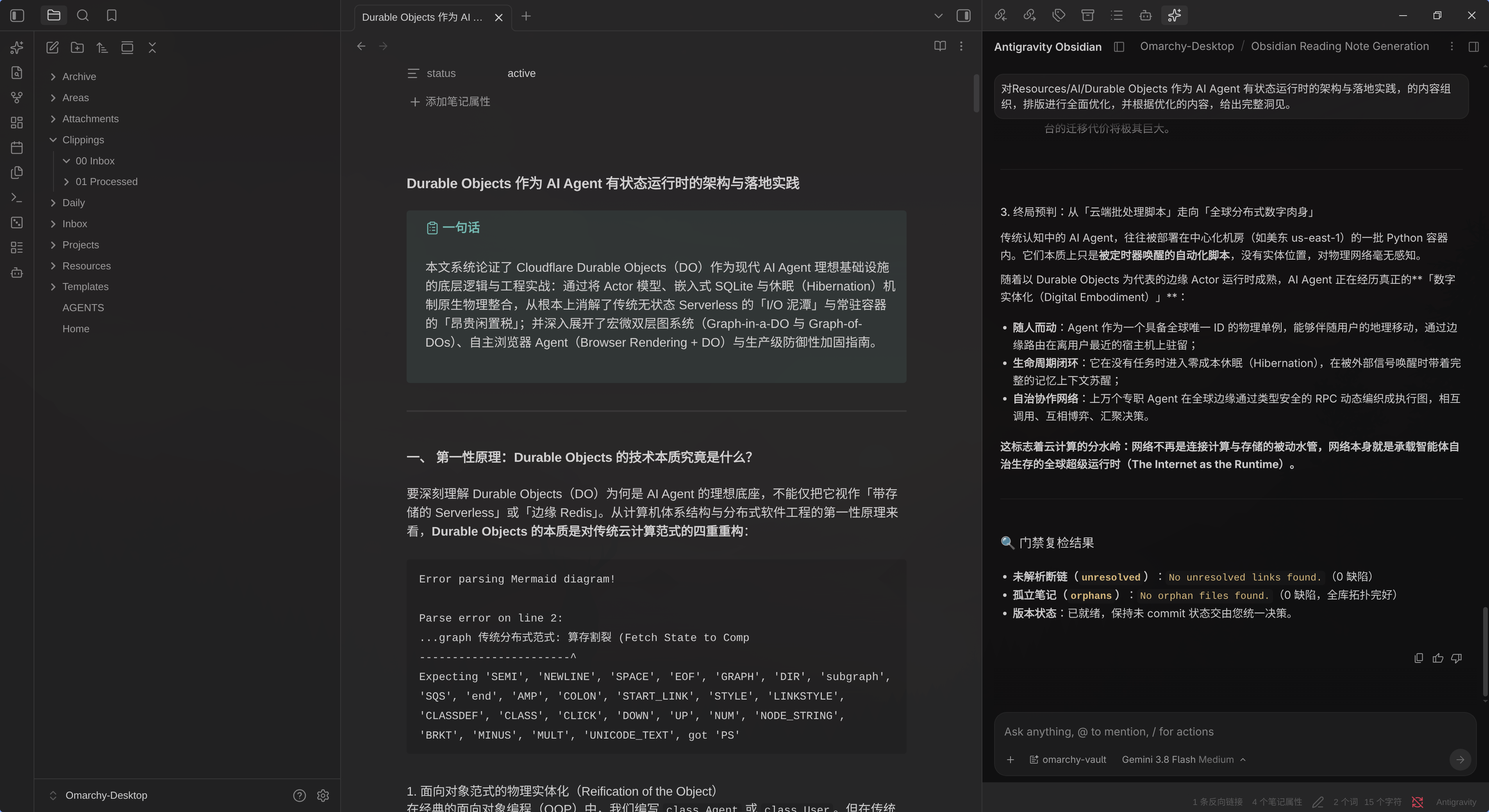
The assistant web hub running inside an Obsidian tab


Requirements

  • Desktop only. The plugin spawns agy as a child process, so it cannot run on mobile.
  • The agy CLI must be installed and authenticated. The plugin does not bundle or install it. Configure the binary path in settings if it is not in a standard location.

Installation

From the community plugins browser

Search for "Antigravity" under Settings → Community plugins → Browse, then install and enable it.

If it does not appear there yet, use a manual install instead.

Manual install

  1. Download main.js, manifest.json, and styles.css from the latest release.
  2. Create the folder <your-vault>/.obsidian/plugins/antigravity/.
  3. Place the three files inside it.
  4. In Obsidian, enable the plugin under Settings → Community plugins.

From source

git clone https://github.com/kyc/obsidian-antigravity.git
cd obsidian-antigravity
npm install
npm run build

npm run build writes the bundle to main.js in the repository root. Setting OBSIDIAN_PLUGIN_PATH additionally mirrors the three plugin files into that directory, which is useful for testing against a live vault. The sync is skipped when the variable is unset, and a failed copy warns without failing the build.


Features

  • Discrete vault tasks — Run refactoring, link auditing, frontmatter cleanup, and MOC generation from the command palette, without a conversational UI.
  • Embedded web hub — Optionally open a tab running agy --hub, giving you the full Antigravity web UI (streaming thinking blocks, tool cards, multi-agent artifacts) inside Obsidian.
  • Vault context awareness — The active note path, editor selection, or containing folder is extracted and passed to the agent automatically.
  • Status bar control — A live status indicator with a spinner, click to cancel a running task.
  • Vault rules — An AGENTS.md file is created and injected so the agent follows Obsidian conventions such as [[wikilinks]] and YAML frontmatter.
  • Permission gating — Tasks run in restricted approval mode by default, and the assistant web hub passes no permission bypass to its daemon. Unrestricted autonomous execution is gated behind a setting, a separate confirmation for each of the two paths (one-off tasks, and hub sessions), and a persistent risk banner on results.

Commands

All commands are available from the command palette and can be bound to hotkeys. Names follow Obsidian's sentence case convention.

Command ID Description
Open assistant web hub view open-hub Opens the embedded webview tab running the Antigravity web hub.
Run task on active context run-task Opens the task dialog with a context badge (selection / note / vault) and action presets.
Fix wikilinks in active note fix-links Audits wikilinks, fixes broken ones, and suggests links for unlinked references.
Audit and clean frontmatter in active note audit-frontmatter Validates and standardizes YAML tags, aliases, and metadata without removing custom fields.
Build map of content (MOC) for current folder build-folder-moc Scans the folder and creates or updates a _MOC.md index note.
Stop current task stop-task Cancels the running agy process.

The ribbon icon opens the hub. Right-click it, or hold Alt while clicking, for a menu with the task and stop actions instead.


Configuration

Found under Settings → Antigravity.

Language — Interface language. Options are auto (follows Obsidian), English, Simplified Chinese, and Traditional Chinese.

Antigravity binary path — Location of the agy executable. When empty, the plugin searches ~/.local/bin, /usr/local/bin, /usr/bin, and your PATH. The Verify binary button runs agy --version to confirm the plugin can execute it.

Default model — Model ID passed to agy. Run agy models to list the IDs your account can use. The dropdown offers gemini-3.8-flash-high, gemini-3.8-flash-medium, gemini-3.8-flash-low, gemini-3.7-flash-high, gemini-3.7-flash-medium, gemini-3.7-flash-low, gemini-3.6-flash-high, gemini-3.6-flash-medium, gemini-3.6-flash-low, gemini-3.1-pro-high, gemini-3.1-pro-low, claude-sonnet-4-6, claude-opus-4-6-thinking, and gpt-oss-120b-medium.

Reasoning intensity is part of the model ID itself. agy rejects a --model carrying an -high / -medium / -low suffix when --effort is also supplied ("conflicts with --effort"), so the plugin sets the level through the model choice alone and never passes --effort.

Default agent — Agent persona passed via --agent. Defaults to omarchy-vault.

Assistant hub

  • Hub profile name — Data directory under ~/.gemini/, default antigravity-obsidian. This isolates the hub's conversations and projects from your Antigravity IDE and standalone CLI sessions.
  • Hub port — Port for the local hub HTTP server. 0 picks a free port dynamically.
  • Auto-start hub server — Start the hub daemon when Obsidian loads.

Vault rules

  • Maintain vault rules file — Create and inject a rules file describing Obsidian conventions.
  • Vault rules relative path — Path relative to the vault root, default AGENTS.md. Paths resolving outside the vault fall back to AGENTS.md.

Vault tasks & security

  • Allow unrestricted tasks — Passes --dangerously-skip-permissions to auto-approve tool execution. Applies to both paths: background tasks (agy --print, headless) and the assistant web hub daemon (agy --hub, an interactive session). Each path asks for its own confirmation the first time it runs unrestricted. While disabled, dangerous operations are blocked in headless mode and reported as denied_actions. Note that toggling this setting restarts the hub daemon on the next open, which ends the current hub conversation.
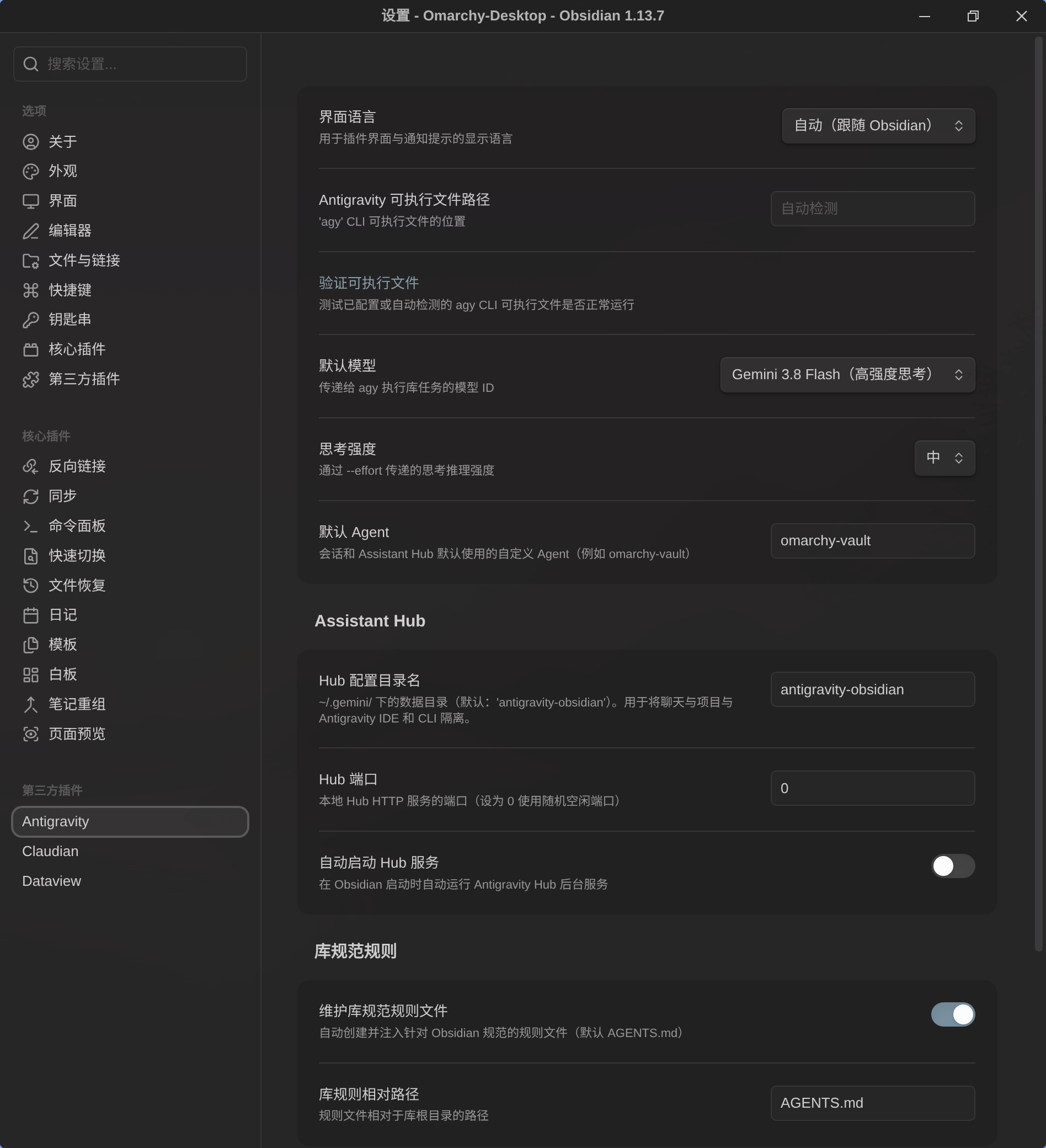
Plugin settings grouped into hub, vault rules, and task security


Security & privacy

  • Desktop only — Node.js child processes are required, declared as "isDesktopOnly": true in manifest.json.
  • Profile isolation — The hub daemon runs with --app_data_dir=antigravity-obsidian, so it cannot lock the database or collide with sessions in your primary Antigravity IDE.
  • Access to ~/.gemini/ — To bootstrap the Antigravity web UI without a second interactive login, the plugin reads ~/.gemini/ to copy OAuth credentials (written with 0600 permissions) and to register a workspace JSON link for your vault.
  • No external network requests — The plugin makes no outbound requests of its own. Its only HTTP call is a loopback health check against 127.0.0.1 to detect when the local hub is listening. All model traffic is handled by the agy process.
  • Path validation — Profile names and rules paths are sanitized against traversal (../). Context paths embedded in prompts are resolved and confined to the vault.
  • Task permissions — Tasks are restricted by default. The plugin does not silently auto-approve tool use.

Development

npm run dev          # Watch mode with automatic rebuild
npm run build        # Production bundle to main.js and sync to vault
npm run typecheck    # Verify TypeScript types
npm test             # Run the Jest unit test suite (9 suites, 118 tests)
npm run lint         # Lint source files with eslint-plugin-obsidianmd

The full validation pipeline, also run by CI on every push and pull request:

npm run typecheck && npm test && npm run build && npm run lint

Unit tests mirror src/ under tests/unit/. See CONTRIBUTING.md for commit conventions and code standards.

Additional documentation:


License

MIT

Similar Plugins

info
• Similar plugins are suggested based on the common tags between the plugins.
Add an ID to the front matter
3 years ago by llimllib
Add links to current note
6 years ago by MrJackphil
This plugin adds a command which allows to add a link to the current note at the bottom of selected notes
AI Agent
a year ago by Manuel Magaña López
Empower your Obsidian vault with an AI agent from the provider of your choice.
AI Chat as Markdown
2 years ago by Charl P. Botha
Augmented Canvas
3 years ago by Léopold Szabatura
Supercharge your Obsidian canvas experience with AI features.
Auto Front Matter
3 years ago by conorzhong
Auto Move File
14 days ago by sx kan
Automatically move files based on frontmatter properties in Obsidian
Automatic Linker
2 years ago by Kodai Nakamura
Banners Reloaded
6 months ago by Dani García
Banners Reloaded offers a simple, fast, and lightweight way to add beautiful and customizable banners to your Obsidian notes. Designed for performance, it gives you powerful control over your vault's appearance through an intuitive interface. Set banners globally, by tag, or override them on any individual note.
Barosaurus
2 months ago by polygonhunter
A command bar for Obsidian — one field for notes, commands, tabs, headings, bookmarks and tags, and every result can be acted on: rename, move, bookmark, format.
Base Board
4 months ago by mderazon
Kanban Plugin For Obsidian
Bases Toolbox
2 months ago by Grub Basket
Adds Quality of Life features to Obsidian Bases
Better Command Palette
5 years ago by Alex Bieg
A better command palette for obsidian
Bulk Tag Manager
2 months ago by ducktapekiller
A comprehensive utility to standarize the entire front matter. Features a dashboard for bulk renaming, enforcing casing rules (lowercase/uppercase), swapping separators (snake/kebab), and generating master tag lists.
Claude Sidebar
2 months ago by derek-larson14
Run Claude Code, Codex, and other agent CLIs in Obsidian
CmdSearch
a year ago by SpaceshipCaptain
Conditional Properties
8 months ago by Diego Eis
Automate frontmatter property updates in your Obsidian notes using simple conditional rules.
Connections
8 months ago by Eric Van Cleve
Copilot auto completion
3 years ago by Jordi Smit
Current View
a year ago by Lucas Ostmann
Automatically set the view mode (Reading, Live Preview, Source) for notes in Obsidian using folder rules, file patterns, or frontmatter.
Custom Commands
a year ago by Staaaaaaaaaan
Create custom commands to be executed in the command palette, and by hotkey. Currently supports opening specific notes, creating notes, inserting snippets, and executing sequences of commands.
Dataview
6 years ago by Michael Brenan
A data index and query language over Markdown files, for https://obsidian.md/.
Date Range Expander
a year ago by Mil
Obsidian plugin - Date Range Expander
Draft Indicator
2 years ago by Brian Boucheron
Show draft status with ✎ icons in the Obsidian file explorer.
Duplicate Detector
2 years ago by David Alcalde
Obsidian plugin to detect and highlight duplicate lines in the active file
EasyLink
a year ago by isitwho
Select text in your obsidian editor to find the most similar content from other notes and easily create links.
Featured Image
2 years ago by Johan Sanneblad
Obsidian plugin to automatically set a featured image property in your notes based on the first image, YouTube link, or Auto Card Link image found in your document. This allows you to create rich note galleries using Folder Notes and Dataview.
Fold Properties By Default
2 years ago by Tommy Bergeron
Always have editor/metadata properties folded by default.
Folder Filelist
a year ago by Bill Anderson
Obsidian plugin for simple folder listing
Force note view mode
5 years ago by Benny Wydooghe
Front Matter Timestamps
2 years ago by LighthouseDino
Track note created and modified times in front matter, kept up to date automatically.
Front Matter Title
4 years ago by Snezhig
Plugin for Obsidian.md
Frontmatter Alias Display
3 years ago by muhammadv-i
A plugin for Obsidian.md to show front-matter aliases as display names in the file menu.
Frontmatter generator
3 years ago by Hananoshika Yomaru
A plugin for Obsidian that generates frontmatter for notes
Frontmatter Markdown Links
2 years ago by mnaoumov
Obsidian Plugin that adds support for markdown links in frontmatter
Frontmatter Metadata Link Classes
a year ago by Varvara Zmeeva / zmeeva.io
Enhanced internal links with automatic classnames based on frontmatter metadata.
Frontmatter Tag Sugest
5 years ago by Jonathan Miller
Autocompletes tags in Obsidian YAML frontmatter. No more deleting #!
Frontmatter to HTML Attributes
6 months ago by Tarek Saier
FuzzyTag
4 years ago by Adrian
Gantt this
a month ago by Altarok
Obsidian plugin showing multiple TTRPG calendars at once in one gantt chart.
Gladdis
3 years ago by Aurélien Stébé
Gladdis (Generative Language Artificial Dedicated & Diligent Intelligence System) - it's an AI chatbot.
Hephaistos Importer
2 years ago by Skallaturi
Non-official plugin for importing characters from Hephaistos.online to Obsidian.md
Image to notes by Photes.IO
2 years ago by Kanaries Data Inc.
AI Image to text notes plugin in obsidian
Insert Arknights URL Banner
a year ago by Rerurate_514
Obsidianのプラグイン、img_dwnldr_wikigg_ak_ktに保存されている画像を選択してbannersプロパティに簡単に設定できるプラグイン
Insta TOC
2 years ago by Nick C.
Generate, update, and maintain a table of contents for your notes while typing in real time.
Karpathy LLM Wiki
2 months ago by Greener-Dalii
Karpathy's LLM Wiki implementation plugin for Obsidian - turns notes and PDFs into a linked, LLM-powered knowledge base with entity pages, concept pages, graph-powered Q&A, and local-first privacy.
Life Tracker
4 months ago by Sébastien Dubois
Capture and visualize the data that matters in your life
Link Range
3 years ago by Ryan Mellmer
Add ranged link support to Obsidian
Links
3 years ago by MiiKey
manipulate & manage obisidian links
Local LLM Helper
2 years ago by Mani Mohan
An Obsidian plugin to process text, chat with AI, and semantically search your notes — works with any OpenAI-compatible LLM server (Ollama, LM Studio, vLLM, and more).
Markdown Media Card
3 years ago by Zhou Hua
MCP Connector
2 months ago by istefox
Your Obsidian vault, exposed to Claude and any MCP client. Runs inside Obsidian, on-device semantic search, no cloud round-trip, no binary to download.
MD Butler
a month ago by Peter Petschownik
Automatically manages YAML frontmatter fields for all notes. A reliable alternative to Templater formulas for consistent metadata.
Mention Autocomplete
2 months ago by Darren Zheng
Type `@` to instantly search and link any note in your vault — with full-text search, rendered preview, and smart sentence extraction.
Mermaid Link Navigator
3 days ago by w-java123
My Thesaurus
2 years ago by Mara-Li
A plugin that auto tags file based on contents and a csv file or a Markdown table (inspired by https://github.com/pmartinolli/MyThesaurus)
NetClip
2 years ago by Elhary
this plugin is for Obsidian that allows you to browse the web and clip webpages directly into your vault.
Nextcloud Link Fixer
2 years ago by KaelLarkin
Nexus AI Chat Importer
2 years ago by Superkikim
Note aliases
4 years ago by Pulsovi
This plugin manages wikilinks aliases and save them on the aliases list of the linked note
Note Favicon
2 years ago by mdklab
Obsidian plugin – Show Favicon from Metadata
Note Types
a month ago by jsmorabito
Note UID Generator
a year ago by Valentin Pelletier
Allow you to automatically generate UID for the notes in your vault.
Notemd
a year ago by Jacob
A Easy way to create your own Knowledge-base! Notemd enhances your Obsidian workflow by integrating with various Large Language Models (LLMs) to process your notes, automatically generate wiki-links for key concepts, create corresponding concept notes, perform web research, and more.
Notes Refresher
2 years ago by Connor Park
Obsidian plugin for AI-generated note refreshers
NoteSmith
a year ago by csteamengine
Notion Suite
5 days ago by craigstfn
Objects
2 days ago by Finn
Ollama
3 years ago by hinterdupfinger
On This Day I
a year ago by Ben Stuart
AI tools for Daily Notes, an Obsidian Plugin
Open Related Url
4 years ago by Dan Pickett
packUp4AI
a year ago by Jeffry
An Obsidian plugin that helps you manage context for external LLM apps.
Page Heading From Links
6 years ago by Mark Beattie
Obsidian plugin to populate page headings
Paste Image Into Property
2 years ago by Nito
PixNote
a month ago by Sofia Milton
Prompt ChatGPT
3 years ago by Coduhuey
Property Panels
2 months ago by Eva Chen
Display and edit Obsidian frontmatter properties in configurable panels that stay inside the note's scrollable content.
Publish Note to Mowen Note
a year ago by ziyou
This is a mowen plugin for Obsidian (https://obsidian.md)
Pure Chat LLM
a year ago by Justice Vellacott
Turn notes into conversations with chatGPT or better yet Ollama
Quick Switcher++
4 months ago by darlal
Enhanced Quick Switcher plugin for Obsidian.md
Recent Files
6 years ago by Tony Grosinger
Display a list of most recently opened files
Simple Banner
a year ago by Sandro Ducceschi
Visually enhance your Obsidian notes with a customizable banner. Supports icons and time/date display.
Sort Frontmatter
3 years ago by Kanzi
Sort frontmatter automatically
Tab Panels
2 years ago by GnoxNahte
Create tab panels to organize content into sections.
Template Folder
a year ago by LucasOe
Obsidian plugin to move notes to a folder when applying a template.
Testing Vault
3 years ago by Michael Pedersen
Title As Link Text
2 years ago by Lex Toumbourou
An Obsidian plugin to set the Link Text using the document title
Title-Only Tab
a year ago by tristone13th
a plugin of obsidian for to change showing tab name to short
Understory
3 months ago by Rosetta Zidian Guo
A connection-sustain plugin: find connections and conflicts, update them over time
Update frontmatter modified date
3 years ago by Alan Grainger
Automatically update a frontmatter/YAML modified date field
Update Time Updater
2 years ago by MURATAGAWA Kei
Obsidian plugin to update the 'update time' element when saving or manually.
Web viewer Bookmarks
a year ago by Stefan Danzl
Obsidian Plugin to create Bookmarks for internal Web Viewer
Weekday Commands
16 days ago by Wren
Wikilinks to MDLinks
6 years ago by Agatha Uy
An Obsidian md plugin which allows for the conversion of individually selected wikilinks to markdown links, and vice versa.