Cloud Storage

by Jiajun Ma
5
4
3
2
1
Score: 58/100

Description

Category: 3rd Party Integrations

The Cloud Storage plugin enhances Obsidian by enabling seamless cloud integration for attachments and file management. It allows users to automatically upload files from specified folders to the cloud, reducing local storage usage and ensuring accessibility across multiple devices. The plugin supports smart link updates within notes, resumable uploads, and flexible storage options, including plugin-provided and S3-compatible storage. Users can manage file uploads efficiently with features like whitelist/blacklist filtering, file renaming, and custom folder movement.

Reviews

No reviews yet.

Stats

18
stars
1,870
downloads
1
forks
599
days
122
days
122
days
0
total PRs
0
open PRs
0
closed PRs
0
merged PRs
0
total issues
0
open issues
0
closed issues
62
commits

Latest Version

4 months ago

Changelog

What's New

Account Recovery Tool

We've added a built-in recovery tool that helps you reconnect with your OBCS cloud data. If you ever switch devices, reinstall Obsidian, or simply need to set up your account again, OBCS can now automatically scan your vault for existing cloud links and restore your account configuration — no manual steps required.

  • Smart Vault Scanning: Automatically detects existing OBCS cloud links in your notes
  • Guided Recovery Flow: A simple step-by-step process to restore account access
  • Batch Support: Handles multiple accounts in a single session
  • Recovery Report: Generates a detailed summary after the process completes

Improved Login Experience

The login flow now provides clearer guidance when setting up on a new device. If your account needs to be reconfigured, the plugin will walk you through the appropriate steps automatically.

Other Improvements

  • Enhanced build pipeline for more reliable releases
  • Improved timeout handling for long-running operations
  • Minor UI text improvements throughout the settings panel
  • General code quality and stability improvements

README file from

Github

Cloud Storage

English | 中文

Cloud Storage is a powerful and user-friendly plugin designed to seamlessly integrate cloud storage capabilities into your Obsidian workflow. This plugin allows you to effortlessly upload your attachments to the cloud, freeing up local storage space and enabling easy sharing and access across all your devices.

Features

  • Automatic Cloud Upload: Seamlessly upload attachments from specified folders to the cloud.
  • Resumable Uploads: Supports resumable uploads, ensuring efficient file transfer.(Only for plugin-provided storage)
  • Smart Link Updating: Automatically updates links in your notes to point to the cloud-stored files, ensuring your notes remain fully functional.
  • Flexible Storage Options: Choose between plugin-provided cloud storage or your own S3-compatible storage solution.
  • Granular File Control:
    • Set up whitelists or blacklists for file extensions to precisely control which files are uploaded.
    • Define maximum file size limits for uploads to efficiently manage your storage.
  • File Management:
    • Option to rename files in the cloud to ensure uniqueness and avoid conflicts.
    • Choose to move or delete local files after successful upload.
  • Comprehensive Storage Management: Easily manage your cloud storage space and uploaded files through an intuitive interface.
  • Multi-platform Sync: Access your uploaded files from any device with internet access.

Video Demonstrations

Here are some quick video demonstrations to help you get started with Cloud Storage:
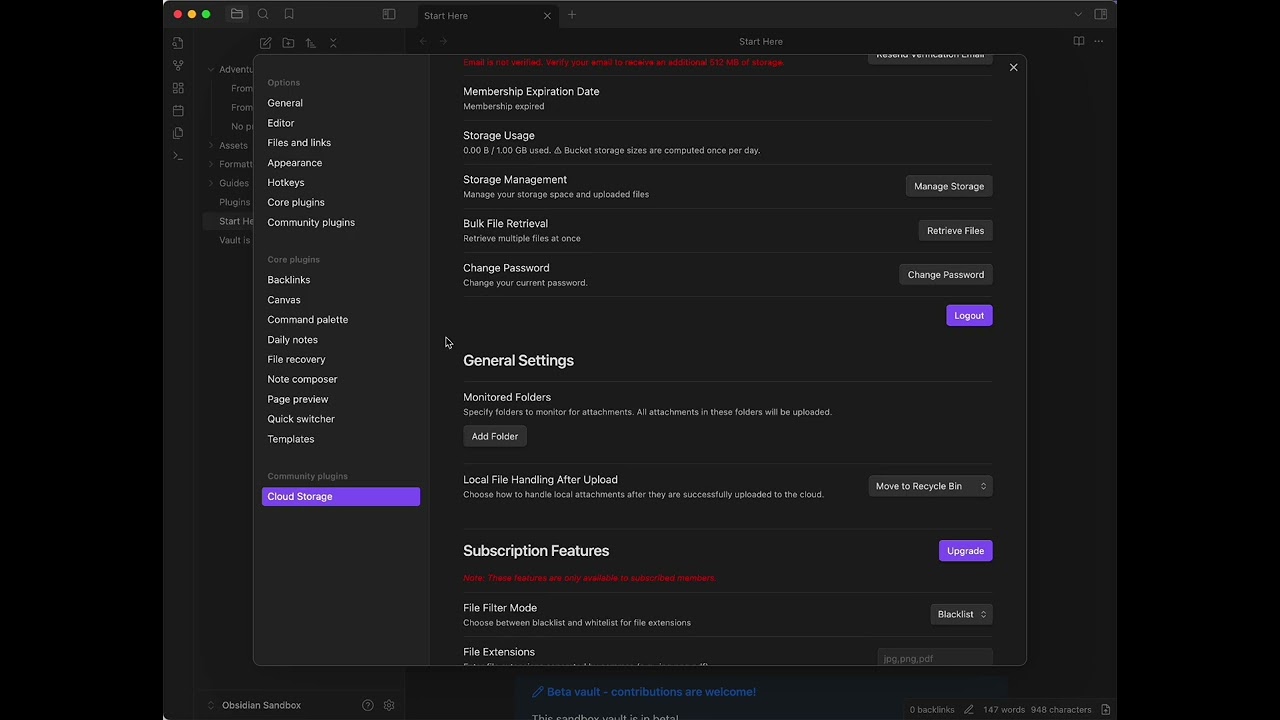
Guide

iShot_2024-11-06_02.08.29 (1).gif

Installation

  1. Open Obsidian and navigate to Settings > Community Plugins.
  2. Disable Safe Mode if it's currently enabled.
  3. Click on "Browse" and search for "Cloud Storage".
  4. Click "Install" next to the Cloud Storage plugin.
  5. Once installed, enable the plugin by toggling the switch next to its name.

Quick Start Guide

  1. Account Setup:

    • Open Cloud Storage settings.
    • Click the "Click Me" button under "Initialization".
    • Select "I am a new user".
    • Update your email address and verify it to receive additional free storage space.
  2. Configure Auto-Upload:

    • Keep the "Auto Upload Attachment" option enabled.
    • Use Obsidian as you normally would - the plugin will automatically manage and upload attachments as they're added.

Detailed Usage Guide

Uploading Attachments Using Commands

  • Open the command palette (Ctrl/Cmd + P).
  • Search for and select either "Cloud Storage: Upload attachments from the monitored folder" or "Upload attachments in current file".

Managing Monitored Folders

  • Configure Monitored Folders: (Only required when using the Upload attachments command)
    • Under "Local" in plugin settings, click "Add Folder".
    • Select or enter the path to the folder you want to monitor for attachments.
    • Repeat this process for all folders you wish to include.
  • Remove a Folder: Click the "Remove" button next to any folder you wish to stop monitoring.
  • Folder Suggestions: As you type, the plugin will suggest existing folders in your vault for easy selection.

File Handling Options

  1. Navigate to the "General Settings" section in the plugin settings.
  2. Find the "Local File Handling After Upload" option.
  3. Choose between:
    • "Move to Recycle Bin": Safely moves uploaded files to your system's recycle bin.
    • "Move to Custom Folder": Relocates uploaded files to a specified folder within your vault.
  4. If you choose "Move to Custom Folder", specify the folder name in the "Custom Move Folder" field below.

Storage Type Configuration

  1. Go to the "User Account" section in the plugin settings.
  2. Find the "Storage Type" dropdown.
  3. Choose between:
    • "Plugin-provided Storage": Uses our secure cloud storage solution.
    • "Custom S3-compatible Storage": Allows you to use your own S3 storage (coming soon).

Advanced Features (Premium)

  1. File Filtering:

    • In the "Subscription Features" section, find "File Filter Mode".
    • Choose between "Blacklist" (exclude specified extensions) or "Whitelist" (only include specified extensions).
    • In the "File Extensions" field, enter file extensions separated by commas (e.g., "jpg,png,pdf").
  2. Maximum File Size:

    • In the same section, locate "Maximum File Size (MB)".
    • Enter the maximum file size in megabytes. Files larger than this will not be uploaded.
  3. File Renaming:

    • Find the "Rename Files in Cloud" toggle.
    • Enable this to add a unique identifier to each file name upon upload, preventing conflicts.

Storage Management

  1. In the plugin settings, click on the "Manage Storage" button.
  2. This will open a web interface where you can:
    • View all uploaded files
    • Delete unwanted files
    • Download files directly from the cloud

Important Notes and Best Practices

  • Free Account Limitations: Free accounts have a storage limit. Consider upgrading for more space if needed.
  • Email Verification: Always verify your email to receive additional free storage space.
  • Regular Backups: While the plugin is designed to be safe and reliable, always keep backups of your important data.
  • Link Updates: The plugin updates file links in your notes automatically. Review your notes after bulk uploads to ensure everything looks correct.
  • Internet Connectivity: Ensure you have a stable internet connection when performing large uploads.
  • File Type Considerations: Be mindful of the file types you're uploading, especially if you're using the whitelist/blacklist feature.
  • Free Egress Policy: Our free data transfer (egress) is intended for reasonable use. If your monthly downloads consistently exceed your stored data volume, your account may be subject to limitations. For example, storing 1 TB and downloading up to 1 TB monthly is acceptable, but regularly exceeding this ratio may result in service restrictions.

Troubleshooting

If you encounter any issues:

  1. Check Your Internet Connection: Ensure you have a stable connection.
  2. Verify Settings: Double-check your monitored folders and other settings.
  3. Restart Obsidian: Sometimes, a simple restart can resolve issues.
  4. Check Console: Advanced users can check the developer console for any error messages.
  5. Contact Support: If problems persist, reach out to our support team.

Support and Contact

If you encounter any issues, have questions, or want to suggest new features, please don't hesitate to reach out:

Upcoming Features

We're constantly working to improve your experience. Here's a sneak peek at some upcoming features:

  • Comprehensive backup and migration tools
  • Email-based file management interface
  • Temporary share links with customizable expiration
  • In-file attachment uploading
  • Filename blacklist feature
  • Improved offline mode functionality

Stay tuned for these exciting updates!

Feedback and Contributions

We value your input! If you have suggestions for improvements or new features, please let us know. For those interested in contributing to the development of Cloud Storage, check out our contribution guidelines (Coming soon).

Thank you for choosing Cloud Storage to enhance your note-taking experience!

Special Thanks

We would like to express our sincere gratitude to the Remotely Save project for their inspiration and assistance. Their work has been invaluable in shaping certain aspects of Cloud Storage. We appreciate their contributions to the Obsidian plugin ecosystem and the open-source community at large.

Similar Plugins

info
• Similar plugins are suggested based on the common tags between the plugins.
Anki Integration
a year ago by Noah Boos AKA Rift
Create flashcards from your notes with a seamless interface, structuring them with metadata and syncing effortlessly via AnkiConnect.
AnySocket Sync
2 years ago by Andrei Vaduva
Securely Synchronize your Vault on a self-hosted server
Arweave Uploader
2 years ago by makesimple
Askify Sync
3 years ago by Kishlay Raj
Attachment Management
3 years ago by trganda
Attachment Management of Obsidian
Attachment Uploader
3 years ago by zhuxining
An attachment uploader plugin for Obsidian
Attachments Cache
a year ago by luisbs
Obsidian plugin to cache attachments locally
Auto Archive
3 years ago by Shane Burke
Auto Archive plugin for Obsidian
Auto Filename
3 years ago by rcsaquino
Auto Filename is an Obsidian.md plugin that automatically renames files in Obsidian based on the first x characters of the file, saving you time and effort.
Auto Folder Note Paste
a year ago by d7sd6u
Convert your note into folder note upon pasting or drag'n'dropping an attachment
Awesome Flashcard
4 years ago by AwesomeDog
Handy Anki integration for Obsidian.
Awesome Reader
3 years ago by AwesomeDog
Make Obsidian a proper Reader.
BetaX NAS Sync
a year ago by Skye
Obsidian NAS Sync
Better File Link
5 years ago by Marc Julian Schwarz
A plugin for the note taking app Obsidian to add better external file links to your notes.
Binary File Manager
4 years ago by qawatake
An Obsidian plugin to manage binary files
BookFusion
2 years ago by BookFusion
BookFusion Obsidian Plugin
BookXNote Sync
2 years ago by CodeListening
将bookxnote中的笔记同步到obsidian指定的文件夹中
Browser History
a year ago by noy4
Sync your browser history to notes.
Checkbox Sync
a year ago by Grol
Keep parent/child checkboxes in sync automatically within your Obsidian task lists.
Cicada Synchronizer
2 years ago by Adapole, Adapole, Mahyar Mirrashed
Cloudinary Uploader
5 years ago by Jordan Handy
An uploader for Obsidian to Cloudinary
Confluence Sync
2 years ago by Prateek Grover
Obsidian plugin for obsidian confluence sync
Consistent attachments and links
5 years ago by Dmitry Savosh
Obsidian plugin. Move note with attachments.
Copy Metadata
3 years ago by wenlzhang
An Obsidian plugin to copy metadata to clipboard and insert it into file name.
CSV Lite
a year ago by Jay Bridge
Simple enough for csv, no more fancy function you need to learn and think!
Cubox
a year ago by delphi-2015
Cubox Official Obsidian Plugin
Custom Attachment Location
5 years ago by RainCat1998
Customize attachment location with variables($filename, $data, etc) like typora.
Douban
4 years ago by Wanxp
an obsidian plugin that can pull data from douban to your markdown file
Edit History
3 years ago by Antonio Tejada
Obsidian Edit History Plugin, automatically save all the edit history of a note, browse and restore previous versions
ExMemo Client
2 years ago by Yan.Xie
exmemo obsidian plugin
External File Card
2 years ago by James-Yu
A plugin for Obsidian showing a card displaying basic information of a file in pre-defined folders.
External Rename Handler
a year ago by mnaoumov
Obsidian Plugin that handles external renames made outside of the app
Feedly Annotations Sync
a year ago by Nick Felker
Download my Feedly annotations
File chucker
3 years ago by Ken Lim
File Cleaner
4 years ago by Johnson0907
A file cleaner plugin for Obsidian.
File Cleaner Redux
3 years ago by husjon
A plugin for Obsidian to help clean up files in your vault
File Compressor
a year ago by networkmastered
File Hider
4 years ago by Oliver Akins
A plugin for https://obsidian.md that allows hiding specific files and folders from the file explorer.
File Order
3 years ago by lukasbach
Obsidian plugin to reorder files with drag-and-drop by customizing a number-prefix in the filenames
File Preview
2 years ago by Huajin
Add file preview contents under file in file explorer.
Filename Heading Sync
5 years ago by dvcrn
Obisdian.md plugin to keep the filename and the first header of the file in sync
Folder Focus Mode
4 years ago by grochowski
Focus file explorer on chosen folder and its files and subdirectories, while hiding all the other elements.
Git File Explorer
2 years ago by Mateus Molina
GitHub Gitless Sync
a year ago by Silvano Cerza
Sync a GitHub repository with vaults on different platforms without requiring git installation
Github Issues
a year ago by LonoxX
An Obsidian plugin that integrates with GitHub to track issues and pull requests directly in your vault.
GitHub Sync
2 years ago by Kevin Chin
Sync Obsidian vault to personal GitHub
Glasp
a year ago by Glasp
Obsidian plugin to import highlights and notes from Glasp
Google Contacts
a year ago by aleksejs1
Obsidian plugin for sync Google Contacts with obsidian notes
Google Drive Sync
2 years ago by Richard Xiong
A plugin to make Obsidian work in Google Drive to enable access to iOS.
Google Keep Import
3 years ago by Dale de Silva
Imports Google Keep backup files
Graphic Organizer
3 months ago by Nick Le Guillou - Superhuman Curiosity
Interactive tree view for visualizing and managing your vault's file hierarchy.
Guid Renamer
2 years ago by Taskscape LTD, Kacper Pabianiak
Renames the currently selected file by providing a unique file name based on GUID pattern
HackMD Sync
2 years ago by thor kampefner
obsidian extension to push and pull notes from hackmd conveniently
Hardcover
4 months ago by aliceinwaterdeep
HTML Reader
4 years ago by Nuthrash
This is a plugin for Obsidian (https://obsidian.md). Can open document with .html and .htm file extensions.
Image Size
a year ago by Jie Zhang
Set the default size for pasted images.
Inbox Organiser
a year ago by Jamie Hurst
Obsidian plugin to capture any new notes into an inbox and periodically prompt to organise these into other folders within the vault.
InfoFlow
a year ago by RockieStar Inc.
Obsidian plugin for InfoFlow.app - This plugin integrates InfoFlow with Obsidian, allowing you to sync your saved articles, web pages, notes, and highlights directly into your Obsidian vault.
Infostacker Note Publish
2 years ago by Taskscape LTD, Patryk Nowak, Kacper Pabianiak
Infostacker plugin for Obisidian
Insert Multiple Attachments
a year ago by mnaoumov
Obsidian Plugin that allows to insert multiple attachments at a time
Instapaper
2 years ago by Instapaper
Official Instapaper plugin for Obsidian
Janitor
4 years ago by Gabriele Cannata
Performs various maintenance tasks on the Obsidian vault
Jira Issue Manager
a year ago by Alamion
Obisdian plugin to sync tasks between Obsidian and Jira
KOI Sync
a year ago by Luke Miller
KOReader Sync
4 years ago by Federico "Edo" Granata
Obsidian.md plugin to sync highlights/notes from koreader
Limitless Lifelogs
a year ago by Maclean Dunkin
Sync your Limitless AI lifelog entries directly into Obsidian markdown files.
LINE Notes Sync
a year ago by onikun94
Link indexer
6 years ago by Yuliya Bagriy
Linked Note Exporter
10 months ago by the-c0d3r
Obsidian plugin to export a note along with all its attachments and linked notes—cleanly, conveniently, and ready to share.
Local Any Files
a year ago by ShermanTsang
A obsidian plugin used to extract and download files in your obsidian note.
Luhman
5 years ago by Dylan Elliott
Markdown Hijacker
a year ago by Yongmini
Beyond the Vault. One hub for every Markdown, everywhere
Markwhen File Sync
a year ago by rouvenjahnke
Synchronize properties from your Obsidian notes with a Markwhen timeline file.
Media Companion
a year ago by Nick de Bruin
Memos AI Sync
a year ago by leoleelxh
obsidian-memos-sync-plugin,将 Memos 内容同步到 Obsidian 的插件,提供无缝集成体验。
Memos Sync
2 years ago by RyoJerryYu
Syncing Memos to Obsidian daily note. Fully compatible with official Daily Notes plugin, Calendar plugin and Periodic Notes plugin.
Merge Notes
3 years ago by fnya
Merge Notes is Plugin for Obsidian
Minote Sync
a year ago by Emac Shen
Minote Sync is a Obsidian plugin to sync Minote(小米笔记) into your Vault.
MrDoc
8 months ago by zmister
An Obsidian plugin for MrDoc that enables two-way synchronization between local Obsidian documents and MrDoc.一个 Obsidian 的 MrDoc 插件,用于 Obsidian 本地文档与 MrDoc 的双向同步
New Filename
a year ago by Amin Sennour
Simple plugin to change the default name for a new note from "Untitled" to a UUID.
New Note Fixer
a year ago by mnaoumov
Obsidian Plugin that unifies the way non-existing notes are created when clicking on their links
Note archiver
3 years ago by thenomadlad
Note Companion Folder
2 years ago by Chris Verbree
A Obsidian Plugin providing a way to associate a folder to a note
Notes Sync Share
3 years ago by Alt-er
Sync and share (publish) your notes in your own private service.
NSFW filter
2 years ago by catvatar
Obsidian Plugin adding a button to toggle visiblity of NSFW notes
Nuke Orphans
4 years ago by Sandorex
Obsidian notes plugin that trashes orphaned files and attachments
Nutstore Sync
7 months ago by nutstore-dev
Obsidian markdown export
4 years ago by bingryan
This plugin allows to export directory/single markdown to a folder. support output format(html/markdown/text)
Open File by Magic Date
4 years ago by simplgy
Paste Image Into Property
a year ago by Nito
Paste image rename
4 years ago by Reorx
Renames pasted images and all the other attachments added to the vault
Peerdraft
3 years ago by Peerdraft
Collaboration for Obsidian – Sync, Share, and Edit anywhere
Pinboard Sync
4 years ago by Mathew Spolin
Obsidian plugin to sync Pinboard.in links to Daily Notes
Readavocado Sync
4 years ago by Cyrus Zhang
Readavocado obsidian plugin to sync your favorite highlights.
Readwise Mirror
5 years ago by jsonmartin
Recently Added Files
2 years ago by Lemon695
List files by last added, includes pictures, pdfs, etc.
Remote Fetch
10 months ago by Shaharyar
Remotely Save
5 years ago by fyears
Sync notes between local and cloud with smart conflict: S3 (Amazon S3/Cloudflare R2/Backblaze B2/...), Dropbox, webdav (NextCloud/InfiniCLOUD/Synology/...), OneDrive, Google Drive (GDrive), Box, pCloud, Yandex Disk, Koofr, Azure Blob Storage.
Remove Empty Folders
3 years ago by fnya
Remove Empty Folders for Obsidian
Rename File to Selection
a year ago by Aava
Rename your file to the current text selection.
Reveal Active File Button
5 years ago by Clare Macrae
Obsidian plugin to add a button to the top of the Obsidian File Explorer, to reveal the active file.
S3 attachments storage
3 years ago by TechTheAwesome
An Obsidian plugin for storage and retrieval of media attachments on S3 compatible services.
S3agle
2 years ago by Turner Monroe (turnercore)
SamePage
4 years ago by SamePage
Screwdriver
4 years ago by vorotamoroz
Settings profiles
2 years ago by 4Source
This is a plugin for Obsidian (https://obsidian.md). Allows you to create various global settings profiles. You can sync them between different vaults. To keep all your settings in sync, you'll never have to manually adjust them again for every vault you have or create in the future.
Share to NotionNext
3 years ago by EasyChris, jxpeng98
Share obsidian markdown file to any Notion database and generate notion share link 同步obsdian文件到任意Notion数据库。
Simple Archiver
a year ago by Mike Farr
An Obsidian plugin that enables you to quickly archive a single note or an entire folder of notes.
Simple Image Inserter
2 years ago by Joey Holtzman
Add images from the file system into Obsidian notes through a built-in file explorer
Strava Sync
2 years ago by Howard Wilson
Sync Strava activities to your Obsidian vault
Sync Cnblog
2 years ago by zhanglei
同步文章到博客园
Sync config folder to common folder
2 years ago by codeonquer
Sync Graph Settings
3 years ago by Xallt
This is a plugin for syncing graph settings (Color Groups and Search Filters) to Local Graphs
Sync to Hugo
2 years ago by Cray Huang
Sync the selected notes from Obsidian to Hugo
Sync Vault CE
a year ago by Camus Qiu
The missing bridge between your 10+ TB cloud drive and your AI brain.
sync-db-os
2 years ago by ketd
Sync-safe file names
8 months ago by j-maas
Ensure your Obsidian files can always be synced across all your devices.
Syncthing Integration
3 years ago by LBF38
Obsidian plugin for Syncthing integration
Taskbone
5 years ago by Dominik Schlund
Obsidian OCR plugin - extract text from images
Telegram Sync
3 years ago by Burtasov Volodymyr
Transfer messages and files from Telegram to Obsidian
Tencent COS for Imgur
a year ago by bobostudio
🔥 Obsidian 腾讯云 COS 图床插件
TickTick
3 years ago by Viduy Cheung
TickTickSync
3 years ago by thesamim
Todoist Sync
6 years ago by jamiebrynes7
Materialize Todoist tasks in Obsidian notes
Trash Explorer
4 years ago by Per Mortensen
Restore and delete files from the Obsidian .trash folder
Unique attachments
5 years ago by Dmitry Savosh
Obsidian plugin. Renames attachments, making their names unique.
Update frontmatter modified date
3 years ago by Alan Grainger
Automatically update a frontmatter/YAML modified date field
Update Relative Links
4 years ago by val
Update time on edit
5 years ago by beaussan
Vault Transfer
2 years ago by ImaginaryProgramming
Transfers a note from one vault to another.
VaultSync
a year ago by Justin Bird
Obsidian plugin to link your vault to a cloud storage provider.
Vikunja Sync
2 years ago by Peter Heiss
Manage your tasks in vikunja.
Vim Multibyte Char Search
4 years ago by anselmwang
Search multibyte characters by the corresponding input method encoding. For example, for Chinese, search "用来" by "yl"
Voicenotes Sync
2 years ago by Andrew Lombardi
Official Obsidian plugin that syncs your notes from VoiceNotes.com into your vault
VSCode Editor
3 years ago by Sun Xvming
Edit Code Files like VSCode in Obsidian.
WebDAV Explorer
3 months ago by 蓝星晓夜
WebDAV Explorer: Connect to WebDAV server, preview files directly in web view, and generate links through simple drag-and-drop.
Webdav File Explorer
3 years ago by red0orange
Weread Plugin
4 years ago by hank zhao
Obsidian Weread Plugin is a plugin to sync Weread(微信读书) hightlights and annotations into your Obsidian Vault.
WikiDocs
2 years ago by pahkey
WuCai highlights Official
3 years ago by 希果壳五彩
WuCai highlights Official, for Sync highlights into your obsidian notes
Yandex Wiki Integration
a year ago by Pavel Sokolov