GitHub Gitless Sync

by Silvano Cerza
5
4
3
2
1
Score: 30/100

Description

Category: 3rd Party Integrations

The GitHub Gitless Sync plugin enables seamless synchronization between your Obsidian vault and a GitHub repository without requiring Git to be installed. Designed with cross-platform compatibility in mind, it supports both desktop and mobile environments using GitHub's REST API. The plugin provides manual and automatic sync options, supports multiple vaults, and includes a conflict resolution interface that helps manage file discrepancies between devices.

Reviews

No reviews yet.

Stats

226
stars
13,794
downloads
34
forks
446
days
386
days
389
days
10
total PRs
7
open PRs
3
closed PRs
0
merged PRs
45
total issues
32
open issues
13
closed issues
0
commits

Latest Version

a year ago

Changelog

  • Fix conflict view not being scrollable #10
  • Fix sync not working if files have been deleted, moved, or renamed #9
  • Fix trying to sync deleted files on first sync #9
  • Fix log file being synced if settings sync is enabled #11
  • Fix issue reading binary files on iOS causing sync to fail #3
  • Fix first sync marked as done on failure #3
  • Fix crashes when unzipping repo on first sync from remote #3
  • Add utility buttons in settings to copy or clean logs
  • Enhance first sync from remote to make less requests #3

README file from

Github

GitHub Gitless Sync

Plugin to sync a GitHub repository with an Obsidian vault.

I highly recommend not using this plugin with another sync service. This might create problems for this plugin when determining what needs to be synced between remote repository and local vault.

Features

These are the main features of the plugin:

  • Desktop and mobile support

  • Doesn't require git

  • Multiple vaults sync

  • Automatic sync on fixed interval

  • Manual sync

  • Conflict resolution view

  • Filtering by file type (TODO 🔨)

Installation

The plugin is available as a community plugin, you can easily search for it in Obsidian and install it from there.
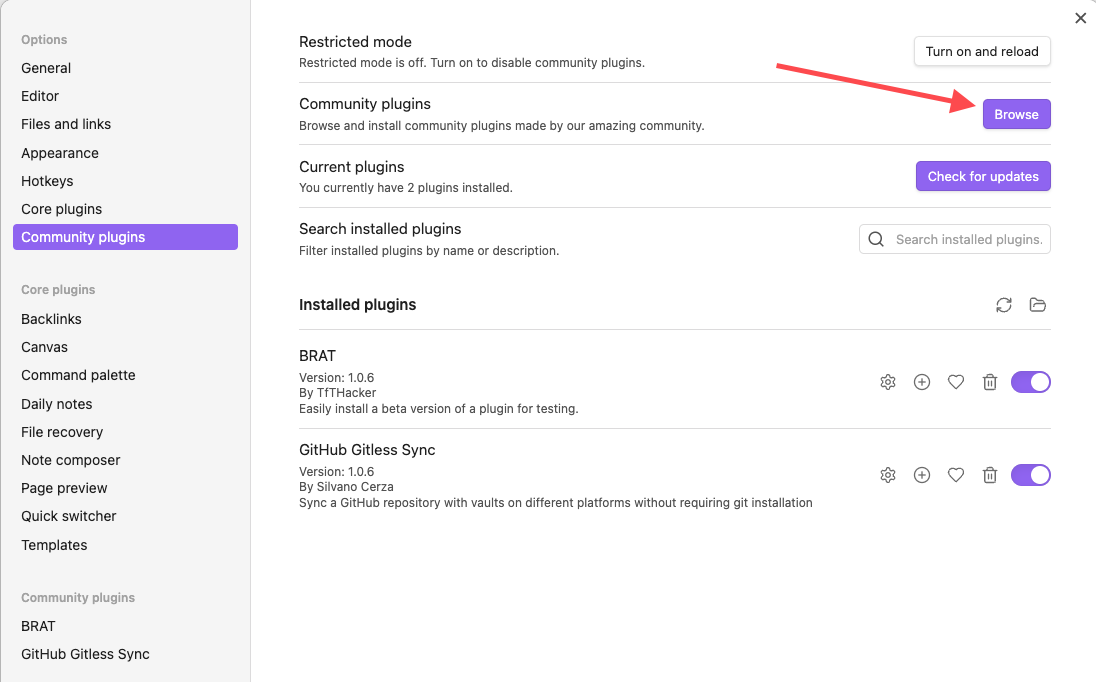
Obsidian community plugin settings

Issues

If you find any problem please open an issue with as many details as possible.

Please also provide logs if possible, you can copy them from the settings page. Remember to enable logging first.
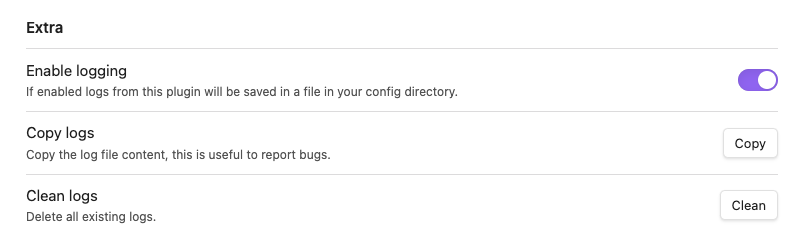
Enable logging

Usage

First sync

[!IMPORTANT] The first sync will only work if either the remote repository or the local vault are completely EMPTY. If both contain files the first sync will fail.

You must also configure the plugin settings before syncing.

These settings are mandatory:

  • Your GitHub Token (see below)
  • Repository owner
  • Repository name
  • Repository branch

If any of this is not set sync won't start.

Token

A GitHub Fine-grained token is required to sync with your repository. You can create one by clicking here. The token must have the Contents permission set to Read and write like in the screenshot below.

GitHub Fine-grained token

I also suggest creating the token with access only to your sync repo.

Sync modes

You can always sync manually by clicking the sync button in the side ribbon. This will always work even if sync on interval is enabled.
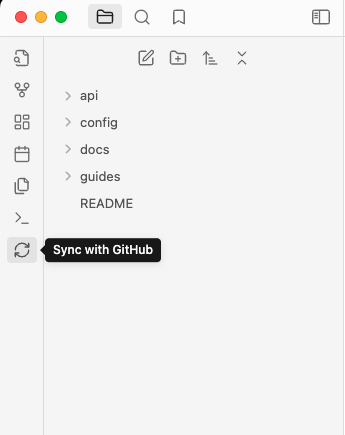
Sync button

If you don't want to see the button you can hide it, just check the plugin settings.

The Sync with GitHub command is also available.

Conflict resolution

When you sync multiple vaults using this plugin you might risk creating conflicts between the remote and a local vault. This usually happens when the remote has a new update from vault A, but vault B edits the file before syncing with remote. That creates a conflict, by default we'll open a view to let you resolve the conflict since you should have all the necessary information to correctly resolve it.

By default the split view will be used on desktop and the unified one on mobile, you can change the settings to always use the one you prefer.
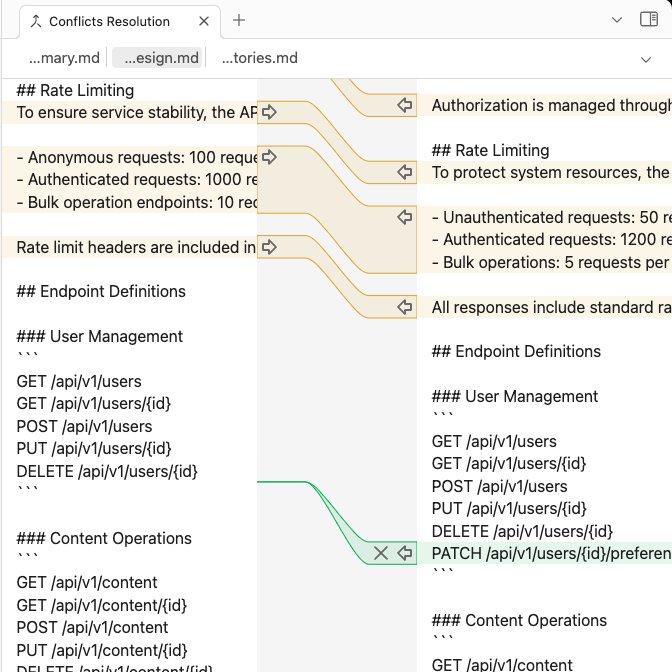
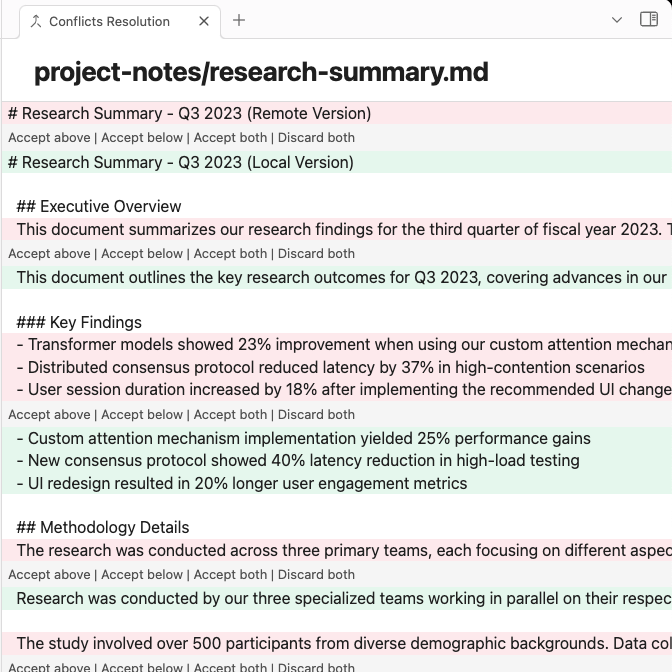
Split conflict resolution Unified conflict resolution

If you don't want to resolve them you can change the settings to always prefer either the remote or local version in case of conflicts.

Config sync

If you want to sync your vault configs with other vault you can enable that. It will sync the whole folder, that is .obsidian by default, including all plugins and themes.

Note that the .obsidian folder will always be present, this happens because the plugin needs to store some metadata to correctly sync

[!CAUTION] DO NOT sync configs if your remote repository is public. That will expose the token you used to sync.

Reset

If you need to reset the plugin settings and metadata you can easily do that in the settings.

That will completely wipe all the sync metadata so you'll have to repeat the first sync as if you just enabled the plugin for the first time.

FAQs

What's different from other sync plugins?

There are obviously other plugins that let you sync your vault with GitHub or other git hosts, like obsidian-git and Obsidian-GitHub-Sync just to name a couple.

Most of those plugins though require the git executable to be present in your system, they might rely on Bash scripts too. This makes them much less portable, it's harder to use on Windows, and mobile is really unstable because most of the times they rely on isomorphic-git.

This annoyed me because I wanted to have the same experience on every platform, and I wanted especially to support mobile.

So I went a different way and chose to sync only with GitHub using their REST APIs, this means I don't rely in anyway on git being present in your system. This way I can easily support desktop and mobile with the same identical logic, and some small necessary differences in the UI for a better user experience.

This obviously comes with some limitations. Since git is not used you can't interact with your repository locally in any way, and any git feature like branching, merging, or rebasing, are not available at all.

Also since this relies only on the GitHub APIs you can only sync with GitHub and no other host.

Can I use this with other sync plugins?

No.

To work correctly this plugin uses a custom metadata file that is updated every time we sync, if you commit changes outside the plugin that file is not updated properly.

Other plugins don't know about that file, so if you sync with others too you risk losing data.

Contributing

Contributions are obviously accepted.

Bug fixes are always welcome, new feature must be discussed first. Open a discussion and let's talk in that case.

Keep PRs as small as possible, I won't review PRs with hundreds of lines if it's mostly code.

Low quality or vibe coded PRs are not welcome. Put some effort in it please.

License

The project is licensed under the AGPLv3 license.

Similar Plugins

info
• Similar plugins are suggested based on the common tags between the plugins.
Anki Integration
a year ago by Noah Boos AKA Rift
Create flashcards from your notes with a seamless interface, structuring them with metadata and syncing effortlessly via AnkiConnect.
AnySocket Sync
2 years ago by Andrei Vaduva
Securely Synchronize your Vault on a self-hosted server
Askify Sync
3 years ago by Kishlay Raj
Awesome Flashcard
4 years ago by AwesomeDog
Handy Anki integration for Obsidian.
Awesome Reader
3 years ago by AwesomeDog
Make Obsidian a proper Reader.
BetaX NAS Sync
a year ago by Skye
Obsidian NAS Sync
BookFusion
2 years ago by BookFusion
BookFusion Obsidian Plugin
BookXNote Sync
2 years ago by CodeListening
将bookxnote中的笔记同步到obsidian指定的文件夹中
Browser History
a year ago by noy4
Sync your browser history to notes.
Checkbox Sync
a year ago by Grol
Keep parent/child checkboxes in sync automatically within your Obsidian task lists.
Cicada Synchronizer
2 years ago by Adapole, Adapole, Mahyar Mirrashed
Cloud Storage
2 years ago by Jiajun Ma
Obsidian Cloud Storage is a powerful and user-friendly plugin designed to seamlessly integrate cloud storage capabilities into your Obsidian workflow. This plugin allows you to effortlessly upload your attachments to the cloud, freeing up local storage space and enabling easy sharing and access across all your devices.
Confluence Sync
2 years ago by Prateek Grover
Obsidian plugin for obsidian confluence sync
Cubox
a year ago by delphi-2015
Cubox Official Obsidian Plugin
Douban
4 years ago by Wanxp
an obsidian plugin that can pull data from douban to your markdown file
Emo
4 years ago by yaleiyale
Use image/file hosting in Obsidian by clipboard or draging file. Obsidian 图床聚合 & Github上传器
Enveloppe
4 years ago by Mara-Li
Enveloppe helps you to publish your notes on a GitHub repository from your Obsidian Vault, for free!
ExMemo Client
2 years ago by Yan.Xie
exmemo obsidian plugin
Feedly Annotations Sync
a year ago by Nick Felker
Download my Feedly annotations
Filename Heading Sync
5 years ago by dvcrn
Obisdian.md plugin to keep the filename and the first header of the file in sync
Fit
2 years ago by joshuakto
File gIT (FIT) to sync your files across mobile and desktop devices using GitHub.
GH Links Shortener
7 months ago by David Barnett
Obsidian plugin to set shortened link text for pasted GitHub URLs
Gist
5 years ago by Jun Lin
📒 Gist View for Obsidian(https://obsidian.md)
Gistr
2 years ago by Aetherinox
Obsidian.md plugin which allows you to use your notes to embed, create, and update gists for Github and Opengist. Light & dark theme support, create / update public & private gists either manually or with autosave.
GitHobs
2 years ago by GabAlpha and MarcoG
Use Obsidian as Github issue editor! A simple plugin to create Github issues directly from Obsidian with logic taken from Git
Github Copilot
2 years ago by Vasseur Pierre-Adrien
A bridge between Obsidian and Github Copilot
GitHub Embeds
3 years ago by Gino Valente
Embed GitHub issues, PRs, and code snippets directly in Obsidian
GitHub Integration
a year ago by Kirill Zhuravlev
Plugin that fetch your github stars into notes
GitHub Issue Augmentation
3 years ago by samprintz
Github Issues
a year ago by LonoxX
An Obsidian plugin that integrates with GitHub to track issues and pull requests directly in your vault.
GitHub Link
2 years ago by Nathonius
GitHub Stars
a year ago by Flying Nobita
Obsidian plugin that displays GitHub star ⭐ counts next to repository links in your notes, in Reading View, Live Preview, and embedded markdown.
GitHub Sync
2 years ago by Kevin Chin
Sync Obsidian vault to personal GitHub
GitHub Tasks
9 months ago by Mike Thicke
Obsidian plugin to sync GitHub issues and PRs to Obsidian TODOs
Glasp
a year ago by Glasp
Obsidian plugin to import highlights and notes from Glasp
Google Contacts
a year ago by aleksejs1
Obsidian plugin for sync Google Contacts with obsidian notes
Google Drive Sync
2 years ago by Richard Xiong
A plugin to make Obsidian work in Google Drive to enable access to iOS.
HackMD Sync
2 years ago by thor kampefner
obsidian extension to push and pull notes from hackmd conveniently
Hardcover
4 months ago by aliceinwaterdeep
Import GitHub Readme
2 years ago by Chasebank87
InfoFlow
a year ago by RockieStar Inc.
Obsidian plugin for InfoFlow.app - This plugin integrates InfoFlow with Obsidian, allowing you to sync your saved articles, web pages, notes, and highlights directly into your Obsidian vault.
Instapaper
2 years ago by Instapaper
Official Instapaper plugin for Obsidian
Jira Issue Manager
a year ago by Alamion
Obisdian plugin to sync tasks between Obsidian and Jira
KOI Sync
a year ago by Luke Miller
KOReader Sync
4 years ago by Federico "Edo" Granata
Obsidian.md plugin to sync highlights/notes from koreader
Limitless Lifelogs
a year ago by Maclean Dunkin
Sync your Limitless AI lifelog entries directly into Obsidian markdown files.
LINE Notes Sync
a year ago by onikun94
Markdown Hijacker
a year ago by Yongmini
Beyond the Vault. One hub for every Markdown, everywhere
Markwhen File Sync
a year ago by rouvenjahnke
Synchronize properties from your Obsidian notes with a Markwhen timeline file.
Memos AI Sync
a year ago by leoleelxh
obsidian-memos-sync-plugin,将 Memos 内容同步到 Obsidian 的插件,提供无缝集成体验。
Memos Sync
2 years ago by RyoJerryYu
Syncing Memos to Obsidian daily note. Fully compatible with official Daily Notes plugin, Calendar plugin and Periodic Notes plugin.
Minote Sync
a year ago by Emac Shen
Minote Sync is a Obsidian plugin to sync Minote(小米笔记) into your Vault.
MrDoc
8 months ago by zmister
An Obsidian plugin for MrDoc that enables two-way synchronization between local Obsidian documents and MrDoc.一个 Obsidian 的 MrDoc 插件,用于 Obsidian 本地文档与 MrDoc 的双向同步
NotePix
9 months ago by Ayush Parkara
NotePix automatically uploads images, screenshots from your Obsidian vault to a designated GitHub repository. It then seamlessly replaces the local link with a fast URL, keeping your vault lightweight and portable.
Notes Sync Share
3 years ago by Alt-er
Sync and share (publish) your notes in your own private service.
Nutstore Sync
7 months ago by nutstore-dev
Open in GitHub
a year ago by Muurphy Chen
This is an Obsidian plugin designed to open project or files directly in GitHub via your browser.
Peerdraft
2 years ago by Peerdraft
Collaboration for Obsidian – Sync, Share, and Edit anywhere
Pinboard Sync
4 years ago by Mathew Spolin
Obsidian plugin to sync Pinboard.in links to Daily Notes
Publish and GitHub URL
5 years ago by kometenstaub
Copy or open the Obsidian Publish URL of a note. You can also open its Git commit history on GitHub.
Readavocado Sync
4 years ago by Cyrus Zhang
Readavocado obsidian plugin to sync your favorite highlights.
Readwise Mirror
5 years ago by jsonmartin
Remotely Save
5 years ago by fyears
Sync notes between local and cloud with smart conflict: S3 (Amazon S3/Cloudflare R2/Backblaze B2/...), Dropbox, webdav (NextCloud/InfiniCLOUD/Synology/...), OneDrive, Google Drive (GDrive), Box, pCloud, Yandex Disk, Koofr, Azure Blob Storage.
SamePage
4 years ago by SamePage
Save as Gist
4 years ago by ghedamat
Settings profiles
2 years ago by 4Source
This is a plugin for Obsidian (https://obsidian.md). Allows you to create various global settings profiles. You can sync them between different vaults. To keep all your settings in sync, you'll never have to manually adjust them again for every vault you have or create in the future.
Share as Gist
4 years ago by timrogers
An Obsidian (https://obsidian.md/) plugin for sharing your notes as a GitHub gist - either privately or publicly.
Share to NotionNext
3 years ago by EasyChris, jxpeng98
Share obsidian markdown file to any Notion database and generate notion share link 同步obsdian文件到任意Notion数据库。
Strava Sync
2 years ago by Howard Wilson
Sync Strava activities to your Obsidian vault
Sync Cnblog
2 years ago by zhanglei
同步文章到博客园
Sync config folder to common folder
2 years ago by codeonquer
Sync Graph Settings
3 years ago by Xallt
This is a plugin for syncing graph settings (Color Groups and Search Filters) to Local Graphs
Sync to Hugo
2 years ago by Cray Huang
Sync the selected notes from Obsidian to Hugo
Sync Vault CE
a year ago by Camus Qiu
The missing bridge between your 10+ TB cloud drive and your AI brain.
Sync-safe file names
8 months ago by j-maas
Ensure your Obsidian files can always be synced across all your devices.
Syncthing Integration
3 years ago by LBF38
Obsidian plugin for Syncthing integration
Taskbone
5 years ago by Dominik Schlund
Obsidian OCR plugin - extract text from images
TickTick
3 years ago by Viduy Cheung
TickTickSync
2 years ago by thesamim
Todoist Sync
6 years ago by jamiebrynes7
Materialize Todoist tasks in Obsidian notes
Vault to blog
2 years ago by barkstone2
Automation tool of making react SPA blog by obsidian vault.
VaultSync
a year ago by Justin Bird
Obsidian plugin to link your vault to a cloud storage provider.
Vikunja Sync
2 years ago by Peter Heiss
Manage your tasks in vikunja.
Vim Multibyte Char Search
4 years ago by anselmwang
Search multibyte characters by the corresponding input method encoding. For example, for Chinese, search "用来" by "yl"
Voicenotes Sync
2 years ago by Andrew Lombardi
Official Obsidian plugin that syncs your notes from VoiceNotes.com into your vault
Weread Plugin
4 years ago by hank zhao
Obsidian Weread Plugin is a plugin to sync Weread(微信读书) hightlights and annotations into your Obsidian Vault.
WikiDocs
2 years ago by pahkey
WuCai highlights Official
3 years ago by 希果壳五彩
WuCai highlights Official, for Sync highlights into your obsidian notes
Yandex Wiki Integration
a year ago by Pavel Sokolov