Recently Added Files

by Lemon695
5
4
3
2
1
Score: 59/100

Description

Category: File Management

The Recently Added Files Plugin for Obsidian simplifies the process of locating newly added documents, images, and PDFs by displaying them directly in the sidebar. This plugin is especially useful when you're working with multiple files and need a quick way to identify and manage recently added content. You can even exclude specific folders or file paths from the list for a more streamlined view. Whether you're renaming new images or editing newly added documents, this plugin provides a quick and organized way to find them. It builds on the foundation of the "recent-files-obsidian" plugin, tailored specifically to highlight newly added files, ensuring a more focused and efficient workflow.

Reviews

No reviews yet.

Stats

6
stars
3,172
downloads
0
forks
603
days
37
days
37
days
0
total PRs
0
open PRs
0
closed PRs
0
merged PRs
1
total issues
0
open issues
1
closed issues
32
commits

Latest Version

a month ago

Changelog

新功能

Pin 置顶 在侧边栏右键任意文件即可将其置顶。置顶文件始终显示在列表最前,以加粗 + 图钉图标标识,置顶状态跨会话持久保存。

最近修改模式 设置中新增「列表追踪模式」,可在新建文件(原有行为)和最近修改文件之间切换。如果你经常编辑既有笔记,切换到修改模式可以快速找到最近处理过的文件。

搜索 侧边栏顶部新增实时搜索框,输入关键词即可按文件名过滤列表,搜索状态在视图刷新时保持稳定。

批量命令 命令面板新增三条命令:

  • 清空列表 — 一键清空所有条目
  • 清理失效条目 — 移除 vault 中已不存在的文件条目
  • 打开最近 5 个文件 — 在新标签页中同时打开最近 5 个条目

改进

  • 排序方式 — 支持最新优先、最旧优先、A→Z、Z→A 四种排序
  • 文件类型图标 — Markdown、图片、视频、PDF、Canvas 各显示独立图标
  • 悬停预览位置修正 — 预览浮层现在会自动检测视窗边界,不再超出屏幕
  • 设置页 — 各功能模块独立开关,关闭后对应设置项和功能均隐藏
  • 无障碍支持 — 搜索框和筛选下拉添加了 aria-label 属性
  • 视图标题 — 侧边栏标签名会根据当前模式显示「最近添加的文件」或「最近修改的文件」

Bug 修复

  • 修复:Pin 图标因 setText 清空父元素导致立即消失,图标从未正常显示
  • 修复:清空列表或删除单个文件时,对应的置顶路径现在也会同步清除
  • 修复:打开文件的路径查找改用 getFileByPath(O(1)),不再全量遍历 vault 文件(O(n))
  • 修复:文件重命名事件改用不可变数据更新,不再直接修改列表对象字段
  • 修复:列表长度裁剪改用 slice,不再使用 splice 原地变异数组
  • 修复:在列表长度输入框输入非数字时不再将 NaN 写入数据模型
  • 修复:文件右键菜单改用正确的 Obsidian 事件来源,第三方插件的菜单条目现在可以正常显示

README file from

Github

Recently Added Files

English | 中文

An Obsidian plugin that displays a real-time sidebar list of your most recently added or modified files — not just opened ones.

Useful when you import a batch of images, drop in reference PDFs, or create several notes at once and need to quickly locate and process them.
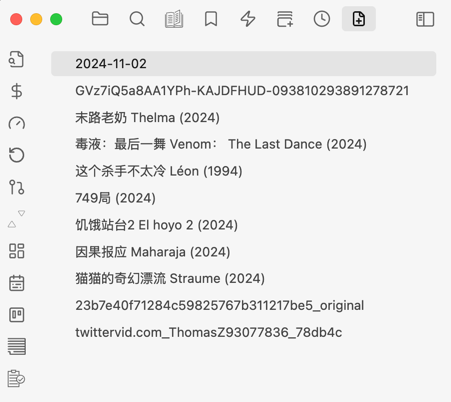
sidebar-1


Features

Feature Description
Recently added / modified Track files by creation date or last modification date
File type filter Show only Markdown, PDF, images, videos, Canvas, or other files
Search Live search box filters the list by filename as you type
Sort order Newest first · Oldest first · A→Z · Z→A
Pin to top Right-click any file to pin it — pinned files always stay at the top
Hash rename Right-click → rename with a SHA-256 hash to resolve filename collisions
Hover preview Hover over an image or PDF entry to see a floating preview
Exclude paths / tags Regex patterns and frontmatter tags to keep the list clean
Show / hide extensions Toggle file extensions in the list

Usage

Sidebar view

Open the command palette and run "Recently Added Files: Open", or click the file icon in the left ribbon.
The view appears in the left sidebar and updates automatically as you add or modify files.

Pin files

Right-click any file item → Pin. Pinned files move to the top of the list and are shown in bold with a pin icon. Right-click again → Unpin to remove the pin.

Type in the search box at the top of the view to filter entries by filename in real time.

File type filter

Enable File type filter in settings, then use the dropdown at the top of the view to switch between All, Markdown, PDF, Images, Videos, Canvas, and Other.

Hash rename

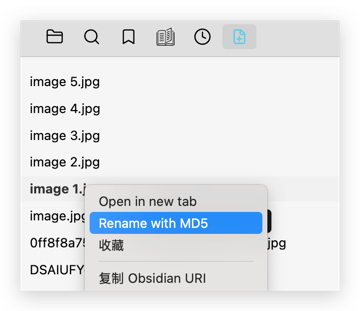
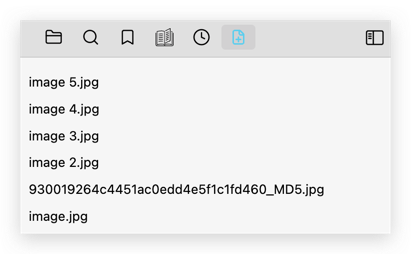
After importing images with duplicate names, right-click the file in the sidebar → Rename with hash. The file is renamed to a unique <sha256>_HASH.<ext> filename, resolving conflicts instantly.

Before:
After:
Hover preview

Hover over an image or PDF entry to see a floating thumbnail preview without opening the file.


Settings

Setting Default Description
List tracking mode Created files Track newly created files or recently modified files
List length 100 Maximum number of entries to keep
Show file extensions Off Show or hide file extensions in the list
Enable file type filter Off Show the type filter dropdown in the sidebar
Default file type filter All files Which type is selected when the view opens
Sort order Newest first How entries are ordered
Omitted pathname patterns Regex patterns (one per line) — matching files are excluded
Omitted frontmatter tags Frontmatter tags (one per line) — matching files are excluded

Module toggles

The settings page lets you enable or disable individual feature modules:

  • Recent files core — file tracking, sidebar list, commands
  • Filter and sort — type filter, sort modes, file-type icons
  • Hover preview — floating image / PDF preview on hover
  • Rename action — right-click hash rename

Commands

Command Description
Open recently added files Open / reveal the sidebar view
Clear recently added files list Empty the list
Prune missing entries Remove entries whose files no longer exist in the vault
Open top 5 recently added files Open the five most recent entries in new tabs

🙏 Acknowledgements

The original idea and core architecture draw heavily from recent-files-obsidian by tgrosinger. Many thanks for the excellent foundation.

This plugin was built to fill a specific gap: while recent-files-obsidian tracks recently opened or edited files, this plugin focuses on recently added files — the ones you just imported, downloaded, or created from another tool — making it much easier to find and process them right after they land in your vault.

Similar Plugins

info
• Similar plugins are suggested based on the common tags between the plugins.
Binary File Manager
4 years ago by qawatake
An Obsidian plugin to manage binary files
Screwdriver
4 years ago by vorotamoroz
Paste image rename
4 years ago by Reorx
Renames pasted images and all the other attachments added to the vault
Folder Focus Mode
4 years ago by grochowski
Focus file explorer on chosen folder and its files and subdirectories, while hiding all the other elements.
File Hider
4 years ago by Oliver Akins
A plugin for https://obsidian.md that allows hiding specific files and folders from the file explorer.
Open File by Magic Date
4 years ago by simplgy
HTML Reader
4 years ago by Nuthrash
This is a plugin for Obsidian (https://obsidian.md). Can open document with .html and .htm file extensions.
Update Relative Links
4 years ago by val
Trash Explorer
4 years ago by Per Mortensen
Restore and delete files from the Obsidian .trash folder
File chucker
4 years ago by Ken Lim
File Order
3 years ago by lukasbach
Obsidian plugin to reorder files with drag-and-drop by customizing a number-prefix in the filenames
Telegram Sync
3 years ago by Burtasov Volodymyr
Transfer messages and files from Telegram to Obsidian
Note archiver
3 years ago by thenomadlad
Edit History
3 years ago by Antonio Tejada
Obsidian Edit History Plugin, automatically save all the edit history of a note, browse and restore previous versions
Syncthing Integration
3 years ago by LBF38
Obsidian plugin for Syncthing integration
Update frontmatter modified date
3 years ago by Alan Grainger
Automatically update a frontmatter/YAML modified date field
Webdav File Explorer
3 years ago by red0orange
Copy Metadata
3 years ago by wenlzhang
An Obsidian plugin to copy metadata to clipboard and insert it into file name.
Auto Archive
3 years ago by Shane Burke
Auto Archive plugin for Obsidian
Merge Notes
3 years ago by fnya
Merge Notes is Plugin for Obsidian
VSCode Editor
3 years ago by Sun Xvming
Edit Code Files like VSCode in Obsidian.
Auto Filename
3 years ago by rcsaquino
Auto Filename is an Obsidian.md plugin that automatically renames files in Obsidian based on the first x characters of the file, saving you time and effort.
Remove Empty Folders
3 years ago by fnya
Remove Empty Folders for Obsidian
Git File Explorer
3 years ago by Mateus Molina
Simple Image Inserter
2 years ago by Joey Holtzman
Add images from the file system into Obsidian notes through a built-in file explorer
Vault Transfer
2 years ago by ImaginaryProgramming
Transfers a note from one vault to another.
S3agle
2 years ago by Turner Monroe (turnercore)
File Preview
2 years ago by Huajin
Add file preview contents under file in file explorer.
Guid Renamer
2 years ago by Taskscape LTD, Kacper Pabianiak
Renames the currently selected file by providing a unique file name based on GUID pattern
NSFW filter
2 years ago by catvatar
Obsidian Plugin adding a button to toggle visiblity of NSFW notes
sync-db-os
2 years ago by ketd
External File Card
2 years ago by James-Yu
A plugin for Obsidian showing a card displaying basic information of a file in pre-defined folders.
Link indexer
6 years ago by Yuliya Bagriy
Unique attachments
5 years ago by Dmitry Savosh
Obsidian plugin. Renames attachments, making their names unique.
Luhman
5 years ago by Dylan Elliott
Better File Link
5 years ago by Marc Julian Schwarz
A plugin for the note taking app Obsidian to add better external file links to your notes.
Update time on edit
5 years ago by beaussan
Cloudinary Uploader
5 years ago by Jordan Handy
An uploader for Obsidian to Cloudinary
Reveal Active File Button
5 years ago by Clare Macrae
Obsidian plugin to add a button to the top of the Obsidian File Explorer, to reveal the active file.
Cloud Storage
2 years ago by Jiajun Ma
Obsidian Cloud Storage is a powerful and user-friendly plugin designed to seamlessly integrate cloud storage capabilities into your Obsidian workflow. This plugin allows you to effortlessly upload your attachments to the cloud, freeing up local storage space and enabling easy sharing and access across all your devices.
Insert Multiple Attachments
2 years ago by mnaoumov
Obsidian Plugin that allows to insert multiple attachments at a time
Inbox Organiser
2 years ago by Jamie Hurst
Obsidian plugin to capture any new notes into an inbox and periodically prompt to organise these into other folders within the vault.
Local Any Files
2 years ago by ShermanTsang
A obsidian plugin used to extract and download files in your obsidian note.
Tencent COS for Imgur
a year ago by bobostudio
🔥 Obsidian 腾讯云 COS 图床插件
External Rename Handler
a year ago by mnaoumov
Obsidian Plugin that handles external renames made outside of the app
New Filename
a year ago by Amin Sennour
Simple plugin to change the default name for a new note from "Untitled" to a UUID.
New Note Fixer
a year ago by mnaoumov
Obsidian Plugin that unifies the way non-existing notes are created when clicking on their links
Media Companion
a year ago by Nick de Bruin
VaultSync
a year ago by Justin Bird
Obsidian plugin to link your vault to a cloud storage provider.
Simple Archiver
a year ago by Mike Farr
An Obsidian plugin that enables you to quickly archive a single note or an entire folder of notes.
Rename File to Selection
a year ago by Aava
Rename your file to the current text selection.
CSV Lite
a year ago by Jay Bridge
Simple enough for csv, no more fancy function you need to learn and think!
Markdown Hijacker
a year ago by Yongmini
Beyond the Vault. One hub for every Markdown, everywhere
Remote Fetch
10 months ago by Shaharyar
WebDAV Explorer
4 months ago by 蓝星晓夜
WebDAV Explorer: Connect to WebDAV server, preview files directly in web view, and generate links through simple drag-and-drop.
Graphic Organizer
4 months ago by Nick Le Guillou - Superhuman Curiosity
Interactive tree view for visualizing and managing your vault's file hierarchy.
File Explorer Reload
2 months ago by mnaoumov
This plugin has not been manually reviewed by Obsidian staff. Reloads file explorer pane