CSV Lite

by Jay Bridge
5
4
3
2
1
Score: 59/100

Description

Category: File Management

The CSV Lite plugin allows users to view and edit CSV files directly within Obsidian without introducing complex interfaces or additional learning curves. Focused on simplicity, it integrates CSV management seamlessly into the Obsidian workspace, treating tables like regular text files while maintaining clean metadata storage. The plugin emphasizes minimalism, removing the need for modals, sidebars, or external documentation, and ensures that interacting with CSV data remains intuitive and fast.

Reviews

No reviews yet.

Stats

38
stars
11,972
downloads
1
forks
547
days
35
days
35
days
21
total PRs
0
open PRs
1
closed PRs
20
merged PRs
40
total issues
3
open issues
37
closed issues
50
commits

Latest Version

a month ago

Changelog

1.8.4

Review cleanup, no functional changes. / 审查遗留项清理,无功能变更。

  • Removed all remaining forced style overrides (compact delimiter dropdown, search highlight); higher-specificity selectors instead. / 移除全部剩余的强制覆盖样式(紧凑分隔符下拉、搜索高亮),改用更高特异性选择器。
  • Fixed URL text being unreadable when a row/column is highlighted. / 修复行/列高亮时 URL 文字看不清的问题。
  • Removed a redundant type assertion. / 移除一处多余的类型断言。

README file from

Github

CSV Lite

Simple enough for csv, no more fancy function you need to learn and think!

中文版本 Readme

DOI Obsidian Download Total Downloads GitHub Issues GitHub Last Commit

v1.1.0

Introduction

Keep your mind on track! Don't waste time creating fancy tables.

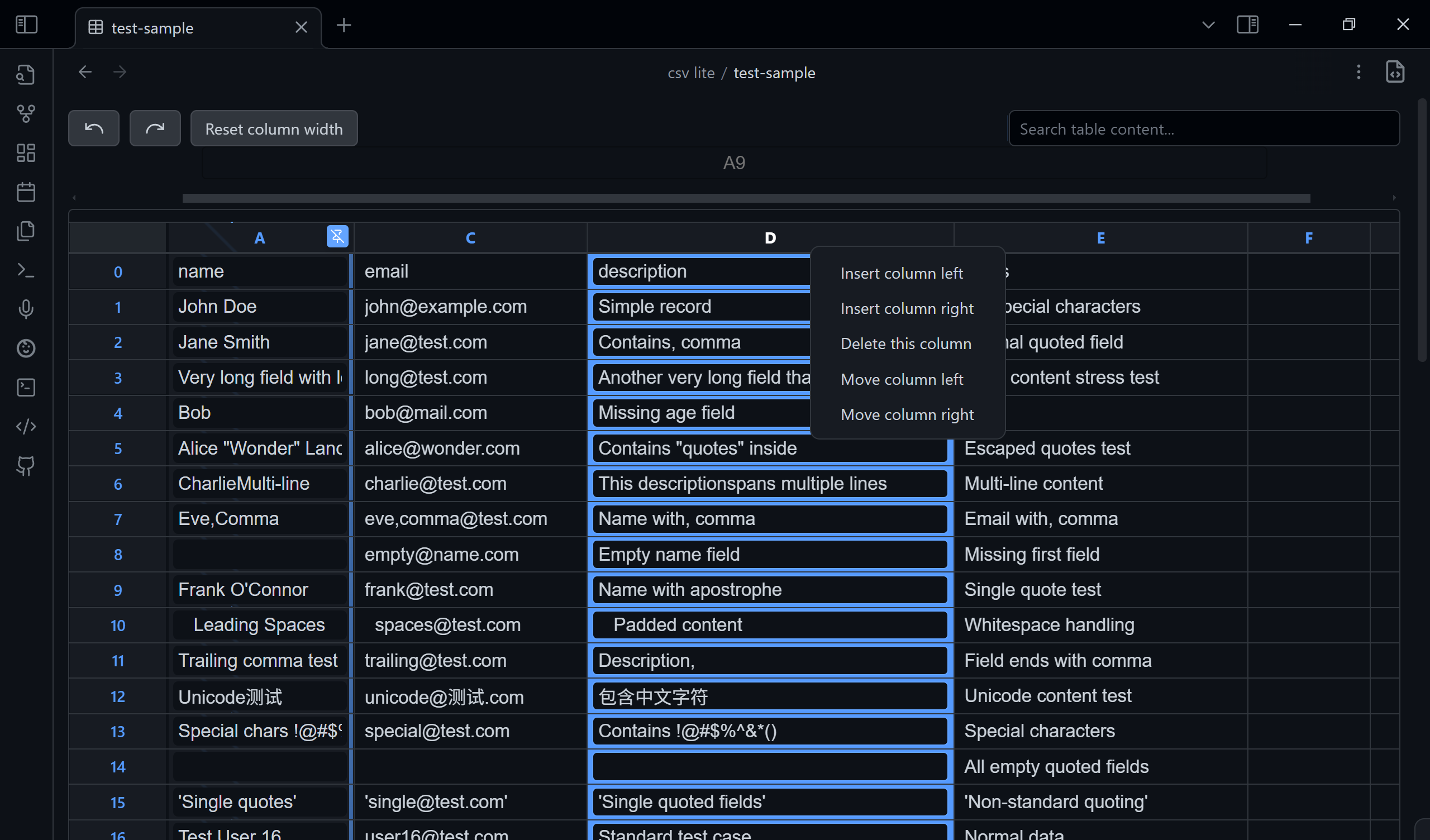
A plugin designed to view and edit CSV files directly within Obsidian.

  • View CSV files in a clean, readable table.
  • Search the entire file to quickly find data (esc to clean).
  • Navigate easily with numbered rows and columns.
  • Pin the selected column so it's always visible.
  • Toggle between the table view and raw source-mode.
  • Edit cells directly by clicking and typing.
  • Manage rows and columns (add, delete, move) with a simple right-click on the header.
  • Create new CSV files: use the command palette or right-click in the File Explorer to quickly create a new .csv file. A unique name like new.csv or new-1.csv will be generated automatically.
  • Switch Delimiter Non‑Destructively: Auto‑detects the file delimiter (comma, semicolon, tab, etc.). Changing the delimiter in the toolbar only re-parses the view; it does NOT rewrite your file. Your original delimiter is preserved when saving edits.
  • Clickable URLs: Plain-text URLs and Markdown-style links ([text](url)) in cells are automatically detected and rendered as clickable links. Click a link to open it in your browser, or click the edit button (✎) to edit the cell content.
  • First Row as Header: Toggle "Header Row" in the toolbar to show the first row as column headers (like Sheets). The choice is remembered per file, only affects the view, and never rewrites your file. Double-click a header to rename it in place.

I have a plan to design my own database using json and csv only. If you have fancy idea about tables or csv, please feel free to issue (I will consider it in csv-lite or my new plugin) or search it in community.

Why Another CSV Plugin?

There are so many CSV plugins. Why choose this one?

Because it is designed to be simple and straightforward. It also keeps up with the latest Obsidian API and typings. No fancy features—just open and edit.

Philosophy

  • No fancy UI, SAY NO TO - modals - sidebar - settingTab - other online docs & tutorials
  • All functions of the ui components above will be covered in a single File view.
  • All in TextFileView/workspace.
  • No more pollution to your vault, all metadata store in ./.obsidian/plugins/csv in json format. (Currently no data.json)
  • Every function must be completed within 3 steps: 0. Locate it visually
    1. Click/Hotkey
    2. Input (if needed)
    3. Confirm/Leave
  • The interface should remain minimal yet functional.
  • Users shouldn't need to leave their workflow environment.
  • CSV manipulation should be as natural as text editing.

Purpose

This plugin enhances Obsidian's functionality by allowing users to work with CSV (Comma-Separated Values) files seamlessly within their vault, eliminating the need to switch between different applications for CSV handling.

Delimiter Handling Philosophy

Team repositories or shared datasets often mix delimiter styles (, ; \t). For safety:

  1. The plugin auto-detects the delimiter when opening a file.
  2. The dropdown ("Auto, , ;") lets you temporarily re-interpret the file without changing it on disk.
  3. Saving edits (cell changes, row/column operations) writes the file back using the ORIGINAL detected delimiter, not the one you temporarily selected—unless the file already used that delimiter.
  4. This prevents accidental mass diffs in version control or breaking pipelines that assume a specific separator.

If you ever need an explicit “convert delimiter” feature, open an issue—we’ll gate it behind a confirmation instead of doing it silently.

Getting Started

Install the plugin through Obsidian's community plugins section and start viewing your CSV files directly in your notes.

Trouble Shooting

You can issue here.

if you encounter any problems exactly with csv, download test/test-sample.csv to see what's different from the test csv file. Issue with an screenshot will help us fix it faster.

Similar Plugins

info
• Similar plugins are suggested based on the common tags between the plugins.
Recent Files
6 years ago by Tony Grosinger
Display a list of most recently opened files
Notebook Navigator
3 months ago by Johan Sanneblad
A better file browser and calendar inspired by Apple Notes, Bear, Evernote and Day One.
Paste image rename
5 years ago by Reorx
Renames pasted images and all the other attachments added to the vault
Custom Attachment Location
5 years ago by RainCat1998
Customize attachment location with variables($filename, $data, etc) like typora.
HTML Reader
4 years ago by Nuthrash
This is a plugin for Obsidian (https://obsidian.md). Can open document with .html and .htm file extensions.
File Explorer++
5 months ago by kelszo
A plugin for https://obsidian.md, which enables the ability to hide and pin specific files and folders in the file explorer by applying custom filters.
Local Backup
3 months ago by velviagris
Automatically creates a local backup of the vault.
Update time on edit
5 years ago by beaussan
VSCode Editor
3 years ago by Sun Xvming
Edit Code Files like VSCode in Obsidian.
Trash Explorer
4 years ago by Per Mortensen
Restore and delete files from the Obsidian .trash folder
Update frontmatter modified date
3 years ago by Alan Grainger
Automatically update a frontmatter/YAML modified date field
Better File Link
5 years ago by Marc Julian Schwarz
A plugin for the note taking app Obsidian to add better external file links to your notes.
File Order
4 years ago by lukasbach
Obsidian plugin to reorder files with drag-and-drop by customizing a number-prefix in the filenames
File Hider
4 years ago by Oliver Akins
A plugin for https://obsidian.md that allows hiding specific files and folders from the file explorer.
Telegram Sync
3 years ago by Burtasov Volodymyr
Transfer messages and files from Telegram to Obsidian
Syncthing Integration
3 years ago by LBF38
Obsidian plugin for Syncthing integration
Reveal Active File Button
5 years ago by Clare Macrae
Obsidian plugin to add a button to the top of the Obsidian File Explorer, to reveal the active file.
Edit History
3 years ago by Antonio Tejada
Obsidian Edit History Plugin, automatically save all the edit history of a note, browse and restore previous versions
Folder Focus Mode
4 years ago by grochowski
Focus file explorer on chosen folder and its files and subdirectories, while hiding all the other elements.
Luhman
5 years ago by Dylan Elliott
Merge Notes
3 years ago by fnya
Merge Notes is Plugin for Obsidian
Unique attachments
6 years ago by Dmitry Savosh
Obsidian plugin. Renames attachments, making their names unique.
Binary File Manager
5 years ago by qawatake
An Obsidian plugin to manage binary files
File Explorer Reload
5 months ago by mnaoumov
Obsidian Plugin that reloads the file explorer files list
Auto Filename
3 years ago by rcsaquino
Auto Filename is an Obsidian.md plugin that automatically renames files in Obsidian based on the first x characters of the file, saving you time and effort.
Vault Transfer
3 years ago by ImaginaryProgramming
Transfers a note from one vault to another.
Link indexer
6 years ago by Yuliya Bagriy
Media Companion
2 years ago by Nick de Bruin
Enhance Copy Note
4 months ago by kzhovn
Plugin which enhances the copy command for Obsidian.
Update Relative Links
4 years ago by val
Cloudinary Uploader
5 years ago by Jordan Handy
An uploader for Obsidian to Cloudinary
Insert Multiple Attachments
2 years ago by mnaoumov
Obsidian Plugin that allows to insert multiple attachments at a time
File Preview
2 years ago by Huajin
Add file preview contents under file in file explorer.
Note archiver
3 years ago by thenomadlad
Webdav File Explorer
3 years ago by red0orange
External Rename Handler
2 years ago by mnaoumov
Obsidian Plugin that handles external renames made outside of the app
Screwdriver
5 years ago by vorotamoroz
New Note Fixer
2 years ago by mnaoumov
Obsidian Plugin that unifies the way non-existing notes are created when clicking on their links
Open File by Magic Date
4 years ago by simplgy
File chucker
4 years ago by Ken Lim
Inbox Organiser
2 years ago by Jamie Hurst
Obsidian plugin to capture any new notes into an inbox and periodically prompt to organise these into other folders within the vault.
Copy Metadata
3 years ago by wenlzhang
An Obsidian plugin to copy metadata to clipboard and insert it into file name.
Auto Archive
3 years ago by Shane Burke
Auto Archive plugin for Obsidian
Git File Explorer
3 years ago by Mateus Molina
Cloud Storage
2 years ago by Jiajun Ma
Obsidian Cloud Storage is a powerful and user-friendly plugin designed to seamlessly integrate cloud storage capabilities into your Obsidian workflow. This plugin allows you to effortlessly upload your attachments to the cloud, freeing up local storage space and enabling easy sharing and access across all your devices.
Recently Added Files
2 years ago by Lemon695
List files by last added, includes pictures, pdfs, etc.
Remove Empty Folders
3 years ago by fnya
Remove Empty Folders for Obsidian
Simple Archiver
2 years ago by Mike Farr
An Obsidian plugin that enables you to quickly archive a single note or an entire folder of notes.
External File Card
2 years ago by James-Yu
A plugin for Obsidian showing a card displaying basic information of a file in pre-defined folders.
S3agle
2 years ago by Turner Monroe (turnercore)
Markdown Hijacker
a year ago by Yongmini
Beyond the Vault. One hub for every Markdown, everywhere
Attachment Organizer
3 months ago by kiteruunner
Automatically organize attachments into zone-based folders with conflict detection and batch operations
Copy Contents
3 months ago by Richard Jones
Copy or export file and folder contents - perfect for LLMs
Office Suite
2 months ago by Vishal Rashmika
View and edit Microsoft Word (.docx), Excel (.xlsx), and CSV/TSV spreadsheet files directly inside Obsidian with native WYSIWYG editing, formatting, and formulas.
Local Any Files
2 years ago by ShermanTsang
A obsidian plugin used to extract and download files in your obsidian note.
Auto Move File
2 months ago by sx kan
Automatically move files based on frontmatter properties in Obsidian
Graphic Organizer
7 months ago by Nick Le Guillou - Superhuman Curiosity
Tencent COS for Imgur
2 years ago by bobostudio
🔥 Obsidian 腾讯云 COS 图床插件
Note Types
3 months ago by jsmorabito
Simple Image Inserter
3 years ago by Joey Holtzman
Add images from the file system into Obsidian notes through a built-in file explorer
VaultSync
2 years ago by Justin Bird
Obsidian plugin to link your vault to a cloud storage provider.
MD Butler
2 months ago by Peter Petschownik
Automatically manages YAML frontmatter fields for all notes. A reliable alternative to Templater formulas for consistent metadata.
WebDAV Explorer
7 months ago by 蓝星晓夜
WebDAV Server Explorer.
New Filename
2 years ago by Amin Sennour
Simple plugin to change the default name for a new note from "Untitled" to a UUID.
Add Attachment
a month ago by olegg90
Obsidian plugin for adding multi attachments
NSFW filter
2 years ago by catvatar
Obsidian Plugin adding a button to toggle visiblity of NSFW notes
Alternative Explorer
2 months ago by sk-obsidian
Alternative Explorer is an Apple Notes–style sidebar for browsing folders and notes in Obsidian. Switch between an expandable folder tree and a notes list — a compact alternative to the built-in File Explorer.
Remote Fetch
a year ago by Shaharyar
Guid Renamer
2 years ago by Taskscape LTD, Kacper Pabianiak
Renames the currently selected file by providing a unique file name based on GUID pattern
Rename File to Selection
2 years ago by Aava
Rename your file to the current text selection.
sync-db-os
2 years ago by ketd
Store
3 months ago by shimeoki
Manage your notes within a single folder.