Create Task

by Simon Knittel
5
4
3
2
1
Score: 50/100

Description

Category: Task Management

The Create Task plugin simplifies the process of adding new tasks in Obsidian by guiding you through a focused modal where you fill in essential details. Whether you're working on multiple projects or just want to categorize tasks by context, you can direct each entry to a specific note. A custom tag can be automatically applied to new tasks, making it easier to integrate with plugins that rely on tag-based organization. The plugin also supports due dates in natural language, so you can quickly specify time frames without memorizing strict formats. By letting you shape tasks exactly how you want them-right down to the note location and date style-you'll spend less time on repetitive task setup and more time actually tackling your to-dos. This approach helps keep task creation quick and flexible, regardless of your workflow.

Reviews

No reviews yet.

Stats

15
stars
3,577
downloads
3
forks
819
days
699
days
699
days
1
total PRs
0
open PRs
1
closed PRs
0
merged PRs
29
total issues
9
open issues
20
closed issues
75
commits

Latest Version

2 years ago

Changelog

This release only upgrades dependencies. There are no changes for users of this plugin.

README file from

Github

Features & Why

Create Task was made to improve the creation of tasks in Obsidian. It won't handle the task management after the creation since there are already many other plugins like CardBoard and Tasks.

The main feature of this plugin is a modal which guides you through the individual steps of creating a task. You can open this modal in many different ways (see Usage for more details).

  • You can configure multiple target notes. Other plugins usually save all tasks in a single note. For my use case I want to store the tasks in different notes depending on the project I'm working on.
  • You can configure a tag which will get appended to the created tasks. This is helpful when using the CardBoard plugin since their columns are tag-based.
  • You can create tasks with a due date and use natural language for defining these. You can also configure the output format since other plugins use different formats for handling dates.

Install

Official plugin browser

https://obsidian.md/plugins?id=create-task

Manual

  1. Download the latest release
  2. Extract the .zip file
  3. Move the extracted directory into your vault's plugin directory (.obsidian/plugins/)
  4. Restart Obsidian
  5. Enable the plugin

Usage

Command palette

You can use Obsidian's command palette to open the modal or this plugin's settings.
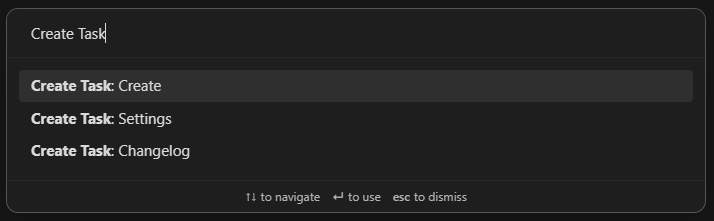
Screenshot of the command palette

Ribbon menu

You can open the modal by clicking this plugin's icon in Obsidian's ribbon menu.
Screenshot of the ribbon menu

URL scheme / Obsidian URI

This plugin supports the URL scheme/Obsidian URI standard.

Using this url (obsidian://create-task) will automatically start Obsidian and open the modal.

You can use parameters to prefill parts of the modal:

  • This prefills the Target note input: note-path=Unsorted%20TODOs.md
  • This prefills the Task description input: task-description=Do%20stuff
  • This prefills the Task details input: task-details=More%20info
  • This prefills the Due date input: due-date=tomorrow
  • This will skip the modal and immediately create the task in the specified note: create=true
Examples

Here are some examples of where you could use the url:

Raycast
  1. Open Raycast
  2. Search for Create Quicklink
  3. Fill out the form
    • Name: Create task
    • Link: obsidian://create-task
    • Open With: Obsidian
  4. Save the Quicklink
  5. Now you can open Raycast and search for Create task in order to start Obsidian and open the modal.
Windows Start Menu/Search
  1. Create a Windows Shortcut in C:\Users\<your-username>\AppData\Roaming\Microsoft\Windows\Start Menu\Programs
  2. For Type the location of the item use the url: obsidian://create-task
  3. For Type the name of the item use: Create task
  4. Save the shortcut
  5. Now you can use the Windows Search and search for Create task. You can also pin this shortcut to the Start Menu.
Google Chrome Bookmark
  1. Create a bookmark by right-clicking the bookmarks bar and choosing Add page...
  2. For Name use: Create task
  3. For URL use the url: obsidian://create-task
Android

You can use Automate to create a homescreen shortcut which opens the create modal.

  1. Install Automate
  2. Create a new Flow in Automate
  3. Attach an App start block to the Flow beginning block
  4. Configure the App start block
    • Package: md.obsidian
    • Activity class: md.obsidian.MainActivity
    • Action: View
    • Data URI: obsidian://create-task
  5. Save the Flow
  6. Add a new widget to your homescreen
  7. Choose the Flow shortcut widget from Automate
  8. Select the newly created flow for the widget
  9. Now you can open Obsidian and the create modal by clicking the new homescreen widget

Similar Plugins

info
• Similar plugins are suggested based on the common tags between the plugins.
Todoist Text
4 years ago by Wes Moncrief
Rewarder
4 years ago by Gustav Gnosspelius
An Obsidian-plugin to get rewards for completing todos
Packrat
4 years ago by Thomas Herden
Process completed instances of recurring items created by the Obsidian Tasks plugin
Todoist completed tasks
4 years ago by Andrew 'Ledary' Kulishov
Obsidian plugin to display the completed tasks
ToggleList
4 years ago by Lite C
This is a simple plugin for Obsidian to overwrite the default behavior of toggle checkbox status. Also, it offers a simple way to toggle through frequently used attributes: task states, task tags, highlighted list, etc.
Week Planner
4 years ago by Ralf Wirdemann
Todo sort
3 years ago by Ryan Gomba
A plugin for Obsidian that sorts todos within a note
Create Note in Folder
3 years ago by Mara-Li
Set a folder in settings and get directly a command to create a note in it. Use this with QuickAdd/Button to get more pratical things :D
Tasks Calendar Wrapper
3 years ago by zhuwenq
This plugin currently provides a timeline view to display your tasks from your obsidian valut, with customizable filters and renderring options.
Send Tasks to OmniFocus
3 years ago by Henry Gustafson
Sync Google Calendar
3 years ago by Dexin Qi
Sync tasks from Obsidian with system calendar
TodoTxt
3 years ago by Mark Grimes
Obsidian plugin to manage todotxt files
Time Ruler
3 years ago by Joshua Tazman Reinier
A drag-and-drop time ruler combining the best of a task list and a calendar view (integrates with Tasks, Full Calendar, and Dataview).
Obligator
3 years ago by Dimitar Dimitrov
A fully featured replacement for the built-in daily notes plugin. Obligator functions like a virtual bullet journal by copying over unchecked to-do items to your new daily note, along with adding any scheduled items you've set up
Checkbox Reorder
3 years ago by Ivan Knöfler
TickTick
3 years ago by Viduy Cheung
Todo.txt Codeblocks
3 years ago by Benjamin Nguyen
Manage your tasks inside Obsidian codeblocks according to the Todo.txt specification.
TODO Wrangler
3 years ago by Jeel Shah
An obsidian plugin to wrangle your Todos and put them in their place.
Tag Project
3 years ago by Odaimoko
GChat Reminder
2 years ago by Anil Erdogan
TickTickSync
2 years ago by thesamim
Task Status
2 years ago by Valerie Burzynski
Quickly change any task status in Obsidian. The searchable modal enables a more dynamic and indiscriminate workflow when you need to change your checkbox markers.
Extended Task Lists
2 years ago by joeriddles
Extended Markdown support for task lists in Obsidian.
Nested Daily Todos
2 years ago by Thomas Brezinski
A plugin for Obsidian will parse previous Daily Notes for incomplete todos and add them to today's Daily Note. It supports grouping the todos by section and supports alternative checkbox states and nested todos.
TaskWarrior Task Wiki
2 years ago by SntTGR
Small and simple task manager widget for obsidian and powered by taskwarrior.
Canvas LMS Task Importer
2 years ago by jordaeday
Imports assignments from Canvas LMS as tasks in Obsidian
Rollover Daily Todos
5 years ago by Matt Sessions
An obsidian plugin that rolls over todo items from the previous daily note
Completed Task Display
5 years ago by Ben Lee-Cohen
Obsidian plugin to control the display of completed tasks
TODO | Text-based GTD
5 years ago by Lars Lockefeer
Tasks
5 years ago by Clare Macrae and Ilyas Landikov (created by Martin Schenck)
Task management for the Obsidian knowledge base.
Random To-Do
5 years ago by NatiAris
Pick a random todo item or a file with todo items
Reminder
5 years ago by uphy
Reminder plugin for Obsidian
Task Collector (TC)
5 years ago by ebullient
Manage tasks and logs within an Obsidian note.
CardBoard
4 years ago by roovo
An Obsidian plugin to make working with tasks a pleasure (hopefully anyway).
Overdue
4 years ago by Peter Parente
Obsidian plugin that marks items as [[Overdue]] if they are not checked off by their due date
Auto Strikethrough Tasks
2 years ago by Nomekuma
Automatically adds strikethrough to completed tasks.
Todos sort
a year ago by Jiri Sifalda
A plugin for Obsidian that sorts todos within a note
Check and Delete
a year ago by Danitiate
An Obsidian plugin that allows you to quickly clean up temporary list-items with the press of a button
Auto Tasks
a year ago by Jamie Hurst
Obsidian plugin to combine periodic notes with tags and tasks to automatically manage your daily, weekly and project TODO lists. Requires the "Periodic Notes" and "Tasks" plugins.
Task Director
a year ago by Cybertramp
A plugin that allows you to easily manage tasks in bulk.
Proletarian Wizard Task Manager
a year ago by Charles Feval
Obsidian plugin ot manage todos and projects directly from your notes.
Simple Todo
a year ago by elliotxx
A minimalist text-based todo manager (Text-Based GTD) for efficient task management in Obsidian.
Clear Todos
a year ago by Joshua Gawenda
An Obsidian Plugin to clear todos that are done
Todoist Context Bridge
a year ago by wenlzhang
Bridge your Obsidian notes with Todoist tasks while preserving rich context, helping you highlight important tasks and maintain seamless workflows between the two platforms. Seamlessly integrate with Dataview and Tasks plugins.
Import Todoist tasks
a year ago by Duke
Import Todoist tasks as Obsidian tasks.
Project Tasks
a year ago by Paul Paterson
An Obsidian Add-in that allows you to create simple projects out of tasks
BuJo Bullets
a year ago by Will Olson
Alternate checkbox types for Obsidian to support Bullet Journal bullets
Inline Checkbox Groups
a year ago by Bradley Wyatt
Obsidian Plugin that creates multiple checkboxes on a single line, separated by a customizable separator character (default '|'), with the option to automatically cross out text when all checkboxes in the line are checked.
Task Board
a year ago by Atmanand Gauns
An Obsidian plugin to view and manage your tasks from whole vault using much efficient boards using various methodologies.
Task Mover
a year ago by Mariia Nebesnaia
A plugin for obsidian to move unfinished tasks to the daily note automatically
Completed Tasks
a year ago by Mgussekloo
A free, simple and intuitive Obsidian plugin that automatically moves completed tasks (checked checkboxes) to the bottom of the list they're in.
Tasks Cleaner
a year ago by lowit
🧹 Tasks Cleaner is a plugin for Obsidian that helps you automatically remove old completed tasks from your Markdown notes
TODO Highlighter
a year ago by Nuraly Dyussenov
Obsidian Plugin that formats the exact string TODO, so it can be easily seen in your notes.
TickTick Quick Add Task
a year ago by Muxin Li
The TickTick Quick Add Obsidian Plugin lets you quickly create tasks in TickTick directly from your Obsidian notes.
GitHub Tasks
8 months ago by Mike Thicke
Obsidian plugin to sync GitHub issues and PRs to Obsidian TODOs
Tasks Map
7 months ago by NicoKNL
A graph view of your tasks.
TODOseq
7 months ago by Stephen Cross
TODOseq ("to-do-seek") is a lightweight, keyword-based task tracker for Obsidian
LighterPack importer
a month ago by Nicola Siniscalchi
Import a packing list from https://lighterpack.com.