Callout Toggles

by Aly Thobani
5
4
3
2
1
Score: 51/100

Description

Category: Note Enhancements

The Callout Toggles plugin for Obsidian is a game-changer for note-takers who love a clean, structured look in their notes. This plugin lets you wrap text lines or entire sections in eye-catching callout blocks-whether it's an alert, a tip, or a quote. You can assign hotkeys to different callout styles, making it super easy to switch between types without breaking your workflow. Plus, if you use the Callout Manager plugin, Callout Toggles seamlessly syncs with custom callouts you've set up, yet it also works just fine as a standalone tool. One thoughtful feature is its ability to keep your custom titles intact when toggling between callout styles, so you won't lose any of your personalized headings. If you're looking to add polish and visual appeal to your notes, Callout Toggles is a must-try addition!

Reviews

No reviews yet.

Stats

19
stars
4,055
downloads
2
forks
555
days
138
days
494
days
6
total PRs
0
open PRs
0
closed PRs
6
merged PRs
11
total issues
2
open issues
9
closed issues
112
commits

Latest Version

a year ago

Changelog

Fixes plugin crash on load when settings file doesn't exist yet

README file from

Github

Callout Toggles

Obsidian logo badge Number of downloads badge

An Obsidian plugin to quickly add, switch, or remove callout blocks in your notes with convenient commands. Provides a separate command for every callout type, so you can easily assign hotkeys for your favorite callouts.

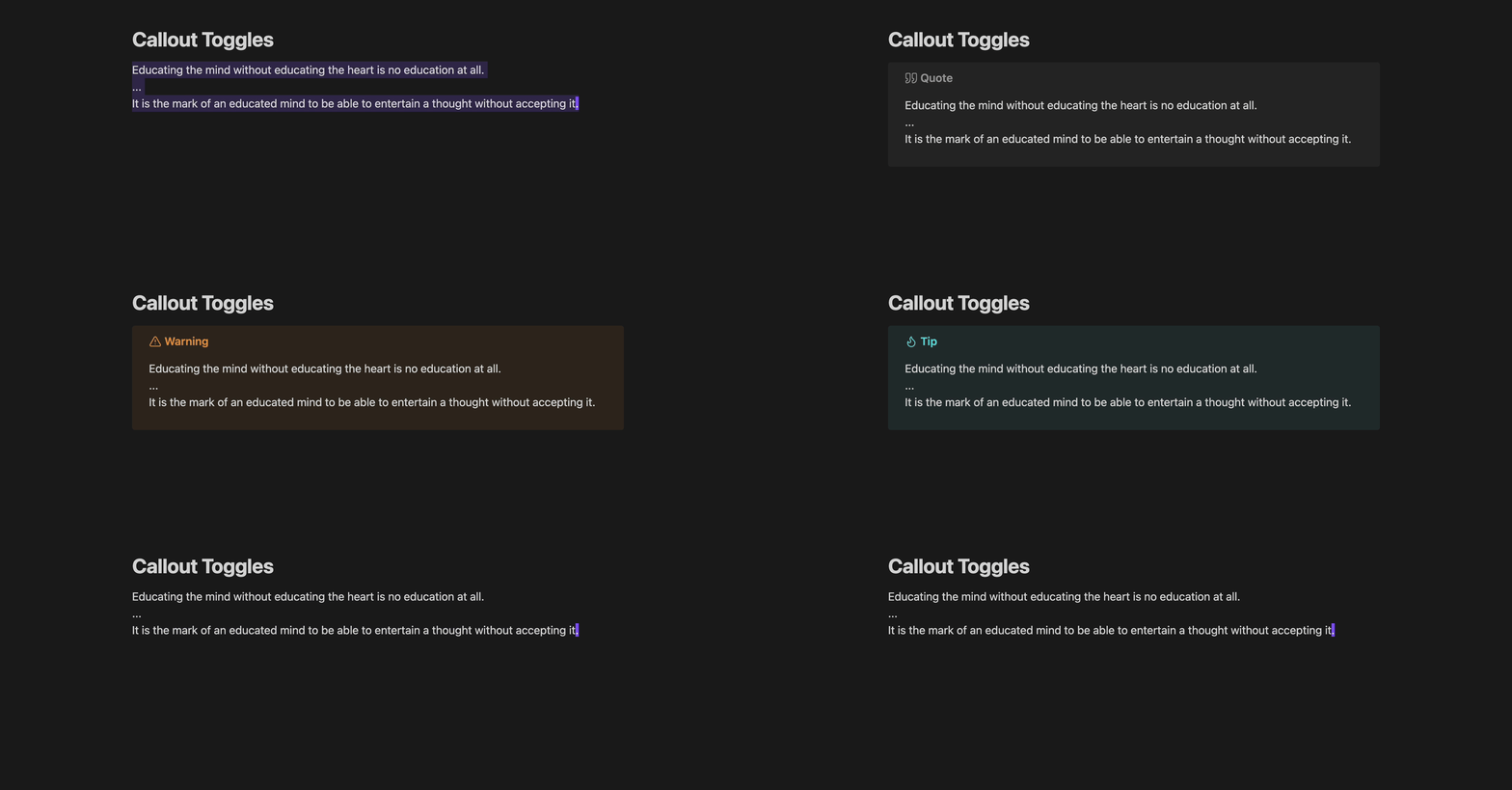
Switching between callout types demonstration

Features

  • Without leaving your keyboard:
    • Insert a fresh (blank) callout, or turn existing text into a callout
    • Remove a callout, turning it back into regular text
    • Switch the type of an existing callout
  • Retain custom titles when wrapping or removing callouts
  • Works with your custom callout types (automatically syncs with Callout Manager if installed)
  • Settings for formatting, auto-selection, foldable callouts, and more

Table of contents

  1. Features
  2. Table of contents
  3. Commands provided
    1. Wrap lines in ... callout
    2. Remove callout from selected lines
  4. Usage examples
    1. Inserting a fresh callout
    2. Wrapping the current line
    3. Wrapping multiple lines
    4. Removing a callout
    5. Retaining custom titles
  5. Custom callouts (Callout Manager)
  6. Feedback
  7. Appreciation

Commands provided

Two types of commands are provided: Wrap lines in ... callout (where ... is a callout type) and Remove callout from selected lines. Using them together, you can easily switch the type of an existing callout.

[!TIP] Both commands work on full lines of text, so your cursor position within a given line doesn't matter. As long as part of a line is selected, the entire line will be included.

Wrap lines in ... callout

One Wrap lines in ... callout command is provided for every possible callout type (❞ Quote, ⚠ Warning, 🔥 Tip, 🐞 Bug, 📝 Note, etc.), so that you can assign separate hotkeys for each of your favorite callouts. This can be used both for inserting fresh callouts, and for turning existing text into callouts.

Remove callout from selected lines

[!IMPORTANT] Note that a callout must begin on the first selected line of text for this command to be available.

This will remove the callout syntax from the selected lines, turning the callout back into regular text. If a custom title is present, it will be retained as a Markdown heading (see Retaining custom titles).

Usage examples

Inserting a fresh callout

To insert a fresh callout of your choice, simply run Wrap lines in ... callout on a blank line:

Inserting a fresh callout

Wrapping the current line

If the current line is not blank and nothing is selected, the current line will be turned into a callout:
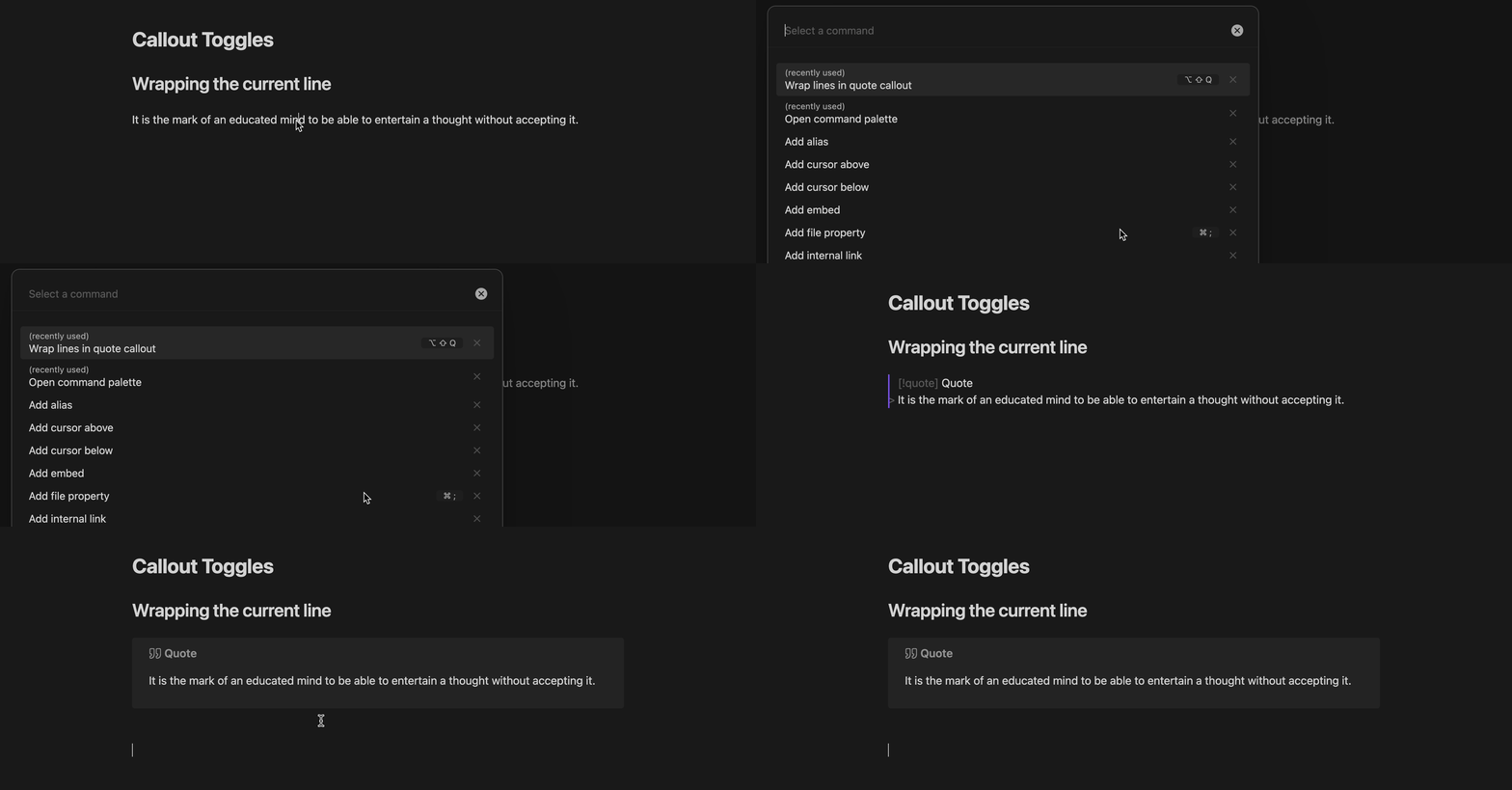
Wrapping the current line in a callout

Wrapping multiple lines

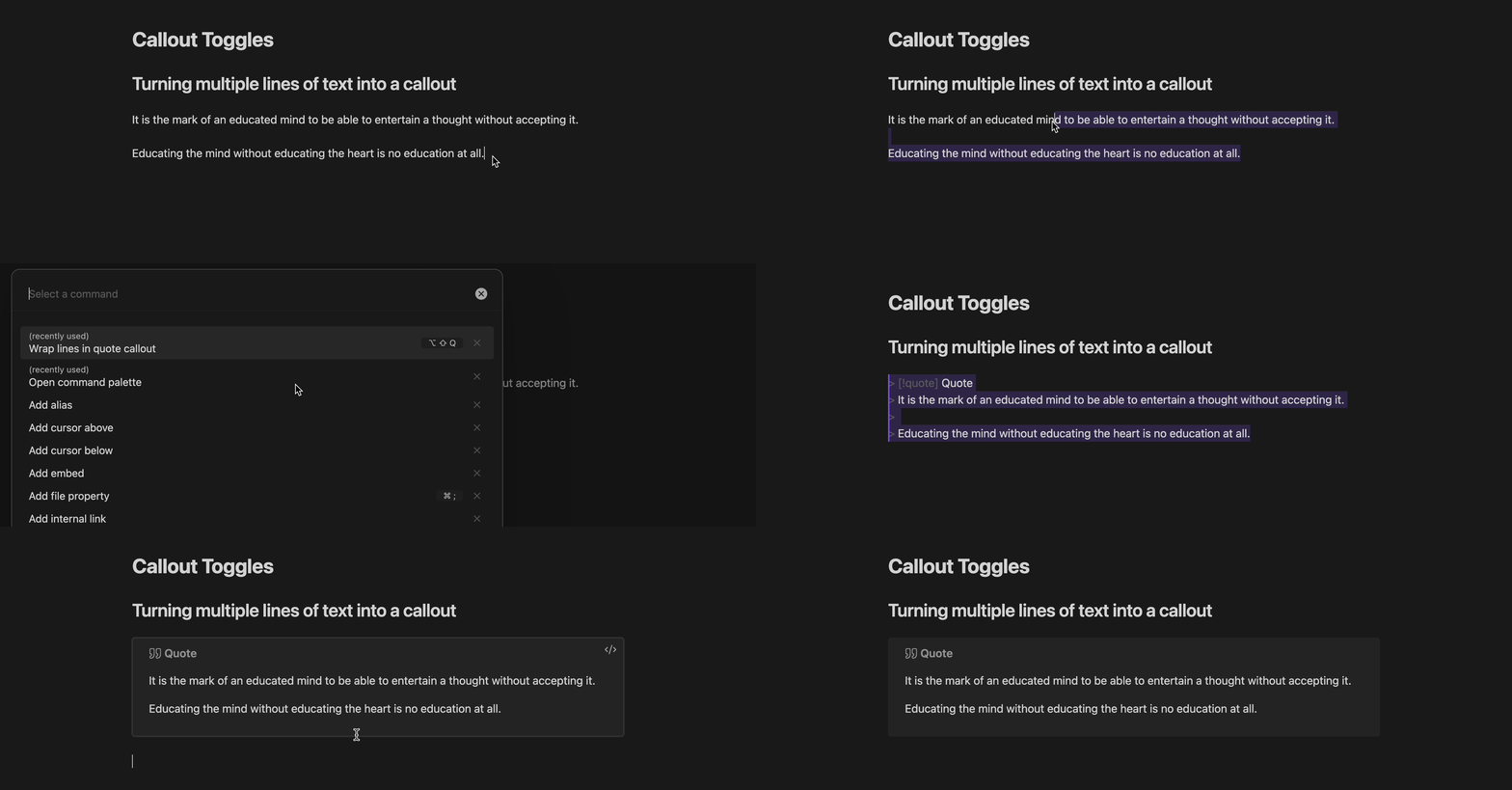
To turn multiple lines of text into a callout, first select the lines, and then run Wrap lines in ... callout:

Wrapping multiple lines in a callout

Removing a callout

To turn a callout back into regular text, run Remove callout from selected lines with the given lines selected (make sure the callout header is on the first selected line):
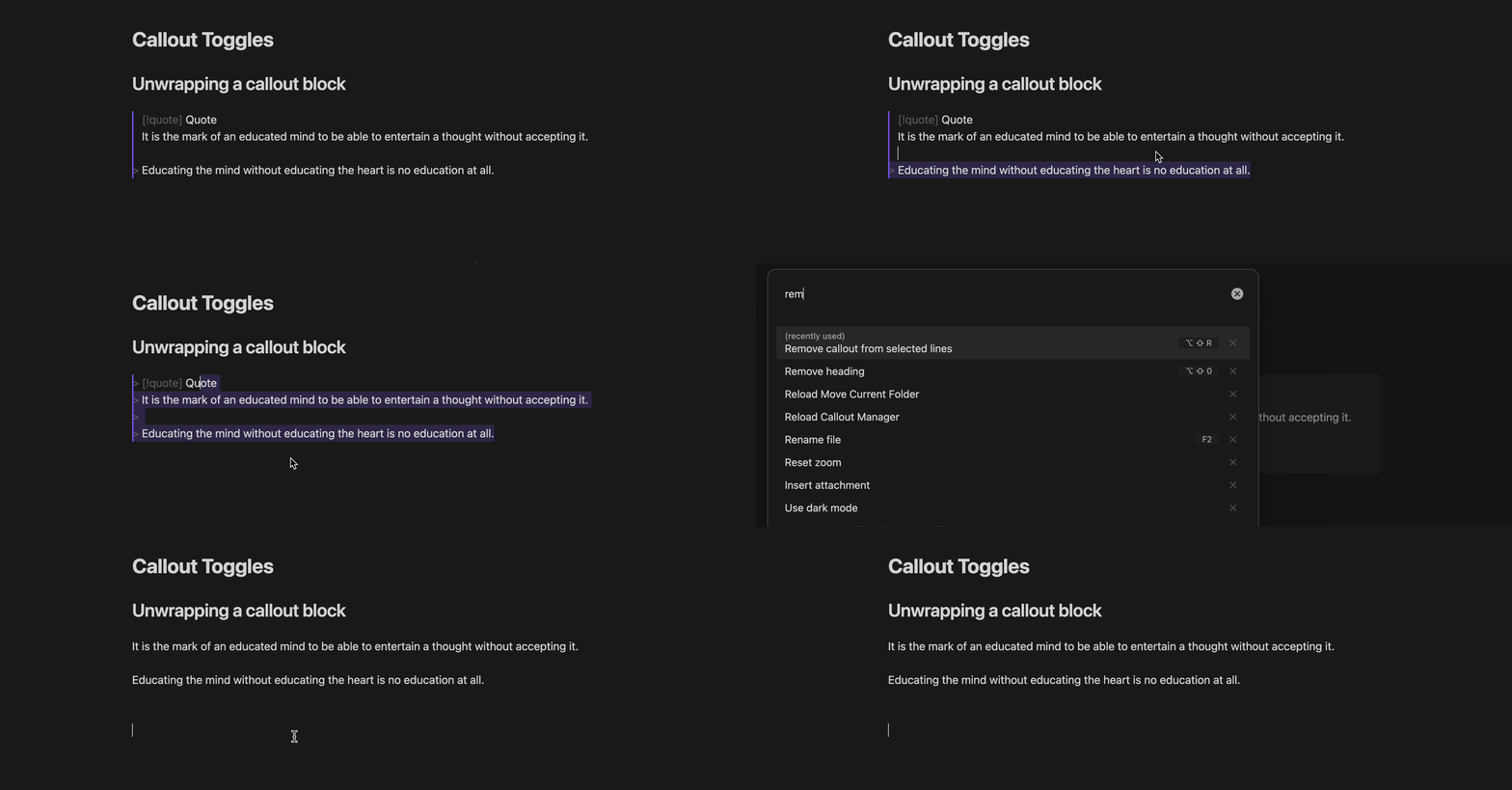
Unwrapping a callout block

Retaining custom titles

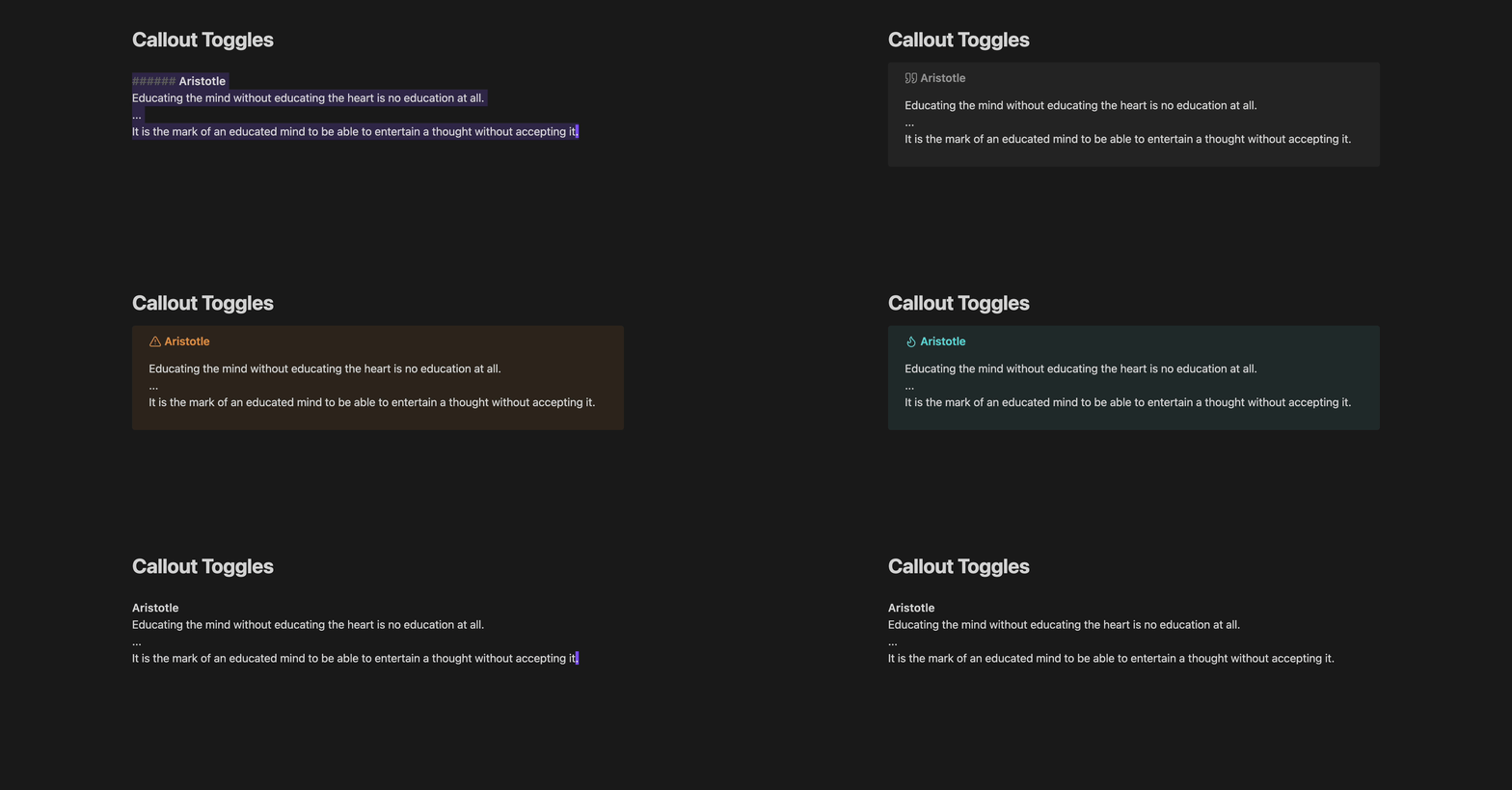
If a callout has a default title (e.g. > [!quote] Quote), the entire header line will be removed when calling Remove callout from selected lines. But if a custom title is present (e.g. > [!quote] Aristotle), it will be retained as a Markdown heading, so that you don't lose your hard work in choosing that title.

Likewise, if you call Wrap lines in ... callout on a selection whose first line is a Markdown heading, the heading will be used as the custom title for the new callout block. This makes it easy to switch between callout types while retaining your custom titles, by calling Remove and then Wrap:

Retaining custom titles while switching between callout types

Custom callouts (Callout Manager)

This plugin automatically integrates with the Callout Manager plugin, if you have it installed. This means that even your custom callout types get their own Wrap commands.

If you don't have Callout Manager installed, no worries, this plugin will still work as expected. A default set of callout types will be available for you to use.

Feedback

If you have any feedback or suggestions, feel free to open an issue and I'd be happy to take a look when I can; although my availability may be limited.

Appreciation

Thanks to the creators of Obsidian, seriously an awesome note-taking app! And big thanks to eth-p for providing a Callout Manager API—super cool and very useful here.

Similar Plugins

info
• Similar plugins are suggested based on the common tags between the plugins.
Achievements
3 years ago by Zachatoo
Add achievements to Obsidian to help guide the user to build good habits in Obsidian.
Admonition
5 years ago by Jeremy Valentine
Adds admonition block-styled content to Obsidian.md
Advanced Tables
6 years ago by Tony Grosinger
Improved table navigation, formatting, and manipulation in Obsidian.md
AI bot
a year ago by kuzzh
The AI Bot Plugin is a powerful tool designed to enhance your note-editing experience in Obsidian by leveraging the capabilities of AI. This plugin allows you to interact with an AI assistant directly within Obsidian, making it easier to generate, edit, and organize your notes with intelligent suggestions and automated tasks.
Auto Bullet
a year ago by takitsuba
Auto Classifier
3 years ago by Hyeonseo Nam
Auto classification plugin for Obsidian using ChatGPT.
Auto pair chinese symbol
5 years ago by renmu123
中文符号自动补齐
Auto-\displaystyle Inline Math
2 years ago by Ryota Ushio
An Obsidian.md plugin to automatically make all inline maths \displaystyle.
Autocorrect Formatter
2 years ago by b-yp
A plugin running on Obsidian that utilizes autocorrect to format Markdown content.
Better Math in Callouts & Blockquotes
2 years ago by Ryota Ushio
An Obsidian plugin to add better Live Preview support for math rendering inside callouts & blockquotes.
Better Order List
2 years ago by Boninall
Blockier
2 years ago by blorbb
An Obsidian.md plugin for easier block editing.
Blockquote Levels
4 years ago by Carlo Zottmann
A plugin for Obsidian (https://obsidian.md) that adds commands for increasing/decreasing the blockquote level of the current line or selection(s).
BookNav
a year ago by jemberton
A plugin for ObsidianMD that enables book style navigation links in a note.
Bottom to Top
a year ago by Henry Gustafson
Callout Copy Buttons
a year ago by Aly Thobani
An Obsidian plugin that adds copy buttons to callout blocks in your notes.
Callout Integrator
3 years ago by
A plugin for Obsidian to allow the integration of long blocks of text into callouts.
Callout Manager
3 years ago by eth-p
An Obsidian.md plugin that makes creating and configuring callouts easy.
Callout menu
2 years ago by Anareaty
Callout Suggestions
2 years ago by Casey Fryer
Obsidian Plugin for autocompleting callouts.
CalloutX
a year ago by br4in
An Obsidian plugin that allows you to view, manage, and customise callout icons in your vault.
Canvas Format Brush
a year ago by wenlzhang
An Obsidian plugin that allows you to copy and paste formatting attributes (size and color) between canvas elements, similar to the format painter in Word.
Change Case
3 years ago by David Brockman
Plugin to let you change the case (camelCase, snake_case, etc) of the current selection.
Chat clips
a year ago by sleepingraven
Record chat in ordinary markdown list.
Citation Callouts
9 months ago by Michael Marvive
Obsidian Plugin that formats a quote with a citation in a custom callout
cMenu
5 years ago by Chetachi
An Obsidian.md plugin that adds a minimal text editor modal for a smoother writing/editing experience ✍🏽.
Code block from selection
5 years ago by Dmitry Savosh
Obsidian plugin. Adds code block for the selected text.
Comments
a year ago by Jasper Surmont
Consecutive Lists
2 years ago by Josh Tucker
Discord Timestamps
a year ago by Erika Gozar
Displays discord timestamps in read mode as they would appear in Discord.
Editor Autofocus
2 years ago by Mgussekloo
Extended Markdown Syntax
a year ago by Kotaindah55
Extend your Markdown syntax using delimiters instead of HTML tags, such as underlining, superscript, subscript, highlighting, and spoiler.
Format Hotkeys
5 years ago by Ansel Santosa
Google Docs style formatting hotkeys for Obsidian
Formatto
2 years ago by Deca
Simple, fast, and easy-to-use Obsidian Markdown formatter.
Ghost Fade Focus
5 years ago by Sami Korpela
Ghost Fade Focus plugin for Obsidian
GPT-3 Notes
3 years ago by micahke
An Obsidian plugin to generate notes based on GP3 output.
Heading Level Indent
3 years ago by svonjoi
obsidian plugin for hierarchical structuration of document content based on heading levels
Heading Toggler
2 years ago by Lord Turmoil
Toggle heading levels in Obsidian
heti
2 years ago by Moeyua
HTML Tabs
3 years ago by Patrick Tournet
Obsidian plugin allowing the creation and rendering of Tabs and tab panels in your notes.
Image Helper
2 years ago by Chongmyung Park
Context menu to convert a image to another format in reading view in Obsidian.md
Image Size
a year ago by Jie Zhang
Set the default size for pasted images.
Inline Admonitions
2 years ago by Scott Tomaszewski
Inline spoilers
2 years ago by logonoff
Adds Discord-like syntax for inline spoilers.
Interlinear Glossing
3 years ago by Mijyuoon
An Obsidian plugin for interlinear glosses used in linguistics texts.
Jisage -Japanese Indentation-
a year ago by Telehakke
Obsidian plugin.
Keyboard Formatter
8 months ago by Lauloque
Formats keyboard text (kbd) in your Obsidian notes quickly and consistently.
LaTeX to unicode converter
3 years ago by fjdu
Convert LaTeX commands into unicode sequences
List Callouts
4 years ago by mgmeyers
Create callouts in lists in Obsidian.
LLM Summary
2 years ago by QSun
wip
Markdown Formatting Assistant
5 years ago by Reocin
This Plugin provides a simple WYSIWYG Editor for Markdown and in addition a command line interface. The command line interface facilitate a faster workflow.
Masking Type
a year ago by Telehakke
Obsidian plugin.
Mindmap
2 years ago by YunXiaoYi
An Obsidian plugin for creating Mindmaps.
Multi-line Formatting
5 years ago by nmady
Format Obsidian text over an entire selection, even if that selection has paragraph breaks in the middle!
New Bullet With Time
3 years ago by Boninall
A plugin allows you to auto add current time to new bullet line.
Note Placeholder
a year ago by XZSt4nce
Replaces text of note link to placeholder in view mode.
Obsidian Columns
4 years ago by Trevor Nichols
ObsidianTweaks
4 years ago by Jeppe Klitgaard
A plugin that implements a number of tweaks that should've been native to Obsidian.
Ordered List Style
3 years ago by erykwalder
Paste Mode
5 years ago by Jacob Levernier
Obsidian Notes plugin for pasting text and blockquotes to the cursor's current level of indentation.
Paste Reformatter
a year ago by Keath Milligan
A plugin for Obsidian that reformats pasted HTML and plain text content, giving you precise control over how content is transformed when pasted into your notes.
Pluck
5 years ago by Kevin Barrett
Quickly create notes in Obsidian from web pages.
Post Webhook
a year ago by MasterB1234
A plugin for Obsidian that sends notes to Webhook endpoints (e.g. n8n, Make.com, Zapier) for streamlined automation and integration.
Reading comments
3 years ago by BumbrT
Reading comments, for consuming books or large articles in markdown with https://obsidian.md/.
Relative Timestamps
2 years ago by Charles Young
Remove Newlines
2 years ago by Elias Jaffe
A plugin for Obsidian.md which removes newlines and blank lines from selected or pasted text.
Smart Typography
5 years ago by mgmeyers
Converts quotes to curly quotes, dashes to em dashes, and periods to ellipses
SupSub
3 years ago by Wjgoarxiv
::SupSub enables wrapping selected text with `<sup>` or `<sub>` tags::
Table Extended
5 years ago by AidenLx
Extend basic table in Obsidian with MultiMarkdown table syntax
Templater
6 years ago by SilentVoid
A template plugin for obsidian
Text Conversions
3 years ago by Juan D Frias
Text conversions for Obsidian
tidit
a year ago by codingthings.com
tidit is an Obsidian - https://obsidian.md - plugin that adds timestamps to your document as you type — when you want it, how you want it, where you want it.
Time Inserter
7 months ago by heycalmdown
Obsidian plugin to insert current time at cursor position with exact or rounded formats
Toggle Case
3 years ago by automattech
Obsidian plugin to toggle between `lowercase` `UPPERCASE` and `Title Case`
Trakt.tv Sync
a year ago by Nick Felker
Sync Trakt checkins to Obsidian file
Varinote
a year ago by Giorgos Sarigiannidis
A plugin for Obsidian that allows you to add variables in Templates and set their values during the Note creation.
Vim Marker Sharpener
a year ago by Artem Dvoryadkin
Text formatting commands in Vim mode. Supports applying styles (bold, italic, etc.). Works correctly in visual mode with selected text.
Whisper
3 years ago by Nik Danilov
Speech-to-text in Obsidian using Whisper
Wrap with shortcuts
4 years ago by Manic Chuang
Wrap selected text in custom tags with shortcuts.
Writing
3 years ago by johackim
Write and format your next book directly from Obsidian
ZettelFlow
3 years ago by RafaelGB
ZettelFlow is a plugin for Obsidian that helps you to create and manage your notes in a Zettelkasten way.
复制图文 (Copy Image Text)
a year ago by msgk
obsidian插件,复制笔记内容(包括文本和图片)到剪贴板