Citation Callouts

by Michael Marvive
5
4
3
2
1
Score: 50/100

Description

The Citation Callouts plugin transforms copied quotes with citations into neatly formatted callouts, giving referenced material a polished, book like presentation. It automatically pulls the source name from the citation and uses it as the callout title, while preserving rich text elements like bold, italics, and hyperlinks. The resulting callout includes a book icon for visual clarity, making cited passages stand out cleanly in your notes. Access is flexible - you can trigger the feature via the command palette, ribbon icon, or a custom hotkey.

Reviews

No reviews yet.

Stats

5
stars
585
downloads
0
forks
277
days
286
days
329
days
7
total PRs
0
open PRs
0
closed PRs
7
merged PRs
0
total issues
0
open issues
0
closed issues
0
commits

Latest Version

a year ago

Changelog

Initial for Obsidian Publishing. Use the plugin to format your Logos quote with references into a customized callout.

README file from

Github

Citation Callouts

An Obsidian plugin that formats quotes with citations from various sources into beautiful callouts.

Features

  • Smart Book/Source Name Extraction: Automatically extracts the source name from your citation
  • Rich Text Support: Preserves formatting including bold, italic, and hyperlinks
  • Beautiful Callouts: Creates formatted callouts with the book icon and extracted source name as the callout title
  • Multiple Access Methods: Use command palette, ribbon icon, or keyboard shortcut

Installation

From Obsidian Community Plugins

  1. Open Obsidian Settings
  2. Go to Community Plugins and ensure Safe Mode is OFF
  3. Click Browse and search for "Citation Callouts"
  4. Click Install and then Enable

This plugin is available in the official Obsidian Community Plugin directory.

Usage

  1. Copy content that includes a citation with a URL or source reference
  2. In Obsidian, use one of these methods:
    • Command Palette: Press Ctrl/Cmd + P and search for "Paste as Citation Callout"
    • Ribbon Icon: Click the book icon in the left sidebar
    • Keyboard Shortcut: Assign a custom shortcut in Settings → Hotkeys

Example

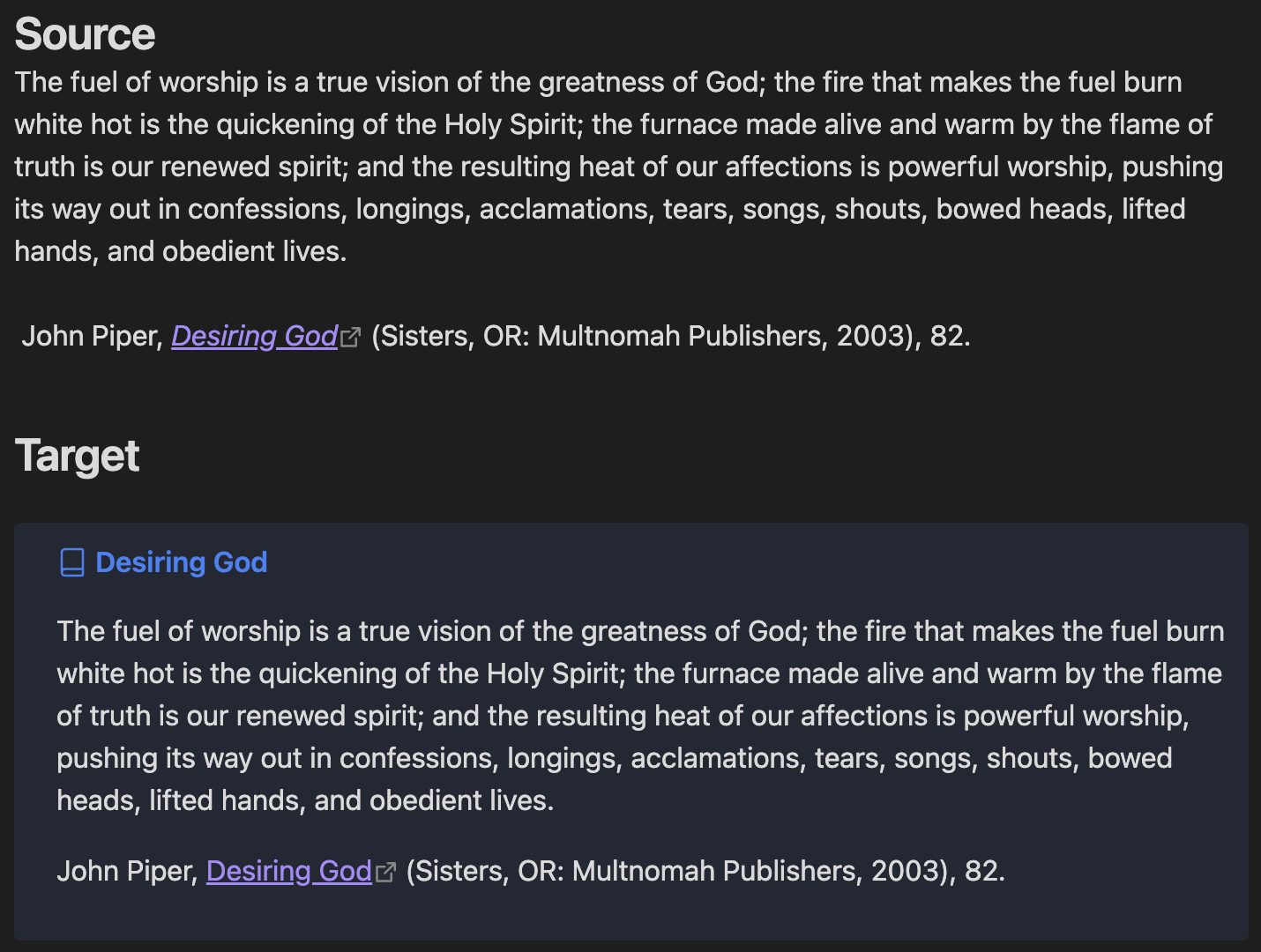
Citation Plugin Example

Quote in Clipboard:

The fuel of worship is a true vision of the greatness of God; the fire that makes the fuel burn white hot is the quickening of the Holy Spirit; the furnace made alive and warm by the flame of truth is our renewed spirit; and the resulting heat of our affections is powerful worship, pushing its way out in confessions, longings, acclamations, tears, songs, shouts, bowed heads, lifted hands, and obedient lives.

John Piper, [_Desiring God_](https://ref.ly/logosres/desiringgod?ref=Page.p+82&off=1501&ctx=mplete+our+picture.+~The+fuel+of+worship+) (Sisters, OR: Multnomah Publishers, 2003), 82.

Pasted as Citation Callout:

> [!Citation] Desiring God
> The fuel of worship is a true vision of the greatness of God; the fire that makes the fuel burn white hot is the quickening of the Holy Spirit; the furnace made alive and warm by the flame of truth is our renewed spirit; and the resulting heat of our affections is powerful worship, pushing its way out in confessions, longings, acclamations, tears, songs, shouts, bowed heads, lifted hands, and obedient lives.
> 
> John Piper, [_Desiring God_](https://ref.ly/logosres/desiringgod?ref=Page.p+82&off=1501&ctx=mplete+our+picture.+~The+fuel+of+worship+) (Sisters, OR: Multnomah Publishers, 2003), 82.

Requirements

  • Obsidian v0.15.0 or higher
  • Content with proper citation formatting for best results

Development

Setup

  1. Clone this repository into your vault's plugins folder:

    cd /path/to/your/vault/.obsidian/plugins/
    git clone https://github.com/Marvive/Citation-Callouts.git
    
  2. Install dependencies:

    cd Citation-Callouts
    npm install
    
  3. Build the plugin:

    npm run build
    
  4. Enable the plugin in Obsidian

Scripts

  • npm run dev: Start development with file watching
  • npm run build: Build for production
  • npm run version: Bump version and update files

Support

If you encounter any issues or have feature requests, please create an issue on GitHub.

Contributing

Contributions are welcome! Please feel free to submit a Pull Request.

Author

Michael Marvive - GitHub Profile

License

MIT License


This plugin works best with properly formatted citations that include source references or URLs.

Similar Plugins

info
• Similar plugins are suggested based on the common tags between the plugins.
Admonition
5 years ago by Jeremy Valentine
Adds admonition block-styled content to Obsidian.md
Zotero Desktop Connector
4 years ago by mgmeyers
Insert and import citations, bibliographies, notes, and PDF annotations from Zotero into Obsidian.
Citations
5 years ago by Jon Gauthier
Obsidian plugin which integrates your academic reference manager with the Obsidian editor. Search your references from within Obsidian and automatically create and reference literature notes for papers and books.
Callout Manager
3 years ago by eth-p
An Obsidian.md plugin that makes creating and configuring callouts easy.
List Callouts
4 years ago by mgmeyers
Create callouts in lists in Obsidian.
Obsidian Columns
4 years ago by Trevor Nichols
Pandoc Reference List
4 years ago by mgmeyers
Display a formatted reference in Obsidian's sidebar for each pandoc citekey in the active document.
Callout menu
2 years ago by Anareaty
Reference Map
3 years ago by Anoop K. Chandran
Reference and citation map for literature review and discovery
Quote of the Day
5 years ago by Florin Bobis
An Obsidian plugin to insert random quotes as Markdown.
Callout Integrator
3 years ago by
A plugin for Obsidian to allow the integration of long blocks of text into callouts.
Callout Suggestions
2 years ago by Casey Fryer
Obsidian Plugin for autocompleting callouts.
Copy as LaTeX
4 years ago by mo-seph
Quick plugin to be able to copy/paste from Obsidian/Markdown into a Latex document
Better Math in Callouts & Blockquotes
2 years ago by Ryota Ushio
An Obsidian plugin to add better Live Preview support for math rendering inside callouts & blockquotes.
Pretty BibTeX
3 years ago by Sandro Figo
A plugin for Obsidian that shows raw BibTeX bibliography entries in a prettier way. (https://obsidian.md)
Inline Admonitions
2 years ago by Scott Tomaszewski
Local Quotes
4 years ago by ka1tzyu
📜 Collect your quotes from all over the vault and embed them in different locations with refresh delays
Quoth
4 years ago by Eric Rykwalder
Air Quotes
3 years ago by Alan Grainger
Plugin for Obsidian. Search and insert quotes from a source text as you type. This is great for reading a physical book or eReader while taking notes on a separate laptop or phone.
Simple Citations
2 years ago by masaki39
Add & update simple literature notes from Zotero.
Quote Share
3 years ago by DuocNV
Generate beautifull image from Obsidian.
Blockier
2 years ago by blorbb
An Obsidian.md plugin for easier block editing.
Status Bar Quote
3 years ago by Jinu
Obsidian plugin - You can pin your favorite quote.
Callout Toggles
2 years ago by Aly Thobani
An Obsidian plugin to quickly add, change, or remove callout wrappers in your notes.
Latex Exporter
a year ago by Matthew S. Scott
Callout Copy Buttons
a year ago by Aly Thobani
An Obsidian plugin that adds copy buttons to callout blocks in your notes.
Comments
a year ago by Jasper Surmont
Rich Text Editor Shortcuts
2 years ago by Joshua Wootonn
Create and toggle checkboxes, paste links wrapping your current selection, and toggle underline without leaving the keyboard.
BibTeX Scholar
6 months ago by Qilong Liu
Make your literature review and writing contextual and frictionless—right inside your Obsidian vault!
logos-refs
a year ago by Joey Kilgore
Easily take refs from Logos into Obsidian
LiteCite
8 months ago by ras0q
A lightweight Obsidian plugin that creates citation notes from a BibTeX / BibLaTeX file
CalloutX
a year ago by br4in
An Obsidian plugin that allows you to view, manage, and customise callout icons in your vault.
Prologue
6 months ago by joshavanier
notes & reminders on obsidian tabs
Paste Quote
a year ago by Jacob Williams
Helps with formatting and citing quotes when pasting into Obsidian.
Bibtex Entry View
9 months ago by Kyoungdeuk
Load the bibtex entry of a given bibkey from a given bib file and show the entry in the code block of bibkey.