Header navigation

by readwithai
5
4
3
2
1
Score: 32/100

Description

The Header navigation plugin enhances navigation within Obsidian notes by allowing users to move quickly between headers and toggle their visibility. Users can fold and unfold headers to streamline the view of large documents, making it easier to focus on specific sections. The plugin offers command palette actions for navigation and folding, which can be assigned to hotkeys for faster access. This tool is inspired by the header navigation features found in Emacs org-mode, providing a familiar experience for those accustomed to structured document navigation. It supports efficient movement through long-form content, helping users stay organized and maintain a clear overview of document structure.

Reviews

No reviews yet.

Stats

13
stars
1,190
downloads
0
forks
506
days
493
days
511
days
0
total PRs
0
open PRs
0
closed PRs
0
merged PRs
7
total issues
7
open issues
0
closed issues
36
commits

Latest Version

a year ago

Changelog

remove style.css, rename commands, readme tweaks.

README file from

Github

Header navigation plugin

Blog post, @readwithai

This is a header navigation plugin for the markdown editor called Obsidian. This plugin lets you quickly navigate between headers and fold them. It provides a command to toggle the folding of a header.

It is a third-party plugin and has no affiliation with the Obsidian editor.

Installation

This plugin should be available as an Obsidian community plugin.

Alternatively, you can install it directly by:

  1. Cloning the git repository into .obsidian/plugins in your vault
  2. Running npm install, npm run dev in the repository
  3. Reloading obsidian
  4. Enabling the plugin in the community plugins tab of settings.

Usage

Press Ctrl-p to open the command palette and search for "header nagivation". You will then have a list of command that this plugin provides.

I would suggest binding these commands to hotkeys. You might find a plugin like sequence hotkeys useful: this allows you to define a "prefix" key such as Ctrl-m for motion commands so that you can then assign e.g Ctrl-m Up etc for moving around headers.
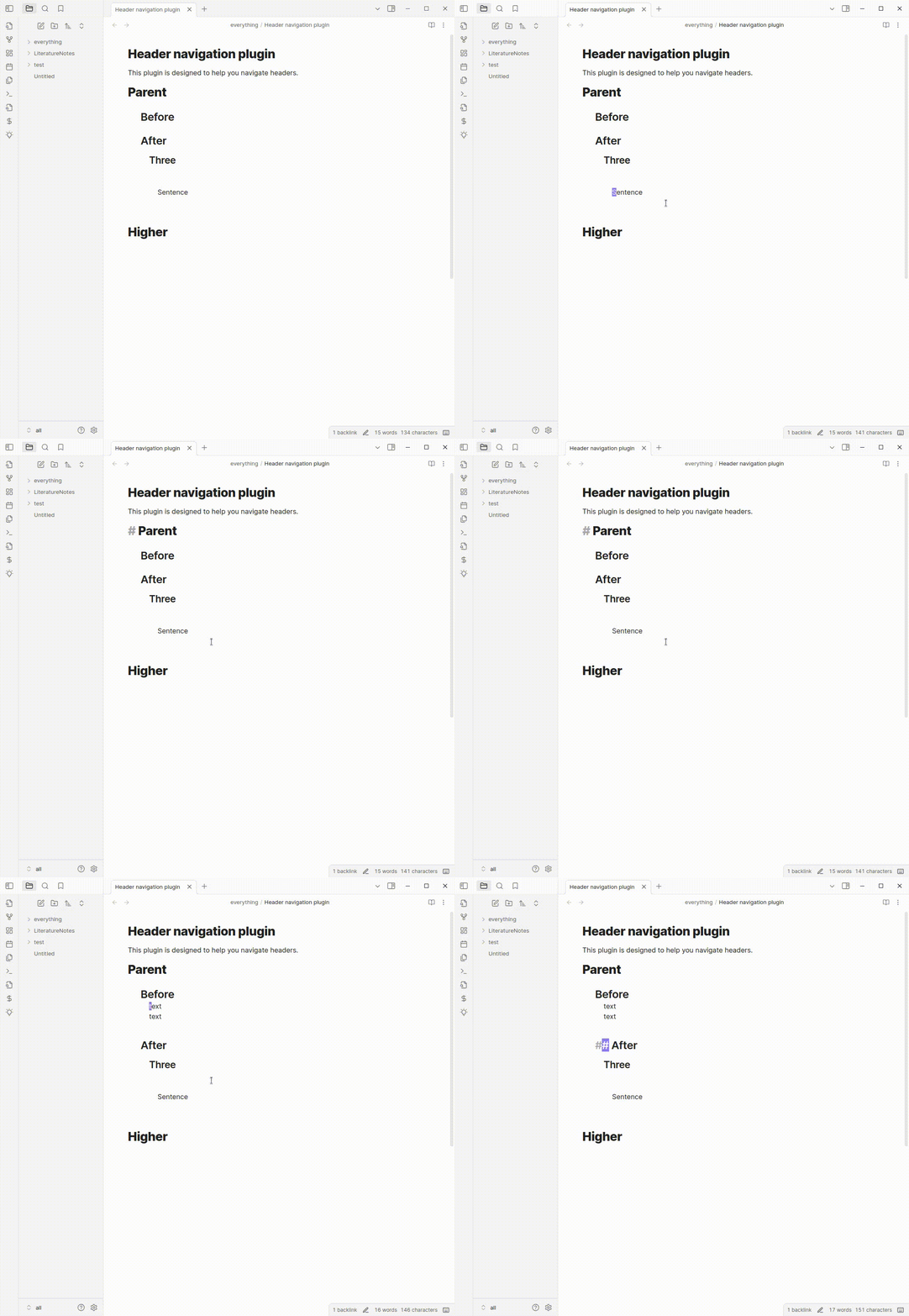
demonstraction of features

This tool is very much influenced by the functions provided by emacs org-mode.

This project uses the remark markdown parser and its source code is included (under and MIT license) within the built main.js file.

This plugin was based on the obsidian sample plugin.

Quiet outline provides a sidebar tool similar to a "code browser" that allows you to perform similar motions with a mouse, and well as reorder headings.

About me

If you like this you might like my plugin-repl for obsidian that lets you quickly script Obsidian.

I make productivity tools and AI tools related to reading and research. If that sounds interesting you can follow me on twitter or bluesky.

I write about these topics on substack.

If you find this piece of software useful. Maybe give me money (like $2 dollars?) on my kofi.

Similar Plugins

info
• Similar plugins are suggested based on the common tags between the plugins.
AidenLx's Folder Note - folderv Component
4 years ago by AidenLx
Creases
4 years ago by Liam Cain
👕 Tools for effectively folding markdown sections in Obsidian
Influx
4 years ago by Jens M Gleditsch
An alternative backlinks plugin, which displays relevant and formatted excerpts from notes with linked mentions, based on the position of mentions in the notes' hierarchical structure (bullet level indentation).
Tag Summary
4 years ago by J.D Gauchat
obsidian floating toc
3 years ago by curtgrimes modified by Cuman
Rapid Notes
3 years ago by valteriomon
Pending notes
3 years ago by Ulises Santana
Obsidian plugin for searching links without notes in your vault.
Link Range
3 years ago by Ryan Mellmer
Add ranged link support to Obsidian
oblogger
3 years ago by loftTech
tag explorer and frontmatter logger plugin for obsidian
Automatic Table Of Contents
3 years ago by Johan Satgé
💠 An Obsidian plugin to create a table of contents in a note, that updates itself when the note changes
Multiple Notes Outline
3 years ago by iiz
Auto Archive
3 years ago by Shane Burke
Auto Archive plugin for Obsidian
Typing
3 years ago by Nikita Konodyuk
Programmatic customizations for groups of notes
Keyword Highlighter
2 years ago by Marcel Goldammer
Automatically highlight specified keywords within your Obsidian notes for enhanced visibility and quick reference.
Subdivider
2 years ago by Tricster
Subdivider converts your notes into nested folders, automatically creating separate files for each subheading.
Mxmind Mindmap
2 years ago by mxmind
mxmind for obsidian plugin
Cards View
2 years ago by Maud Royer
Plugin for Obsidian.md. Displays a card view of your notes.
SystemSculpt AI
2 years ago by SystemSculpt.com
Enhance your Obsidian App experience with AI-powered tools for note-taking, task management, and much, MUCH more.
Header Counter
2 years ago by Nancy Lee
Line Arrange
2 years ago by Chitwan Singh
Obsidian Plugin For Arranging Lines.
Header Adjuster
2 years ago by Valentin Pelletier
Header level Reformat Plugin for Obsidian
Note 2 Tag Generator
2 years ago by Augustin
Daily Note Collector
2 years ago by Adar Butel
An Obsidian plugin that adds links to new notes to your daily note.
Workbench
5 years ago by ryanjamurphy
A plugin to help you collect working materials.
Link indexer
5 years ago by Yuliya Bagriy
Footlinks
5 years ago by Daha
Obsidian plugin that extracts urls from the main text to footer, offering a better reading/editing experience.
Page Heading From Links
5 years ago by Mark Beattie
Obsidian plugin to populate page headings
Carry-Forward
5 years ago by Jacob Levernier
An Obsidian Notes plugin for generating and copying block IDs, and copying lines with a link to the copied line
Title Serial Number
4 years ago by Domenic
This is an obsidian plugin, and it adds serial numbers to your markdown title.
WonderBox
a year ago by Christian HUMBERT
Link Maintainer
a year ago by wenlzhang
An Obsidian plugin that helps you maintain note links when splitting or reorganizing notes.
Smart Link Alias
a year ago by Victor Perez-Cano
Inbox Organiser
a year ago by Jamie Hurst
Obsidian plugin to capture any new notes into an inbox and periodically prompt to organise these into other folders within the vault.
Atomizer
a year ago by Zac Bagley
An AI-Driven Obsidian plugin designed to turn lengthy text into insightful atomic notes. Perfect for turning source notes into ideas in a Zettelkasten workflow.
Dataview Autocompletion
a year ago by Daniel Bauer
Fold Properties By Default
a year ago by Tommy Bergeron
Always have editor/metadata properties folded by default.
Note ID
a year ago by Dominik Mayer
Displays notes by their ID, enabling structured sequences for manuscripts or a Zettelkasten ("Folgezettel")
Automatic Linker
a year ago by Kodai Nakamura
Multiple Daily Notes
a year ago by Vab Kapoor
Obsidian plugin for adding multiple daily notes, with some extra configurations too.
TOC compatible with Publish
a year ago by Brian Collery
Create a table of contents plugin that has 2 features: Automatically updates and is compatible with Publish
NoteMover shortcut
a year ago by Lars Bücker
Quickly and easily move notes to predefined folders. Perfect for organizing your notes.
Template Folder
9 months ago by LucasOe
Obsidian plugin to move notes to a folder when applying a template.
Discrete
9 months ago by shkarlsson
Note Companion AI
8 months ago by Benjamin Ashgan Shafii
Note Companion: AI assistant for Obsidian that goes beyond just a chat. (prev File Organizer 2000)
Next TOC
4 months ago by RavenHogWarts
Floating TOC panel