Keyword Highlighter

by Marcel Goldammer
5
4
3
2
1
Score: 47/100

Description

Category: Note Enhancements

The Keyword Highlighter plugin enhances the note-taking experience in Obsidian by allowing users to highlight specific keywords for better organization and readability. Ideal for researchers, students, and professionals, the plugin makes it easy to locate important information within large volumes of text. Users can highlight keywords by typing them followed by a colon (e.g., TODO:), with predefined options like TODO, ADD, and FIXME. Additionally, custom keywords can be added with customizable font and background colors, edited for flexibility, or removed as needed. This feature ensures clarity and focus in your notes, improving productivity and information retrieval.

Reviews

No reviews yet.

Stats

35
stars
9,062
downloads
5
forks
904
days
86
days
732
days
15
total PRs
0
open PRs
1
closed PRs
14
merged PRs
23
total issues
11
open issues
12
closed issues
14
commits

Latest Version

2 years ago

Changelog

Added an option to disable the use of font color and background color individually (#26).

README file from

Github

Keyword Highlighter Plugin

Overview

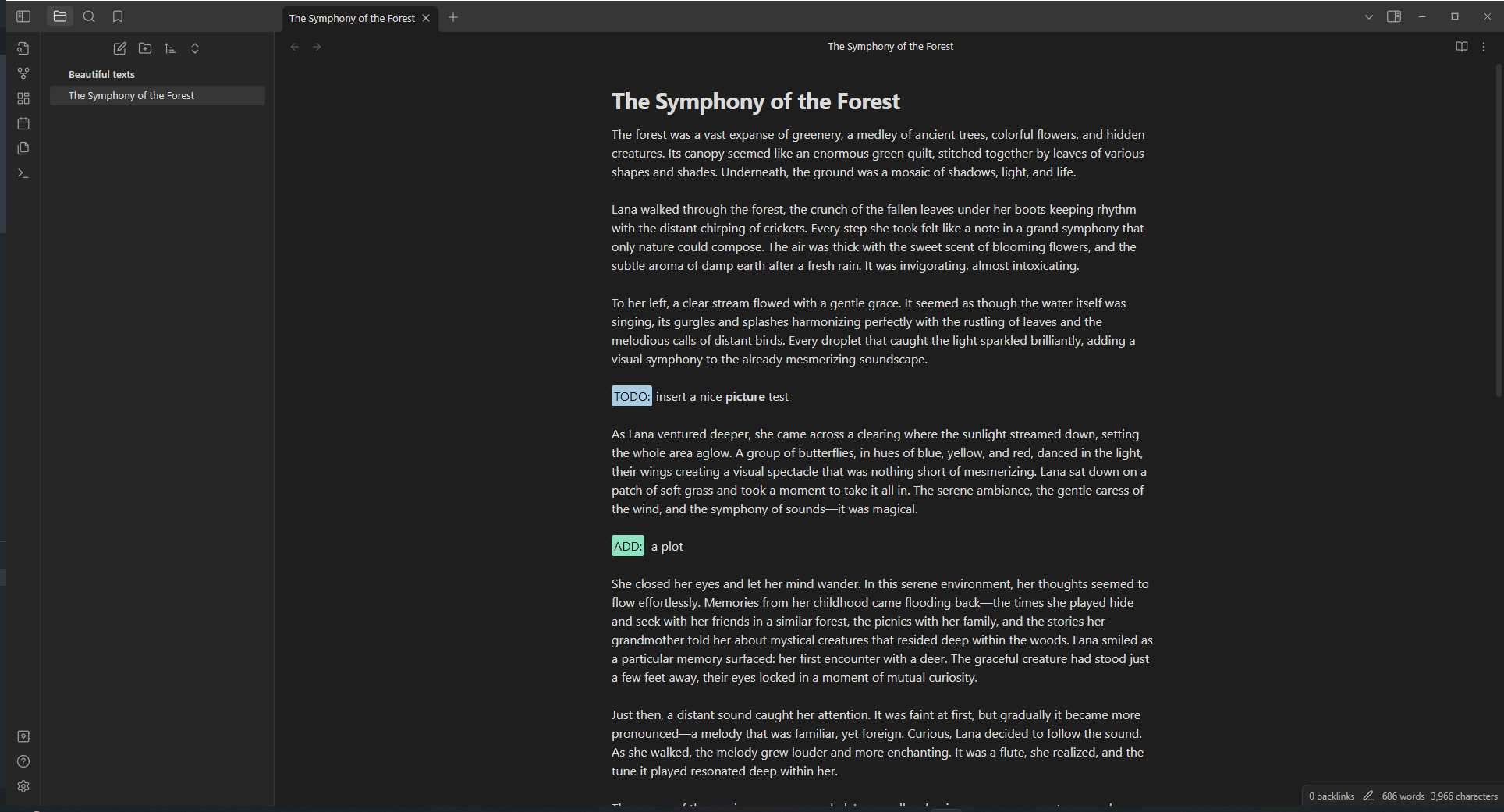
A picture that shows the plugin in action.

The Obsidian Keyword Highlighter is a powerful plugin designed for Obsidian users who wish to enhance their note-taking experience. This plugin allows you to highlight specific keywords in your notes, making it easier to locate and organize important information. It's perfect for researchers, students, and professionals who deal with large volumes of text and need a quick way to identify key concepts.

How it works
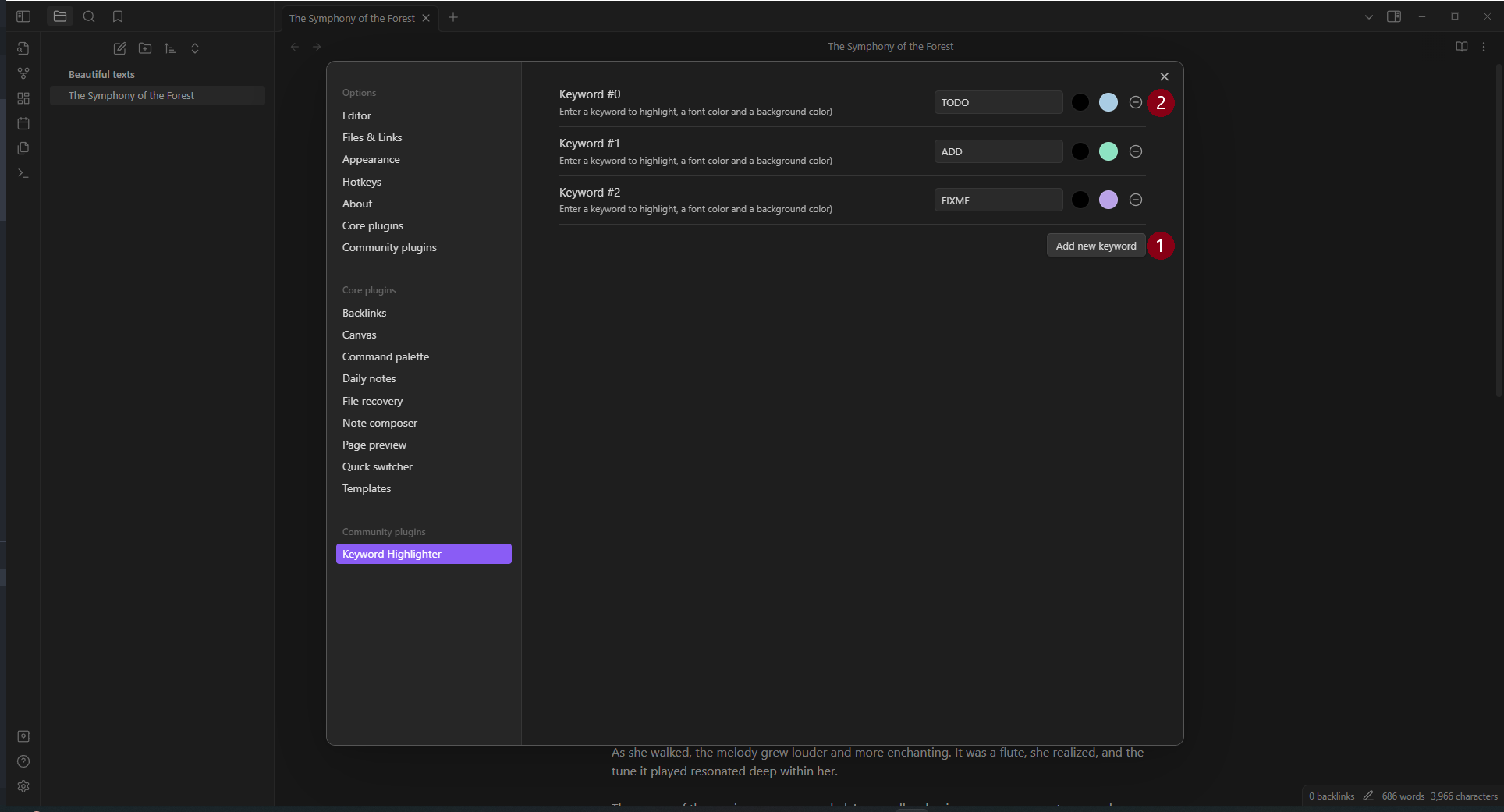
A picture on how to use this plugin.

Use the keyword highlighting

Simply type any configured keyword in your notes and it will be automatically highlighted. There are three predefined keywords: TODO, ADD, FIXME. For example, writing TODO or TODO: prepare a ☕ will both be highlighted.

Add a new keyword

To add a new keyword just press the button Add new keyword (1). Then enter the keyword, followed by the font color and the background color. That's it!

Edit a keyword

Well, that's easy! Just edit the keyword or the font and background colors.

Remove a keyword

Easy aswell, just hit the delete button (2).

Advanced Features

Case-Sensitive Matching

By default, the plugin matches keywords with exact case sensitivity (e.g., "TODO" will only match "TODO", not "todo" or "Todo"). You can change this behavior in the Global Settings:

  1. Open the plugin settings
  2. Expand the "Global Settings" section
  3. Toggle the "Case-sensitive matching" checkbox

When case-sensitive matching is disabled, keywords will match regardless of case. For example, "TODO" will match "todo", "Todo", "TODO", etc.

Regular Expression Patterns

For advanced pattern matching, you can use regular expressions instead of simple keywords. To define a regex pattern:

  1. Wrap your pattern in forward slashes: /pattern/
  2. For example: /TODO|FIXME|NOTE/ will match any of these words

When you create a regex pattern, a visual indicator badge (.*) appears next to the keyword number in the settings, making it easy to identify regex-enabled keywords at a glance.

Examples:

  • /\b(TODO|FIXME|NOTE)\b/ - Matches any of these words with word boundaries
  • /TASK-\d+/ - Matches "TASK-" followed by any number (e.g., "TASK-123")
  • /\[.*?\]/ - Matches any text within square brackets (non-greedy)

Installation

This plugin can be accessed and installed directly from the Obsidian Community Plugin Store. Alternatively, for manual installation, simply download the required files and place them in your Obsidian vault's plugins folder.

Similar Plugins

info
• Similar plugins are suggested based on the common tags between the plugins.
AidenLx's Folder Note - folderv Component
4 years ago by AidenLx
Influx
4 years ago by Jens M Gleditsch
An alternative backlinks plugin, which displays relevant and formatted excerpts from notes with linked mentions, based on the position of mentions in the notes' hierarchical structure (bullet level indentation).
Tag Summary
4 years ago by J.D Gauchat
obsidian floating toc
3 years ago by curtgrimes modified by Cuman
Rapid Notes
3 years ago by valteriomon
Code Preview
3 years ago by Hank
Obsidian code block render by file path
Pending notes
3 years ago by Ulises Santana
Obsidian plugin for searching links without notes in your vault.
Codeblock Customizer
3 years ago by mugiwara
Codeblock Customizer plugin for Obsidian
Link Range
3 years ago by Ryan Mellmer
Add ranged link support to Obsidian
Code Styler
3 years ago by Mayuran Visakan
A plugin for Obsidian.md for styling codeblocks and inline code
oblogger
3 years ago by loftTech
tag explorer and frontmatter logger plugin for obsidian
Automatic Table Of Contents
3 years ago by Johan Satgé
💠 An Obsidian plugin to create a table of contents in a note, that updates itself when the note changes
Multiple Notes Outline
3 years ago by iiz
Auto Archive
3 years ago by Shane Burke
Auto Archive plugin for Obsidian
Typing
3 years ago by Nikita Konodyuk
Programmatic customizations for groups of notes
Subdivider
2 years ago by Tricster
Subdivider converts your notes into nested folders, automatically creating separate files for each subheading.
PDF++
2 years ago by Ryota Ushio
PDF++: the most Obsidian-native PDF annotation & viewing tool ever. Comes with optional Vim keybindings.
Mxmind Mindmap
2 years ago by mxmind
mxmind for obsidian plugin
Cards View
2 years ago by Maud Royer
Plugin for Obsidian.md. Displays a card view of your notes.
SystemSculpt AI
2 years ago by SystemSculpt.com
Enhance your Obsidian App experience with AI-powered tools for note-taking, task management, and much, MUCH more.
GDScript Syntax Highlighting
2 years ago by RobTheFiveNine
Adds live GDScript syntax highlighting to code blocks in the Obsidian editor.
Header Counter
2 years ago by Nancy Lee
Line Arrange
2 years ago by Chitwan Singh
Obsidian Plugin For Arranging Lines.
Header Adjuster
2 years ago by Valentin Pelletier
Header level Reformat Plugin for Obsidian
AI image analyzer
2 years ago by Swaggeroo
Analyze images with AI to get keywords of the image.
Note 2 Tag Generator
2 years ago by Augustin
Daily Note Collector
2 years ago by Adar Butel
An Obsidian plugin that adds links to new notes to your daily note.
Workbench
5 years ago by ryanjamurphy
A plugin to help you collect working materials.
Link indexer
5 years ago by Yuliya Bagriy
Footlinks
5 years ago by Daha
Obsidian plugin that extracts urls from the main text to footer, offering a better reading/editing experience.
Page Heading From Links
5 years ago by Mark Beattie
Obsidian plugin to populate page headings
Annotator
5 years ago by Elias Sundqvist
A plugin for reading and annotating PDFs and EPUBs in obsidian.
Carry-Forward
5 years ago by Jacob Levernier
An Obsidian Notes plugin for generating and copying block IDs, and copying lines with a link to the copied line
Highlightr
4 years ago by Chetachi
A minimal and aesthetically pleasing highlighting menu that makes color-coded highlighting much easier 🎨.
Title Serial Number
4 years ago by Domenic
This is an obsidian plugin, and it adds serial numbers to your markdown title.
Occura
2 years ago by Alexey Sedoykin
Plugin for https://obsidian.md/ that automatically selected same text occurrences in opened note
Header navigation
a year ago by readwithai
An obsidian plugin to navigate around and toggle folding on headers
WonderBox
a year ago by Christian HUMBERT
Link Maintainer
a year ago by wenlzhang
An Obsidian plugin that helps you maintain note links when splitting or reorganizing notes.
Smart Link Alias
a year ago by Victor Perez-Cano
Inbox Organiser
a year ago by Jamie Hurst
Obsidian plugin to capture any new notes into an inbox and periodically prompt to organise these into other folders within the vault.
Atomizer
a year ago by Zac Bagley
An AI-Driven Obsidian plugin designed to turn lengthy text into insightful atomic notes. Perfect for turning source notes into ideas in a Zettelkasten workflow.
Note Annotations
a year ago by Jan Beck
Dataview Autocompletion
a year ago by Daniel Bauer
Note ID
a year ago by Dominik Mayer
Displays notes by their ID, enabling structured sequences for manuscripts or a Zettelkasten ("Folgezettel")
Automatic Linker
a year ago by Kodai Nakamura
Extended Markdown Syntax
a year ago by Kotaindah55
Extend your Markdown syntax using delimiters instead of HTML tags, such as underlining, superscript, subscript, highlighting, and spoiler.
Multiple Daily Notes
a year ago by Vab Kapoor
Obsidian plugin for adding multiple daily notes, with some extra configurations too.
Sentence Rhythm
a year ago by Adam Fletcher
Obsidian plugin added toggleable colored highlights to sentences based on their length
NoteMover shortcut
a year ago by Lars Bücker
Quickly and easily move notes to predefined folders. Perfect for organizing your notes.
Template Folder
9 months ago by LucasOe
Obsidian plugin to move notes to a folder when applying a template.
Discrete
9 months ago by shkarlsson
Note Companion AI
8 months ago by Benjamin Ashgan Shafii
Note Companion: AI assistant for Obsidian that goes beyond just a chat. (prev File Organizer 2000)
Long sentence highlighter
8 months ago by Robert Meißner
Always Color Text
8 months ago by Kazi Aidah Haque
Automatically colors texts across the Obsidian Vault!
HiWords
7 months ago by Kai
Effortlessly grow your vocabulary as you read, with automatic highlighting and translation of unfamiliar words.
Auto Keyword Linker
4 months ago by Daniel Rhodes
Stop manually typing [[brackets]] around recurring terms. Configure keywords with variations once, and automatically link them as you write or across your entire vault.