Flexible Pomodoro

by grassbl8d
5
4
3
2
1
Score: 23/100

Description

The Flexible Pomodoro plugin offers an adaptable approach to time management in Obsidian, allowing users to track tasks and productivity using the Pomodoro Technique. It features a timer displayed in the status bar, options for customizable Pomodoro durations, and the ability to toggle between countdowns and stopwatches. Users can extend their Pomodoro sessions or initiate breaks as needed. The plugin supports task logging, allowing users to track completed tasks and log them into daily notes or a dedicated log file. The Workbench feature enables users to manage multiple active notes during a Pomodoro, offering persistent tracking of task progress even after restarts. Customization options include timer sounds, automatic session starts, and detailed task tracking for better control of productivity workflows.

Reviews

No reviews yet.

Stats

59
stars
14,388
downloads
5
forks
1,617
days
1,270
days
1,353
days
1
total PRs
1
open PRs
0
closed PRs
0
merged PRs
28
total issues
22
open issues
6
closed issues
0
commits

Latest Version

4 years ago

Changelog

Added custom pomodoro times. Fixes for Stopwatch functionality.

README file from

Github

Flexible Pomo Timer for Obsidian

Simple plugin that displays a pomodoro timer in the Obsidian status bar.
timer screenshot

What's New ?

Stopwatch

Added stopwatch functionality as an alternative to using Pomodoros.

Run Command Start Pomodoro Stopwatch

Custom Times

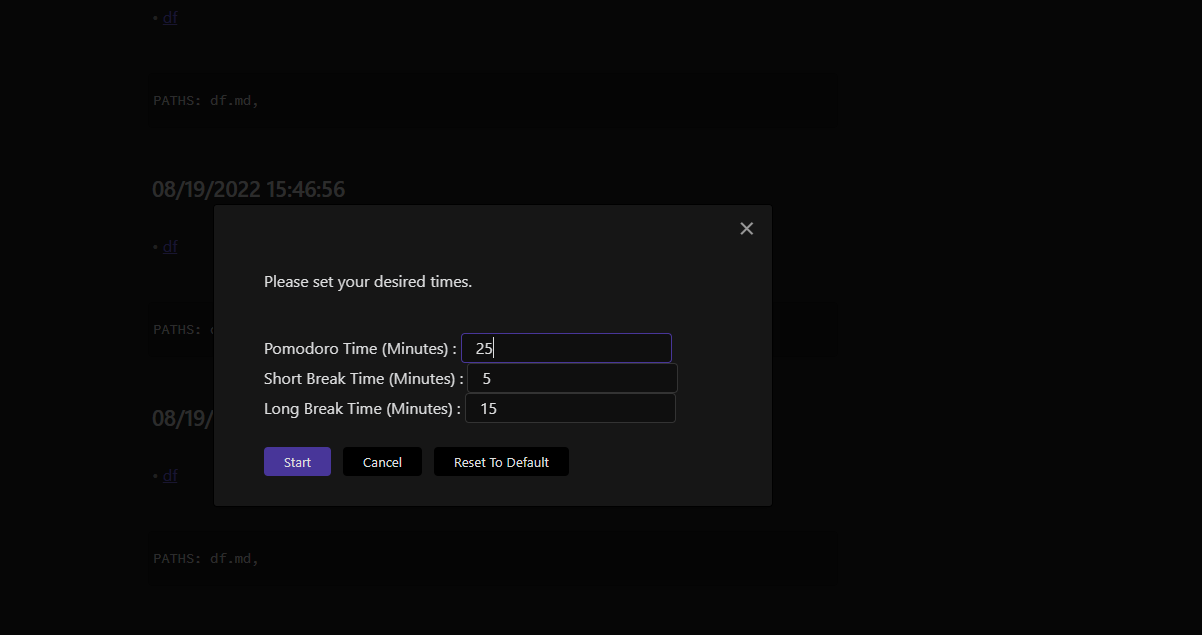
Custom Pomodoro allows you to start a Pomodoro with custom times.
img_7.png

Additional Commands
  • Start Custom Pomodoro
  • Start Last Used Custom Pomodoro

Use

Click the clock icon in the left ribbon panel to start. Click again to toggle pause.

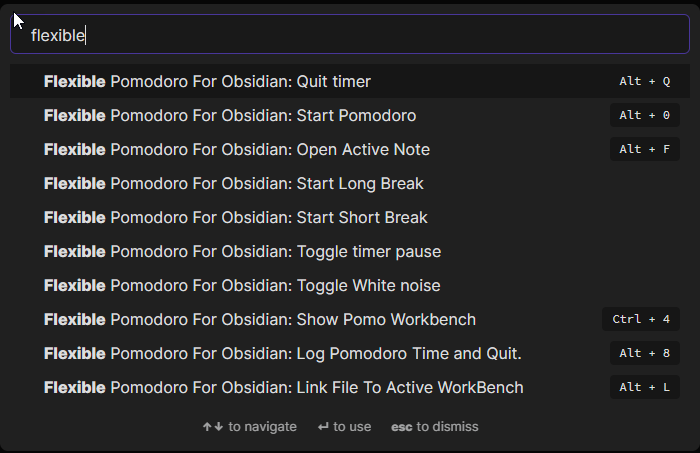
All of these actions are available from the command pallete. You can also set a hotkey to quit the timer.

Typical Workflow

The typical workflow in Flexible Pomodoro is to Start your Pomodoro.
Do your work and at the end of the 25 minute period, you will be asked if you want to extend or not.
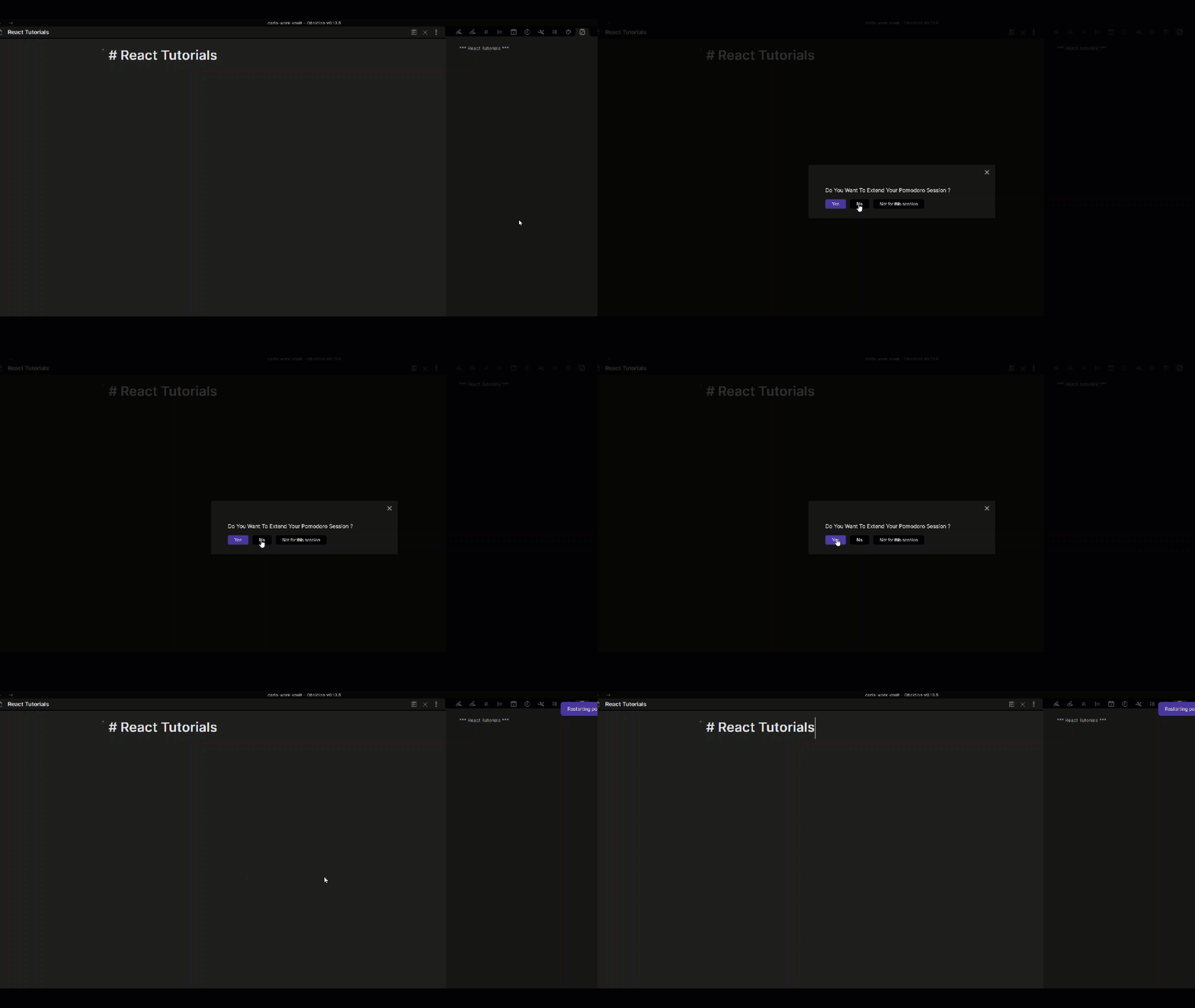
If you choose Yes, your pomodoro will extend a stopwatch will appear instead of a countdown timer. If you choose No, a Break timer will start. If you choose Not For This Session, the normal pomodoro cycle timers will kick in.

Use Log And Quit and Workbench. Having this option has made it more easily to move from one task to another without being bound by the 25 minutes, thus making it Flexible. You can also extend beyond the 25 minute interval if you choose Yes.

Use Log And Quit when you want to finish your Pomodoro early or if you have extended your Pomodoro and wanted to finish.

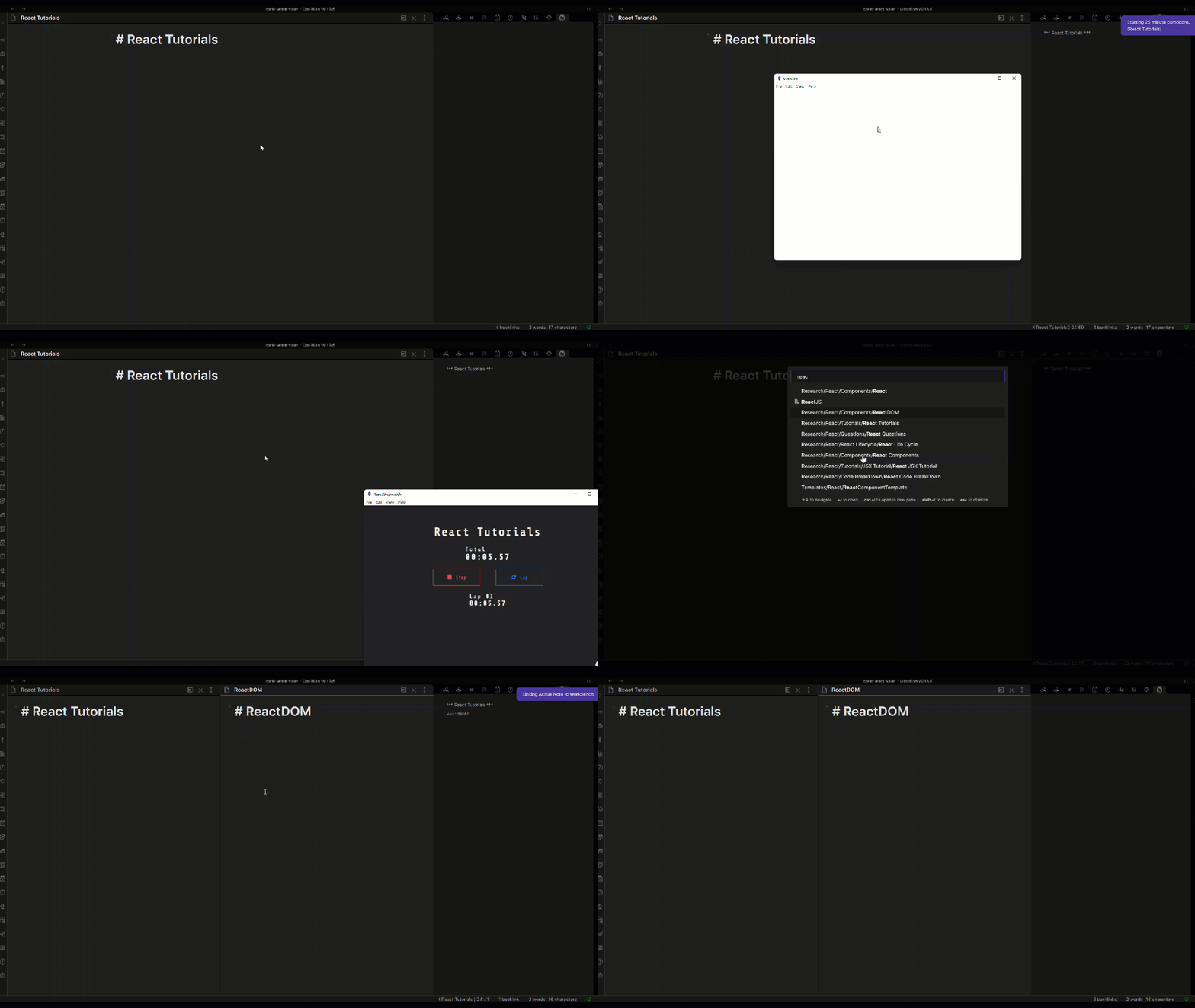
Use the Workbench to track multiple files and the checkboxes/tasks that you create in them. Start A Pomodoro first to use the workbench. Use Link Active File To Workbench to add files other than the originally started one into the workbench. When you use Log And Quit, all the details will be logged into your daily note or Pomodoro Log.

After log and quit, please view your Daily Note or Pomodoro Log to get details of all the things that you did.
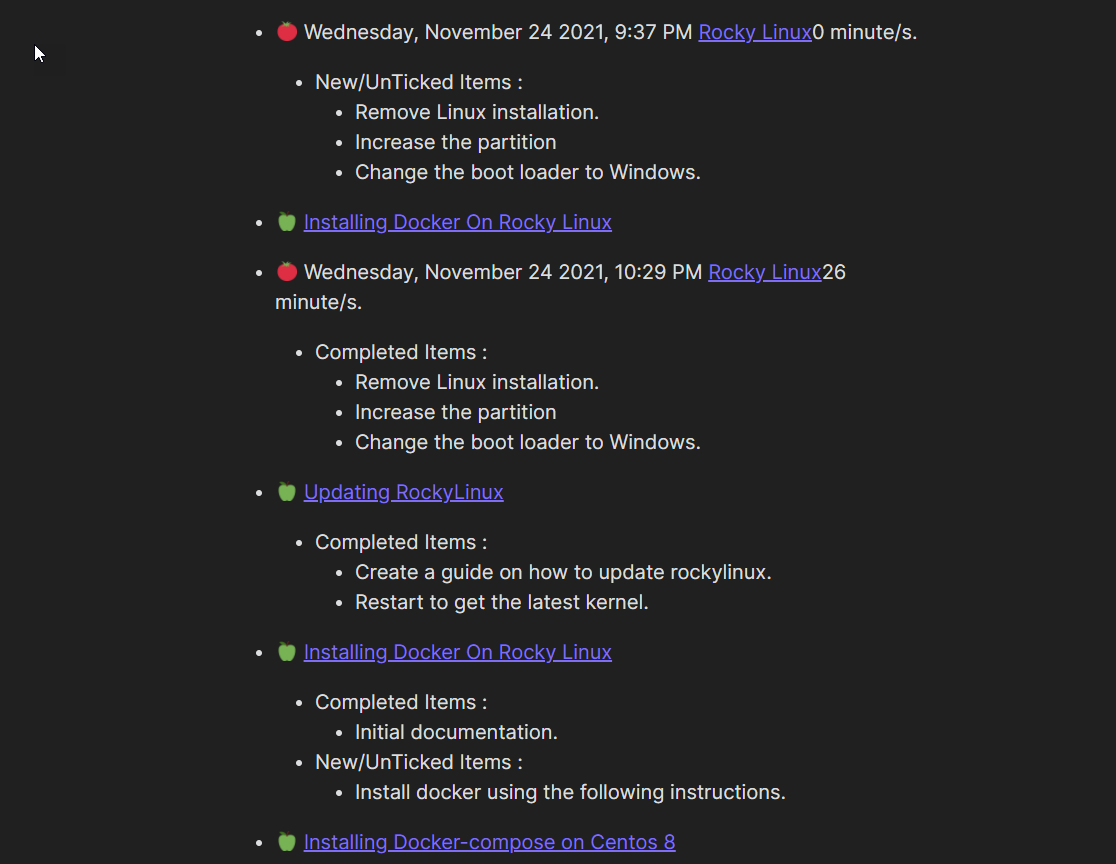
Workbenches will help you track your current state of mind.

Use keyboard shortcuts to make everything easier.
Roadmap

  • Add summary logging for pomodoro
  • Add rest tracking.
    • Add sound indicator for rest.
    • Add rest time to logging.
  • Add better task tracking for pomodoros.
    • Include completed tasks/new tasks for Active Note.
  • Pomo Workbench
    • Track multiple files during a pomodoro period.
    • Add current progres indicator.
    • Add active file indicator in pomo workbench leaf.
    • Add automatic Linking Mode.
    • handle renames and deletes
    • handle move files
    • Option to have a persistent workbench
    • Persistent work bench across restarts.
    • Option to save workbench types.
    • Option to include Daily Note in WorkBench/logging.
    • Option to change order of notes in workbench.

Settings

You can change the duration of the pomodoro timer, breaks, and interval between long breaks, and toggle the end of timer sound and white noise.

Autostart timer allows you to toggle whether the next break or pomodoro start automatically after the next, or waits for you to start it. If disabled, you can specify a number of pomodoro-and-break cycles that run automatically (for instance, if you want to run two pomodoros and their corresponding breaks without stopping and then pause, enter 2).

Logging

If you enable logging, the plugin will write to the file you specify as your log file at the end of each pomodoro. If no such file exists, it will be created at the end of your first pomo. By default, the log message is "🍅 dddd, MMMM DD YYYY, h:mm A" (e.g. "🍅 Friday, July 16 2021, 6:18 PM"), but you can specify your own message using moment display format.

"Log to daily note" will append the log to the daily note. Please note that this currently only works by appending to the end of the file.

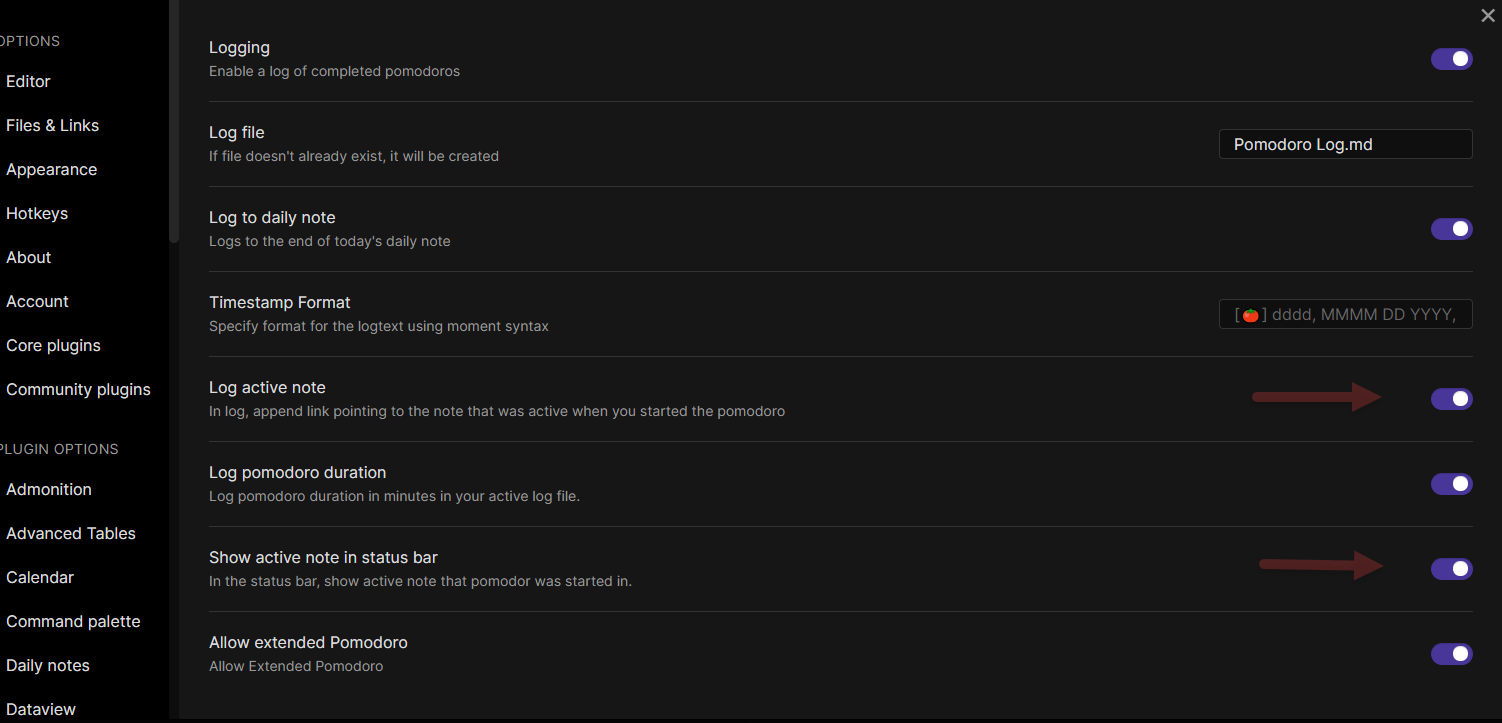
"Log active note" will include a link to the active note at the time the pomodoro timer started in the log message.

You can open the current log file by clicking the timer.

Flexible Pomodoro Features

Early Logging and Quitting

For tasks that were finished much earlier, the tool provides additional commands for logging and quitting. Once triggered, the application will already log the Pomodoro and stop the timer. For this to work, Pomodoro logging should be turned on in options.
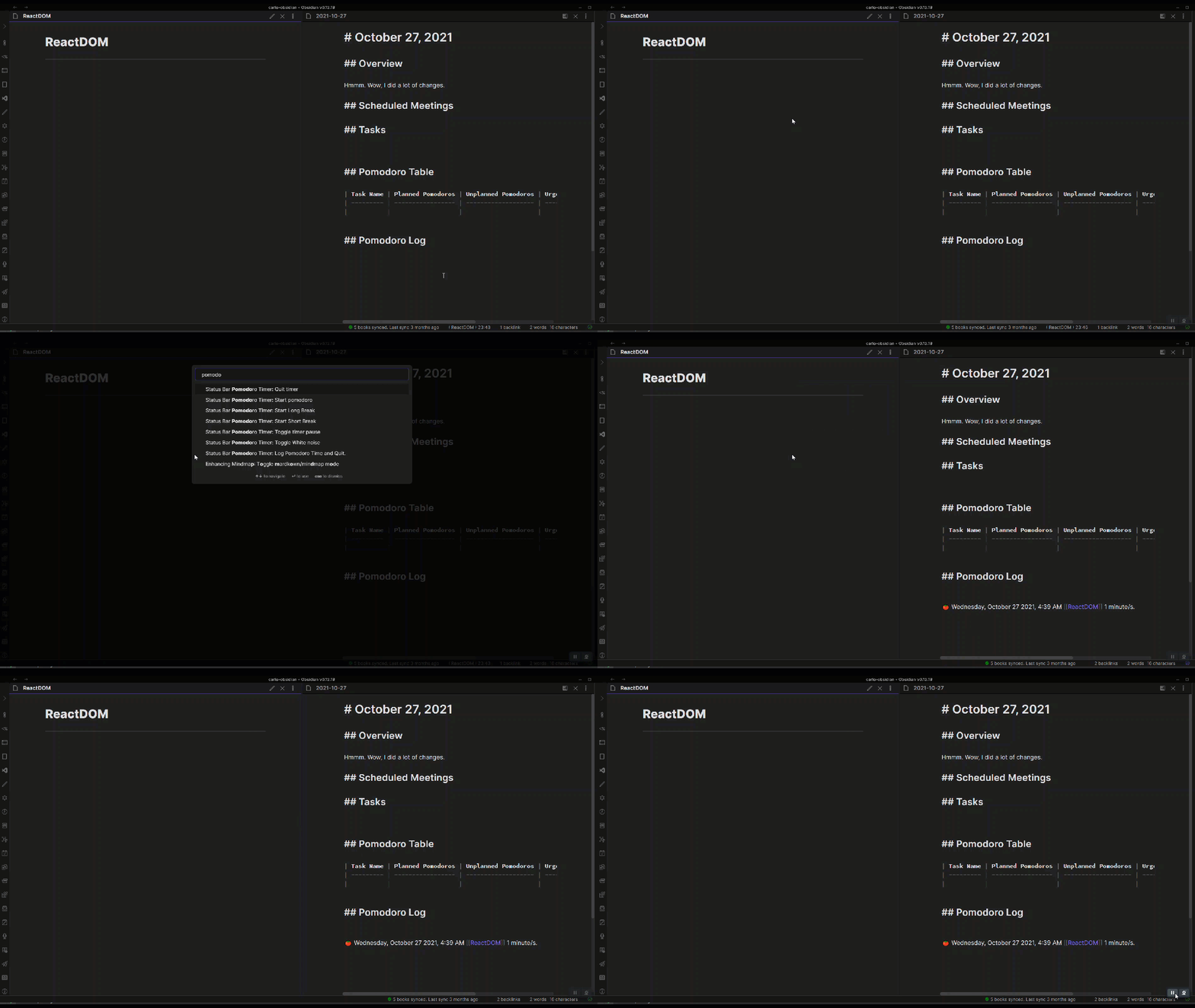
log_pomodoro_time

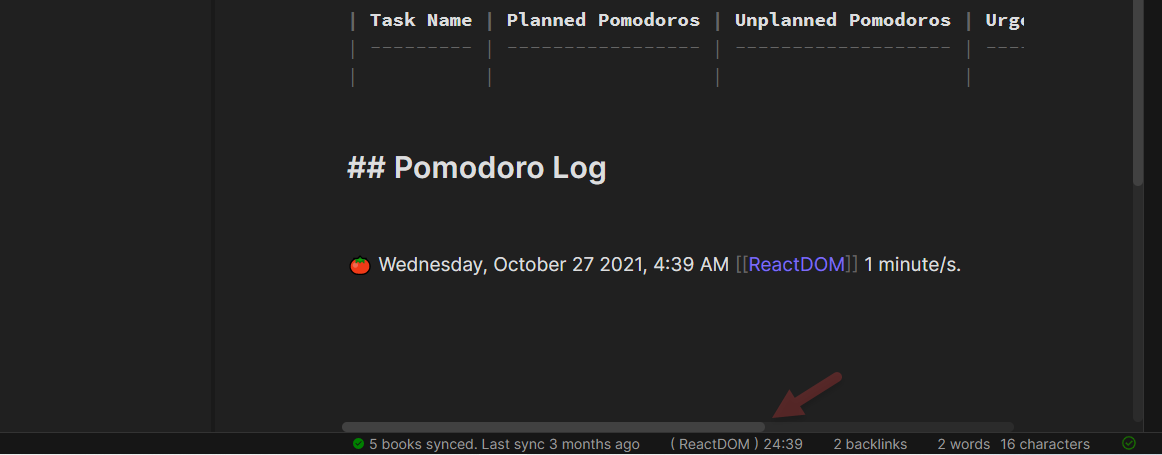
Show Active Note In Status Bar

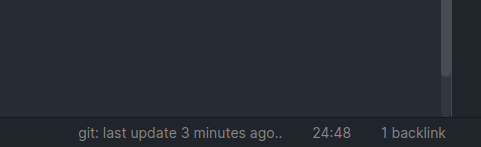
When this option is turned on the active note will be shown in the pomodoro timer.
img.png

img_1.png

For this to work, options should enable

Extended Pomodoro

For Pomodoro users that want to work outside of the pomodoro time limit, this option provides a flexible option to extend your Pomodoro. If you choose to extend, a stop watch will start to log the pomodoro. If you choose not to extend, the next break will start already.
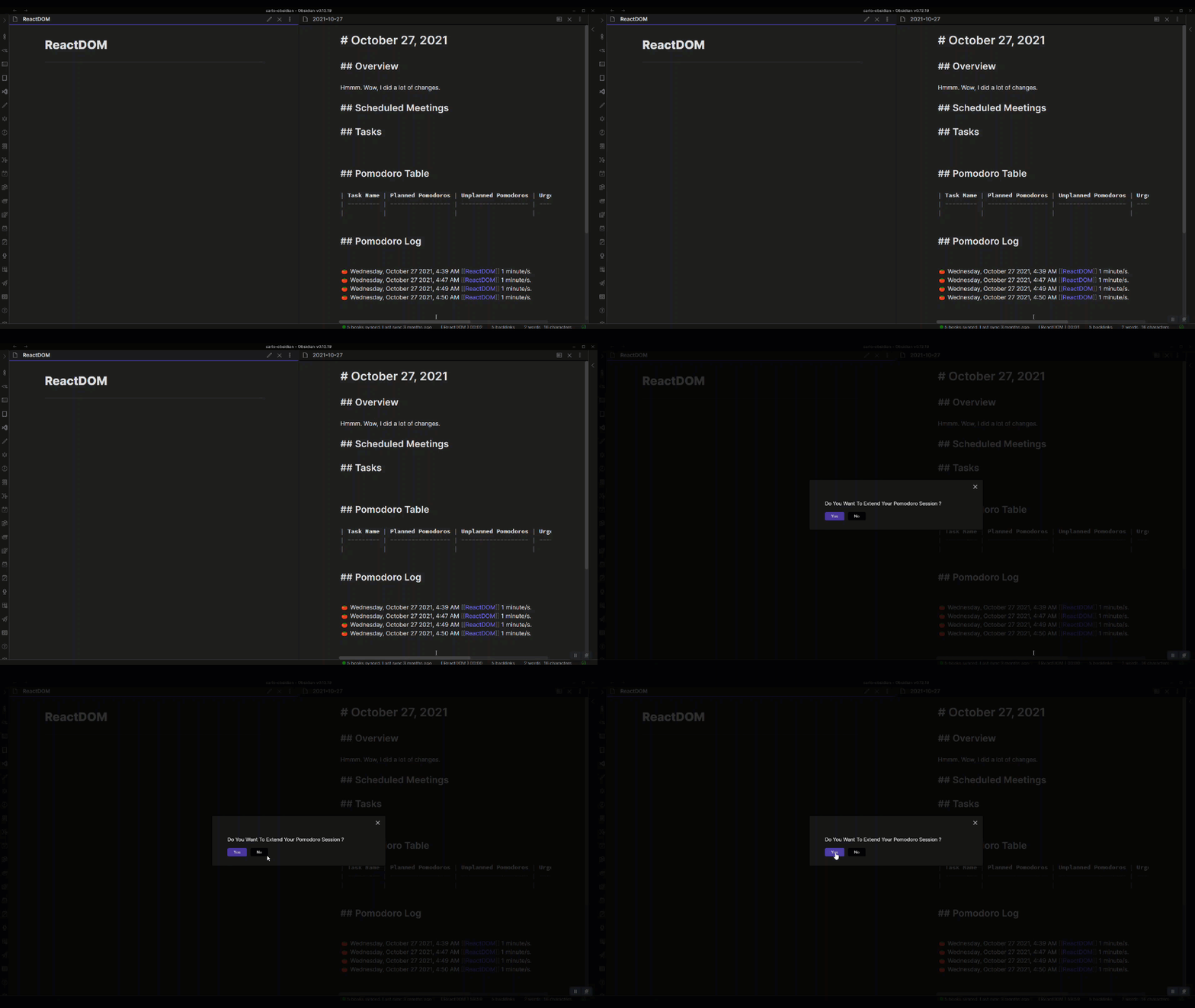
extended_pomdoro.gif

Please use Log Pomodoro Time and Quit so that extended pomodoros are logged and recorded.
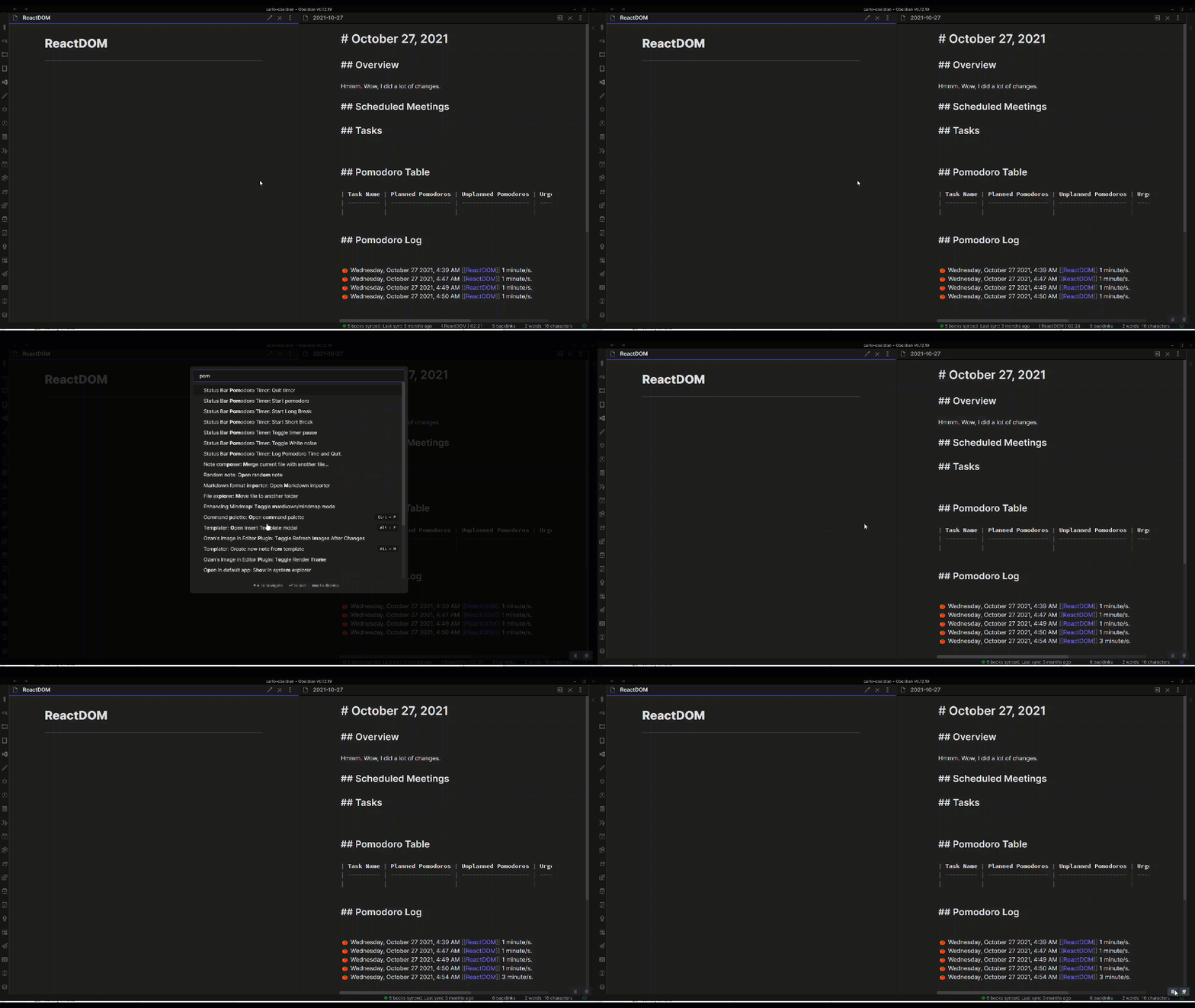
ending_extended_pomodoro.gif

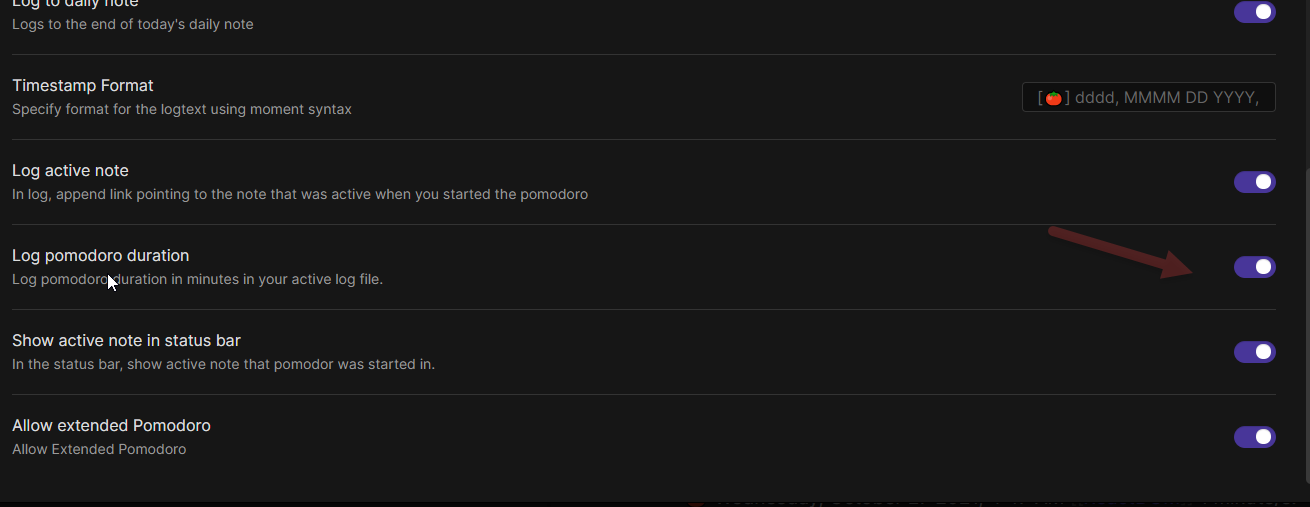
Log Pomodoro Duration

Added an option so that pomodoro duration is logged.
img_3.png

Enable Normal Pomodoros For Session

At the end of the pomodoro, you can have a choice to use normal pomodoros for the rest of the session. This reverts to the original pomodoro mode.

img_5.png

Better Visual Indicator

Added a visual indicator based on https://github.com/third774/react-stopwatch
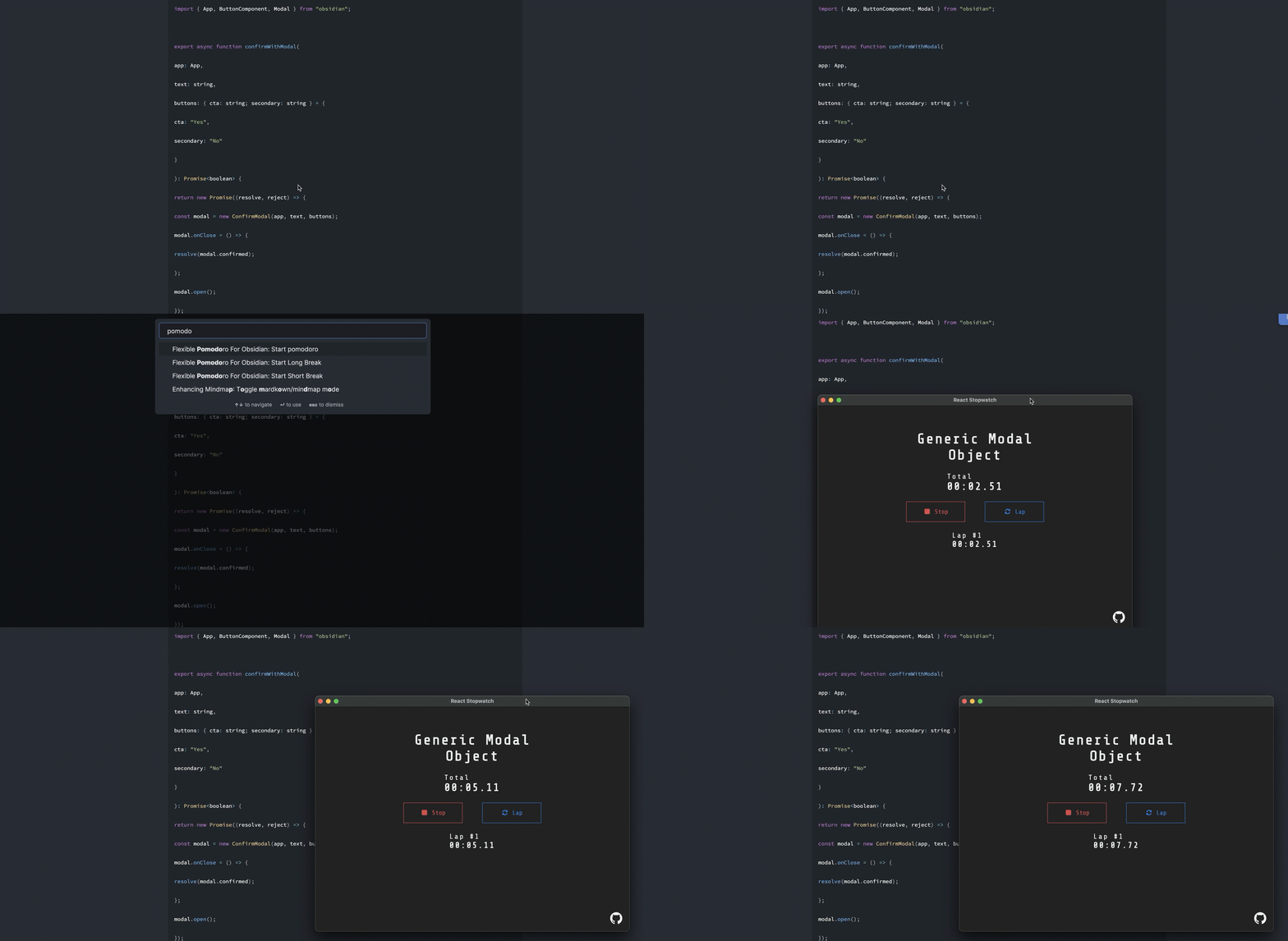
Log Pomodoro Tasks

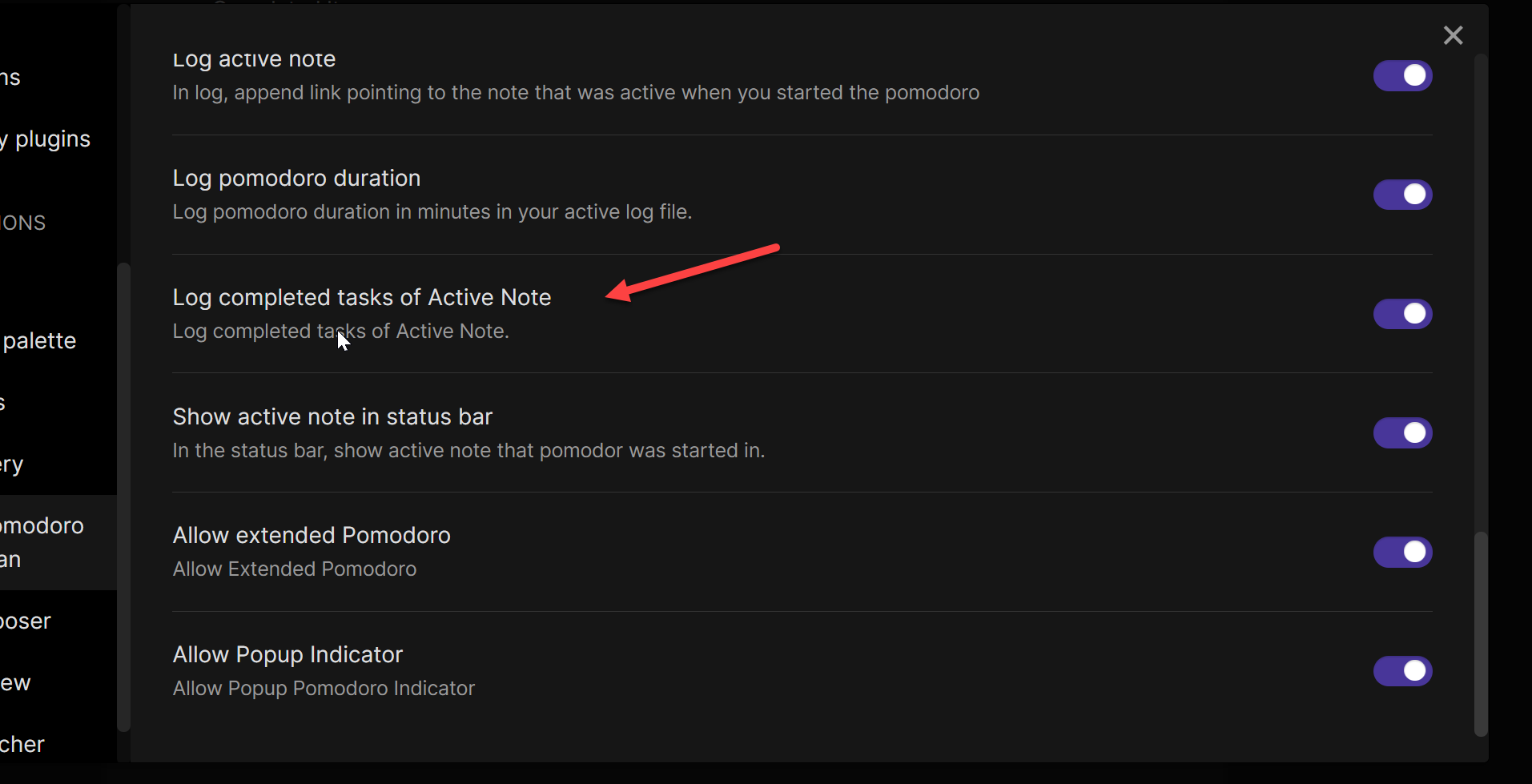
Added tracking of Pomodoro Tasks. These are the checkboxes inside. It will track all of the tasks that were ticked during a Pomodoro Session of the current Active Note. Tasks will only be tracked in the Active Note and it will only be tracked when the Pomodoro is in active note. Tracking will not work during breaks.

Note: There is a current limitation that tracking is only based on text of files. Duplicates might not be tracked properly.
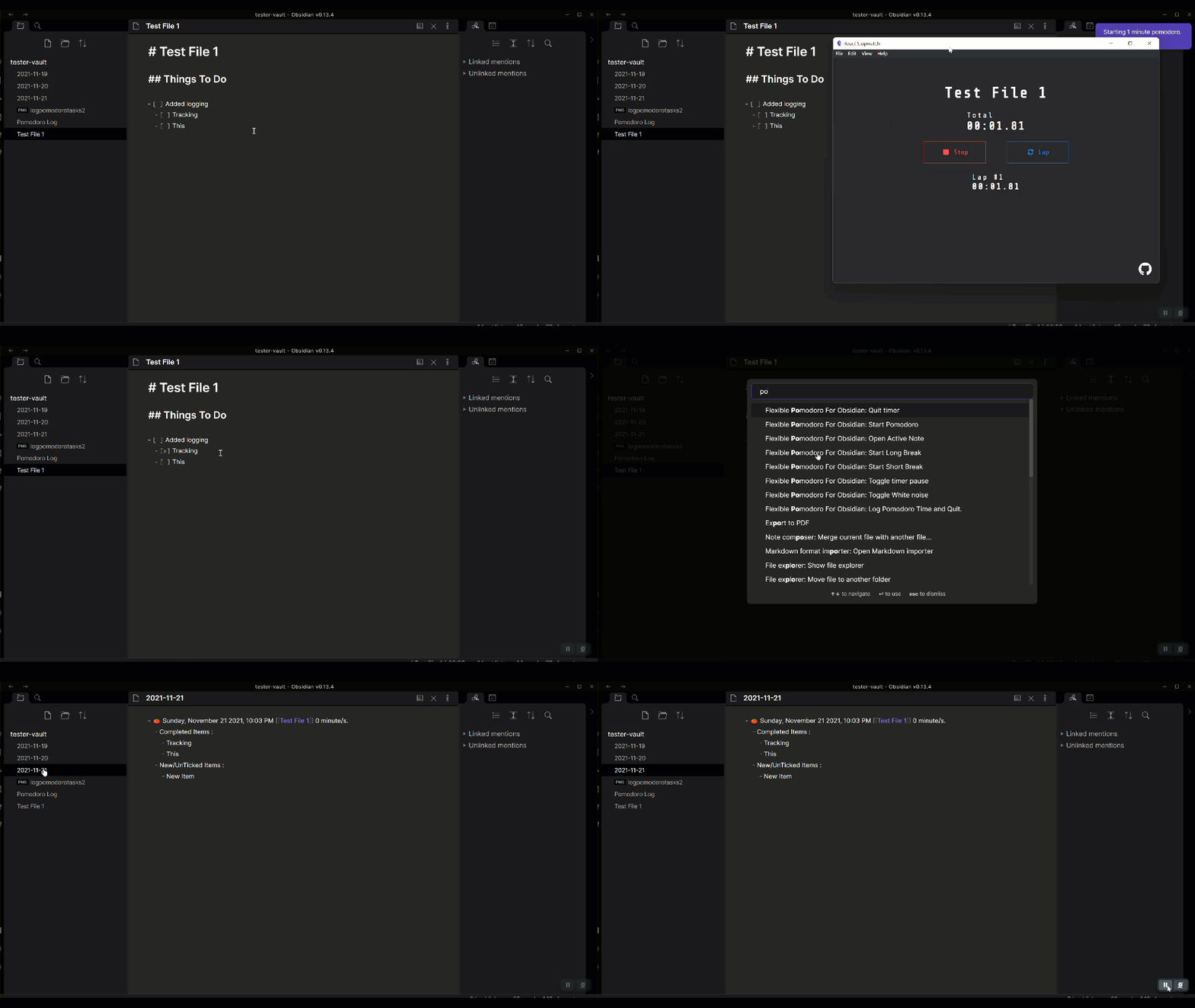
Please be sure to enable in settings.
Pomo Workbench

The workbench is a feature that you can use to have multiple files tracked during a Pomodoro period. This will enable the user to log tasks added and completed with these multiple files.
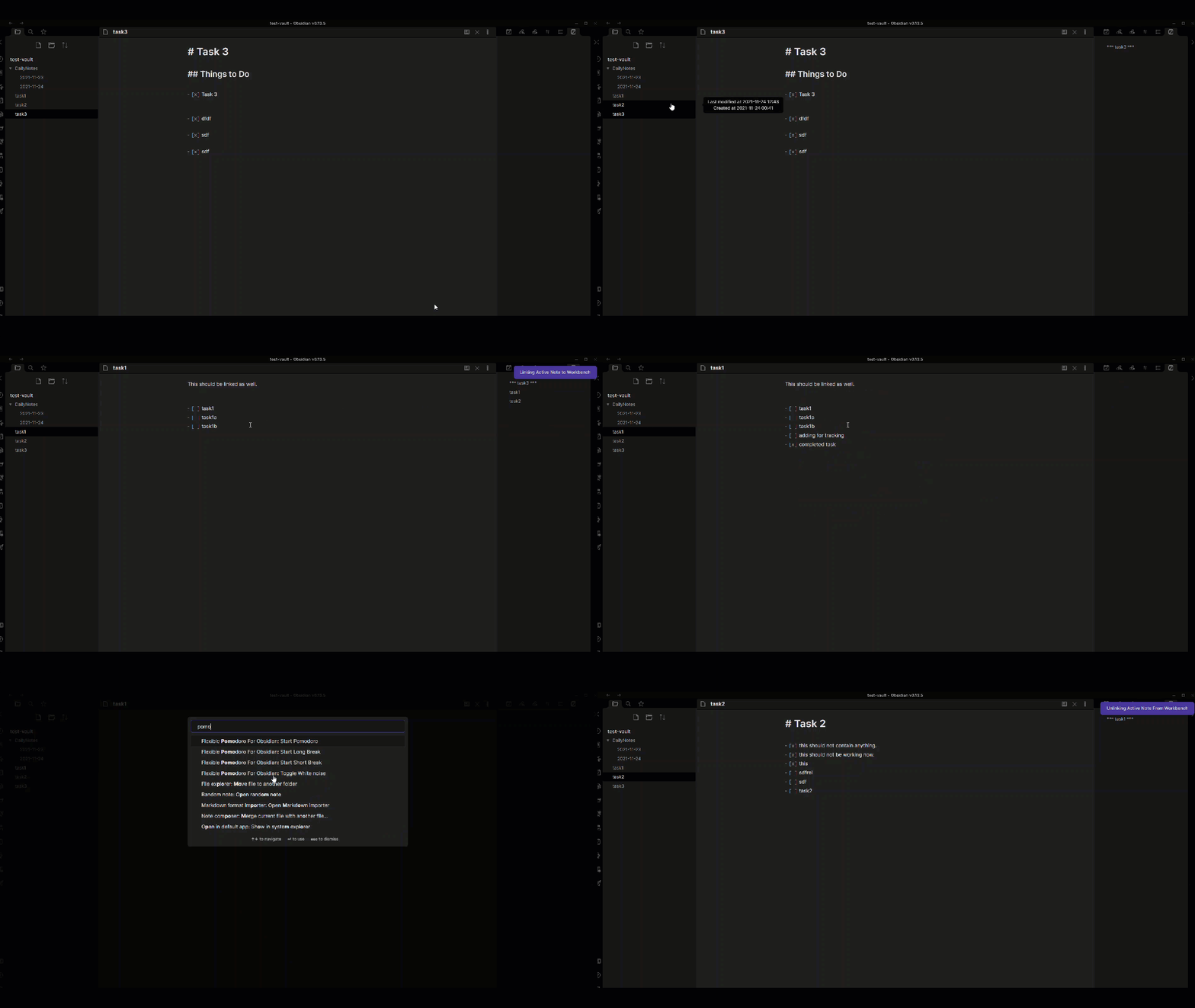
Persistent Workbench

Persistent workbenches enable you to save different types of Workbenches in a folder in your vault. This enables the plugin to persist Workbenches across restart and enables the user to save different types of workbenches.

Please be sure to set your workbench folder first. Workbench Files that are saved will be placed in this folder.
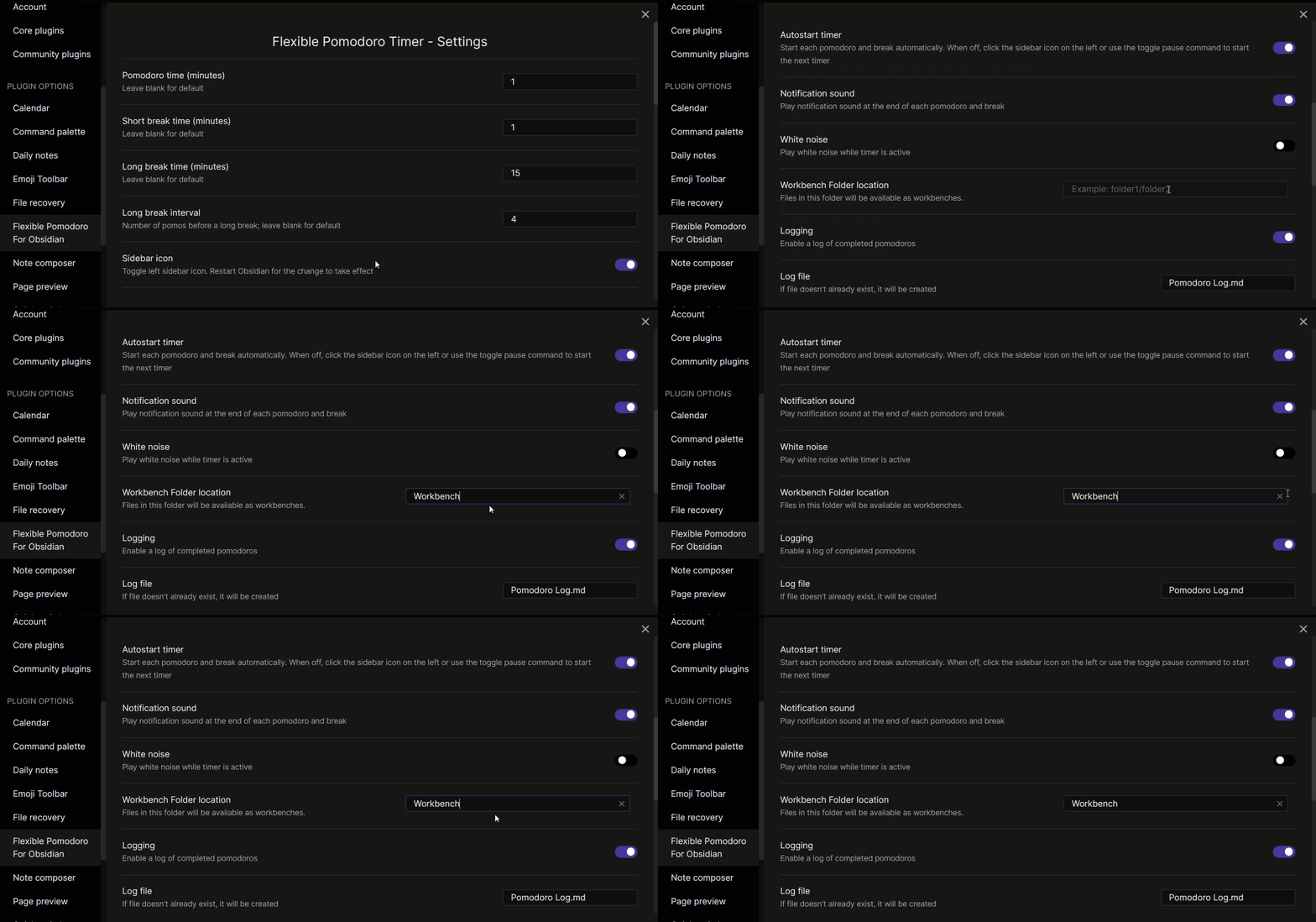
Save Pomo Workbench As

Save your workbench

To make a workbench persistent, be sure to call Save Pomo Workbench As command.
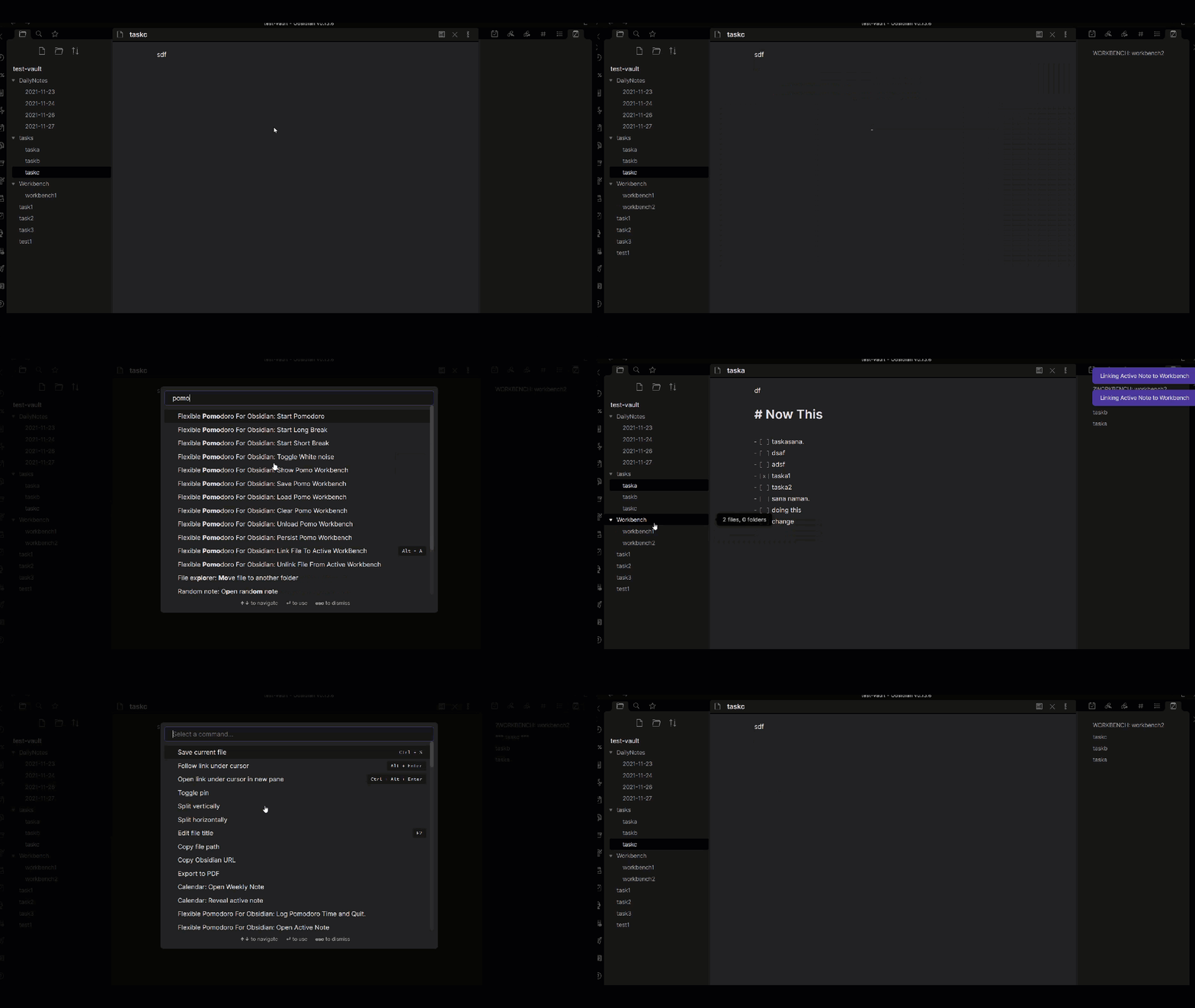
Load A Workbench

Load a workbench command loads previously created workbenches.
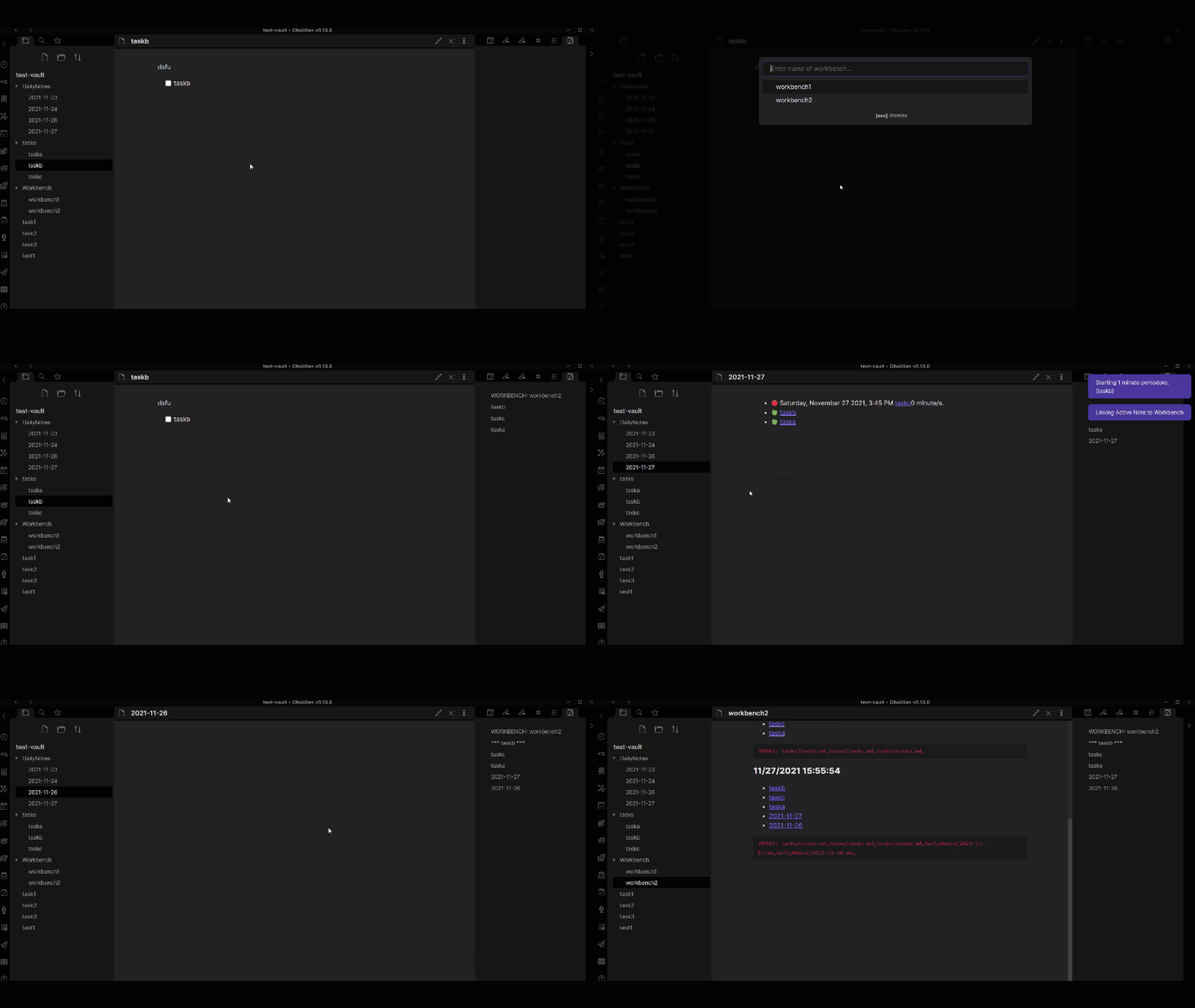
Sortable Workbench

Additional commands have been added to sort the workbench contents.
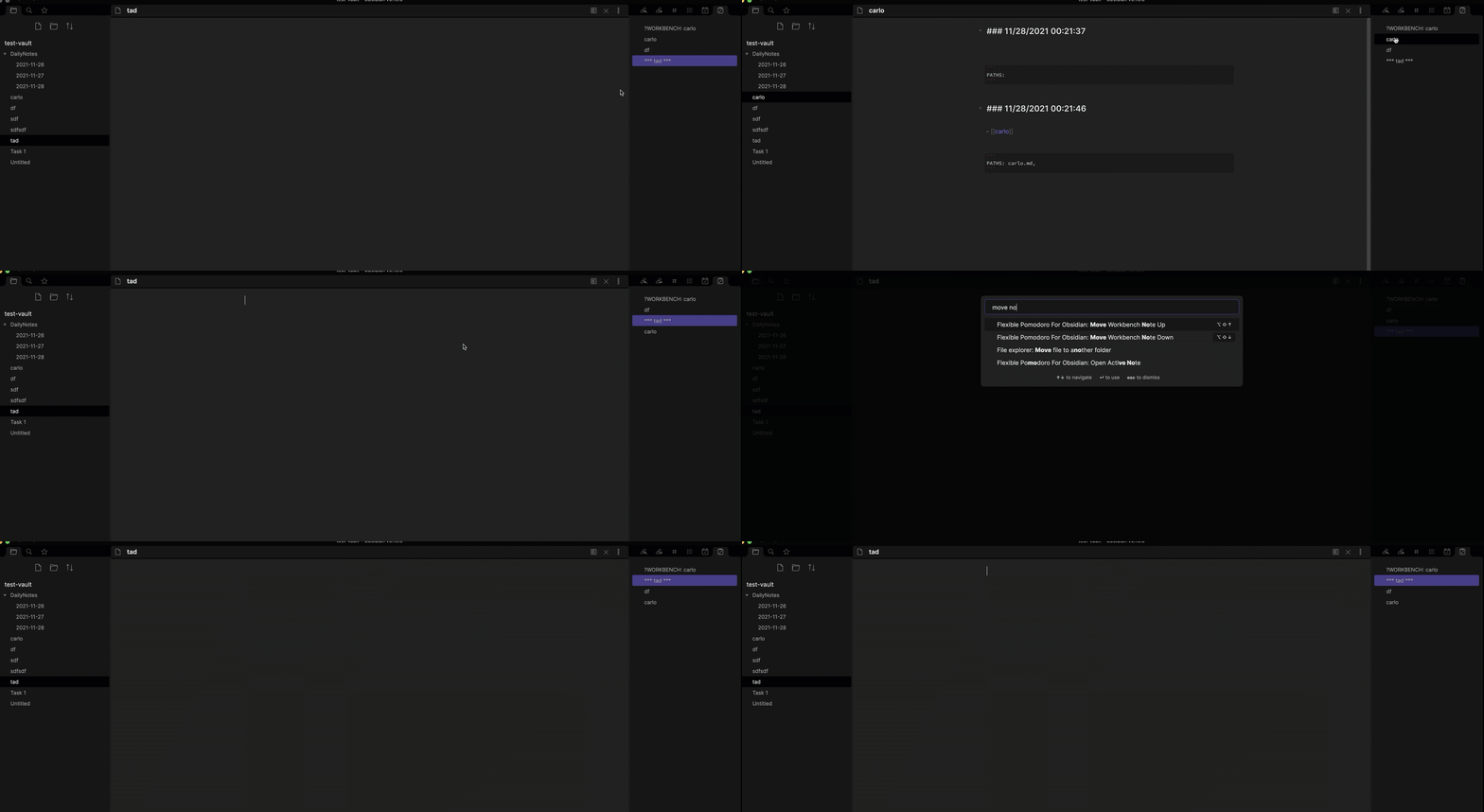
Additional Commands

Start Short Break

Starts a short break manually.

Start Long Break

Starts a long break manually.
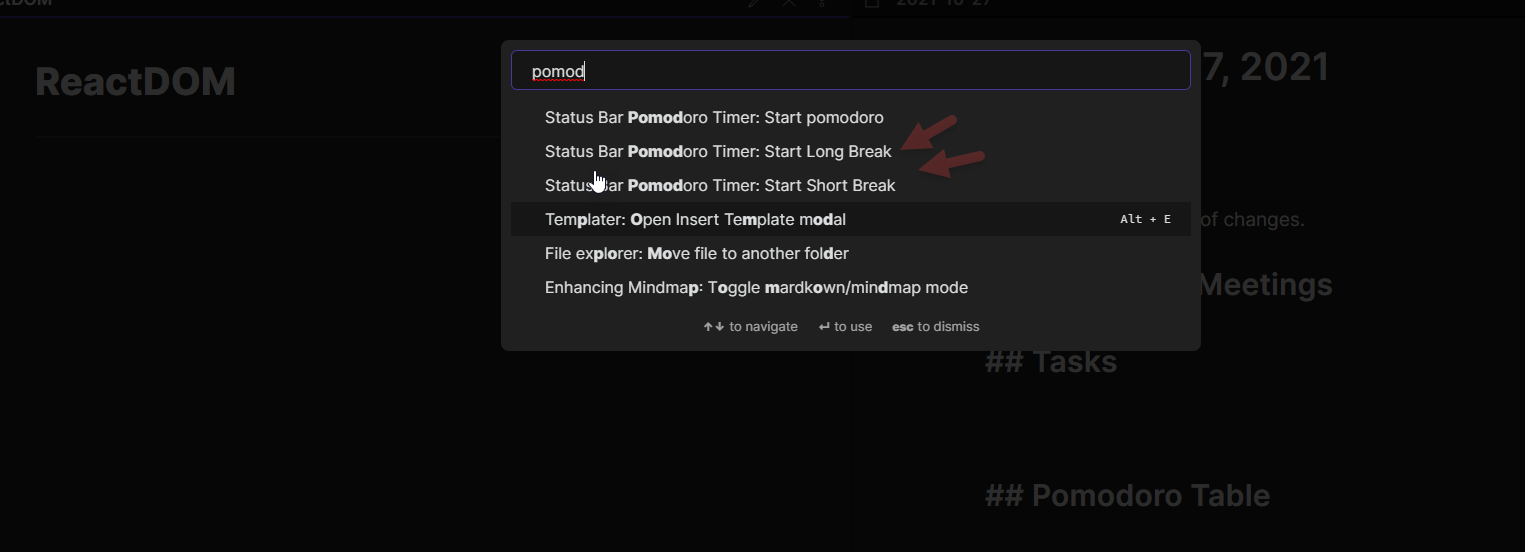
img_2.png

Reveal Active Pomdoro Note

Reveals the active Pomdoro note to the right pane.
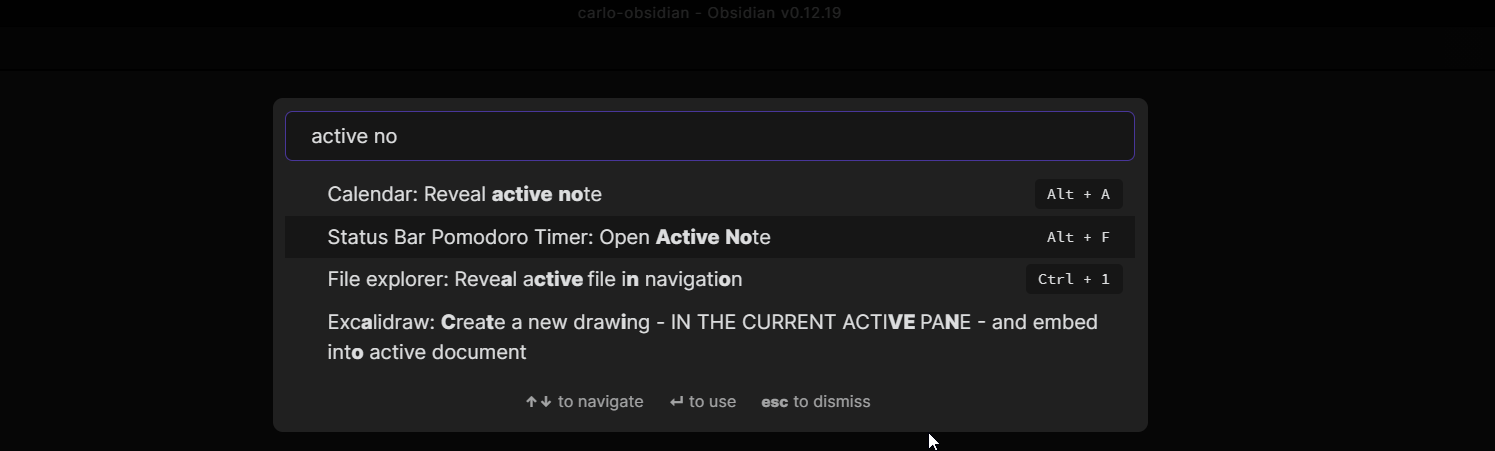
img_4.png

Save Pomo Workbench As

Save the Pomo workbench to a file. You can choose a new one or an old one. Saving overrides all the contents of the file but history is still stored in your Workbench folder.

Files will be persisted in your workbench folder.
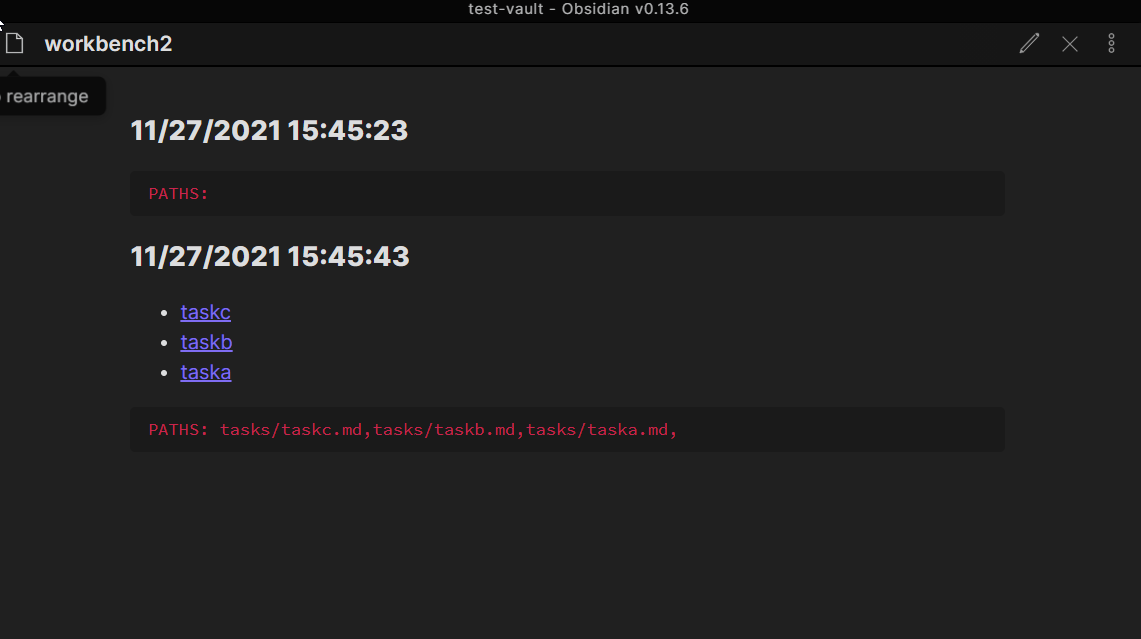
Save Pomo Workbench

Save Pomo Workbench commands enable you to save the current state of your workbench if you linked or unlinked any files. It can also be called when the order is changed. A new version will be stored inside your Workbench file.

Load Pomo Workbench

Loads a previously created Pomoworkbench.

Unload Pomo Workbench

Enables you to unload the current persistent workbench loaded.

Adds a File to the current pomodoro workbench.

Removes a file from the current pomo workbench.

Show Pomo WorkBench

Reveals the pomo workbench in the right leaf.

Clear Pomo WorkBench

Clears the pomo workbench. Active note will not be removed if timer is active and not on a break.

Toggle Workbench Location

Changes the location of workbench from left to right or vice-versa.

Note: Manual workbench moves are not tracked. You will need to trigger command twice.

Show Current Progress

Invokes a modal that shows the current task items that are new or ticked during a Pomodoro sequence.

Move Note Up

Moves the current Active Note up in the Workbench.

Move Note Down

Moves the current Active Note down in the Workbench.

Similar Plugins

info
• Similar plugins are suggested based on the common tags between the plugins.
Note Toolbar
2 years ago by Chris Gurney
Flexible, context-aware toolbars for your notes in Obsidian.
TaskNotes
10 months ago by Callum Alpass
Task and time-tracking management with calendar integration for Obsidian
Smart Composer
a year ago by Heesu Suh
AI chat assistant for Obsidian with contextual awareness, smart writing assistance, and one-click edits. Features vault-aware conversations, semantic search, and local model support.
Hotkeys++
6 years ago by Argentina Ortega Sainz
Adds hotkeys to toggle todos, ordered/unordered lists and blockquotes in Obsidian
Tab Switcher
5 years ago by Vinzent & phibr0
Tab Switcher - Obsidian Plugin
TODO | Text-based GTD
5 years ago by Lars Lockefeer
Tasks Calendar Wrapper
3 years ago by zhuwenq
This plugin currently provides a timeline view to display your tasks from your obsidian valut, with customizable filters and renderring options.
Status Bar Pomodoro Timer
5 years ago by kzhovn
A status bar pomodoro timer plugin for Obsidian.
Modal forms
3 years ago by Danielo Rodriguez
Define forms for filling data that you will be able to open from anywhere you can run JS
Pomodoro Timer
2 years ago by eatgrass
A pomodoro timer that helps manage your daily focus
Contribution Graph
2 years ago by vran
generate interactive gitxxx style contribution graph for obsidian, use it to track your goals, habits, or anything else you want to track.
Floating Search
3 years ago by Boninall
A plugin for searching text by using Obsidian default search view.
Gemini Scribe
a year ago by Allen Hutchison
An obsidian plugin to interact with Google Gemini
TimeStamper
4 years ago by Martin Eder
A plugin for Obsidian to quickly insert customized date- and time-stamps to the currently active note
Typing Assistant
3 years ago by Jambo
Typing Assistant is a plugin that improves writing efficiency and provides a user experience similar to that of【Notion】
Super Simple Time Tracker
4 years ago by Ellpeck
Multi-purpose time trackers for your notes!
Autocomplete
5 years ago by Yeboster
Obsidian plugin to provide text autocomplete
Day Planner (OG)
3 years ago by James Lynch (continued by Erin Schnabel)
An Obsidian plugin for day planning and managing pomodoro timers from a markdown task list.
Toggl Track
5 years ago by Maxime Cannoodt
A Toggl integration plugin for the popular knowledge base application Obsidian.
Heading Shifter
4 years ago by kasahala
Easily Shift and Change markdown headings.
Hotkeys for templates
5 years ago by Vinzent
Workbench
5 years ago by ryanjamurphy
A plugin to help you collect working materials.
Audio Notes
3 years ago by Jason Maldonis
Easily take notes on podcasts and other audio files using Obsidian Audio Notes.
Doubleshift
4 years ago by Qwyntex
Obsidian Plugin to open the command palette by pressing shift twice
Shortcuts extender
6 years ago by kitchenrunner
Plugin for Obsidian: Use shortcuts for input special symbols and changing level of headings without language switching
Daily Stats
5 years ago by Dhruvik Parikh
Plugin to view your daily word count across all notes in your Obsidian.md vault.
Word Sprint
4 years ago by Andrew Lombardi
Obsidian Word Sprint plugin
Mxmind Mindmap
2 years ago by mxmind
mxmind for obsidian plugin
Personal Assistant
3 years ago by edony
A plugin that harnesses AI agents and streamlining techniques to help you automatically manage Obsidian.
Journal Review
3 years ago by Kageetai
Review your daily notes on their anniversaries, like "what happened today last year"
Plugin Manager
3 years ago by ohm-en
Allows better management of Obsidian.md plugins.
Key Promoter
5 years ago by Johannes Theiner
Learn keyboard shortcuts by showing them when using the mouse
Pomodoro
5 years ago by Tokuhiro Matsuno
Swiss army knife
3 years ago by mwoz123
Copy Inline Code
3 years ago by Ondrej Zavodny
Keyshots
3 years ago by KrazyManJ
🔮📝 Obsidian plugin that adds classic hotkey/shortcuts commands from popular IDEs like Visual Studio Code or JetBrains Family.
Proletarian Wizard Task Manager
a year ago by Charles Feval
Obsidian plugin ot manage todos and projects directly from your notes.
Uncheck All
3 years ago by Shahar Har-Shuv
Obsidian plugin to uncheck all checkboxes in a file with one action
AidenLx's Folder Note - folderv Component
4 years ago by AidenLx
WakaTime
3 years ago by WakaTime
Obsidian.md plugin for automatic time tracking and metrics generated from your Obsidian usage activity.
Timer
3 years ago by Marius Wörfel
Obsidian plugin, which allows you to measure time.
Timekeep
2 years ago by Jacobtread
Obsidian task time tracking
Week Planner
4 years ago by Ralf Wirdemann
Habit Calendar
3 years ago by Hedonihilist
Monthly Habit Calendar for DataviewJS. This plugin helps you render a calendar inside DataviewJS code block, showing your habit status within a month.
Link with alias
3 years ago by Pavel Vojtechovsky
Obsidian plugin for handy creation of links and alias in front matter of target document
Grandfather
5 years ago by Danny Hernandez
A simple Obsidian plugin to display the time and date on the status bar
Ego Rock
2 years ago by Ashton Eby
An obsidian plugin that implements a basic taskwarrior UI for listing and modifying tasks.
DEVONlink
5 years ago by ryanjamurphy
Open notes indexed in DEVONthink in, well, DEVONthink
Habitica Sync
5 years ago by Leoh and Ran
This is a under-development Obsidian Plugin for Habitica
Obsidian-compatible Watcher for ActivityWatch
3 years ago by Grimmauld
Obsidian plugin to track user activity with ActivityWatch
Multi-line Formatting
5 years ago by nmady
Format Obsidian text over an entire selection, even if that selection has paragraph breaks in the middle!
Stopwatch
5 years ago by Tokuhiro Matsuno
Marjdown shortcuts
4 years ago by Jules Guesnon
🪨 Obsidian plugin that allows to write markdown from commands
Daily notes opener
4 years ago by Reorx
Easily open daily notes and periodic notes in new pane; customize periodic notes background; quick append new line to daily notes.
Quick snippets and navigation
4 years ago by @aciq
Quick snippets and navigation for Obsidian
Weekly Review
3 years ago by Brandon Boswell
Pomodoro Widget
2 years ago by bitegw
A plugin for ObsidianMD that adds a pomodoro timer widget. Get it from the Community plugins tab.
Formatto
2 years ago by Deca
Simple, fast, and easy-to-use Obsidian Markdown formatter.
Boost Link Suggestions
3 years ago by Jacob Levernier
An Obsidian (https://obsidian.md) plugin for altering the order of inline link suggestions by link count and manual boosts.
Rapid Notes
3 years ago by valteriomon
Things Link
4 years ago by @gavmn
Mini Toolbar
3 years ago by AidenLx & Boninall
mini context toolbar in editor for Obsidian
Navigate Cursor History
4 years ago by heycalmdown
WordWise
2 years ago by ckt1031
Writing companion for AI content generation.
Autocorrect Formatter
2 years ago by b-yp
A plugin running on Obsidian that utilizes autocorrect to format Markdown content.
Search++
5 years ago by Noureddine Haouari
Allow inserting text context search results on the active note.
Grind Manager
2 years ago by dromse
Gamify your task management with rewards system, craft your tasks by tags.
Command Alias
5 years ago by @Yajamon
Obsidianのコマンドに対してエイリアスを設定するプラグイン
Gemmy
3 years ago by Obsidian
Occura
2 years ago by Alexey Sedoykin
Plugin for https://obsidian.md/ that automatically selected same text occurrences in opened note
Time Things
2 years ago by Nick Winters
Show clock, track time spent editing a note, and track the last time a note has been edited.
Blockquote Levels
4 years ago by Carlo Zottmann
A plugin for Obsidian (https://obsidian.md) that adds commands for increasing/decreasing the blockquote level of the current line or selection(s).
GPT-LiteInquirer
3 years ago by ittuann
💬 Experience OpenAI ChatGPT assistance directly within Obsidian, drafting content without interrupting your creative flow.
Note Chain
2 years ago by ZigHolding
Package my frequently used tools, highly personal plugins.
Activity Logger
5 years ago by Creling
PopKit
2 years ago by Zhou Hua
Progress Clocks
2 years ago by Nathan Clark
Progress clocks and other useful widgets for https://obsidian.md/.
Brainframe
3 years ago by pedersen
Auto Periodic Notes
2 years ago by Jamie Hurst
Obsidian plugin to create new periodic notes automatically in the background and allow these to be pinned in your open tabs. Requires the "Periodic Notes" plugin.
Key Sequence Shortcut
4 years ago by anselmwang
Execute obsidian commands with short key sequences. For example, 'tp' for 'Toggle Preview' and 'tb' for 'Toggle Sidebar'. Easier to remember.
Go to Line
5 years ago by phibr0
Daily Statistics
2 years ago by yefengr
obsidian daily statistics
Insert Multiple Attachments
a year ago by mnaoumov
Obsidian Plugin that allows to insert multiple attachments at a time
Lemons Search
2 years ago by Moritz Jung
An Obsidian plugin that offers a fast fuzzy finder based quick switcher with preview.
Amazing Marvin
5 years ago by Shirayuki Nekomata
Simple plugin for Amazing Marvin
Book Smith
a year ago by Yeban
一个用于在Obsidian上进行书籍管理及长文创作的Obsidian插件
Bookmarks Caller
2 years ago by namikaze-40p
This is an Obsidian plugin which can easily open bookmarks.
Flow
2 years ago by Ben Phillips
Implements key processes in David Allen's Getting Things Done (GTD) methodology
Editor Commands Remap
5 years ago by cactus5
Obsidian plugin to map hotkeys to editor commands
Typing
3 years ago by Nikita Konodyuk
Programmatic customizations for groups of notes
Filename Emoji Remover
4 years ago by Yüksel Tolun
A simple plugin for the note taking app Obsidian that will rename your files to remove emojis in their names.
CAO
a year ago by Godot
Claude AI for Obsidian
Harpoon
3 years ago by mask(developermask)
Waka time box
3 years ago by complexzeng
Codename
3 years ago by dstack
VaultAI
8 months ago by Tharushka Dinujaya
An AI chatbot plugin for Obsidian using the Gemini API for note summarization, content generation, and more. Enhance your workflow with AI assistance like the Notion AI bot.
Search Templates Library
3 years ago by Pentchaff
Obsidian plugin that allows to store searches templates for later use, and displays search results both in the search view and graph view.
Due When
3 years ago by Andy Baxter
An Obsidian plugin which gives shortcuts to insert set due dates
PomoBar
a year ago by Miguel Pimentel
PomoBar is a minimalist Pomodoro timer that lives in your Obsidian status bar with optional audio notifications to keep you on track
Spacekeys
a year ago by Jared Lumpe
Obsidian plugin to define hotkeys based on sequences of keypresses.
Another Simple Todoist Sync
2 years ago by eudennis
Obsidian.md plugin to integrate with Todoist app.
Postfix
3 years ago by Bhagya Nirmaan Silva (@bhagyas)
A postfix plugin for Obsidian
Daily Routine
a year ago by sechan100
new version of daily-routine obsidian plugin
Random Number Generator
2 years ago by iRewiewer
Gives you a random number
Tick Tones
a year ago by DontBlameMe
A plugin for Obsidian which makes checkboxes satisfying
Pomodoro Planner
2 years ago by Onur Nesvat
Checkbox Time Tracker
2 years ago by UD
Checkbox Time Tracker for Obsidian
Task list
2 years ago by Ted Marozzi
A simple obsidian plugin enabling better task management via lists.
RescueTime
3 years ago by Tatsuya Hayashi
A RescueTime integration plugin to view your activity logs in Obsidian.
Days Since
2 years ago by gndclouds
A plugin to show the number of days since a given date.
Minidoro
4 months ago by Shakti Sampad Swain
Minidoro is a minimalist Pomodoro timer that lives right in your Obsidian header. It's designed to be simple, unobtrusive, and fully customizable.
Activity Heatmap
a year ago by Zak Hijaouy
Focus Time
a year ago by AstraDev
Focus Time is a plugin that helps you track how much time you spend on each note.
Note Minimap
8 months ago by Yair Segel
Add a minimap to your Obsidian notes.
Editor Autofocus
2 years ago by Mgussekloo
MantouAI
2 years ago by Morino Pan
MantouAI—— 让Obsidian变身智能助手
Dataview Autocompletion
a year ago by Daniel Bauer
Simple Todo
a year ago by elliotxx
A minimalist text-based todo manager (Text-Based GTD) for efficient task management in Obsidian.
Copy Section
2 years ago by skztr
Obsidian.md plugin adding a Copy button to the top of Headed sections
Cursor Position History
a year ago by Florian Gubler
A Plugin to remember (and make accessible) the cursor history in Obsidian. Both within a file and across files.
Folder overview
a year ago by Lost Paul
Provides a dynamic overview of your vault or folders in the format of a code block.
ManicTime
2 years ago by Finkit d.o.o.
Daily note creator
2 years ago by Mario Holubar
Automatically creates missing daily notes.
Countdown To
a year ago by Gui Cattani
A countdown/progress Obsidian widget using progressbar.js
PDF Paste
a year ago by Cormac
Fastimer
2 years ago by vkostyanetsky
Intermittent fasting tracker plugin for Obsidian
Goal Tracker
a year ago by Ben Rotholtz
Todos sort
a year ago by Jiri Sifalda
A plugin for Obsidian that sorts todos within a note
Inline Checkbox Groups
a year ago by Bradley Wyatt
Obsidian Plugin that creates multiple checkboxes on a single line, separated by a customizable separator character (default '|'), with the option to automatically cross out text when all checkboxes in the line are checked.
Typezen
a year ago by Ilgam Gabdullin
Plugin for obsidian which lets you turn zen mode instantly
Ctrl-XA cycle various items
2 years ago by nbossard
The equivalent in Obsidian of Vim Ctrl X-A. But supercharged with lists of various items : days, months, ...
Markwhen File Sync
a year ago by rouvenjahnke
Synchronize properties from your Obsidian notes with a Markwhen timeline file.
LinkMagic
2 years ago by AndyReifman
AI integration Hub
a year ago by Hishmat Salehi
A modular AI integration hub for Obsidian
Focus Tracker
2 years ago by Jeet Sukumaran
White Noise
a year ago by Zhou Hua
Unit Converter
a year ago by Ruslan Zabarov
Unit conversion plugin for Obsidian
Daily Prompt
2 years ago by Erl-koenig
Sentinel
a year ago by Giorgos Sarigiannidis
A plugin for Obsidian that allows you to update properties or run commands based on document visibility changes.
Canvas Link to Group
6 months ago by TGRRRR
Plugin for Obsidian Canvas enabling direct links to specific groups within canvas files for improved navigation
Weekly Goal Tracker
a year ago by George Gorman
Pinned Daily Notes
a year ago by Jeremy Neiman
Dynamically update a pinned tab with today's daily note
Organized daily notes
a year ago by duchangkim
Automatically organizes your daily notes into customizable folder structures for better organization and easier navigation.
Target Word Count
2 years ago by TwoFive Labs
Target Word Count Plugin for Obsidian
Brain Dump Mode
a year ago by yesjinu
Obsidian plugin - DISABLE your delete key and eliminate hesitation!
Asana
a year ago by Ryan Bantz
Obsidan plugin that creates tasks in Asana for highlighted text or the current line
Daily Random Note
a year ago by Alexandre Silva
Daily Random Notes in Obsidian.
doing
2 years ago by rooyca
What was I doing?
Relative Timestamps
2 years ago by Charles Young
Kikijiki Habit Tracker
a year ago by KIKIJIKI
Kikijiki Habit Tracker Plugin for Obsidian
AI Revisionist
a year ago by Synaptic Labs
Runsh
a year ago by Ddone
A simple plugin that allows to run shell commands from obsidian.
Tab Limiter
a year ago by Henry Gustafson
Limits the number of tabs that can be opened in Obsidian
Chronotyper
a year ago by BambusControl
Obsidian plugin for tracking note edit time
Wakatime / Wakapi
a year ago by Kevin Woblick
Connect your Obsidian to Wakatime or Wakapi to track the time spent while browsing or writing notes.
JIRA links shortener
a year ago by Ruslans Platonovs
Obsidian JIRA links shortener plugin
Role Switch
2 months ago by Zafrem
Switch between different work roles (developer, writer, researcher, etc.) with intentional transitions and session tracking.
Timelog
4 months ago by Eddie Blundell
Time logging plugin for obsidian
Select word
2 years ago by Connor Espino
Note Progressbar
a month ago by Ryoma Kawahara
Displays a live progress bar summarizing checkbox completion in the active note.
Lark Style CountDown Timer
5 months ago by Zhaoyang Yu
Task Director
a year ago by Cybertramp
A plugin that allows you to easily manage tasks in bulk.
Tag Timer
4 months ago by quantavil
The Tag Timer is a versatile plugin for Obsidian that allows you to seamlessly track the time you spend on specific tasks or sections within your notes.
Superstition
a year ago by Jeffry
An Obsidian plugin for routine management.
Fetch Prayer Times
a year ago by Ecys
Fetches times from Aladhan API and inserts into a table.
Hanko
a year ago by Telehakke
Obsidian plugin.
SolidTime Integration
a year ago by proniclabs
Obsidian SolidTime Integration Plugin
Sonkil
9 months ago by ohyoungpark
Crackboard
2 years ago by Franklin
Obsidian plugin for crackboard.dev