
README file from
GithubGit Plugin for Obsidian
A powerful community plugin for Obsidian.md that brings Git integration right into your vault. Automatically commit, pull, push, and see your changes — all within Obsidian.
Documentation
All setup instructions (including mobile), common issues, tips, and advanced configuration can be found in the full documentation.
Mobile users: The plugin is highly unstable. Please check the dedicated Mobile section below.
Key Features
- Automatic commit-and-sync (commit, pull, and push) on a schedule.
- Auto-pull on Obsidian startup
- Source Control View to stage/unstage, commit and diff files - Open it with the
Open source control viewcommand. - History View for browsing commit logs and changed files - Open it with the
Open history viewcommand. - Diff View for reviewing changes side by side and staging or resetting individual hunks - Open it with the
Open diff viewcommand. - Conflict resolution in the editor with highlighted changes and buttons to keep either version, both versions, or the common ancestor when available.
- Signs in the editor to indicate added, modified, and deleted lines/hunks (desktop only).
- Submodule support for managing multiple repositories (desktop only and opt-in)
- GitHub integration to open files and history in your browser
For detailed file history, consider pairing this plugin with the Version History Diff plugin.
UI Previews
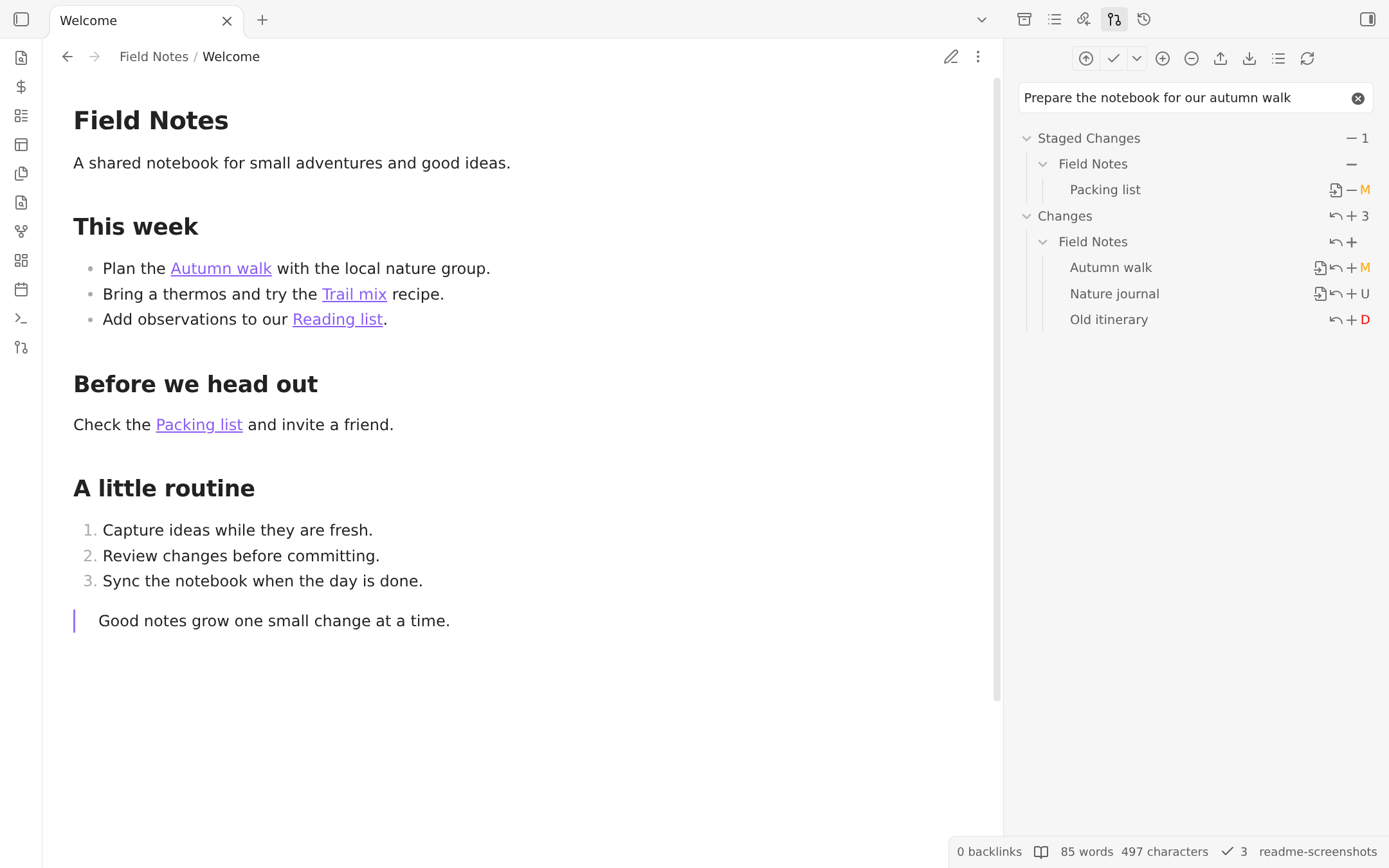
Source Control View
Manage your file changes directly inside Obsidian, including staging and unstaging individual files and committing them. The main Commit action commits staged changes when present. The actions menu provides explicit staged-only and all-changes alternatives, plus amending the previous commit on desktop.
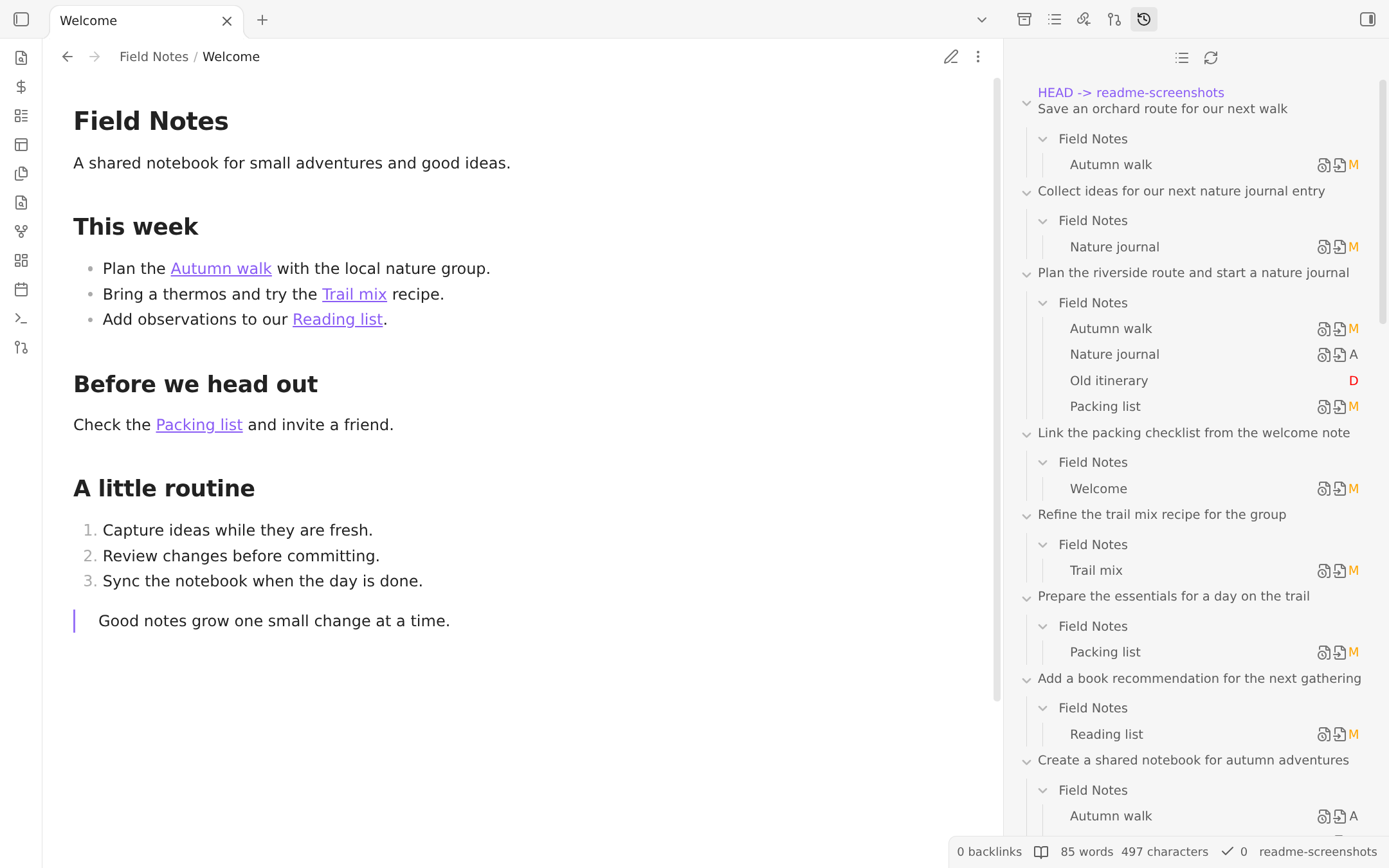
History View
Show the commit history of your repository. The commit message, author, date, and changed files can be shown. Author and date are disabled by default as shown in the screenshot, but can be enabled in the settings.
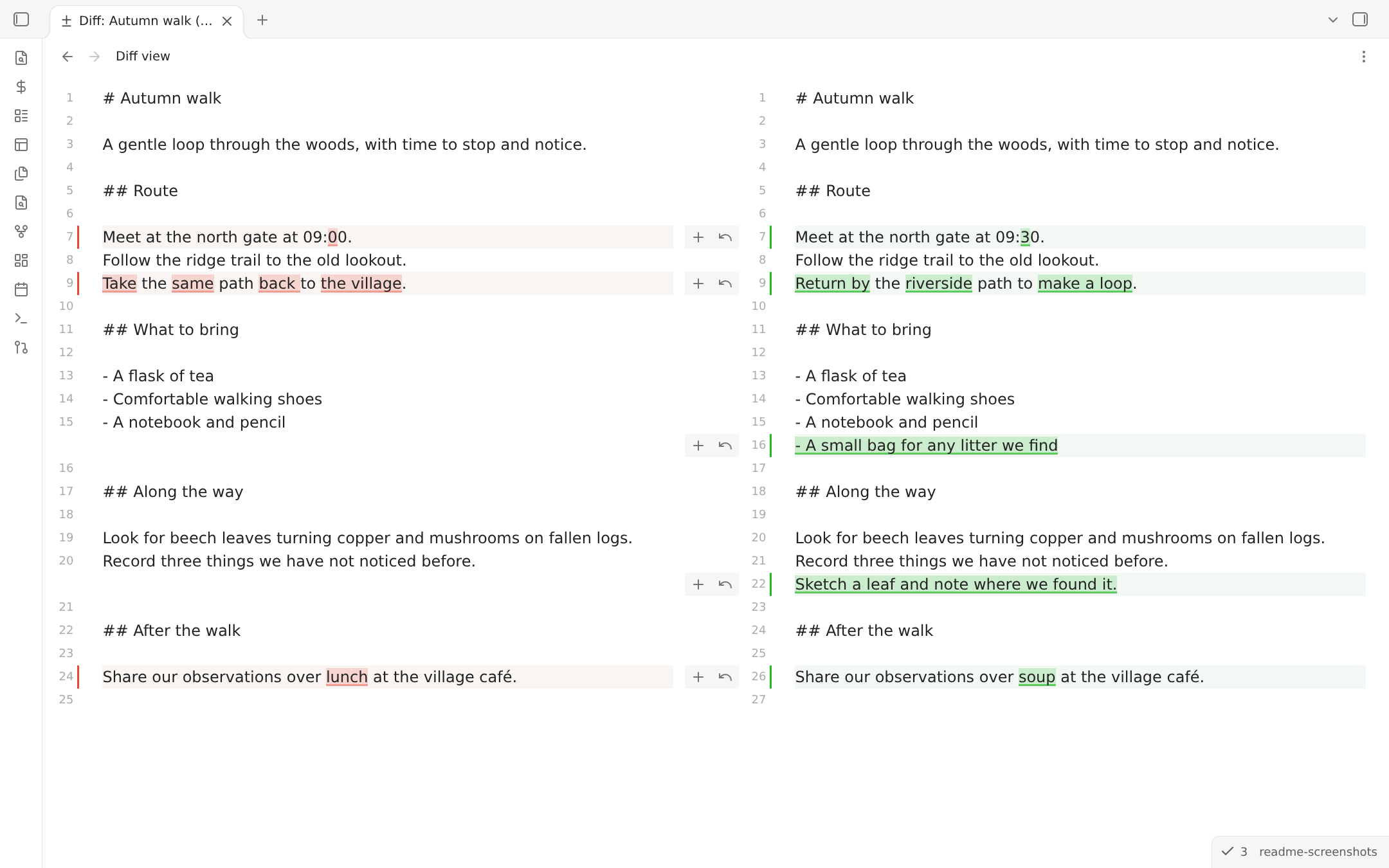
Diff View
Compare versions side by side with highlighted changes. Review, stage, or reset individual hunks without leaving the diff view.
Open it from the source control view or via the Open diff view command.
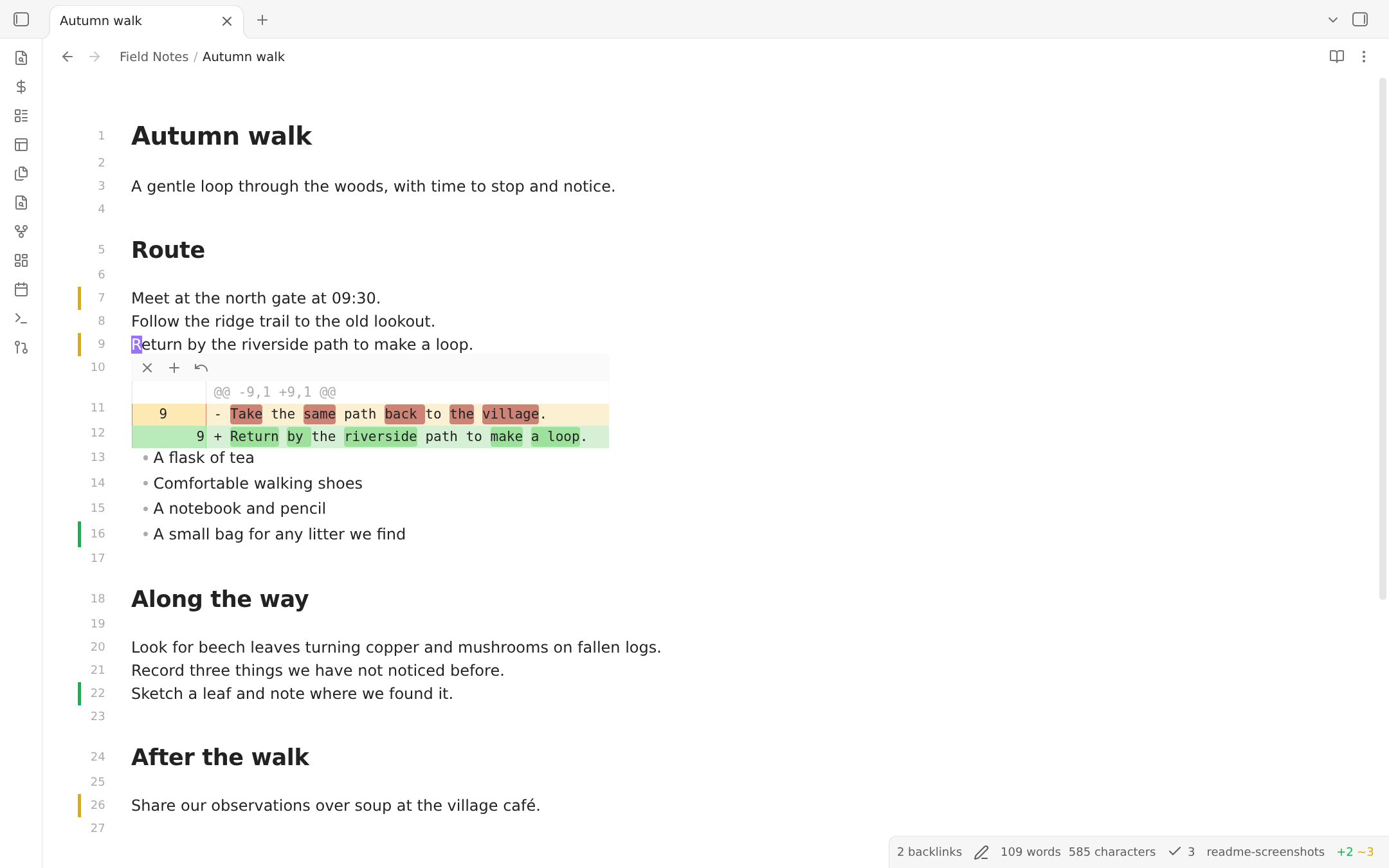
Signs in the Editor
View line-by-line changes directly in Live Preview with added, modified, and deleted line/hunk indicators. You can stage and reset changes right from the signs. There are also commands to navigate between hunks and stage/reset hunks under the cursor. Needs to be enabled in the plugin settings.
Conflict Resolution
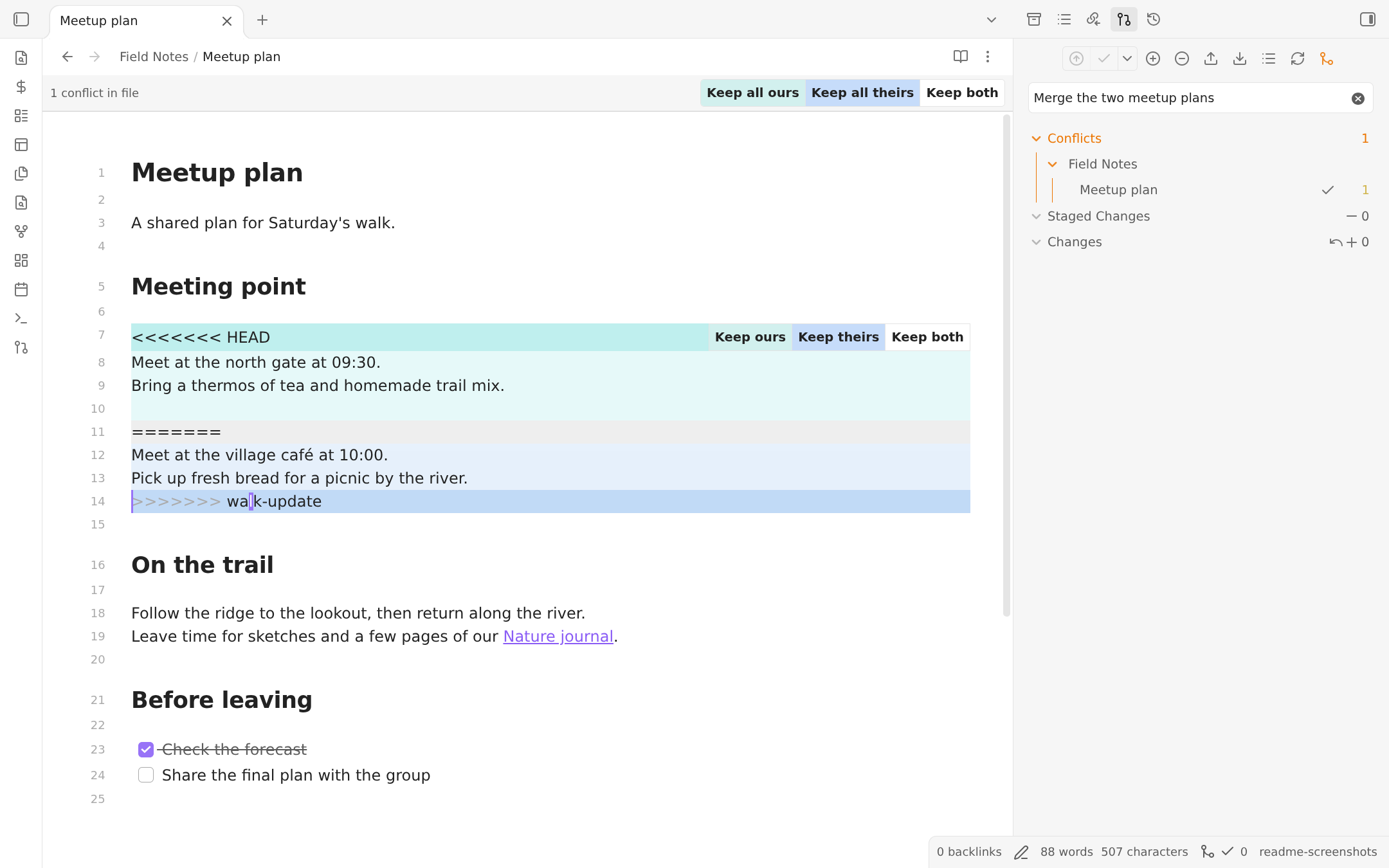
Resolve conflicting changes in Live Preview without leaving your note. Highlighted sections show your version and the incoming version, with buttons to keep ours, theirs, or both. The bar at the top lets you apply a choice to every conflict in the file. Source Control lists conflicted files and shows how many conflict blocks remain.
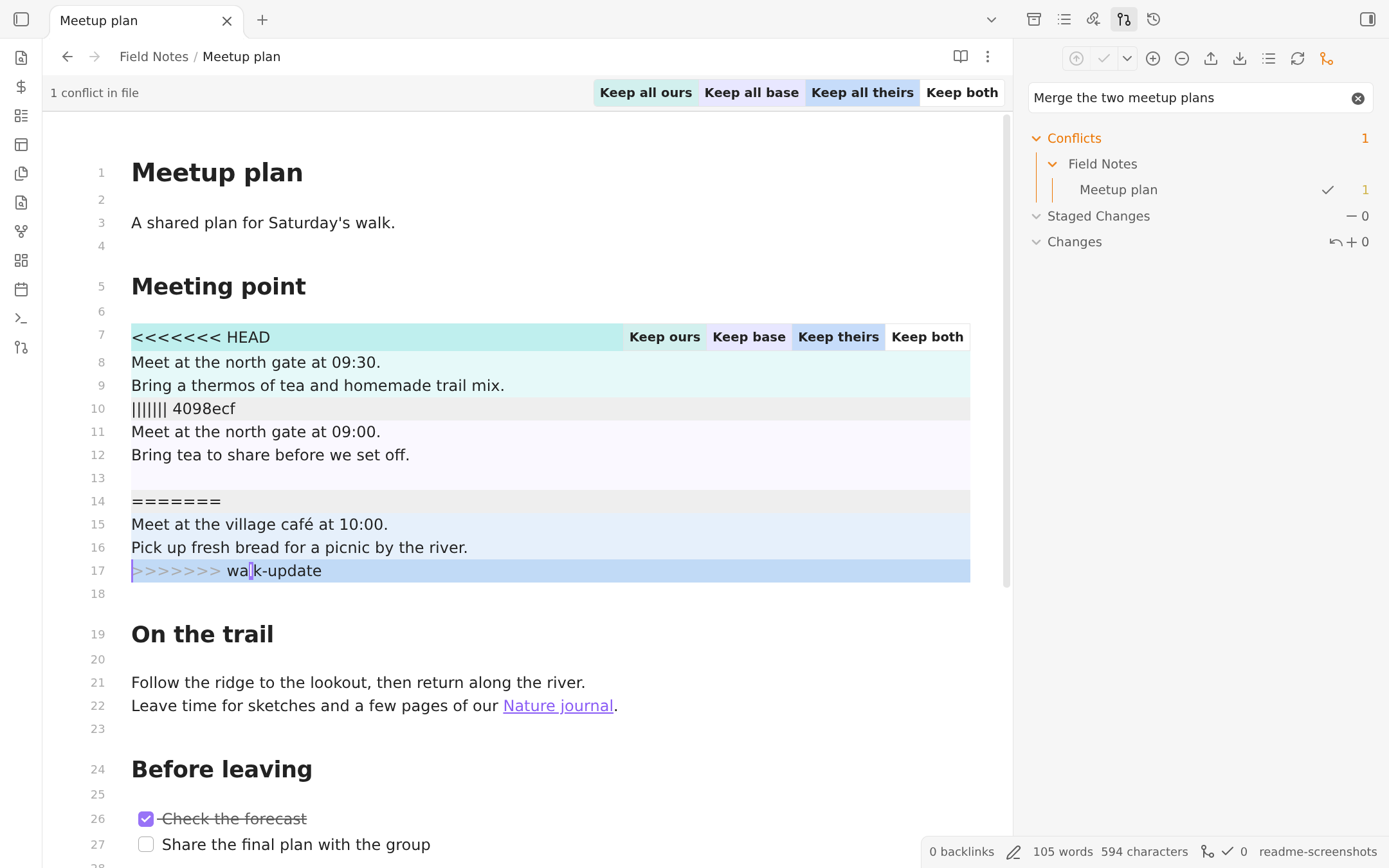
When Git includes the common ancestor (for example, with merge.conflictStyle=diff3), you can also compare and keep the base version.
After reviewing the result, mark the file as resolved in Source Control, then commit to finish the merge. See the conflict resolution guide for the full workflow.
Available Commands
Not exhaustive - these are just some of the most common commands. For a full list, see the Command Palette in Obsidian.
- Changes
List changed files: Lists all changes in a modalOpen diff view: Open diff view for the current fileStage current fileUnstage current fileDiscard all changes: Discard all changes in the repository
- Commit
Commit: Commits staged changes when present. If nothing is staged, either stages and commits all changes or stops, depending on theStage all changes when nothing is stagedsettingCommit with specific message: Same as above, but with a custom messageCommit all changes: Commits all changes without pushingCommit all changes with specific message: Same as above, but with a custom message
- Commit-and-sync
Commit-and-sync: With default settings, this will commit all changes, pull, and pushCommit-and-sync with specific message: Same as above, but with a custom messageCommit-and-sync and close: Same asCommit-and-sync, but if running on desktop, will close the Obsidian window. Will not exit Obsidian app on mobile.
- Remote
Push,PullEdit remotes: Add new remotes or edit existing remotesRemove remoteClone an existing remote repo: Opens dialog that will prompt for URL and authentication to clone a remote repoOpen file on GitHub: Open the file view of the current file on GitHub in a browser window. Note: only works on desktopOpen file history on GitHub: Open the file history of the current file on GitHub in a browser window. Note: only works on desktop
- Manage local repository
Initialize a new repoCreate new branchDelete branchCAUTION: Delete repository
- Miscellaneous
Open source control view: Opens side pane displaying Source control viewOpen history view: Opens side pane displaying History viewEdit .gitignoreAdd file to .gitignore: Add current file to.gitignore
Desktop Notes
Community scorecard
The Obsidian community scorecard reports automated code checks, including warnings about shell execution and direct filesystem access. On desktop, this plugin needs those capabilities to run your installed Git and work with repository metadata and Git configuration beyond Obsidian's vault API. These requirements contribute to the Review rating, so read it alongside the individual findings and in the context of native Git integration.
Authentication
Some Git services may require further setup for HTTPS/SSH authentication. Refer to the Authentication Guide
Obsidian on Linux
- Snap is not supported due to its sandboxing restrictions.
- Flatpak is not recommended, because it doesn't have access to all system files. They are actively fixing many issues, but there are still issues. Especially with more advanced setups.
- Please use AppImage or a full access installation of your system's package manager instead (Linux installation guide)
Mobile Support (Experimental)
The Git implementation on mobile is very unstable! I would not recommend using this plugin on mobile, but try other syncing services.
One such alternative is GitSync, which is available on both Android and iOS. It is not associated with this plugin, but it may be a better option for mobile users. A tutorial for setting it up can be found here.
The Git plugin works on mobile thanks to isomorphic-git, a JavaScript-based re-implementation of Git - but it comes with serious limitations and issues. It is not possible for an Obsidian plugin to use a native Git installation on Android or iOS.
Mobile Feature Limitations
- No SSH authentication (isomorphic-git issue)
- Limited repo size, because of memory restrictions
- No rebase merge strategy
- No submodules support
Performance Caveats
[!caution] Depending on your device and available free RAM, Obsidian may
- crash on clone/pull
- create buffer overflow errors
- run indefinitely.
It's caused by the underlying git implementation on mobile, which is not efficient. I don't know how to fix this. If that's the case for you, I have to admit this plugin won't work for you. So commenting on any issue or creating a new one won't help. I am sorry.
Tips for Mobile Use:
If you have a large repo/vault I recommend staging individual files and setting automatic commit globs to Include matches with an empty list, so automatic commits use only staged files.
Contact & Credits
- The Line Authoring feature was developed by GollyTicker, so any questions may be best answered by her.
- This plugin was initially developed by denolehov. Since March 2021, it's me Vinzent03 who is developing this plugin. That's why the GitHub repository got moved to my account in July 2024.
- If you have any kind of feedback or questions, feel free to reach out via GitHub issues.
Support
If you find this plugin useful and would like to support its development, you can support me on Ko-fi.
