Source Mode Styling

by Chris Howard
5
4
3
2
1
Score: 53/100

Description

Category: Customization & UI

The Source Mode Styling plugin transforms source mode into a genuine raw text editor with monospace fonts and customizable styling options. It creates clear visual separation from Live Preview by applying developer friendly aesthetics. The plugin automatically detects monospace fonts installed on your system (Source Code Pro, Fira Code, JetBrains Mono, etc.) and lets you control font weight, size, color, line height and background.

Reviews

No reviews yet.

Stats

14
stars
1,553
downloads
0
forks
230
days
12
days
12
days
0
total PRs
0
open PRs
0
closed PRs
0
merged PRs
0
total issues
0
open issues
0
closed issues
39
commits

Latest Version

12 days ago

Changelog

Version 0.3.0

Various bug fixes and compliance with Obsidian code standards

Note: Future versions will require Obsidian 1.13.0.

[0.3.0] - 2026-09-03

Added

  • A one-time notice for users on Obsidian below 1.13.0, telling them this is the last version they will be offered and that later releases need a newer Obsidian. It stays on screen until dismissed and is never shown again.

Fixed

  • Source mode styling now applies in popout windows. The styling variables were set on the main window's document root, which a popout window cannot see, so its editors were left unstyled even though they were correctly marked as being in source mode.

Changed

  • Styling variables are applied per editor rather than globally, and are cleared from an editor when it leaves source mode

[0.2.36] - 2026-09-01

Changed

  • Upgraded eslint-plugin-obsidianmd to 0.4.2, clearing the transitive dependency vulnerabilities reported against the lint tooling
  • Pinned the obsidian API typings to 1.8.7 instead of tracking latest, so the declared minimum app version cannot be outgrown by accident

[0.2.35] - 2026-09-01

Fixed

  • Source mode styling is no longer overridden by the Minimal theme, which tied this plugin's editor rule on specificity and won on load order. The configured font, size, line height, colours and weight now apply under Minimal.

[0.2.34] - 2026-09-01

Fixed

  • Headings in source mode now follow the configured source mode font size instead of being pinned to a fixed size

Changed

  • Removed the last !important from the stylesheet by overriding the heading line rather than the heading span, which wins on specificity alone

[0.2.33] - 2026-09-01

Fixed

  • Disabling the plugin now clears source mode styling from editors in popout windows, which the previous document-scoped lookup could not reach
  • A pending view mode update can no longer re-apply styling after the plugin is disabled

Changed

  • Collapsed three separate timers into one debounced view mode update, so opening a file no longer triggers the same work three times

[0.2.32] - 2026-08-31

Fixed

  • Font detection now scopes its test CSS variable to the test element instead of the document root, so detection works when the settings tab is open in a popout window
  • Font detection falls back to the active window's body rather than the main window's

Changed

  • Removed the unused synchronous font detection function, which duplicated the async version
  • Use Obsidian's global sleep() to yield between font detection chunks instead of a bare setTimeout
  • Use Obsidian DOM helpers (createSpan, createEl) in font detection and settings inputs
  • Declare Obsidian globals in the ESLint config

Documentation

  • Corrected the GitHub Releases link in README, which pointed at a different repository

See CHANGELOG.md for detailed changes.

README file from

Github

Source Mode Styling

Differentiate your Obsidian source mode from Live Preview edit mode with a raw text like aesthetic using customizable monospace fonts and styling options.

Overview

Source Mode Styling enhances Obsidian's source mode editor by applying monospace fonts and customizable styling that's familiar to developers and text editor users. While Obsidian's default source mode shows markdown syntax but retains most visual formatting, this plugin gives you an authentic "raw" editing experience providing greater differentiation with the Live Preview editor mode.

Key Benefits:

  • Full control over source mode appearance
  • Monospace font detection - automatically finds available fonts on your system
  • Real-time preview - changes apply instantly
  • Theme-aware - respects your theme's colours when desired
  • Cross-platform - works on desktop and mobile

Installation

  1. Open Obsidian Settings
  2. Go to Community plugins and disable Safe mode
  3. Click Browse and search for "Source Mode Styling"
  4. Install and enable the plugin

Manual Installation

  1. Download the latest release from GitHub Releases
  2. Extract the files to your vault's .obsidian/plugins/sourcemode-styling/ directory
  3. Reload Obsidian or restart the application
  4. Enable the plugin in Settings → Community plugins

Usage

Quick Start

  1. Open any markdown file in source mode
  2. Go to Settings → Community plugins → Source Mode Styling
  3. Customize your font and styling preferences

Configuration Options

Setting Description Options
Monospace font Choose your preferred coding font Auto-detected system fonts + theme default
Font weight Control text thickness Normal, Light, Semi-bold, Custom (100-900)
Font size Adjust text size for readability Custom or theme default
Font colour Set font custom colour Custom colour picker or theme default.
Line height Adjust vertical spacing Custom or theme default
Heading colour Set custom headings colour. Custom colour picker or theme default
Background colour Set editor background Custom colour picker or theme default

Font Detection

The plugin automatically detects monospace fonts installed on your system, including popular options like:

  • Source Code Pro
  • Fira Code
  • JetBrains Mono
  • Consolas
  • Monaco
  • And many more...

Examples

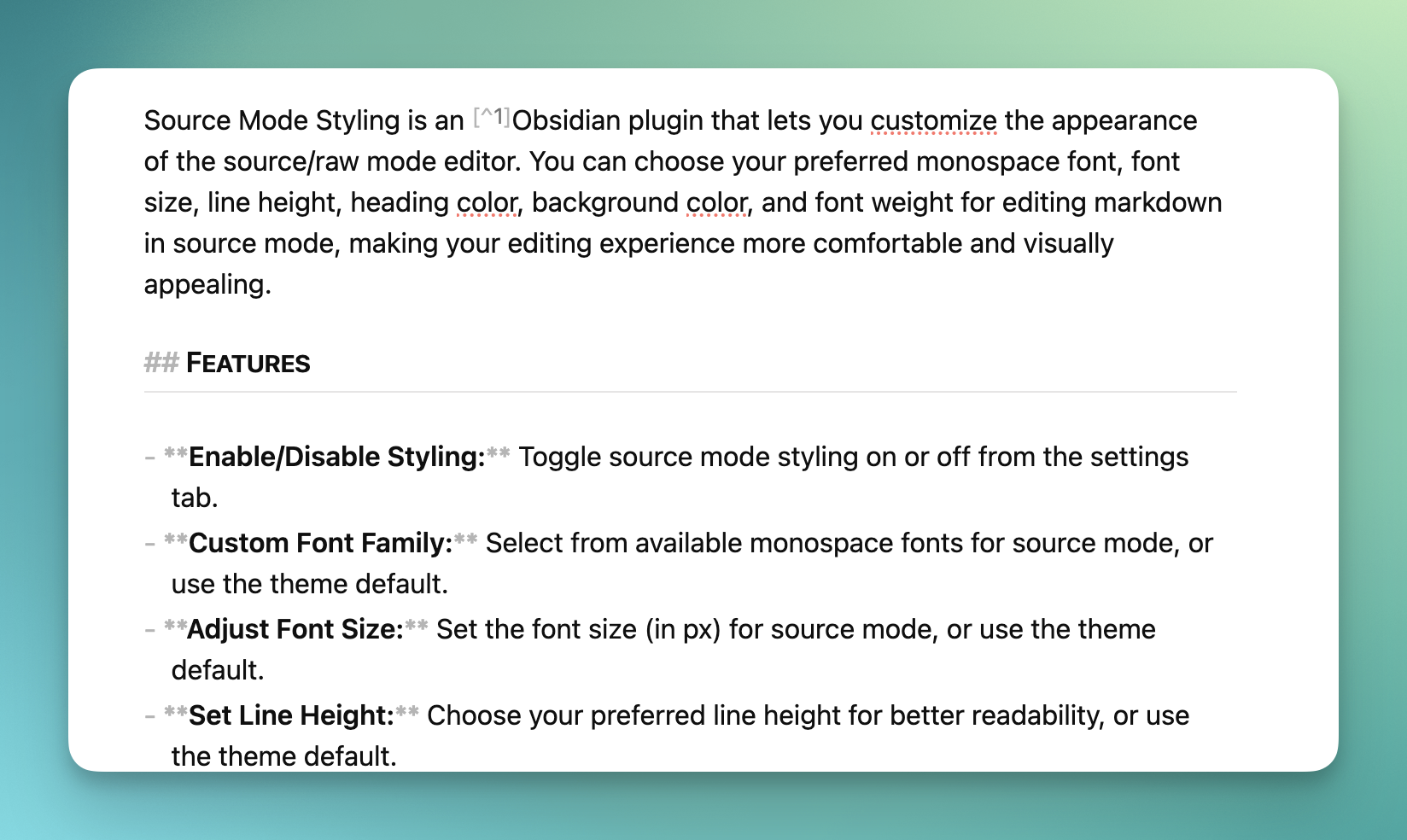
Obsidian Live Preview mode Obsidian Live Preview
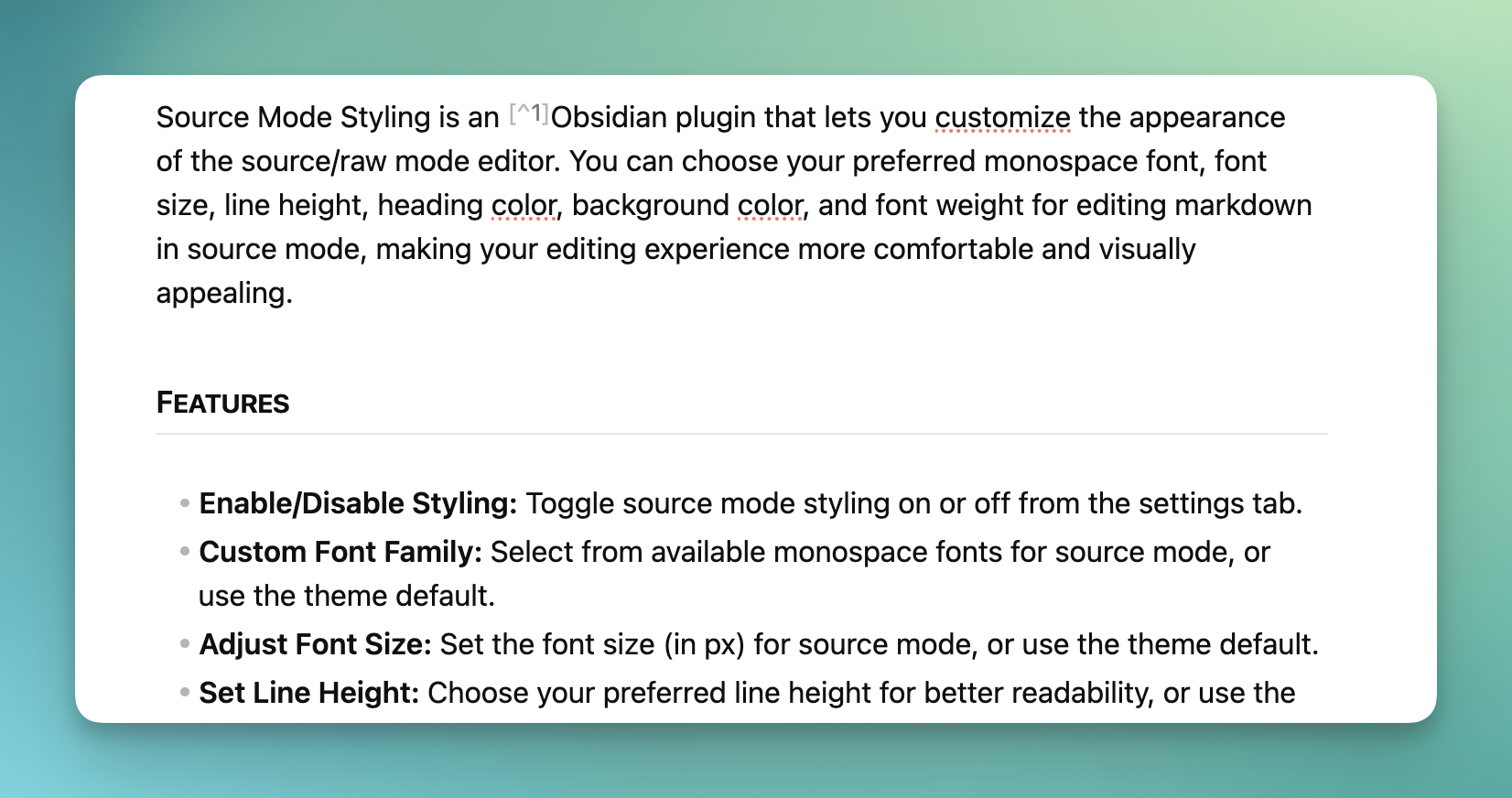
Before vs After

Default Obsidian Source Mode:

  • Displays formatting syntax with theme styling
  • Minimal visual differentiation from Live Preview mode
  • Variable-width fonts
  • Theme-dependent appearance

1.00

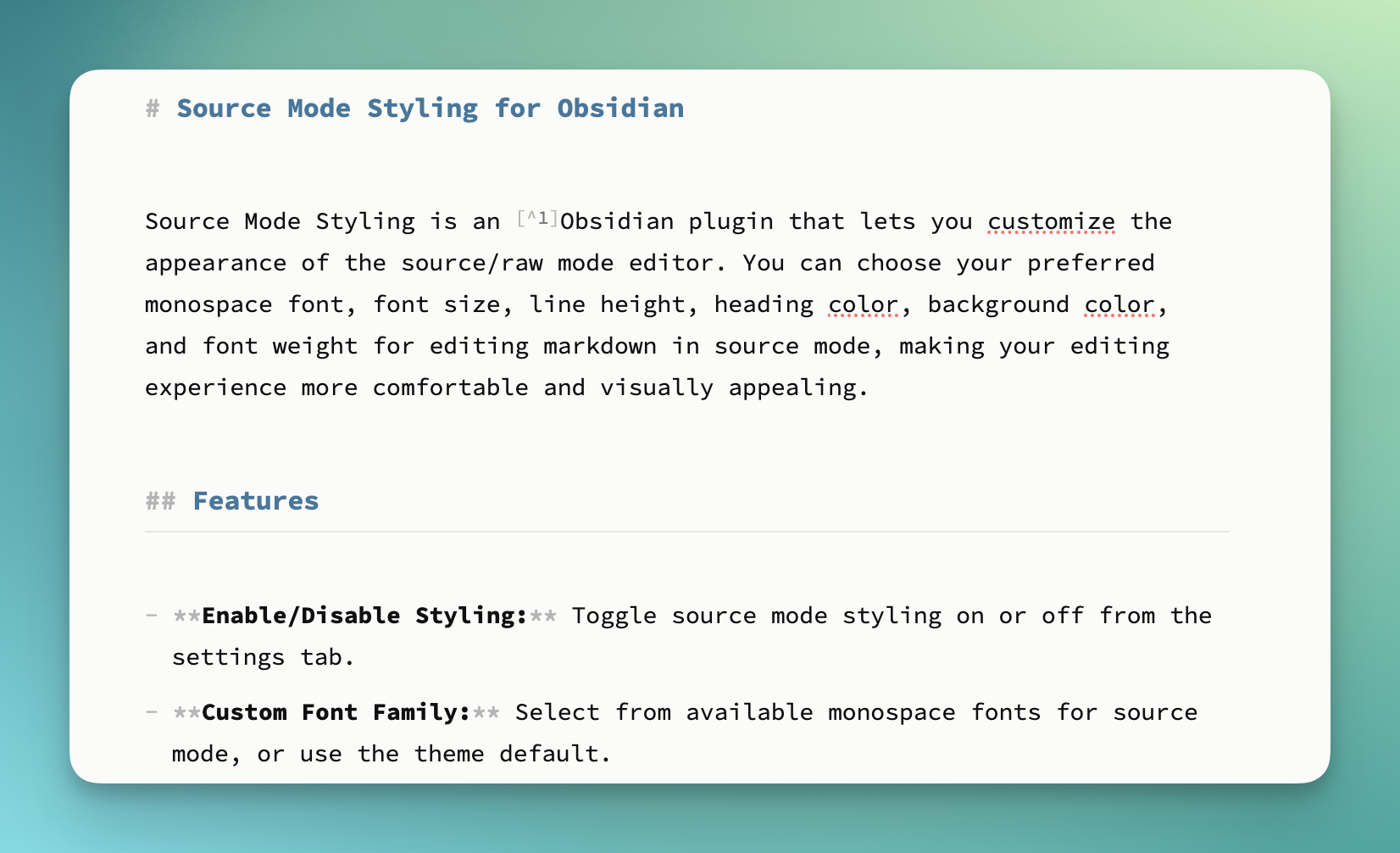
With Source Mode Styling:

  • Clean, monospace text rendering
  • Uses theme colours and styling
  • Customizable colours and sizing
  • True "raw" editor look and feel
  • Clear differentiation from Live Preview editing
1.00

Advanced Usage

Theme Integration

The plugin works seamlessly with Obsidian themes:

  • Use "Theme default" options to maintain theme consistency
  • Override specific elements (fonts, colours) while keeping theme aesthetics
  • Custom settings persist across theme changes

CSS Customization

For advanced users, the plugin adds a class .source-mode-raw and generates CSS that can be further customized:

/* All text */
.source-mode-raw .markdown-source-view.mod-cm6 .cm-scroller {
   /* Your styles */
}

/* Headings */
.source-mode-raw .markdown-source-view.mod-cm6 .cm-header {
  /* Your styles */
}

Compatibility

  • Obsidian Version: 1.9.14+
  • Platforms: Windows, macOS, Linux, iOS, Android
  • Themes: Compatible with all Obsidian themes
  • Other Plugins: No known conflicts

Troubleshooting

Font Not Appearing?

  • Ensure the font is properly installed on your system
  • Try refreshing the plugin settings
  • Check if the font supports monospace character spacing

Settings Not Applying?

  • Make sure you're in source mode (not live preview)
  • Try toggling the plugin off and on
  • Restart Obsidian if issues persist

Mobile Issues?

  • Font selection is limited to system fonts on mobile
  • Some advanced features may not be available on mobile platforms

Contributing

Contributions are welcome! Please see our development documentation for setup instructions.

Development Setup

  1. Clone the repository
  2. Run npm install to install dependencies
  3. Run npm run dev for development with hot reload
  4. Run npm run build to build for production

Changelog

See CHANGELOG.md for version history and release notes.

Requirements

  • Minimumum verified on Obsidian 1.9.x

License

MIT License © Chris Howard 2025

Buy me a coffee

Similar Plugins

info
• Similar plugins are suggested based on the common tags between the plugins.
Custom Frames
5 years ago by Ellpeck
An Obsidian plugin that turns web apps into panes using iframes with custom styling. Also comes with presets for Google Keep, Todoist and more.
Daily Notes Editor
4 years ago by boninall
A plugin for you to edit a bunch of daily notes in one page(inline), which works similar to Roam Research's default daily note view.
Base Tag Renderer
4 years ago by Darren Kuro
A lightweight obsidian plugin to render the basename of tags in preview mode.
Kill and Yank
4 years ago by INOUE Takuya
Obsidian plugin to enable kill and yank in editor
Custom Classes
4 years ago by Lila Rest
A minimal Obsidian plugin that allows you to add your own HTML classes to chosen Markdown elements directly from your notes.
Code Styler
3 years ago by Mayuran Visakan
A plugin for Obsidian.md for styling codeblocks and inline code
Sheets Extended
3 years ago by NicoNekoru
Plugin that adds features to tables in obsidian including merging, vertical headers, and custom css
Custom Font Loader
3 years ago by Amir Pourmand
A plugin to set custom font for obsidian
Editor Autofocus
3 years ago by Mgussekloo
Font Size Adjuster
3 years ago by Ryota Ushio
An Obsidian.md plugin to adjust font size via commands.
Fontsource
2 years ago by Ayuhito
A plugin to load custom fonts from Fontsource into Obsidian.
MathLive in Editor Mode
2 years ago by MizarZh
MathLive input in editor mode.
Checkbox styling helper
2 years ago by JaewonE
Render theme-independent SVG icon bullets from plain Markdown markers.
CSS Inserter
2 years ago by Erika Gozar
Inserts user-defined css snippets into the selected text.
Tailwind Snippet
2 years ago by Nicholas Wilcox
An Obsidian plugin that enables usage of Tailwind CSS.
Minimal Theme Settings
6 years ago by @kepano
Settings plugin to control colors and fonts in Minimal Theme
Better Word Count
6 years ago by Luke Leppan
Counts the words of selected text in the editor.
Typewriter Scroll
6 years ago by death_au
Typewriter Scroll Obsidian Plugin
Emoji Toolbar
6 years ago by oliveryh
An Obsidian plugin to quickly add emojis into your notes
Contextual Typography
6 years ago by mgmeyers
Relative Line Numbers
6 years ago by Nadav Spiegelman
Min3ditorHotkeys
6 years ago by Davor Sauer
Obsidian plugin adding minimal editor hotkeys
Admonition
5 years ago by Jeremy Valentine
Adds admonition block-styled content to Obsidian.md
Image in Editor
5 years ago by Ozan Tellioglu
This Obsidian plugin to view Images, Transclusions, iFrames and PDF Files within the Editor without a necessity to switch to Preview.
Reset Font Size
5 years ago by luckman212
Plugin for Obsidian that adds shortcuts for resetting the font size (zoom level).
Auto Split
5 years ago by James Sartelle
Open notes with side-by-side editor & preview
CookLang Editor
5 years ago by death_au/cooklang
Edit and display Cooklang recipes in Obsidian
Asciidoctor editor
2 years ago by dzruyk
Obsidian asciidoc editor plugin
Markdown Tags
2 years ago by John Smith III
Enhance your Markdown documents with custom tags. Use predefined or custom labels, customizable colors, and arrow indicators to visually track tasks and statuses.
Mode manager
2 years ago by dk949
Better management of reading/editing modes in obsidian
Frontmatter to HTML Attributes
6 months ago by Tarek Saier
Negative Heading
6 months ago by Ashan Devine
Plugin for Adding Discord Style Negative Headings to Obsidian
Path in tab title
5 months ago by d9k
Helix Keybindings
4 months ago by obsidian-helix
Use Helix keybindings inside Obsidian.md
Local Fonts
2 months ago by flowing-abyss
Load and use local fonts in Obsidian.
Power Editor
2 months ago by Power Plugins
Format any note from a toolbar, selection bubble, or slash menu: WYSIWYG editing, block drag handles, image resizing, dictation, and AI edits, all staying plain Markdown.
Composition Mode
2 months ago by kazys varnelis
Composition-mode-obsidian-plugin