css snippets

by Daniel Brandenburg
5
4
3
2
1
Score: 41/100

Description

Category: Customization & UI

The CSS Snippets plugin for Obsidian enables users to easily load and manage custom CSS snippets within their vault. By placing .css files in a designated folder, the plugin automatically loads them, providing a simple way to customize the appearance of Obsidian. Users can reload or unload these styles with commands in the command palette. The plugin also has future plans for more features, such as individual snippet toggling, a settings tab, and scoped styles. This plugin helps users personalize the Obsidian interface without needing to manually configure each style.

Reviews

No reviews yet.

Stats

19
stars
22,894
downloads
0
forks
2,003
days
2,002
days
2,002
days
0
total PRs
0
open PRs
0
closed PRs
0
merged PRs
5
total issues
3
open issues
2
closed issues
0
commits

Latest Version

5 years ago

Changelog

README file from

Github

Obsidian CSS Snippet Manager

An Obsidian plugin for loading custom css snippets
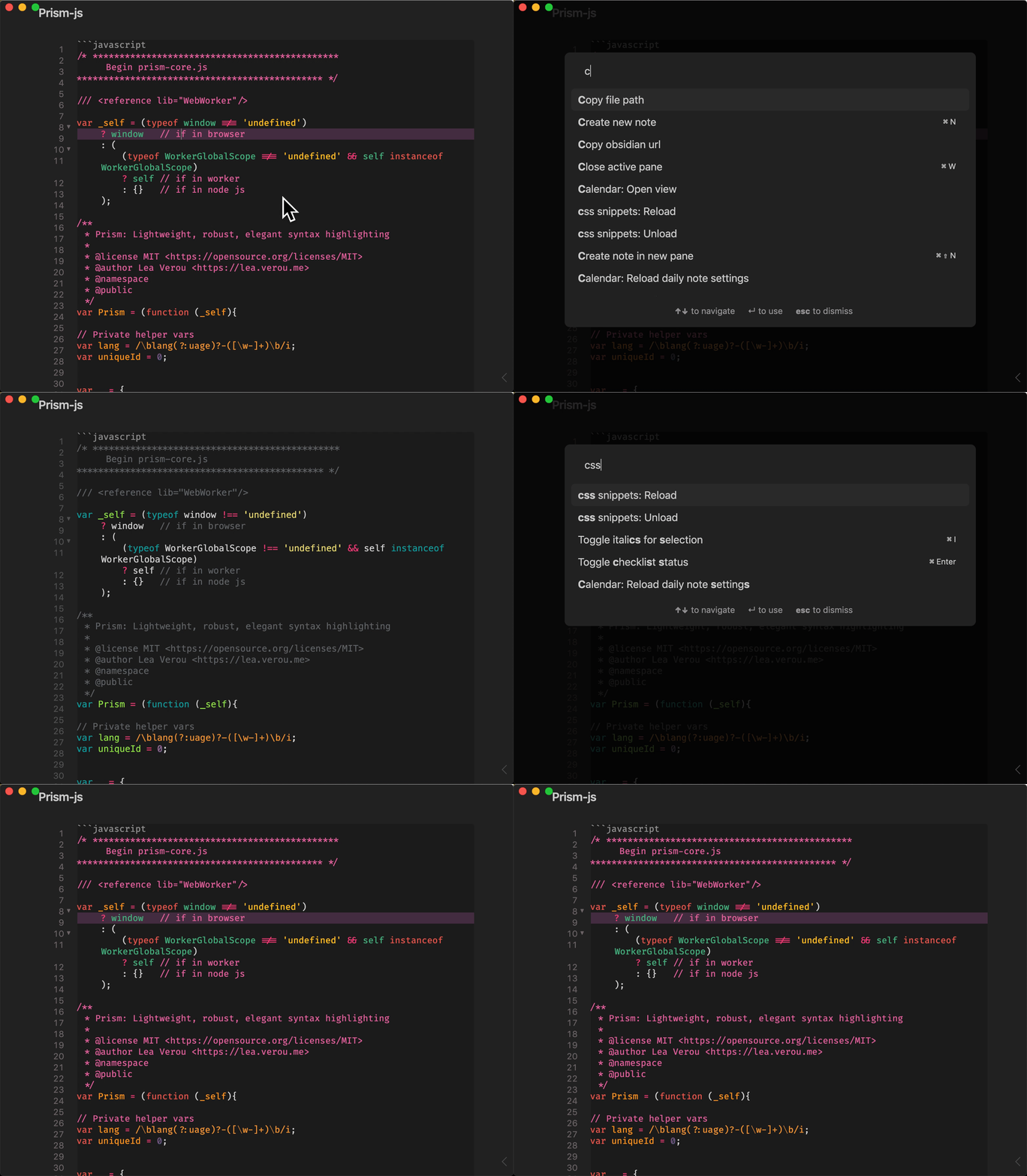
Example gif

Usage

Put .css files into css-snippets in the vault root. They get automagically loaded when the plugin loads.

This adds two commands:

  1. "css snippet: Reload" - loads or reloads the css files, use this if you add a new file to the folder.
  2. "css snippet: Unload" - unloads all loaded style snippets

Roadmap

  • Setting tab that allows user to set the folder for storing snippets
  • Toggle snippets individually ( command palette?)
  • consider adding scss and sass compilation???
  • scoped styles (defined in page frontmatter or based on tags etc.) - but need to find a solution for applying scoped style so that they apply only to the page not global

Compatibility

Custom plugins are only available for Obsidian v0.9.7+. The current API of this repo targets Obsidian v0.9.7+.

Installation

From within Obsidian

From Obsidian v0.9.8, you can activate this plugin within Obsidian by doing the following:

  • Open Settings > Third-party plugin
  • Make sure Safe mode is off
  • Click Browse community plugins
  • Search for "css snippets"
  • Click Install
  • Once installed, close the community plugins window and activate the newly installed plugin
Updates

You can follow the same procedure to update the plugin

From GitHub

  • Download the Latest release
  • Extract the obsidian-css-snippets folder from the zip to your vault's plugins folder: <vault>/.obsidian/plugins/
    Note: On some machines the .obsidian folder may be hidden. On MacOS you should be able to press Command+Shift+Dot to show the folder in Finder.
  • Reload Obsidian
  • If prompted about Safe Mode, you can disable safe mode and enable the plugin. Otherwise head to Settings, third-party plugins, make sure safe mode is off and enable the plugin from there.

Development

This project uses Typescript to provide type checking and documentation.
The repo depends on the latest plugin API in Typescript Definition format, which contains TSDoc comments describing what it does.

Note: The Obsidian API is still in early alpha and is subject to change at any time!

If you want to contribute to development and/or just customize it with your own tweaks, you can do the following:

  • Clone this repo.
  • npm i or yarn to install dependencies
  • npm run build to compile.
  • Copy manifest.json, main.js and styles.css to a subfolder of your plugins folder (e.g, <vault>/.obsidian/plugins/cm-editor-syntax-highlight-obsidian/)
  • Reload obsidian to see changes

Alternately, you can clone the repo directly into your plugins folder and once dependencies are installed use npm run dev to start compilation in watch mode.
You may have to reload obsidian (ctrl+R) to see changes.

Version History

v0.1.0

Initial Release. Basic functionality

Similar Plugins

info
• Similar plugins are suggested based on the common tags between the plugins.
Admonition
5 years ago by Jeremy Valentine
Adds admonition block-styled content to Obsidian.md
Custom Frames
4 years ago by Ellpeck
An Obsidian plugin that turns web apps into panes using iframes with custom styling. Also comes with presets for Google Keep, Todoist and more.
Code Styler
3 years ago by Mayuran Visakan
A plugin for Obsidian.md for styling codeblocks and inline code
Contextual Typography
5 years ago by mgmeyers
Sheets Extended
3 years ago by NicoNekoru
Plugin that adds features to tables in obsidian including merging, vertical headers, and custom css
MySnippets
5 years ago by Chetachi
MySnippets is a plugin that adds a status bar menu allowing the user to quickly manage their snippets within the comfort of their workspace 🖌.
Canvas CSS class
3 years ago by Lisandra-dev
A plugin that will add a css class to your canvas & adding to each canvas the path to help personnalization
Style Text
3 years ago by Juanjo Arranz
Apply custom CSS styles to selected text in your Obsidian Notes
Snippetor
4 years ago by ebullient
An assist for creating CSS snippets for Obsidian
Hyphenation
3 years ago by 7596ff
Enables justified text and hyphenation
Custom Classes
3 years ago by Lila Rest
A minimal Obsidian plugin that allows you to add your own HTML classes to chosen Markdown elements directly from your notes.
Markdown Tags
a year ago by John Smith III
Enhance your Markdown documents with custom tags. Use predefined or custom labels, customizable colors, and arrow indicators to visually track tasks and statuses.
Regex Mark
2 years ago by Mara-Li
Snippet Commands
5 years ago by death_au
Registers custom css snippets as commands (which you can bind hotkeys to)
Base Tag Renderer
3 years ago by Darren Kuro
A lightweight obsidian plugin to render the basename of tags in preview mode.
Obsidian Stylist
3 years ago by ixth
Obsidian plugin that allows to add classes and styles on markdown blocks
Auto Class
4 years ago by Nathonius
Automatically add CSS classes to notes based on file path.
Group Snippets
4 years ago by Mara-Li
Create folder of snippets to activate them in one click !
CSS Inlay Colors
2 years ago by Benji Grant
Show inline color hints for CSS colors in Obsidian
Custom Theme Studio
7 months ago by @gapmiss
An Obsidian.md plugin to create and tweak custom themes with live CSS editing, element styling, and instant previews. All without leaving Obsidian.
Checkbox styling helper
2 years ago by JaewonE
Helps you styling checkboxes in preview mode.
CSS Inserter
2 years ago by Erika Gozar
Inserts user-defined css snippets into the selected text.
Tailwind Snippet
2 years ago by Nicholas Wilcox
An Obsidian plugin that enables usage of Tailwind CSS.
Source Mode Styling
3 months ago by Chris Howard
Obsidian plugin. Provides a customisable raw look in source mode using a monospace font to clearly differentiate from Live Preview.
Frontmatter to HTML Attributes
2 months ago by Tarek Saier
Makes YAML frontmatter available as data-* attributes in HTML, enabling metadata based CSS styling.