Custom Commands

by Staaaaaaaaaan
5
4
3
2
1
Score: 55/100

Description

The Custom Commands plugin lets users define personalized commands to speed up common workflows like opening specific notes, creating templated files, inserting dynamic text snippets, or chaining multiple actions together. Each command type-Open, Create, Insert, and Sequence-can be customized with placeholders like date and time, and even configured to open notes in a new tab or window. This is particularly useful for recurring tasks such as journaling, note-taking for meetings, or setting up a morning routine. By centralizing these repetitive actions into named commands accessible from the command palette, the plugin helps users save time and maintain consistency in their workflows.

Reviews

No reviews yet.

Stats

17
stars
2,762
downloads
1
forks
511
days
190
days
190
days
7
total PRs
0
open PRs
0
closed PRs
7
merged PRs
4
total issues
0
open issues
4
closed issues
7
commits

Latest Version

6 months ago

Changelog

What's Changed

New Contributors

Full Changelog: https://github.com/Staaaaaaaaaan/obsidian-custom-commands/compare/1.0.6...1.0.7

README file from

Github

Custom Commands for Obsidian

Create personalized commands in Obsidian to streamline your workflow. Define commands that can open specific notes, create new notes with optional templates, insert text snippets, or run sequences of other commands.
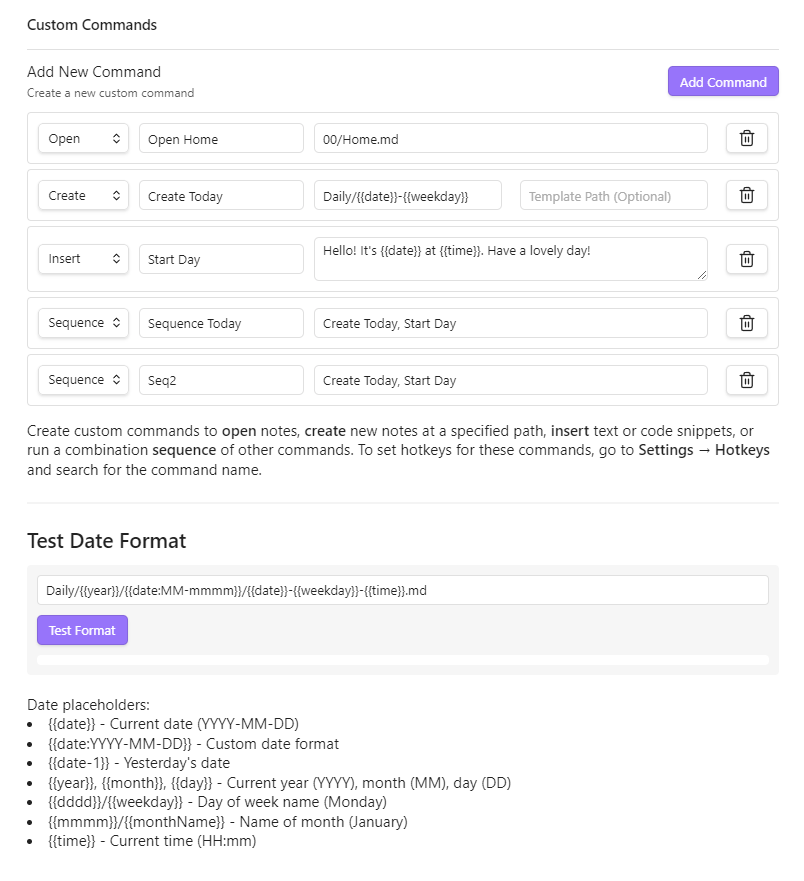
Custom Commands Settings

Features

  • Open Commands: Navigate directly to specific notes using dynamic date formatting
  • Create Commands: Generate new notes at specific paths with optional templates
  • Insert Commands: Insert text snippets with dynamic date/time placeholders
  • Sequence Commands: Chain multiple commands together to execute in sequence
  • Date & Time Placeholders: Use dynamic date/time formatting in all commands
  • New Tab Control: Choose whether commands open notes in current tab, new tab, or new window

Installation

From Obsidian Community Plugins

  1. Open Settings in Obsidian
  2. Navigate to Community plugins and turn off Restricted Mode
  3. Click Browse and search for "Custom Commands"
  4. Install the plugin and enable it

Manual Installation

  1. Download the latest release from the GitHub releases page
  2. Extract the files into your .obsidian/plugins/custom-commands/ folder
  3. Reload Obsidian and enable the plugin in Settings > Community plugins

Usage

Creating a Command

  1. Go to Settings > Custom Commands
  2. Click "Add Command"
  3. Choose a command type (Open, Create, Insert, or Sequence)
  4. Give your command a name
  5. Fill in the required fields based on the command type
  6. Your command will appear in the Command Palette (Ctrl/Cmd+P)

Command Types

Open Command

Opens an existing note at the specified path.

  • Path: The path to the note (e.g., Journal/{{date}}.md)
Create Command

Creates a new note at the specified path, optionally using a template.

  • Path: Where to create the new note (e.g., Meetings/{{date}}-Meeting.md)
  • Template Path: Optional path to a template file to use as content
Insert Command

Inserts a snippet of text at the current cursor position.

  • Snippet: The text to insert, which can include date/time placeholders
Sequence Command

Runs multiple commands in sequence.

  • Command Names: Comma-separated list of command names to execute in order

Date & Time Placeholders

Use these dynamic placeholders in paths, templates, and snippets:

  • {{date}} - Current date (YYYY-MM-DD)
  • {{date:YYYY-MM-DD}} - Custom date format
  • {{date+1}} - Tomorrow's date
  • {{date-1}} - Yesterday's date
  • {{year}}, {{month}}, {{day}} - Current year, month, day
  • {{weekday}} - Day name (Monday, Tuesday, etc.)
  • {{monthName}} - Month name (January, February, etc.)
  • {{time}} - Current time (HH:mm)
  • {{time:HH:mm:ss}} - Custom time format

Adding Hotkeys

  1. Go to Settings > Hotkeys
  2. Search for your custom command by name
  3. Click the plus icon to add a hotkey

Examples

Daily Journal

  • Type: Create
  • Name: Open Today's Journal
  • Path: Journal/{{year}}/{{date}}-{{weekday}}.md
  • Template: Templates/Journal.md

Meeting Notes

  • Type: Create
  • Name: New Meeting
  • Path: Meetings/{{date}}-Meeting.md
  • Template: Templates/Meeting.md

Insert Timestamp

  • Type: Insert
  • Name: Add Timestamp
  • Snippet: [{{time}}]

Morning Routine

  • Type: Sequence
  • Name: Morning Setup
  • Command Names: Open Today's Journal, Add Timestamp, Daily Note: Open today's daily note

Compatibility

  • Requires Obsidian v0.15.0 or above
  • Works on desktop and mobile

License

This project is licensed under the MIT License - see the LICENSE file for details.

Support

Similar Plugins

info
• Similar plugins are suggested based on the common tags between the plugins.
Quick Switcher++
4 months ago by darlal
Enhanced Quick Switcher plugin for Obsidian.md
Convert url to preview (iframe)
4 months ago by fhachez
Plugin for Obsidian.md to convert a selected URL to an iframe.
Hotkeys++
4 months ago by argenos
Adds hotkeys to toggle todos, ordered/unordered lists and blockquotes in Obsidian
Shell commands
5 years ago by Jarkko Linnanvirta
Execute system commands via hotkeys or command palette in Obsidian (https://obsidian.md). Some automated events are also supported, and execution via URI links.
Hotkey Helper
6 years ago by PJ Eby
Easily see and access any Obsidian plugin's options pane or hotkey assignments (including conflicts) from the Community Plugins tab
Code Editor Shortcuts
5 years ago by Tim Hor
Obsidian plugin to add keyboard shortcuts commonly found in code editors such as Visual Studio Code (vscode) or Sublime Text
Better Command Palette
5 years ago by Alex Bieg
A better command palette for obsidian
SystemSculpt AI
3 months ago by systemsculpt
Enhance your Obsidian App experience with AI-powered tools for note-taking, task management, and much, MUCH more.
Jump to link
6 years ago by MrJackphil
Quick jump between links using hotkeys
Hotkeys for specific files
6 years ago by Vinzent
Hotkeys for templates
5 years ago by Vinzent
Keyboard Analyzer
4 years ago by cogscides
Obsidian plugin to display command hotkeys on a visible keyboard layout
Local LLM Hub
2 months ago by TAKESHI MORITA
All-in-one local AI hub for Obsidian — LLM chat with vault tools, MCP servers, RAG, workflow automation, encryption, and edit history. Fully private, no cloud required.
Gemini Helper
2 months ago by TAKESHI MORITA
AI chat, workflow automation, semantic search (RAG), LLM Wiki (OKF) powered by Google Gemini. Works on both desktop and mobile.
Keyshots
4 years ago by KrazyManJ
🔮📝 Obsidian plugin that adds classic hotkey/shortcuts commands from popular IDEs like Visual Studio Code or JetBrains Family.
Font Size Adjuster
3 years ago by Ryota Ushio
An Obsidian.md plugin to adjust font size via commands.
Leader Hotkeys
6 years ago by Tony Grosinger
Use a leader-key (tmux style) for hotkeys in Obsidian.md
Mesh AI
2 years ago by Chasebank87
Global Hotkeys
5 years ago by Marc Jessome
Global hotkey support for Obsidian.md
Callout Integrator
4 years ago by
A plugin for Obsidian to allow the integration of long blocks of text into callouts.
Auto pair chinese symbol
5 years ago by renmu123
中文符号自动补齐
Hotkeys for Bookmarks
6 years ago by Vinzent
Search Everywhere
5 years ago by Mom0
Obsidian Search Everywhere Plugin
Format Hotkeys
6 years ago by Ansel Santosa
Google Docs style formatting hotkeys for Obsidian
Star Gate
2 months ago by starhunter
obsidian gate plugin
Sequence Hotkeys
4 years ago by Ruan Moolman
Obsidian plugin to support a sequenced of keyboard shortcuts to run commands.
Hyperlink Remover
a year ago by Daniel Agafonov
Easily remove hyperlinks and wikilinks from selected text or the entire note.
LLM Hub
2 months ago by TAKESHI MORITA
Obsidian plugin for AI chat, workflow automation, and semantic search — supports Gemini, OpenAI, OpenRouter, Grok, Ollama, and CLI backends
Cycle In Sidebar
4 years ago by Houcheng
Cycle through tabs of left/ right sidebar panel
Custom list character
3 years ago by Lilian POULIQUEN
Custom list character is a simple plugin allowing you to choose which character to use when making bullet lists in Obsidian.
Chorded Hotkeys
4 years ago by Trey Connor Meyers
Type multiple letters at the same time to trigger text insertion, template insertion, or command execution.
Min3ditorHotkeys
6 years ago by Davor Sauer
Obsidian plugin adding minimal editor hotkeys
Editor Commands Remap
5 years ago by cactus5
Obsidian plugin to map hotkeys to editor commands
Symbol linking
a year ago by Evan Bonsignori ; Mara-Li
Adds ability to link with any trigger in Obsidian. Each trigger can limit linking to specific folders or file.
Open File by Magic Date
4 years ago by simplgy
Hotkeys Chords
5 years ago by Dario Balboni
MemoChron
a year ago by Michalis Efstratiadis
Calendar integration and note creation with support for public iCalendar URLs.
AutoPause
2 months ago by ckep1
Allows only one audio track playing in Obsidian at a time, pausing the others.
Calculite
a year ago by Holo
Standard calculator plugin for Obsidian.
Web viewer Bookmarks
a year ago by Stefan Danzl
Obsidian Plugin to create Bookmarks for internal Web Viewer
Barosaurus
2 months ago by polygonhunter
A command bar for Obsidian — one field for notes, commands, tabs, headings, bookmarks and tags, and every result can be acted on: rename, move, bookmark, format.
Streams
a year ago by Floyd
Streams Obsidian Plugin
Duplicate line
a year ago by Marcin Sztolcman
Plugin for Obsidian: duplicate current line, or selection.
Floating Notes
2 months ago by haotiencheng
Floating popout window for instant note capture in Obsidian, inspired by Raycast Notes.
CmdSearch
2 years ago by SpaceshipCaptain
Hotstrings
2 years ago by wakywayne
Open in Cursor
a year ago by awaken233
An Obsidian plugin to open files in Cursor IDE or other VSCode-based editors (VSCode, Kiro, etc.) with automatic cursor position jumping. 一个可以在 Cursor IDE 或其他类 VSCode 编辑器中打开文件并自动跳转光标位置的 Obsidian 插件。
YouTrack Fetcher
a year ago by Forketyfork
Obsidian plugin for creating notes out of YouTrack issues
Recent Tab Switcher
2 years ago by Samuel Ang
Recent Tab Switcher Plugin for Obsidian.
Vim Marker Sharpener
a year ago by Artem Dvoryadkin
Text formatting commands in Vim mode. Supports applying styles (bold, italic, etc.). Works correctly in visual mode with selected text.
Editing Mode Hotkey
2 years ago by Signynt
Obsidian plugin to change the default editing mode (between Live Preview and Source) using a command or hotkey
Capitaliser
7 months ago by Emanuel Oliveira
An Obsidian plugin that cycles text capitalisation (lowercase → UPPERCASE → Capitalise Each Word) using Shift+F3, just like Microsoft Word
Select word
2 years ago by Connor Espino
Antigravity
16 days ago by ke yongcheng
Autonomous vault management, knowledge organization, and agentic intelligence powered by Google Antigravity (agy).
HOME key
a year ago by shichishima
Obsidian Plugin to move cursor to beginning of text, considering Markdown heading characters.
Weekday Commands
a month ago by Wren
Markdown Cleaner
5 months ago by gao-qian-long
Obsidian格式化markdown插件