On This Day I

by Ben Stuart
5
4
3
2
1
Score: 51/100

Description

Category: Learning & Knowledge Management

The On This Day I plugin enhances daily journaling in Obsidian by adding AI-powered commands that reflect on past entries and analyze diet-related content. It can scan your vault to find journal notes from the same date in previous years, generating summaries to help capture yearly progress or memories. Additionally, it parses food-related journal entries to estimate daily calories and macros.

Reviews

No reviews yet.

Stats

0
stars
461
downloads
0
forks
482
days
459
days
459
days
0
total PRs
0
open PRs
0
closed PRs
0
merged PRs
0
total issues
0
open issues
0
closed issues
0
commits

Latest Version

a year ago

Changelog

Remove beta (now removed) diet estimates feature - simplifying On This Day I back to its core, Through The Years, feature.

README file from

Github

on-this-day-i

This plugin for Obsidian adds AI commands for daily journals.
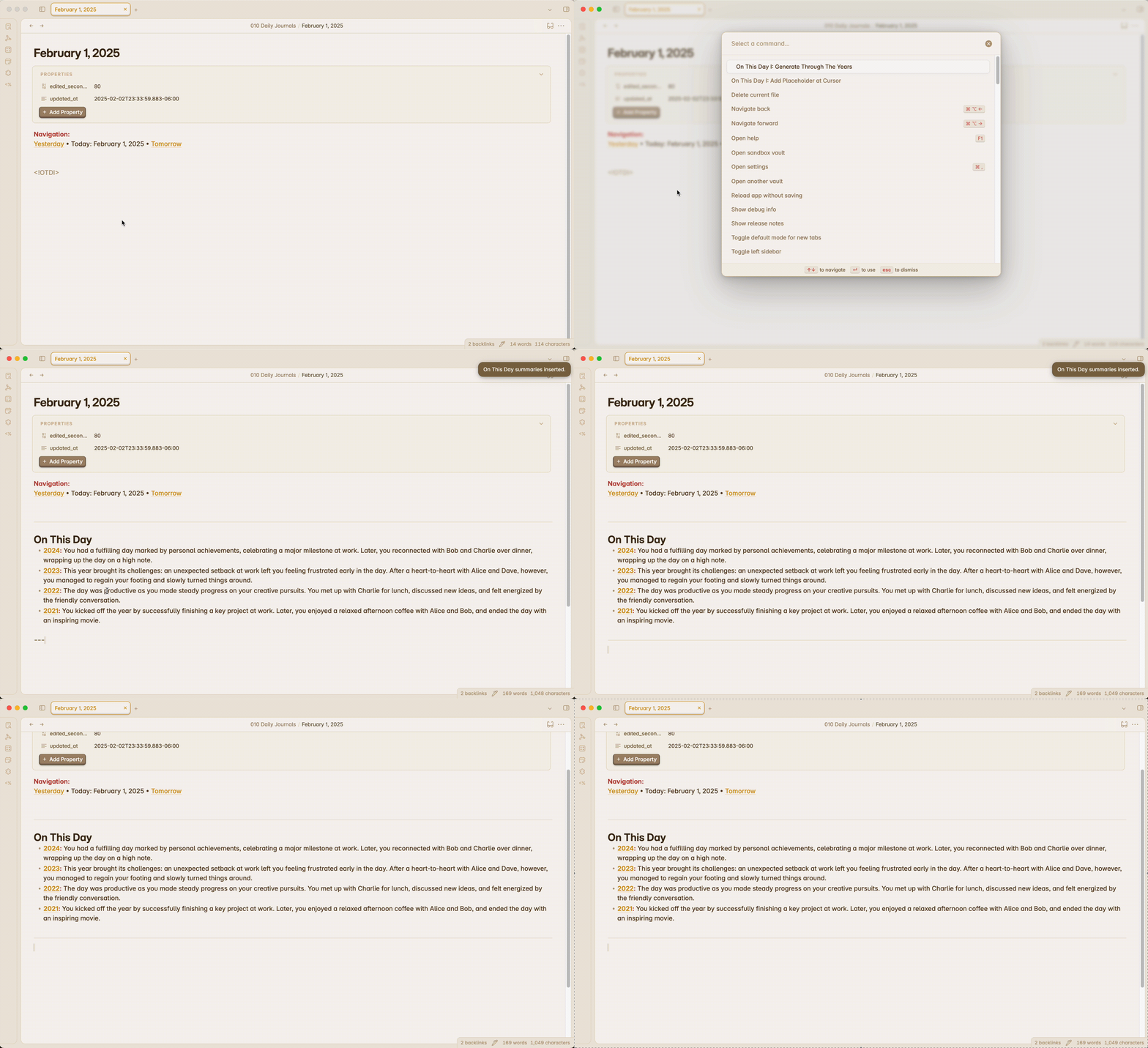
Features

This plugin comes with two commands:

Add Placeholder at Cursor

Adds a custom tag at your cursor location which the generation command looks for and replaces if it is available. The tag can be changed in settings. A tag command and setting should be available for each generation command.

Generate Through The Years

Uses AI to find Daily Notes from the same date as your current note in years past. Generates a brief summary of this date for each instance of it through the years and places it in your note.

How to Use

  • Enable the plugin in the settings menu and update the plugin settings accordingly.
  • Open the command palette and search for On This Day I to see the commands.
  • If you want the output to be placed at a certain location in your note, add a placeholder (default is , can be changed in settings). Run the On This Day I: Add Placeholder at Cursor command if you'd like to automatically add a placeholder to your note at cursor location.
  • Run the command On This Day I: Generate Through The Years to generate your yearly insights.

OpenAI

  • This plugin makes a network call to the OpenAI API to generate the journal summaries.
  • Must have OpenAI API key. See platform.openai.com. Add this key to plugin settings.
  • Model can be adjusted. Currently support gpt-3.5-turbo and gpt-4. Older models will be cheaper and often faster, but newer models will have higher quality outputs.

Through the Years Date Requirements

  • Must be run from a note with a valid Date format. Update the date format in settings to match your daily note format.
  • Daily notes must all follow the same date format (e.g, MMMM D, YYYY would be something like February 6, 2025)
  • There must be at least one other daily note from this day in a past year.

How to Install

From within Obsidian

You can activate this plugin within Obsidian by doing the following:

  • Open Settings > Third-party plugin
  • Make sure Safe mode is off
  • Click Browse community plugins
  • Search for "On This Day I"
  • Click Install
  • Once installed, close the community plugins window and activate the newly installed plugin

Obsidian Mobile

When using Obsidian on a mobile device, open the command palette to access the On This Day I plugin commands.

Similar Plugins

info
• Similar plugins are suggested based on the common tags between the plugins.
AI Agent
10 months ago by Manuel Magaña López
Empower your Obsidian vault with an AI agent from the provider of your choice.
AI Chat as Markdown
2 years ago by Charl P. Botha
Augmented Canvas
2 years ago by Léopold Szabatura
Supercharge your Obsidian canvas experience with AI features.
Claude Sidebar
15 days ago by derek-larson14
Run Claude Code, Codex, and other agent CLIs in Obsidian
Copilot auto completion
3 years ago by Jordi Smit
Gladdis
3 years ago by Aurélien Stébé
Gladdis (Generative Language Artificial Dedicated & Diligent Intelligence System) - it's an AI chatbot.
Image to notes by Photes.IO
2 years ago by Kanaries Data Inc.
AI Image to text notes plugin in obsidian
Local LLM Helper
2 years ago by Mani Mohan
An Obsidian plugin to process text, chat with AI, and semantically search your notes — works with any OpenAI-compatible LLM server (Ollama, LM Studio, vLLM, and more).
MCP Connector
14 days ago by istefox
Add integrations like semantic search and custom Templater prompts to Claude or any MCP client.
Nexus AI Chat Importer
2 years ago by Superkikim
Notes Refresher
2 years ago by Connor Park
Obsidian plugin for AI-generated note refreshers
NoteSmith
a year ago by csteamengine
Ollama
3 years ago by hinterdupfinger
packUp4AI
a year ago by Jeffry
An Obsidian plugin that helps you manage context for external LLM apps.
Prompt ChatGPT
2 years ago by Coduhuey
Pure Chat LLM
a year ago by Justice Vellacott
Turn notes into conversations with chatGPT or better yet Ollama
Understory
2 months ago by Rosetta Zidian Guo
A connection-sustain plugin: find connections and conflicts, update them over time