
README file from
GithubTypst Mate
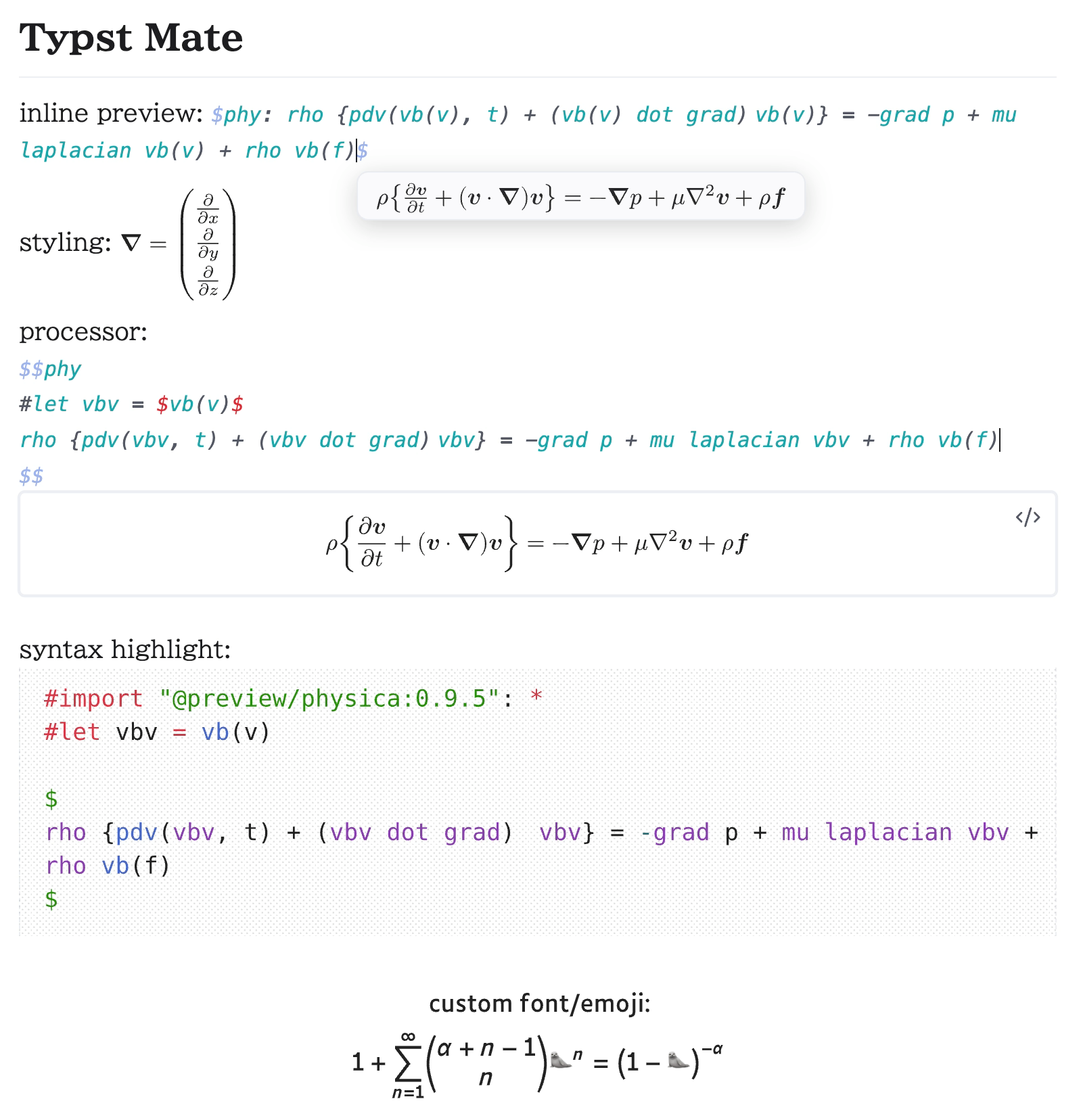
Render math expressions in Obsidian using Typst instead of MathJax.

| Snippet | Script |
|---|---|
 |
 |
For details, refer to the Documentation section below.
I welcome Discussions featuring your wonderful snippets!
Are you an Obsidian LaTeX Suite user? Check out this guide, or if you want to use only Typst codeblocks, check out this issue.
[!NOTE] For a smoother experience, some values are different from (or added to) standard Typst defaults. (e.g.
datetime,smallcaps,fontsize, andCURSOR) See the notes here for details.
Features
- Support inline math, display math, and code blocks
- Support preamble and templates (called processors)
- Linter
.typView- Bracket Jump
- Typst Shortcut
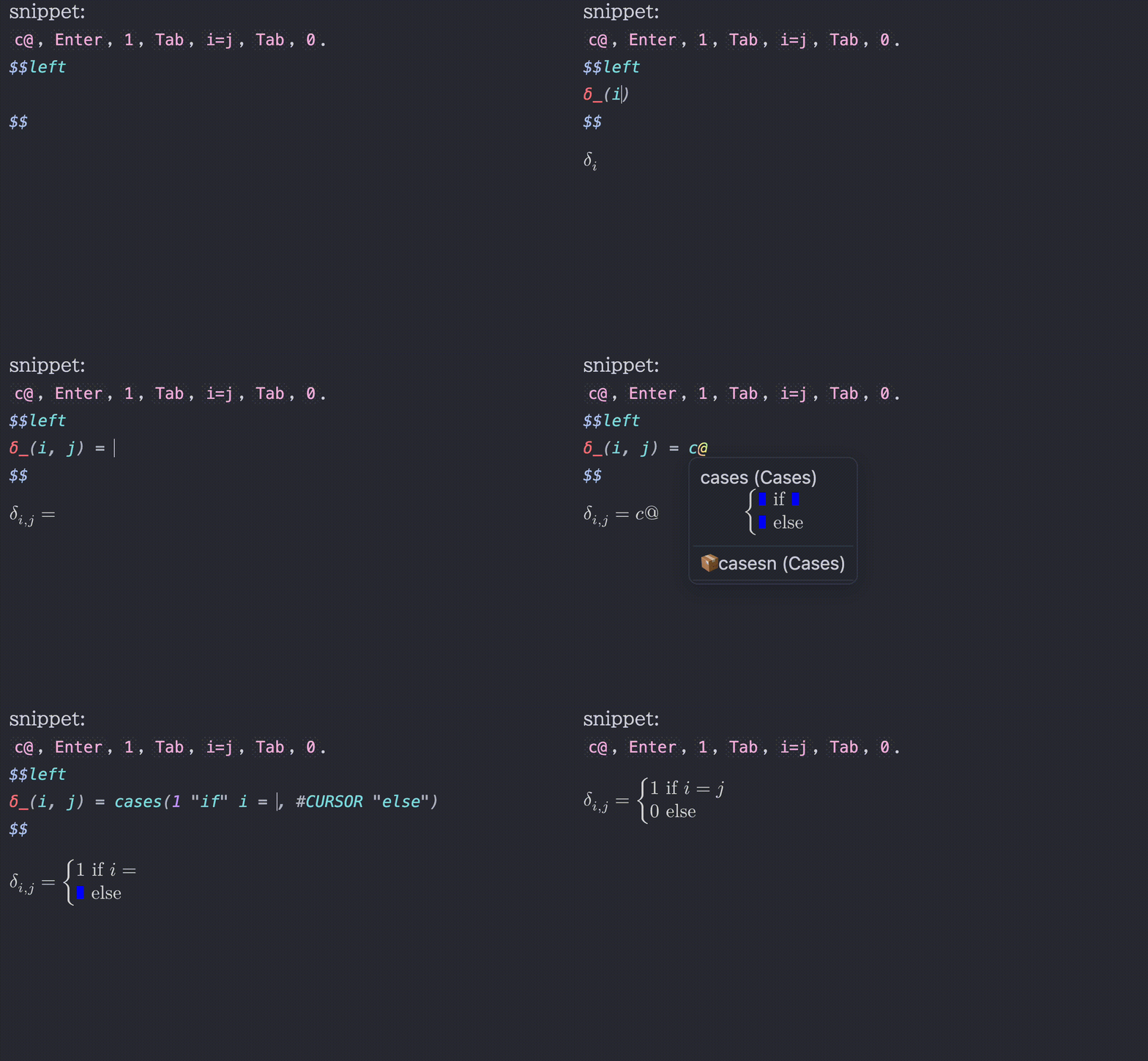
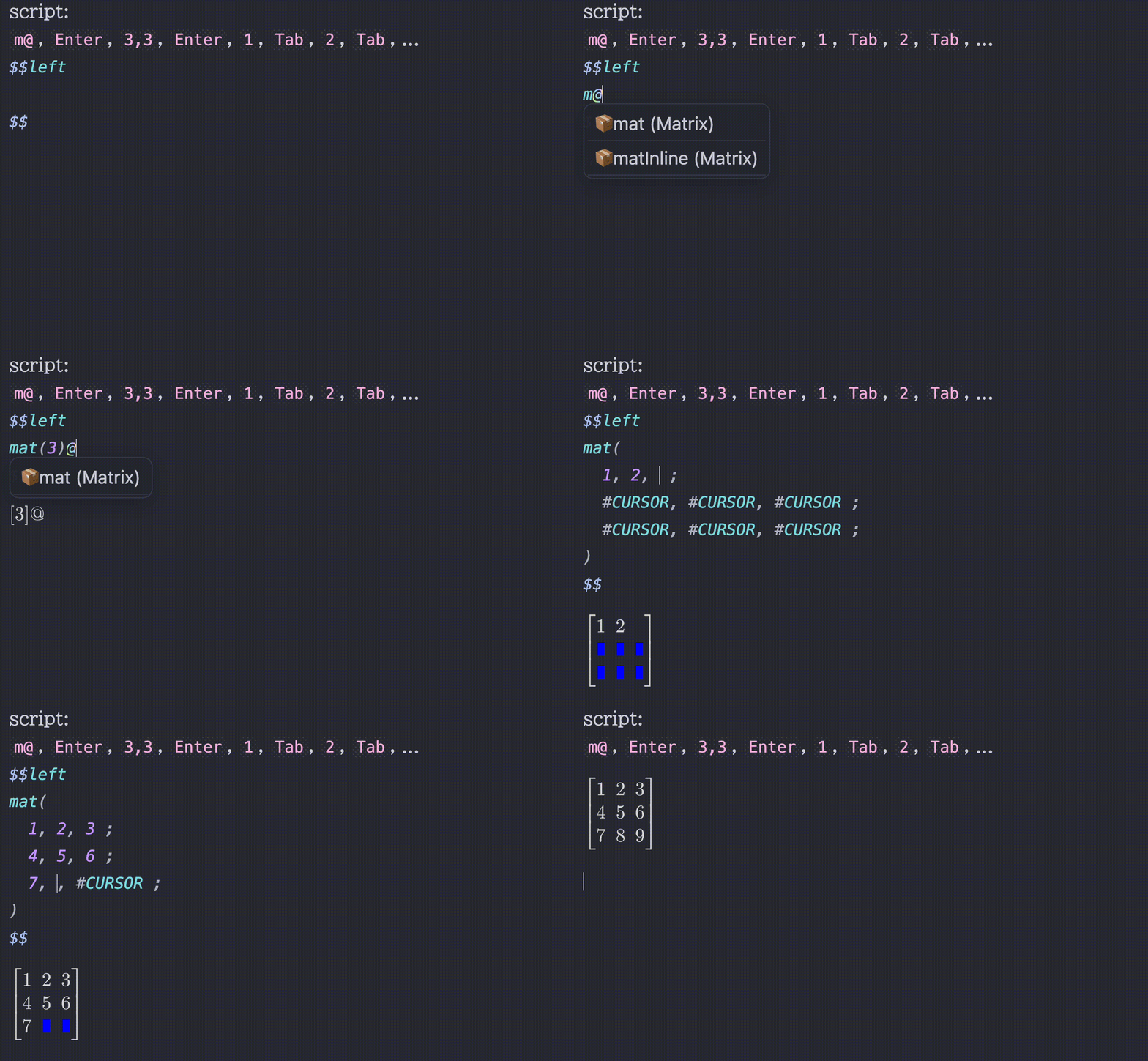
- Snippets / Scripts
- Bracket highlights
- Symbol completion
- Type a leading backslash
\to make the search look for LaTeX commands
- Type a leading backslash
- Inline math preview / Codeblock preview
- Available on mobile app
- Support background rendering
- Use font size from Obsidian settings
- Inherit text color from Obsidian theme
- Additional styling customization
- e.g., an option
inline-middleto vertically center inline math so it lines up naturally with the surrounding text
- e.g., an option
- Use custom fonts and import system fonts (desktop app only for importing)
- Almost all1 Typst packages are supported (desktop app only for importing local packages)
- Tables and blockquotes support with proper display math handling (
<br>and\n[\s\t]*>will be automatically replaced with line breaks) - Excalidraw integration
- Equation Citator integration
- No more flickering inline math compatibility
- PDF Export, Better Export PDF, Export Image plugin, and Webpage HTML Export compatibility
- Typst Tools
- Context Menu
- Copy as SVG (Obsidian Theme / Typst Default)
- Copy as PNG (Transparent / Opaque)
- Copy as img tag (for embedding into Obsidian notes)
- Support 'click to jump' (experimental)
- Click codeblock output
- Click math output with ctrl
For a better typing experience, I strongly recommend installing the No more flickering inline math plugin by RyotaUshio:
| Turned OFF | Turned ON |
|---|---|
 |
 |
Installation
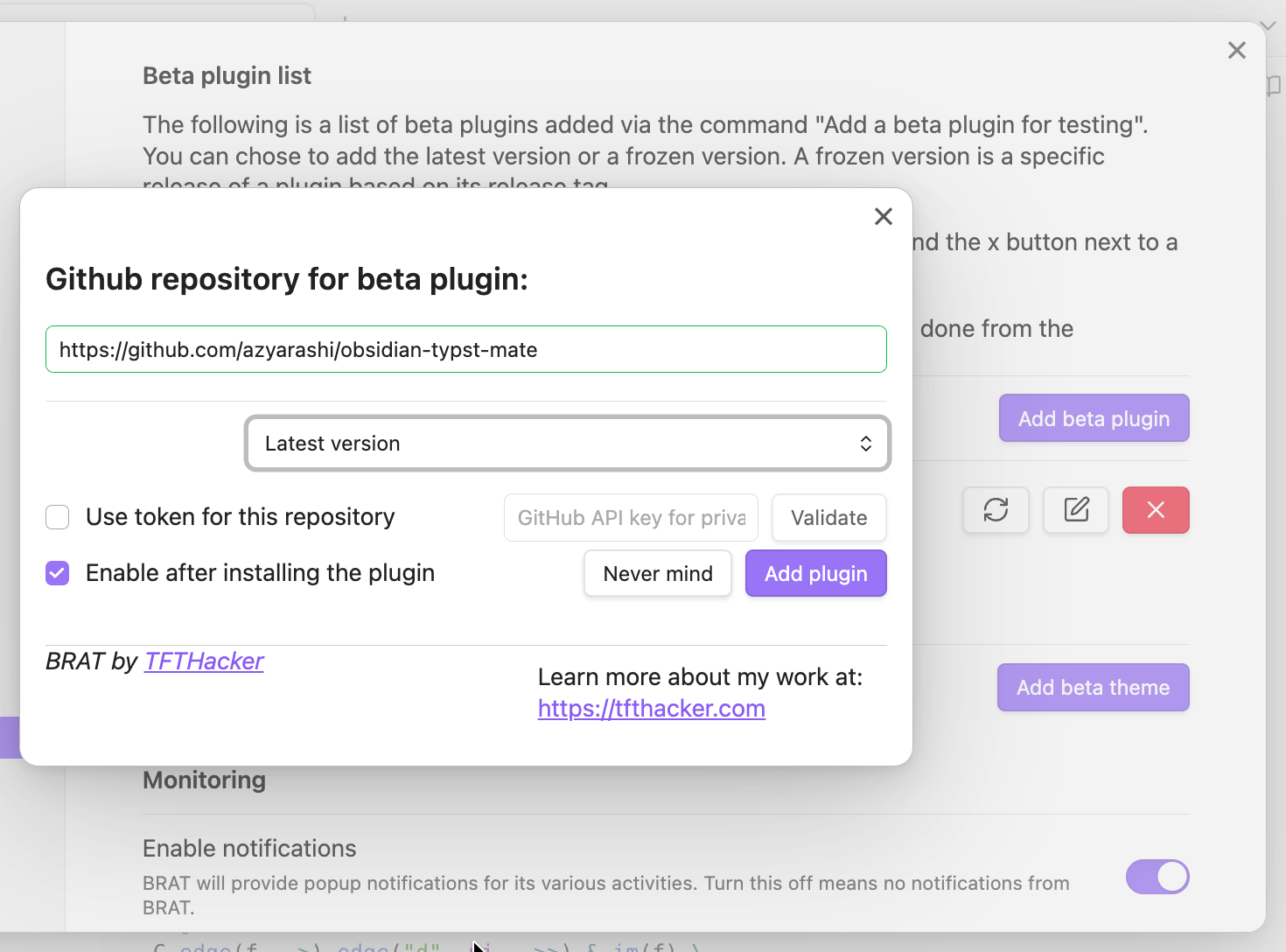
You can install this plugin via the Community Plugins tab within Obsidian. Search for "Typst Mate". Alternatively, you can also install using BRAT.
Documentation
- Processor - Customize rendering with preambles, templates, and styling
- Snippets - Auto-expanding shortcuts for math input
- Shortcuts - Wrap selected text in Typst functions (e.g.
sqrt,bold) - Tab Jump - Navigate through math content with Tab
- Commands - Available commands and actions
- Migrating from LaTeX Suite - Guide for Obsidian LaTeX Suite users
Compatibility
Official Features
- PDF Export
Community Plugins
- Excalidraw (use the
typst-render-to-excalidrawcommand) - Equation Citator (
Advanced Settings>Enable Typst Mode> reload the plugin) - Markmind
- No more flickering inline math
- Better Export PDF
- Export Image plugin
- Webpage HTML Export (don't forget to include CSS from Style Options and disable background rendering)
If the export doesn't work correctly, try disabling background rendering before exporting.
Customization
Default Preamble
#set page(margin: 0pt, width: auto, height: auto)
#show raw: set text(1.25em)
#set text(size: fontsize)  // `fontsize` refers to the settings in Obsidian
#import "@preview/mannot:0.3.1": *
#import "@preview/quick-maths:0.2.1": shorthands
#show: shorthands.with(
  ($+-$, sym.plus.minus),
  ($|-$, math.tack),
)
// Typst 0.13.1 or before (plugin 2.1.7 or before)
// #let scr(it) = text(features: ("ss01",), box($cal(it)$))
Custom Styling
You can apply your own custom CSS, not just the styling included in the plugin.
Depending on the three modes (inline, display, and codeblock), the styling method (style), and the identifier (id), the following CSS classes will be added:
typstmate-(mode)typstmate-style-(style)typstmate-id-(id)
Acknowledgements
Typst Mate leverages the following open-source projects:
- Typst - a modern and powerful typesetting system
- TyLax - a fast and highly compatible LaTeX to Typst converter
- Detypify - a tool for recognizing handwritten math symbols
- Quiver - a tool for creating commutative diagrams
- unicode-math - distributed under the LaTeX Project Public License (LPPL) 1.3c.
and contributors:
I'm grateful to the developers for making this plugin possible!
Disclosures
This section contains wording required for publishing on Obsidian's official Community Plugins page, so I include it here.
Network
This plugin makes use of a large WebAssembly (Wasm) binary. Bundling it directly would significantly increase startup time, so it is automatically downloaded from the Releases page instead.
Network access is required to install Typst packages, and is also required by Typst Tools to display lists of packages and symbols and to use Detypify and Quiver.
Reading Local Files (Desktop App only)
If the cache for a given package cannot be found inside the Vault, this plugin will fall back to accessing the same local package files used by the Typst CLI. For the exact locations, see typst/README.md#local-packages.
Planned Update Contents
See Discussion#10.