Cliplet

by namikaze-40p
5
4
3
2
1
Score: 52/100

Description

The Cliplet plugin acts as a private clipboard and snippet manager within your vault, independent of the system clipboard. It lets you capture, store, and reuse text or code snippets effortlessly without overwriting your OS clipboard. You can keep a searchable history of snippets and access them across devices using an optional data.json file stored in your vault, or keep them isolated per device through IndexedDB. Each cliplet is encrypted at rest, ensuring privacy even in synced environments.

Reviews

No reviews yet.

Stats

7
stars
1,260
downloads
0
forks
185
days
42
days
42
days
0
total PRs
0
open PRs
0
closed PRs
0
merged PRs
0
total issues
0
open issues
0
closed issues
0
commits

Latest Version

a month ago

Changelog

  • Security Updates: Updated internal dependencies to resolve reported vulnerabilities.

README file from

Github

Cliplet

An Obsidian plugin that serves as a clipboard and snippet manager — your own, separate from the OS clipboard.

Concept

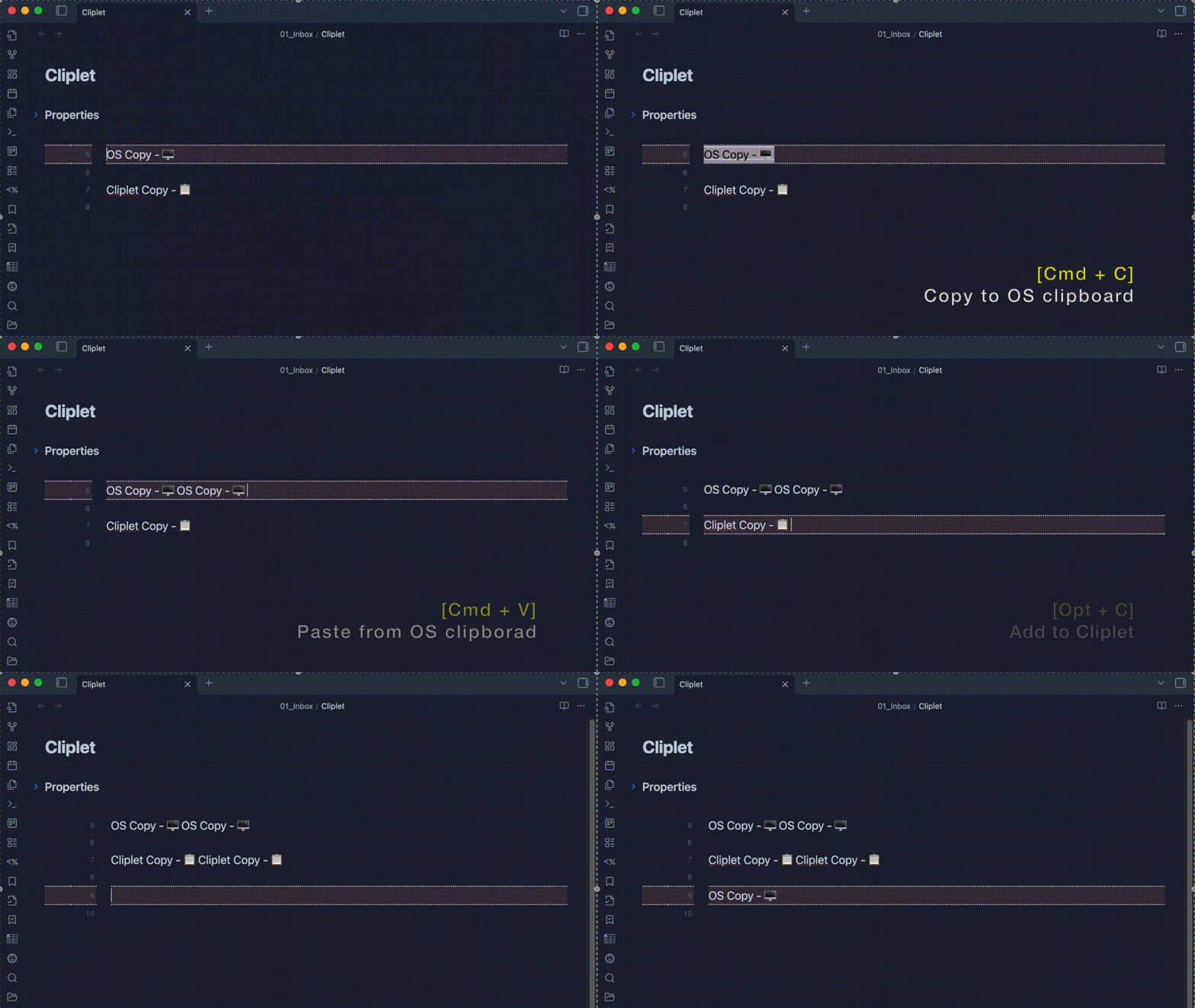
Cliplet is designed to keep your snippets always at hand inside Obsidian. With its separate clipboard, you can capture ideas, reuse text or code, and speed up your writing—without ever overwriting your system clipboard.

Cliplet also provides a Cliplet history inside Obsidian. With the data.json option, your snippets stay with your vault and sync across devices.

Why Cliplet?

  • Keep multiple snippets without overwriting your system clipboard.
  • Keep work and personal snippets separate from your OS clipboard.
  • Mobile-friendly: browse and paste snippets where clipboard managers are limited.
demo

Storage Options

Cliplet supports two storage methods. With a maximum of 200 items and encryption at rest, performance is comparable in most cases—choose based on portability and backup preferences.

  • IndexedDB – Stored in Obsidian’s internal browser database per vault and per device. This allows you to keep different cliplet data on different devices or vaults, making it useful for separating work and personal content or desktop and mobile usage.
  • data.json – Stored as a JSON file inside your vault. Easy to locate and manage, and included in your vault backups, sync, and version control.

Both options work entirely offline and keep your data private (content is encrypted at rest).

Storage type Advantages Disadvantages
IndexedDB Per-device and per-vault isolation enables different data sets for different contexts. Does not sync between devices; data is stored locally on each device.
data.json Easy to locate and manage. Included in vault backups, sync solutions, and Git history. Portable between devices. Storing many large cliplets can increase file size, which may slow loading or sync times.

[!NOTE]

  • Encryption: Cliplet encrypts stored content. While this prevents casual access, it is open-source software—someone with sufficient knowledge and access could theoretically decrypt the data.
  • data.json storage notes:
    • If your vault is stored on the internet (e.g., in a public GitHub repository or shared cloud folder), avoid making data.json publicly accessible. Even though its contents are encrypted, publishing it may still expose sensitive information to potential decryption attempts.
    • Using data.json lets your cliplets sync across devices — but only if your sync service keeps that file up to date.
      Some services, like iCloud, can be slow or unreliable at syncing data.json, especially on iPhone or iPad.
      If you frequently use Cliplet across multiple devices, please check how reliably your sync solution updates data.json before relying on it.
  • Device behavior: IndexedDB is per device and per vault; data.json travels with your vault (Obsidian Sync/Dropbox/Git, etc.).
  • Switching: You can change the storage method in settings. A built-in migration moves all items to the selected storage and deletes them from the previous one.

How to use

For the best experience, assign hotkeys to Cliplet commands in Obsidian’s settings.
This allows you to add, paste, and search cliplets quickly without leaving the keyboard.

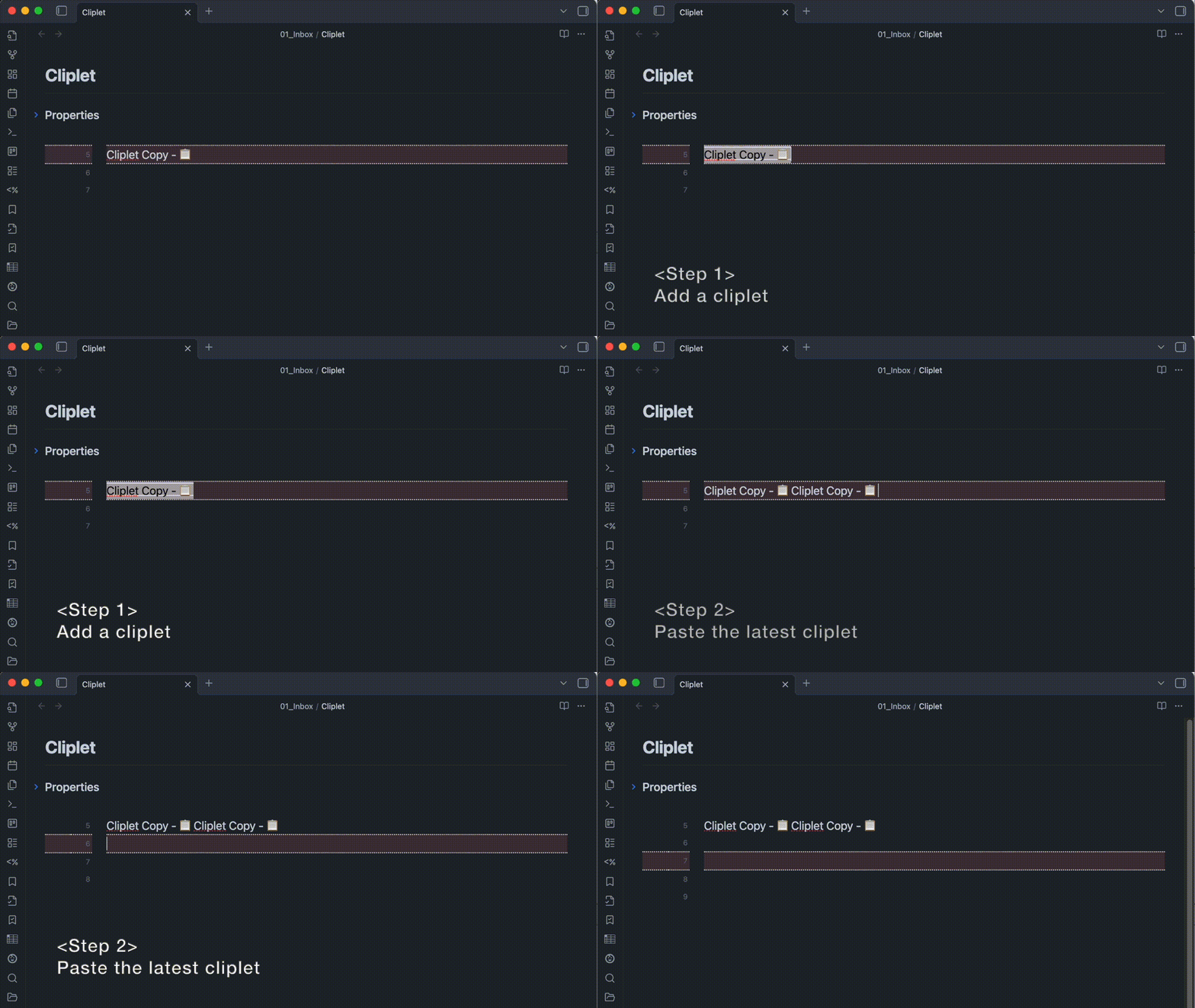
  1. Add a cliplet: Run the “Add cliplet” command after selecting text.
  2. Paste the latest cliplet: Run the “Paste latest cliplet” command.
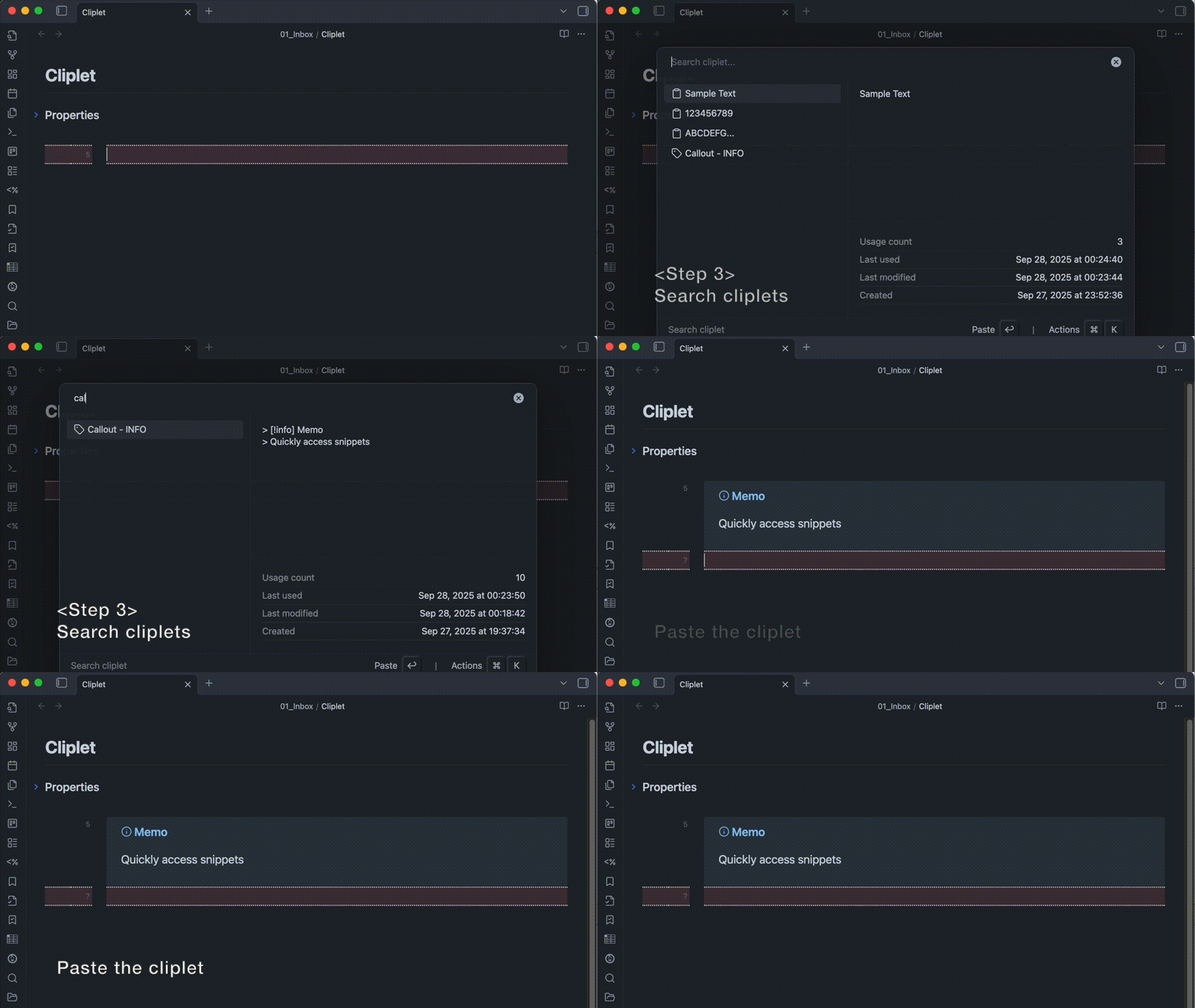
  3. Search cliplets: Run the “Search cliplet” command to find, then paste or edit the desired cliplet.
demo

demo

About placeholders

Cliplet lets you insert dynamic values inside cliplet content.
Use the following placeholders when writing cliplets:

Placeholder Description  Input example Output example
{cursor} Moves the cursor to the first {cursor} found in the text. Any additional {cursor}s are ignored. Hello {cursor}world Hello │world
{clipboard} Inserts the current OS clipboard text at this point. Text: {clipboard} Text: apple(If clipboard = apple)

Installation

You can find and install this plugin through Obsidian’s Community Plugins Browser.
For detailed steps or alternative installation methods, click here.

Similar Plugins

info
• Similar plugins are suggested based on the common tags between the plugins.
Meld Encrypt
5 years ago by meld-cp
Hide secrets in your Obsidian.md vault
Callout Manager
3 years ago by eth-p
An Obsidian.md plugin that makes creating and configuring callouts easy.
Image auto upload
5 years ago by renmu123
auto upload image with picgo
Google Drive Sync
a year ago by Richard Xiong
A plugin to make Obsidian work in Google Drive to enable access to iOS.
Share Note
3 years ago by Alan Grainger
Instantly share an Obsidian note with the full theme exactly like you see in your vault. Data is shared encrypted by default, and only you and the person you send it to have the key.
CSS Editor
3 years ago by Zachatoo
Edit CSS snippets in Obsidian.
Text Snippets
5 years ago by Ariana Khitrova
Snippets plugin for obsidian
Copy document as HTML
3 years ago by mvdkwast
Obsidian plugin: copy document as HTML, including images
MySnippets
5 years ago by Chetachi
MySnippets is a plugin that adds a status bar menu allowing the user to quickly manage their snippets within the comfort of their workspace 🖌.
Show Current File Path
5 years ago by Ravi Mashru
Obsidian plugin to show the file path of the current file in the status bar
Heading Shifter
4 years ago by kasahala
Easily Shift and Change markdown headings.
QuickShare
4 years ago by Maxime Cannoodt (@mcndt)
📝 An Obsidian plugin for sharing encrypted Markdown notes on the web. Zero configuration required.
Pieces for Developers
3 years ago by Pieces For Developers
Pieces' powerful extension for Obsidian-MD that allows users to access their code snippets directly within the Obsidian workspace
Extract Highlights
5 years ago by Alexis Rondeau
Manage your highlights in Obsidian by easily creating, removing and exporting them.
Smart Context
a year ago by 🌴 Brian
Cryptsidian
5 years ago by triumphantomato
Encrypt all files in your Obsidian.md Vault with a password.
Copy Inline Code
3 years ago by Ondrej Zavodny
Copy Image
2 years ago by Felipe D.S. Lima
Easily copy image to clipboard by right clicking image.
Typst Mate
3 months ago by azyarashi
Render math expressions with Typst instead of MathJax in Obsidian.
Snippetor
4 years ago by ebullient
An assist for creating CSS snippets for Obsidian
Slash snippets
10 months ago by echo-saurav
Insert snippet of text with slash command
Snippet Commands
5 years ago by death_au
Registers custom css snippets as commands (which you can bind hotkeys to)
Image Uploader
5 years ago by Creling
gpgCrypt
3 years ago by Tjado Mäcke
Seamlessly encrypts your notes using GPG. Supports smartcards for enhanced security! 🔒📝📎
Export to HTML
a year ago by kalvn
Export a note as HTML in the clipboard or in a file.
JSONifier
5 years ago by Kjell Connelly
Snippets
5 years ago by Pelao
Jelly Snippets
3 years ago by Spencer Gouw
A simple text snippets plugin for Obsidian.md. BACKUP SNIPPETS BEFORE UPDATING.
Sync Vault CE
a year ago by Camus Qiu
The missing bridge between your 10+ TB cloud drive and your AI brain.
Group Snippets
4 years ago by Mara-Li
Create folder of snippets to activate them in one click !
Relative Find
5 years ago by phibr0
Advanced Copy
2 years ago by leschuster
An Obsidian plugin to copy Markdown and transform it into HTML, Anki, or any custom format. Create custom profiles with versatile templates tailored to your workflow.
Image To Lskypro
3 years ago by NekouTarou
支持直接上传图片到图床Lsky,基于https://github.com/renmu123/obsidian-image-auto-upload-plugin.git改造。
Global Markdown Encryption
2 years ago by shlemiel
a plugin for encrypting obsidian markdowns in-memory, single password based.
External File Linker
a year ago by Kay606
Confluence Converter
a year ago by Addo Zhang
An Obsidian Plugin for Confluence
Snippets Manager
2 years ago by Venkatraman Dhamodaran
Snippets Manager (Text Expander) For Obsidian
GPG Encrypt
2 years ago by Luis Jaramillo
Obsidian Plugin GPG Inline Encrypt
Paste From History
2 years ago by Daniel Karakka
Obsidian plugin that adds the ability to paste text from Obsidian's clipboard history.
Publish URL
2 years ago by Hananoshika Yomaru
copy the publish url to clipboard
Eccirian Encrypt
10 months ago by Entropiex
Next-generation file encryption solution
Evernote Decryptor
2 years ago by rcmdnk
Obsidian Plugin for encrypted data imported from Evernote
Image Embedder
a year ago by Natalie Sumbo
Paste Image Rename and Convert
a year ago by iaos
An obsidian plugin that renames pasted images and covert formats
Crypt It
2 years ago by fyears
Obsidian plugin allowing users to right click on a file to generate an encryption version of the file using a password.
Cloud sync
9 months ago by Bing
一款强大的 Obsidian 同步插件,支持将笔记自动同步到多种云盘服务,提供端到端加密保护,让您的笔记既安全又便捷。
Age Encrypt
a year ago by Metin Ur
A plugin for Obsidian that provides age-based encryption for your notes.
Paste Image Into Property
a year ago by Nito
Convert Base64 to PNG
a year ago by Nykko Lin
Converts base64-encoded images to local PNG files for Obsidian.
File Share
2 years ago by muckmuck
A lightweight obsidian.md plugin for sharing files between multiple vaults
Snippetsaurus
a year ago by Christian Humbert
Recursive Copy
2 years ago by datawitch
Inline Code Copy
a year ago by Hongchen Lin
Clipboard Manager
9 months ago by Ayush Raj
The clipboard obsidian plugin
Vault Encrypt
5 months ago by Pluppen
Obsidian Plugin that encrypts/decrypts the entire vault.
Command Line
a year ago by Steven Stallion
Copy command lines from your notes to the clipboard.
Cypher
a year ago by Atharva Wankhede
Obsidian Plugin
Send Note
a year ago by jvsteiner
Instantly share an Obsidian note text/content with other users. Data is shared encrypted by default, and only you and the person you send it to have the key.
Sync-safe file names
6 months ago by j-maas
Ensure your Obsidian files can always be synced across all your devices.
Paste as file link
8 months ago by Matthias Büge
This plugin is used to paste a text from the clipboard as a link to an existing obsidian note
Ghost Text
8 months ago by lawrencefeng17
Hanko
a year ago by Telehakke
Obsidian plugin.
Sonkil
9 months ago by ohyoungpark
Fix Line Endings on Copy
7 months ago by KiwiJanus
Auto Math
a month ago by Vladislav Sorokin
Auto-expands LaTeX snippets. External rules with live reload, Custom Rules Editor, and default math pack.
Lskypro Upload V2
a month ago by 3kk0
Auto upload local images to LskyPro.