Textgrams

by Akop Kesheshyan
5
4
3
2
1
Score: 43/100

Description

Category: Note Enhancements

The Textgram Plugin for Obsidian provides a unique way to incorporate ASCII graphics directly into your notes. Whether you're documenting technical processes, creating flowcharts, Gantt charts, or tables, this plugin allows you to create flexible, versioned, and portable visual representations using text. By storing these graphics in your notes, they are automatically rendered as SVG images in preview mode, offering a seamless viewing experience. The plugin leverages the typograms library, ensuring an easy-to-use, text-based solution that doesn't lock you into specific tools. While you can manually create your ASCII graphics, future updates will include a built-in editor for even more convenience. This plugin is perfect for users who prefer keeping everything in Obsidian without relying on external diagramming tools.

Reviews

No reviews yet.

Stats

96
stars
1,691
downloads
3
forks
577
days
555
days
555
days
1
total PRs
0
open PRs
1
closed PRs
0
merged PRs
2
total issues
1
open issues
1
closed issues
9
commits

Latest Version

2 years ago

Changelog

README file from

Github

Textgram Plugin for Obsidian

Obsidian plug-in that allows you to create and store ASCII graphics in your notes. It can be used to to define diagrams, flowcharts, complex tables, Gantt charts and more in technical documentation, that will be rendered as a nice SVG graphics in the preview mode.

This plug-in is based on typograms library, originally developed by Sam Goto.
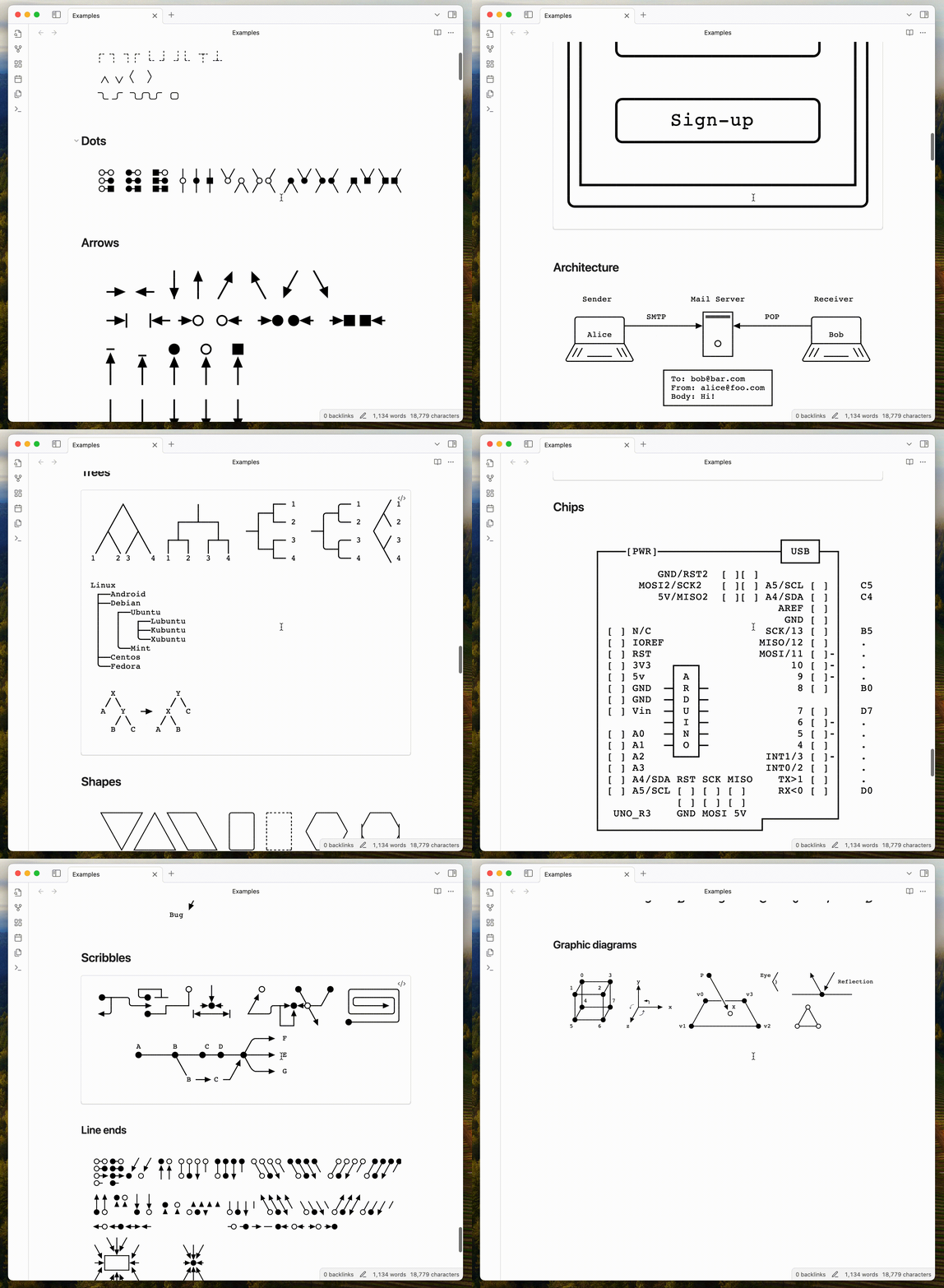
Obsidian Textgrams plugin example

Motivation

I'm a software engineer and I use Obsidian to document my projects, as long as support my continuous learning process. I often need to create diagrams, flowcharts, tables and other graphics, that are not locked in a specific tool, but can be easily shared and versioned in my notes.

Using ASCII graphics allows to create a very flexible and portable content, that can be easily edited and versioned in a text file, without loosing benefits of a visual representation.

Features

  • Store ASCII graphics in notes and render them as SVG graphics in the preview mode.
  • Use build-in editor to create and modify ASCII graphics without leaving Obsidian.

Installation

Install the plugin via the Obsidian third-party plugin browser.

  1. Open the Obsidian settings.
  2. In the sidebar, select Community plugins.
  3. Search for Textgrams in available plugins.
  4. Click Install.
  5. Enable the plugin in the Obsidian settings.

Usage

Just create a code block with textgram language and write your ASCII graphics inside it.

Example:

You can find more examples here.

Development

If you have any suggestions, issues or feature requests, please open an issue in the GitHub repository.

Support this project

You can support this project by starring the repository, sharing it with your friends or contributing to the code.

You can also support the author by buying him a coffee. Click sponsor button on the top of the page.

Similar Plugins

info
• Similar plugins are suggested based on the common tags between the plugins.
Text Generator
4 years ago by Noureddine Haouari
Text Generator is a versatile plugin for Obsidian that allows you to generate text content using various AI providers, including OpenAI, Anthropic, Google and local models.
Translator
4 years ago by Haifeng Lu
A plugin for Obsidian to translate selected text.
Text Dataset Aid Plugin
3 years ago by Conner Ohnesorge
This is a obsidian plugin to help with the creation of personal jsonl datasets for text generation models.
Toggle Case
3 years ago by automattech
Obsidian plugin to toggle between `lowercase` `UPPERCASE` and `Title Case`
Text Extractor
3 years ago by Simon Cambier
A (companion) plugin to facilitate the extraction of text from images (OCR) and PDFs.
Jelly Snippets
3 years ago by Spencer Gouw
A simple text snippets plugin for Obsidian.md. BACKUP SNIPPETS BEFORE UPDATING.
Colored Text
3 years ago by Erinc Ayaz
Iconoir Icons
3 years ago by @gapmiss
A plugin for creating customized icons in Obsidian.md
Colored Tags
3 years ago by Pavel Frankov
Colorizes tags in different colors.
Text Transform
3 years ago by ipshing
Text Conversions
3 years ago by Juan D Frias
Text conversions for Obsidian
Dynamic Text Concealer
2 years ago by Matt Cole Anderson
Obsidian.md Plugin to conceal or replace user configured text patterns in Live Preview and Read Mode.
Text Focus
2 years ago by usysrc
Focus the text area when opening a new note.
SwiftLaTeX Render
2 years ago by gboyd068
TinyChart
2 years ago by Alin Coop
Dead simple ASCII charts for Obsidian.
Regex Mark
2 years ago by Mara-Li
Remove Newlines
2 years ago by Elias Jaffe
A plugin for Obsidian.md which removes newlines and blank lines from selected or pasted text.
Arcane Obfuscate
2 years ago by Shusako
Obfuscate text in Obsidian.md with an arcane runic effect.
Text expand
6 years ago by MrJackphil
A simple text expand plugin for Obsidian.md
Text Snippets
5 years ago by Ariana Khitrova
Snippets plugin for obsidian
Icon Swapper
5 years ago by mgmeyers
Allows swapping out Obsidian's icons
Text Format
5 years ago by Benature
Format seleted text in Obsdidian.md
Text Transporter
5 years ago by TfTHacker
Text Transporter - advanced text management for Obsidian.
Colorizelt
2 years ago by Artsem Holub (WiNE-iNEFF)
Easy color and clear selected text
Text Finder
2 years ago by hafuhafu
Provides a find/replace window in edit mode similar to VSCode (supports regular expressions and case sensitivity).
SVG Style Editor
2 years ago by ARGOSTA
An Obsisan.md plugin for styling embeded SVG files
Snippetsaurus
2 years ago by Christian Humbert
ASCII Tree Generator
a year ago by Matěj Michálek
My SVGs
5 months ago by Omar Badawy
An Obsidian plugin that Registers your own SVGs into Obsidian's global icon library for use with other plugins or however you want.
GLSL Viewer
4 months ago by iY0Yi
Preview GLSL shaders on Obsidian.