Regex Mark

by Mara-Li
5
4
3
2
1
Score: 60/100

Description

Category: Note Enhancements

The Regex Mark plugin is a powerful tool for Obsidian users who want to add custom CSS classes to their text based on regular expressions. With this plugin, you can define a regex pattern and a corresponding CSS class, and the plugin will automatically apply that class to any text that matches the pattern. This allows for fine-grained styling of your notes and increases readability.

The plugin also supports advanced features such as custom Markdown tags, code block highlighting, and import/export functionality. Additionally, it provides options to disable regex matching in specific views (reading mode, live preview, source mode) and change the default open/close tags for regex patterns.

Overall, Regex Mark is a versatile plugin that can help you customize your Obsidian experience and make your notes more visually appealing.

Reviews

No reviews yet.

Stats

32
stars
8,652
downloads
2
forks
846
days
123
days
126
days
8
total PRs
0
open PRs
0
closed PRs
8
merged PRs
31
total issues
2
open issues
29
closed issues
11
commits

Latest Version

4 months ago

Changelog

1.11.1 (2026-05-19)

Bug Fixes

  • keep regex markers hidden unless cursor is inside match (45bfd0e)
  • use Decoration.mark instead of widget to allow markdown inside matches (0d9cdcd)

README file from

Github

Obsidian Regex Mark is a plugin for Obsidian that allows to add custom CSS classes to text based on regular expressions.

Usage

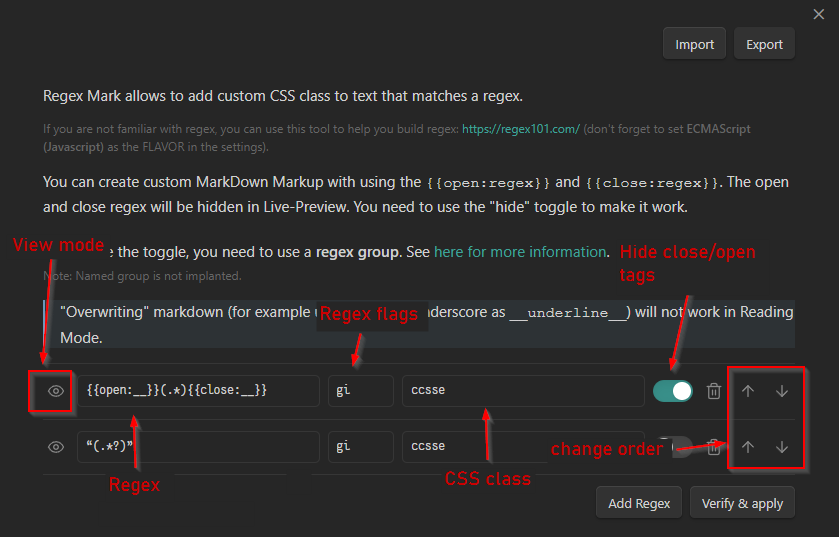
Add a regular expression and a CSS class to the plugin settings. The plugin will then add the CSS class to any text that matches the regular expression.

The contents of the regex will be added to the span tag with the data-content attributes for a more granular styling.

How it works

The following regular expression will add the CSS class comment to any text that matches the regular expression.

regex: //.*$
class: comment

And the following text:

This is a normal line of text. //This is a comment.

will be converted to:

<p>This is a normal line of text. <span data-contents="//This is a comment." class="comment">//This is a comment.</span></p>

It is also possible to create "custom" Markdown tags using the {{open:regex}} and {{close:regex}} syntax. You need to toggle the option hide to enable it.

[!NOTE] The usage of __ for underline (ie __text__) is not supported in reading mode, but works well in Live Preview!

The plugin will mimic the behavior of Obsidian with transforming:

__text__

to:

<span class="underline" contenteditable="false">
  <span>
    <span class="cm-hide">__</span>
    <span class="underline">this is a normal text with underline (in LP)</span>
    <span class="cm-hide">__</span>
  </span>
</span>

The css will after hide the .cm-hide class, unless you select it (only in livePreview for the selection).

Selecting the text will show everything, like with other markup.

Named group

You can also encapsulate a sub-css into a regex mark, using named group. The group name will be used as the CSS class. For example :

  • Regex : {{open:^-# }}((@(?<bold>.*)@)?(?<other>.*))
  • Text : ^-# @bold@ hello world
  • Result :
    <span class="small" data-contents="^-# @bold@ hello world">
      <span class="bold">bold</span>
      <span class="other"> hello world</span>
    </span>
    

[!important] If you want to keep the rest of the text, you need to add another named group at the end of the regex, like (?<other>.*) in the example above. This mean that is not possible to match multiple time the same group in the same text: -# @bold@ hello world @bold@ will not work as expected.

[!WARNING] The named group is only displayed when not in source mode or when the cursor is not on the text.

Class Substitution

To the class string substitution will be applied. Explaination taken from

Pattern Inserts
$$ Becomes "$"
$& Becomes the full matched string.
$n Becomes the capturing group n
$<Name> Becomes the named capturing group "Name"

For example :

  • Regex : \color\[(r|b|g)]
  • Class : color-$1
  • Text : \color[r]
  • Result :
    <span class="color-r" data-contents="\color[r]">
      \color[r]
    </span>
    

Settings
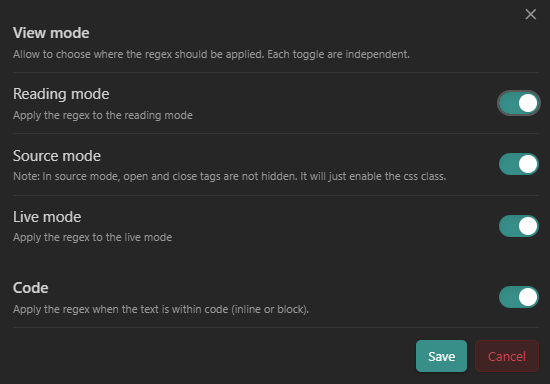
img.png

View mode

img.png You can disable "per view" the regex, aka, disabling for:

  • Reading mode
  • Live Preview mode
  • Source mode

Each toggle is independent, so you can disable for reading mode, but enable for live preview mode.

You can also disable/enable a snippet within code (code-block or inline, between backticks), with toggle "Code".

Auto rules

You can enable (or disable) a regex for a specific files, using either :

  • The file path
  • Properties (YAML frontmatter) based on the values of a configurable frontmatter key (regex_mark by default)1.

You can choose to NOT or EQUAL :

  • NOT : The regex will not be applied to all files that not match the rule.
  • EQUAL : The regex will be applied to all files that match the rule.

In auto-rules, regex are supported, so you can use them too.

Change open/close tags (advanced user only!)

This setting allow to change the default {{open:}} and {{close:}} tags to something else, allowing to use the } (for example) as an opening/closing (ie {regex} can be recognized and stylized). When the tags are changed, the regex are automatically updated to use the new tags. If a regex is broken, it will be disabled in all view, and a warning will be displayed in a Notice.

Import / export

You can share your regexes with other people without manually sharing the data.json using the import / export feature. You can also use it to back up your regexes.

The settings also port the open/close tags, so you can share the settings with the tags you use. Manual regex in object format can also be imported, and they will be added to the list.

Next steps

You can then use the CSS class to style the text in your CSS snippet or any other usages. You can even import or export settings from others!

Examples

  • Underline : {{open:__}}(.*){{close:__}} Note: To make it works in Reading mode, read this
  • SuperScript : {{open:\^}}(.) (Note: It works for "one" character only here, but you can use ^x^ syntax if you want to use for more text: {{open:\^}}(.*){{close:\^}})
  • SubScript : {{open:_}}([a-zA-Z\d]\b)) (As before, it works for only one element)

The CSS for the above example is:

.superscript {
    vertical-align: super;
    font-size: 90%;
}

.subscript {
    vertical-align: sub;
    font-size: 90%;
}

Additional notes

In reading mode the plugin can't override the default mark behavior. For example, ** and __ will be always bold, and render without the tag. The plugin won't recognize the opening and closing pattern, and ignore it.

To prevent this, you can escape the pattern using a backslash (\):

\__hello world\__
lorem ipsum (won't be in italic)

In reading view, it will render as:

__hello world__

And the regex should be: {{open:\\?_\\?_}}(.*){{close:\\?_\\?_}} You need to make the backslash optional, because they don't render in the reading view.


[!WARNING] If your Obsidian refuse to open a file, and you get this error in the console:

RangeError: Decorations that replace line breaks may not be specified via plugins

That's mean that one of your regex doesn't work inside Obsidian. You need to check every regex you have added to find the one that cause the issue and delete it, and reload Obsidian to make it work again. I tried to find a way to catch the error and display it in the console, but I didn't find a way to do it... So, if you have any idea, I'm open to suggestions!


Credits


Transparency

I use some IA (with Copilot in Agent) on some part of the code, mainly for the experimental features like the named group. I already standed against the use of AI for code generation, but I think that using it for some parts of the code is not a problem, as long as I don't use it for the main part of the plugin, and I uderstand the results. I also, sometimes, ask question to ChatGPT to help me to "think" (as a duckduck debugging) about the code, but I don't use it to write the code (or only some little snippets).

If you like, you can help me, correct the code generation, or even help me with pair programming! My discord is mara__li (yes, simple likes that, with two underscore). You can also find me on the official Obsidian Discord Server. I'm (mostly) chill >:)

Footnotes

  1. You need to reload the file (open it again) to apply/disable the regex when the frontmatter is changed in the reading mode.

Similar Plugins

info
• Similar plugins are suggested based on the common tags between the plugins.
aDHL
a year ago by tine-schreibt
The Dynamic Highlights Plugin, but with hotkeys, more options and sorting; works well with Highlightr.
April Automatic Timelines
3 months ago by april-gras
Simple timeline generator plugin for story tellers using obsidian
Arcane Obfuscate
2 years ago by Shusako
Obfuscate text in Obsidian.md with an arcane runic effect.
Auto Class
5 years ago by Nathonius
Automatically add CSS classes to notes based on file path.
Auto Replacer
a year ago by Alecell
A live text replacement plugin that applies automatic formatting, corrections, or custom replacements in real-time. Define your own regex-based rules and transformation logic to modify text dynamically as you type.
AutoMover
a year ago by Al0cam
Move files and notes with specified names into their designated folders according to rules you define.
Blue Star
2 years ago by Wang Guoshi
A plugin for Obsidian that generates Anki flashcards in various ways.
Bulk Rename
4 years ago by Oleg Lustenko
Canvas CSS class
4 years ago by Lisandra-dev
A plugin that will add a css class to your canvas & adding to each canvas the path to help personnalization
Colored Tags
3 years ago by Pavel Frankov
Colorizes tags in different colors.
Colored Text
3 years ago by Erinc Ayaz
Colorizelt
2 years ago by Artsem Holub (WiNE-iNEFF)
Easy color and clear selected text
CSS Inlay Colors
2 years ago by Benji Grant
Show inline color hints for CSS colors in Obsidian
CSS Inserter
2 years ago by Erika Gozar
Inserts user-defined css snippets into the selected text.
Custom Selected Word Count
a year ago by banisterious
Custom Selected Word Count for Obsidian
Custom Theme Studio
a year ago by @gapmiss
An Obsidian.md plugin to create and tweak custom themes with live CSS editing, element styling, and instant previews. All without leaving Obsidian.
Dynamic Text Concealer
3 years ago by Matt Cole Anderson
Obsidian.md Plugin to conceal or replace user configured text patterns in Live Preview and Read Mode.
Embed HTML
3 months ago by mnaoumov
Obsidian Plugin that adds support for embedding HTML files
File Explorer++
4 months ago by kelszo
A plugin for https://obsidian.md, which enables the ability to hide and pin specific files and folders in the file explorer by applying custom filters.
FileName Styler
a year ago by Marc Feininger
An Obsidian plugin to hide, customize, and decorate file names in the sidebar using regex and customizable profiles.
Find and replace in selection
5 years ago by Dmitry Savosh
Obsidian plugin. Find and replace in selection.
Global Search and Replace
3 years ago by Mahmoud Fawzy Khalil
A plugin to do a global search and replace in all your Obsidian vault files.
Group Snippets
4 years ago by Mara-Li
Create folder of snippets to activate them in one click !
Hide Commands in Menu
2 years ago by bomian98
Obsidian Plugin, hide different commands in different menus.
Hyphenation
4 years ago by 7596ff
Enables justified text and hyphenation
Jelly Snippets
3 years ago by Spencer Gouw
A simple text snippets plugin for Obsidian.md. BACKUP SNIPPETS BEFORE UPDATING.
Linkify
4 years ago by Matthew Chan
LinkMagic
2 years ago by AndyReifman
MySnippets
5 years ago by Chetachi
MySnippets is a plugin that adds a status bar menu allowing the user to quickly manage their snippets within the comfort of their workspace 🖌.
Path in tab title
4 months ago by d9k
Regex Line Filter
a year ago by 64MM4-KN1F3
A note filtering plugin for Obsidian
Regex Pipeline
5 years ago by No3371
An Obsidian plugin that allows users to setup custom regex rules to automatically format notes.
Remove Newlines
2 years ago by Elias Jaffe
A plugin for Obsidian.md which removes newlines and blank lines from selected or pasted text.
Snippet Commands
5 years ago by death_au
Registers custom css snippets as commands (which you can bind hotkeys to)
Snippetor
5 years ago by ebullient
An assist for creating CSS snippets for Obsidian
Snippetsaurus
2 years ago by Christian Humbert
Style Settings
5 years ago by mgmeyers
A dynamic user interface for adjusting theme, plugin, and snippet CSS variables within Obsidian
Style Text
3 years ago by Juanjo Arranz
Apply custom CSS styles to selected text in your Obsidian Notes
Tag Links
2 years ago by Zacchary Dempsey-Plante
A plugin for Obsidian that allows tags to be opened as links using a hotkey.
Text Conversions
3 years ago by Juan D Frias
Text conversions for Obsidian
Text Dataset Aid Plugin
4 years ago by Conner Ohnesorge
This is a obsidian plugin to help with the creation of personal jsonl datasets for text generation models.
Text expand
6 years ago by MrJackphil
A simple text expand plugin for Obsidian.md
Text Extractor
4 years ago by Simon Cambier
A (companion) plugin to facilitate the extraction of text from images (OCR) and PDFs.
Text Finder
2 years ago by hafuhafu
Provides a find/replace window in edit mode similar to VSCode (supports regular expressions and case sensitivity).
Text Focus
3 years ago by usysrc
Focus the text area when opening a new note.
Text Format
5 years ago by Benature
Format seleted text in Obsdidian.md
Text Generator
5 years ago by Noureddine Haouari
Text Generator is a versatile plugin for Obsidian that allows you to generate text content using various AI providers, including OpenAI, Anthropic, Google and local models.
Text Snippets
6 years ago by Ariana Khitrova
Snippets plugin for obsidian
Text Transform
3 years ago by ipshing
Text Transporter
5 years ago by TfTHacker
Text Transporter - advanced text management for Obsidian.
Textgrams
2 years ago by Akop Kesheshyan
Create and store ASCII graphics in your Obsidian
Toggle Case
4 years ago by automattech
Obsidian plugin to toggle between `lowercase` `UPPERCASE` and `Title Case`
Translator
4 years ago by Haifeng Lu
A plugin for Obsidian to translate selected text.
URL Formatter
a year ago by Thomas Snoeck
Automatically formats specific URLs pasted into Obsidian into clean Markdown links.