Convert Base64 to PNG

by Nykko Lin
5
4
3
2
1
Score: 27/100

Description

The Convert Base64 to PNG plugin helps streamline note organization by converting base64-encoded images into local PNG files. It detects embedded base64 image data within your notes, decodes and saves them as image files in a user-defined folder, and updates the note links accordingly. This conversion can be done manually per note or across the entire vault, with optional auto-conversion upon pasting. Customizable settings let users define file names, output folders, and automation preferences. By replacing bulky base64 data with external PNG files, the plugin reduces file size, improves note readability, and enhances portability for sharing or exporting.

Reviews

  • Nathan Broadbent
    Reviewed on Mar 22nd, 2026
    Works perfectly! Can set up a hotkey to convert all base64 images into images under attachments/ Thanks!

Stats

14
stars
1,252
downloads
4
forks
416
days
428
days
428
days
1
total PRs
1
open PRs
0
closed PRs
0
merged PRs
2
total issues
1
open issues
1
closed issues
0
commits

Latest Version

README file from

Github

Convert Base64 to PNG

This plugin for Obsidian converts base64-encoded images in your notes to local PNG files. Reduce the size of your markdown files and make them more portable!

Demo
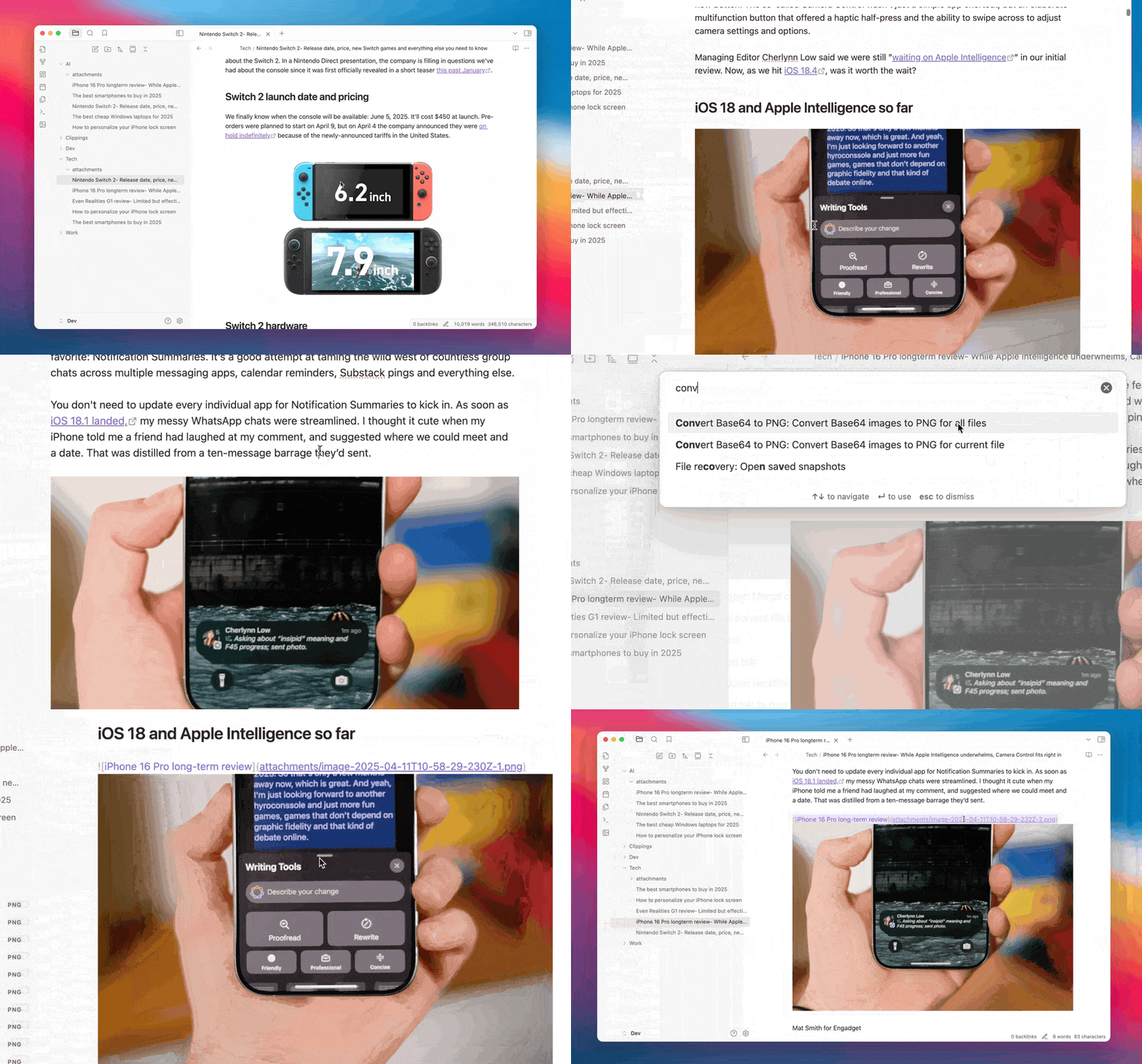
Demo

Features

  • Base64 Detection: Automatically detects base64-encoded images in your notes
  • Local Conversion: Converts base64 images to local PNG files
  • Batch Processing: Process individual files or all files in your vault
  • Customizable Storage: Configure where and how PNG files are stored
  • Automatic Conversion: Option to automatically convert base64 images when pasting

How It Works

When you run the plugin:

  1. It scans your notes for base64-encoded images
  2. Decodes the base64 data to binary
  3. Saves the binary data as PNG files in your configured folder
  4. Updates the links in your notes to point to the local PNG files

This makes your notes smaller, more portable, and easier to work with.

Settings

General Settings

  • Auto Convert: Automatically convert base64 images when pasting
  • Output Folder: Folder where PNG files will be saved (relative to the note)
  • Filename Format: Format for generated filenames with placeholders for date, index, and image type

Commands

  • Convert Base64 images to PNG for current file: Process the currently active file
  • Convert Base64 images to PNG for all files: Process all markdown files in the vault

Installation

From Obsidian Community Plugins

  1. Open Obsidian Settings
  2. Go to Community Plugins
  3. Search for "Convert Base64 to PNG"
  4. Click Install, then Enable

Use Cases

  • Reduce File Size: Base64-encoded images can make your markdown files very large
  • Improve Portability: Local PNG files are more portable and can be used outside of Obsidian
  • Better Organization: Keep your images in a dedicated folder instead of embedded in your notes
  • Easier Editing: Smaller markdown files are easier to edit and work with

Similar Plugins

info
• Similar plugins are suggested based on the common tags between the plugins.
Image auto upload
5 years ago by renmu123
auto upload image with picgo
Copy document as HTML
4 years ago by mvdkwast
Obsidian plugin: copy document as HTML, including images
Show Current File Path
5 years ago by Ravi Mashru
Obsidian plugin to show the file path of the current file in the status bar
File Info Panel
4 years ago by CattailNu
This plugin for Obsidian creates a small File Info view that displays the active file's date created, date modified, file size, and links to open the file in its native application and to open the file's folder.
Smart Context
2 years ago by 🌴 Brian
Extract Highlights
6 years ago by Alexis Rondeau
Manage your highlights in Obsidian by easily creating, removing and exporting them.
Copy Inline Code
3 years ago by Ondrej Zavodny
Copy Image
2 years ago by Felipe D.S. Lima
Easily copy image to clipboard by right clicking image.
Paste image Png to Jpeg
4 years ago by musug
When pasting screenshots into obsidian notes, convert the images to jpeg and compress them
Export to HTML
2 years ago by kalvn
Export a note as HTML in the clipboard or in a file.
Image Uploader
5 years ago by Creling
JSONifier
5 years ago by Kjell Connelly
Advanced Copy
2 years ago by leschuster
An Obsidian plugin to copy Markdown and transform it into HTML, Anki, or any custom format. Create custom profiles with versatile templates tailored to your workflow.
Relative Find
5 years ago by phibr0
Confluence Converter
a year ago by Addo Zhang
An Obsidian Plugin for Confluence
Image To Lskypro
3 years ago by NekouTarou
支持直接上传图片到图床Lsky,基于https://github.com/renmu123/obsidian-image-auto-upload-plugin.git改造。
Disk Usage
3 years ago by Promptier
Obsidian plugin to measure disk usage for tracking size of folders, file types and plugins
Paste From History
2 years ago by Daniel Karakka
Obsidian plugin that adds the ability to paste text from Obsidian's clipboard history.
Publish URL
3 years ago by Hananoshika Yomaru
copy the publish url to clipboard
Image Embedder
a year ago by Natalie Sumbo
Paste Image Rename and Convert
a year ago by iaos
An obsidian plugin that renames pasted images and covert formats
Tiff Viewer
2 years ago by Jan Ullmann
An obsidian plugin to easily convert tiff files to png so that they can be displayed in obsidian
Cliplet
8 months ago by namikaze-40p
An Obsidian plugin that serves as a clipboard and snippet manager — your own, separate from the OS clipboard.
Paste Image Into Property
a year ago by Nito
Recursive Copy
2 years ago by datawitch
Clipboard Manager
a year ago by Ayush Raj
The clipboard obsidian plugin
Command Line
a year ago by Steven Stallion
Copy command lines from your notes to the clipboard.
Paste as file link
10 months ago by Matthias Büge
This plugin is used to paste a text from the clipboard as a link to an existing obsidian note
Ghost Text
10 months ago by lawrencefeng17
Hanko
a year ago by Telehakke
Obsidian plugin.
Fix Line Endings on Copy
9 months ago by KiwiJanus
Sonkil
a year ago by ohyoungpark