Pixel Perfect Image

by Johan Sanneblad
5
4
3
2
1
Score: 60/100

Description

The Pixel Perfect Image plugin enhances image management within Obsidian by providing quick resizing, editing, and file operations directly from the context menu. Users can adjust image dimensions to preset percentages or specific pixel values, copy images to the clipboard, and open them in external editors like Photoshop. The plugin also supports quick resizing with mouse wheel scrolling, renaming images, and opening files in system viewers or file explorers.

Reviews

No reviews yet.

Stats

86
stars
19,965
downloads
3
forks
517
days
7
days
7
days
2
total PRs
0
open PRs
2
closed PRs
0
merged PRs
45
total issues
0
open issues
45
closed issues
0
commits

Latest Version

7 days ago

Changelog

Changed

  • We had to remove the option to open images in a custom external app. Obsidian's new Community Plugins security panel flags the system-process access required by this feature as high risk, because it technically gives a plugin broad control over the computer—not just the selected image. You can still use Open in default app. To open images in a specific editor, set that editor as the default app for the image type in your operating system settings.

README file from

Github

Pixel Perfect Image for Obsidian

Available in: English • Deutsch • Español • Français • 日本語 • 中文

Pixel Perfect Image is a plugin for Obsidian that helps you manage images in your notes. Right-click any image to view its details, resize it to exact pixel dimensions, or perform file operations like copying it to the clipboard or opening it in your default app.

Screenshot

If you love using Pixel Perfect Image, please consider buying me a coffee or Sponsor on GitHub ❤️.

Features

  • Pixel perfect resize: Quickly resize images to pixel perfect percentages (100%, 50%, 25%) or custom widths in pixels
  • Mousewheel support: Quick resize with mousewheel (hold Alt/Option and scroll)
  • Copy image to clipboard: For quick paste into other programs
  • Copy local file path to clipboard: If you want to access the image from terminal
  • Show in Finder/Explorer: Open file browser with your image selected
  • Open in default system viewer: Open the image in your default application
  • Rename images: Quickly rename image files right from the context menu
  • Works with both Wikilinks and standard Markdown image links
  • Quick open in new tab: CMD/CTRL + click to open image in new tab

How to Use

  1. Install the plugin from Obsidian's Community Plugins
  2. Right-click an image in your notes
  3. Available options:
    • View filename and dimensions
    • Resize to preset percentages
    • Copy, open, or show in system
    • Rename image files
  4. Quick resize with mousewheel:
    • Hold Alt key (Option on macOS) and scroll over an image
    • Scroll up to increase size, down to decrease
    • Modifier key can be changed in settings (Alt/Ctrl/Shift)
    • Zoom percentage can be adjusted in settings (default 20%)
    • Each scroll step changes size by the configured percentage of current width
  5. Quick actions:
    • CMD/CTRL + click: Open image in new tab

The plugin calculates the new width based on the original image dimensions.

Examples

Original wikilink:

![[image.png]]

After resizing to 50%:

![[image.png|500]]

(assuming the original image was 1000px wide)

Using custom resize width:

![[image.png|600]]

(setting exact width to 600 pixels)

You can configure multiple custom widths (e.g., 600, 800, 1200) in settings, which will appear as separate menu options.

Installation

  1. Open Obsidian Settings
  2. Navigate to Community Plugins
  3. Search for "Pixel Perfect Image"
  4. Click Install
  5. Enable the plugin

Settings

Settings

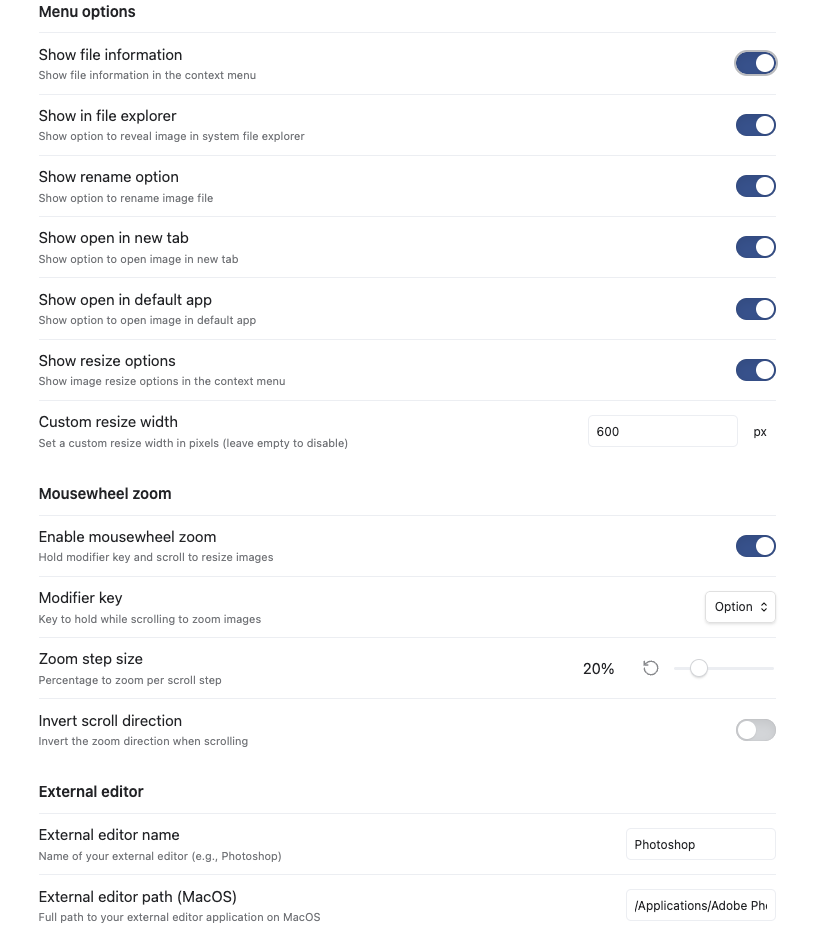
The plugin offers several settings to customize its behavior:

  • Menu options:
    • Toggle individual menu options (main toggle to show/hide menu customization)
    • Show file information in context menu
    • Show "Show in Explorer/Finder" option
    • Show rename option
    • Show delete image and link option
    • Show "Open in new tab" option
    • Show "Open to the right" option
    • Show "Open in new window" option
    • Show "Open in default app" option
  • Resize options:
    • Custom resize sizes (comma-separated, supports percentages like 25%, 50% or pixels like 600px, 800px)
  • CMD/CTRL + click behavior:
    • Configure what happens when CMD/CTRL + clicking an image (do nothing, open in new tab, or open in default app)
  • Mousewheel zoom:
    • Enable/disable mousewheel zoom
    • Choose modifier key (Alt/Ctrl/Shift)
    • Adjust zoom step size
    • Invert scroll direction
  • Advanced:
    • Confirm before delete (show confirmation dialog before deleting files)
    • Debug mode for troubleshooting

Known Issues

Windows and Minimal Theme

When using Pixel Perfect Image on Windows PCs with the Minimal theme, the built-in image zoom can interfere with the right-click menu. To resolve this:

  1. Install the Style Settings plugin
  2. Go to Style Settings > Minimal > Images
  3. Enable the "Disable image zoom" option

This will ensure the best experience with Pixel Perfect Image's right click menu.

Image Converter Plugin Compatibility

If you're using the Image Converter plugin, you should disable its "Right-click menu" option in settings to prevent conflicts with Pixel Perfect Image's context menu.

Support

If you have any questions, suggestions, or issues, please open an issue on the GitHub repository.

Enjoy using Pixel Perfect Image!

Similar Plugins

info
• Similar plugins are suggested based on the common tags between the plugins.
Editing Toolbar
4 years ago by Cuman
An obsidian toolbar plugin, modified from the Cmenu plugin
Metadata Menu
4 years ago by mdelobelle
For data management enthusiasts : type and manage the metadata of your notes.
Imgur
6 years ago by Kirill Gavrilov
Pastes images right to imgur.com
Dynamic Background
4 years ago by Samuel Song
Adding dynamic background effects to the Obsidian editor
Copy Image
2 years ago by Felipe D.S. Lima
Easily copy image to clipboard by right clicking image.
Better MathJax
3 years ago by GreasyCat
Image Tools
2 years ago by Andrey Serov
Canvas Card Background Remover
3 years ago by luxmargos
This Obsidian plugin allows you to make the background of cards transparent in the Canvas for specific embed types, including Image (png), Canvas, and even Markdown.
Note to RED
a year ago by Yeban
一键将 Obsidian 笔记转换为小红书图片进行导出
Spellcheck Toggler
2 years ago by Julian Szachowicz
A plugin for Obsidian which gives you more control over the red-underline spellcheck behaviour.
Auto Correct Capitals Misspellings
2 years ago by Ummel
This plugin automatically corrects words where the first two letters are capitalized and the rest are lower case.
Copy Path
a year ago by shumadrid
An Obsidian plugin that adds context menu actions for copying the full and vault relative path of a file/folder.
Hyperlink Remover
a year ago by Daniel Agafonov
Easily remove hyperlinks and wikilinks from selected text or the entire note.
Quote Share
4 years ago by DuocNV
Generate beautifull image from Obsidian.
Root Folder Context Menu
2 years ago by mnaoumov
Obsidian Plugin that enables context menu for vault root folder
Heading Decorator
a year ago by dragonish
Implement displaying specific content around headings based on their levels.
File Explorer Reload
2 months ago by mnaoumov
This plugin has not been manually reviewed by Obsidian staff. Reloads file explorer pane
CSS Inlay Colors
2 years ago by Benji Grant
Show inline color hints for CSS colors in Obsidian
Additional Icons
2 years ago by Matthew Turk
Add additional iconsets to Obsidian
Image Classify Paste
3 years ago by tianfx
Write Good
a year ago by Mark Hesketh
Obsidian plugin to help improve writing style
Shell Path Copy
10 months ago by Charles Kelsoe (ckelsoe)
Obsidian plugin to copy file and folder paths with shell-friendly formatting for Linux\Mac and Windows
Proofreader
a year ago by pseudometa (aka Chris Grieser)
AI-based proofreading and stylistic improvements for your writing. Changes are inserted as suggestions directly in the editor, similar to suggested changes in word processing apps.
Image Size
a year ago by Jie Zhang
Set the default size for pasted images.
Context Command Hider
a year ago by Mara-Li
This plugin allows you to hide every command from the Obsidian's right-click context menu.
Nova
5 months ago by Shawn Duggan
Nova - AI plugin for Obsidian that edits your documents directly through natural conversation. Stop copying from chat, start collaborating with AI.
Enhanced Publisher
a year ago by Cube
增强的Obsidian发布插件,支持图片自动存储、HTML预览和发布到微信公众号等内容平台
Table Line Break Mobile
5 months ago by marcelflymark
Obsidian plugin: Insert a new line break inside a table cell using the <br> HTML element
Rich Text Editor Shortcuts
2 years ago by Joshua Wootonn
Create and toggle checkboxes, paste links wrapping your current selection, and toggle underline without leaving the keyboard.
Hemingway Mode
2 years ago by Joaquín Bernal
Duplicate line
a year ago by Marcin Sztolcman
Plugin for Obsidian: duplicate current line, or selection.
Hash Pasted Image
2 years ago by Minh Vương
Auto rename pasted images added to the vault via hash algorithm SHA-512
Expand Selection
3 months ago by Alex Tait
Expands the editor selection to lines, sections, or the entire note for convenience on mobile.
Scrambling Title Animations
2 years ago by HistidineDwarf
Animates the title of an opened note by scrambling it in a few visually-appealing ways
Variant Editor
a year ago by Kunal Jain
Obsidian plugin to create variants
Note Favicon
a year ago by mdklab
Obsidian plugin – Show Favicon from Metadata
Mode manager
a year ago by dk949
Better management of reading/editing modes in obsidian
WebDAV Image Uploader
a year ago by ste
Uploads, downloads and deletes images on WebDAV server within Obsidian notes.
Enhanced Image
2 years ago by situ2001
Enhance the experience of image in Obsidian, seamlessly.
AI Revisionist
a year ago by Synaptic Labs
Edit Link Alias
6 months ago by mnaoumov
Obsidian Plugin that adds edit link alias command.
Editing Mode Hotkey
2 years ago by Signynt
Obsidian plugin to change the default editing mode (between Live Preview and Source) using a command or hotkey
Regex Line Filter
a year ago by 64MM4-KN1F3
A note filtering plugin for Obsidian
Select word
2 years ago by Connor Espino
Quick Nav
a year ago by exoticknight
Enhance your editing experience by unleashing the hidden power of shortcuts.