Spellcheck Toggler

by Julian Szachowicz
5
4
3
2
1
Score: 61/100

Description

Category: Customization & UI

The Spellcheck Toggler plugin provides greater control over Obsidian's spellcheck behavior. It allows users to toggle spellcheck for specific types of content, such as internal and external links, as well as HTML comments. This plugin is particularly useful for those who find the red underline for spellcheck distracting, especially when working with links or code. By customizing the plugin settings, users can choose when to enable or disable spellcheck on different elements, improving their editing experience. The plugin is also open to feature requests, allowing users to suggest additional content types to toggle spellcheck for.

Reviews

No reviews yet.

Stats

23
stars
7,087
downloads
2
forks
914
days
194
days
194
days
8
total PRs
0
open PRs
0
closed PRs
8
merged PRs
18
total issues
0
open issues
18
closed issues
1
commits

Latest Version

6 months ago

Changelog

Fixed

  • Adding property in new file no longer resets on first try.

Full Changelog: https://github.com/julzerinos/spellcheck-toggler-obsidian-plugin/compare/1.4.3...1.4.4

README file from

Github

Spellcheck Toggler

A plugin for Obsidian which gives you more control over the red-underline spellcheck behaviour.

If you spend most of your time in the editing view and find yourself annoyed by the red spellcheck underline, you might find this plugin handy to toggle spellchecks for select types of blocks in your notes.

Originally created to disable spellcheck underlining for links in the editing view, but can easily be expanded to support other types of blocks.

Features

  • Feature toggles
    • External links
    • Internal links
    • HTML comments
    • Block quotes
    • Emphasis (italic)
    • Strong (bold)
    • Entire-file toggle
  • Robust behaviour per-file toggle control, with user-set frontmatter properties
  • Modules - each toggle can be controlled from the plugin setting tab to customize for your use case.
  • Open to requests - you can create an issue to request spellcheck toggling for a specific type of block.

Examples
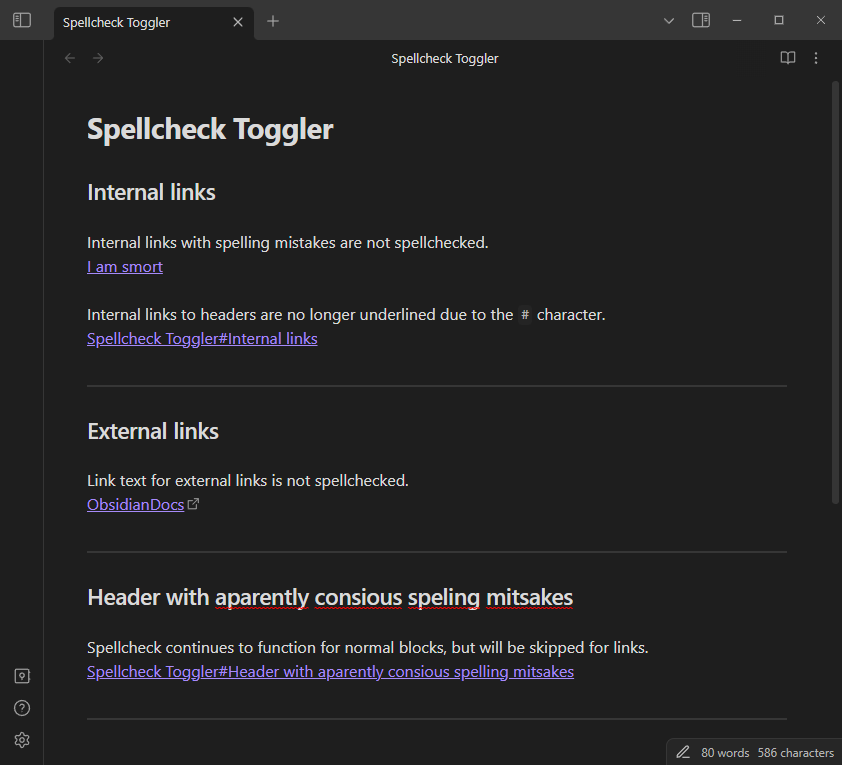
Settings

Configure the spellcheck options with precise control.

You can tweak each spellcheck option individually, either entirely ignoring that option or applying it to your use case with the behaviour dropdown.

Configure spellchecking options. The behaviour of a spellcheck option is defined as follows:

  • "Always spellcheck": the editor default behaviour will be applied (the plugin is not active for the option).
  • "Frontmatter": explicitly use the defined frontmatter override property to toggle spellchecking in a given file, otherwise use a fallback behavior in files without the property.
  • "Never spellcheck": do not use spellcheck in any file for the option.`

Similar Plugins

info
• Similar plugins are suggested based on the common tags between the plugins.
Better MathJax
3 years ago by GreasyCat
Finnish Spellcheck
3 years ago by Anto Keinänen
Hemingway Mode
2 years ago by Joaquín Bernal
Select word
2 years ago by Connor Espino
LanguageTool
2 years ago by Lars Wrenger, Clemens Ertle
LanguageTool Plugin for Obsidian
Rich Text Editor Shortcuts
2 years ago by Joshua Wootonn
Create and toggle checkboxes, paste links wrapping your current selection, and toggle underline without leaving the keyboard.
Auto Correct Capitals Misspellings
2 years ago by Ummel
This plugin automatically corrects words where the first two letters are capitalized and the rest are lower case.
Editing Mode Hotkey
2 years ago by Signynt
Obsidian plugin to change the default editing mode (between Live Preview and Source) using a command or hotkey
AI Revisionist
2 years ago by Synaptic Labs
Pixel Perfect Image
2 years ago by Johan Sanneblad
Pixel perfect 100% image resizing, copy to clipboard, show image in Finder/Explorer, and much more.
Write Good
2 years ago by Mark Hesketh
Obsidian plugin to help improve writing style
Mode manager
a year ago by dk949
Better management of reading/editing modes in obsidian
Quick Nav
a year ago by exoticknight
Enhance your editing experience by unleashing the hidden power of shortcuts.
Duplicate line
a year ago by Marcin Sztolcman
Plugin for Obsidian: duplicate current line, or selection.
Proofreader
a year ago by pseudometa (aka Chris Grieser)
AI-based proofreading and stylistic improvements for your writing. Changes are inserted as suggestions directly in the editor, similar to suggested changes in word processing apps.
Regex Line Filter
a year ago by 64MM4-KN1F3
A note filtering plugin for Obsidian
Korean Spellchecker
a year ago by dldisud
Variant Editor
a year ago by Kunal Jain
Obsidian plugin to create variants
Edit Link Alias
8 months ago by mnaoumov
Obsidian Plugin that adds edit link alias command.
Nova
7 months ago by Shawn Duggan
Nova - AI plugin for Obsidian that edits your documents directly through natural conversation. Stop copying from chat, start collaborating with AI.
Table Line Break Mobile
7 months ago by marcelflymark
Obsidian plugin: Insert a new line break inside a table cell using the <br> HTML element
Expand Selection
5 months ago by Alex Tait
Obsidian plugin to expand your editor selection to lines, sections (recursive), or the entire note
Dragger
3 months ago by ariestar
An Obsidian plugin for dragging and rearranging any block.
Markdown Tabs
2 months ago by xhuajin
Create and render a Tabs component in your notes.
Side-Notes
a month ago by Fried Fishsticks
Tufte-style sidenotes for Obsidian
Sectionals
15 days ago by Aaron Bell
Remove whole sections of a note in Obsidian without selecting them first
Simple Editorial
10 days ago by Beppe
A minimal editorial markup plugin for writers using Obsidian.