Regex Line Filter

by 64MM4-KN1F3
5
4
3
2
1
Score: 47/100

Description

Category: Note Enhancements

The Regex Line Filter plugin enables filtering and editing of note lines based on user-defined regular expressions, enhancing focused editing.

Reviews

No reviews yet.

Stats

9
stars
810
downloads
0
forks
460
days
265
days
266
days
4
total PRs
0
open PRs
1
closed PRs
3
merged PRs
10
total issues
3
open issues
7
closed issues
11
commits

Latest Version

9 months ago

Changelog

Copy filtered text + settings option

README file from

Github

Regex Line Filter plugin for Obsidian

image

Version 1.3.5

Purpose:

The plugin allows users to filter the active editor view in Obsidian so that only lines matching a user-supplied regular expression are displayed. Users can edit these visible lines. Toggling the filter off restores the full view of the note with the edits preserved. Toggling it back on re-prompts for a regex (pre-filled with the last used one).

Key Features:
  • Regex Filtering: Filters the current note based on a JavaScript-compatible regex (including emoji support).

  • Hotkey Assignable Custom Filters: Create custom filters and assign individual hotkeys to them. Toggling multiple custom filters will allow for incremental additive/subtractive filter output.

  • Live Editing: Allows editing of the filtered (visible) lines directly. Edits are saved to the actual note.

  • Toggle Command: Provides a command palette action (and assignable hotkey) to toggle the filter on/off.

  • Regex Input Modal: A clean modal prompts for the regex when activating the filter.

  • Persistent History: Remembers the last 5 unique regex strings used across sessions and displays them as pinable/saveable entries in the input modal for quick reuse.

  • Template Date Variables: Use relative dates in your filters. Eg {{date:YYYY-MM-DD}} or {{today}} for the current date, {{yesterday}}, {{last-month}}, {{last-year}}, {{tomorrow}}, {{next-month}} and {{next-year}}.

  • Empty Line Handling: Includes a setting to choose whether empty lines (containing only whitespace) should also be hidden when the filter is active (defaults to true).

  • **Visual Indicator:**Adds a subtle darkening effect (inset box-shadow) to the editor margins when the filter is active, providing clear visual feedback.

  • Child indents: Child indents will be included in an active filter by default. This behaviour can be disabled in plugin settings if desired.

  • Copying filtered text: Selecting across filtered lines then copying will copy only the visible lines to clipboard. This default behaviuor can be disabled in plugin settings.

Known Limitations:
  • Negative lookaheads: Possible issue with negative lookaheads in regex.
How To:
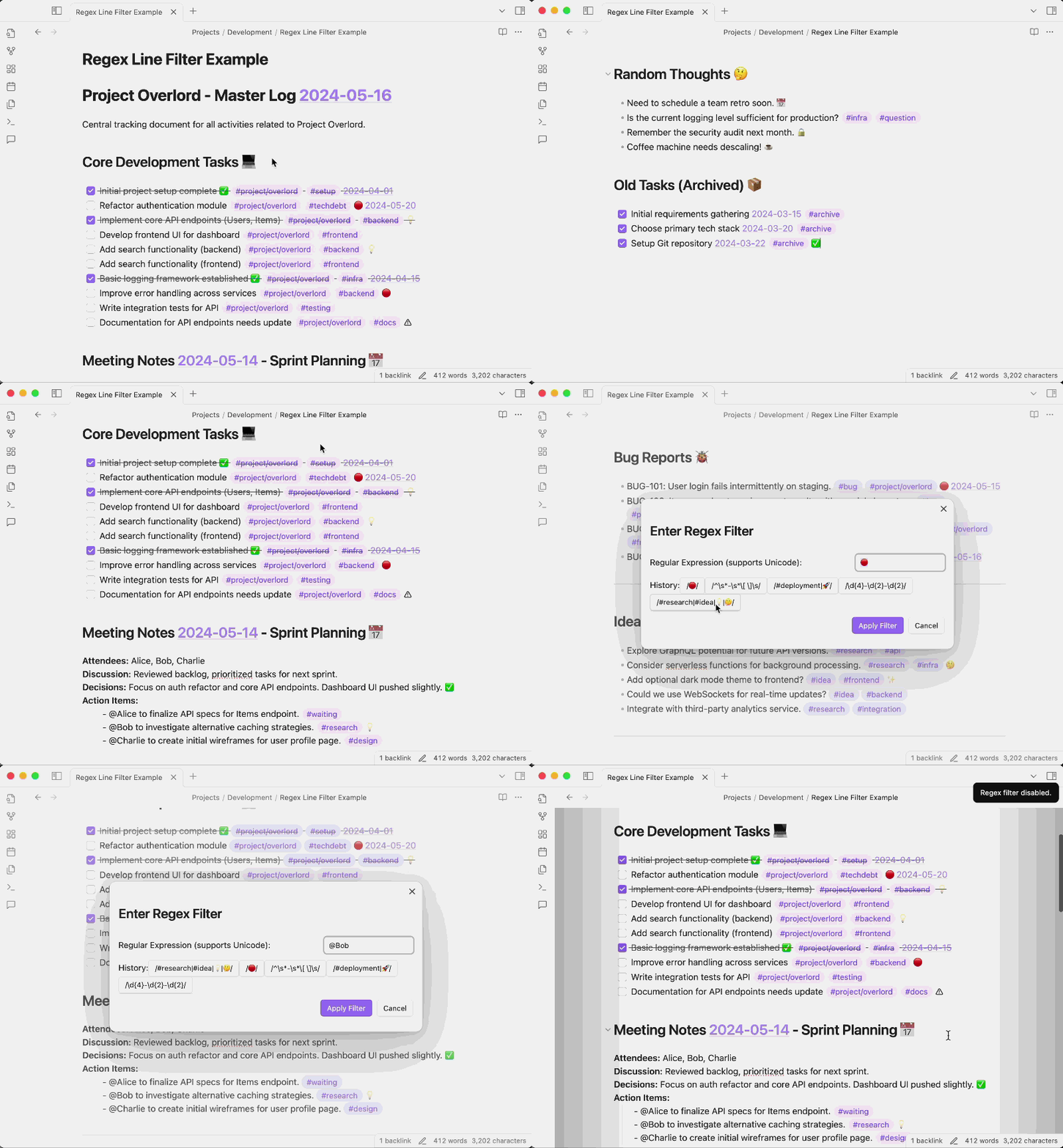
image

Demo showing a number of regex filters used with the plugin assigned to a HotKey.

Thank You:

  • To SkepticMystic for the inspiration for saveable individual filters in your Advanced Cursors plugin.
  • To FelipeRearden, stef-rausch and nanjingman for the feature suggestions!

License: Apache 2.0


Similar Plugins

info
• Similar plugins are suggested based on the common tags between the plugins.
File Explorer++
3 months ago by kelszo
A plugin for https://obsidian.md, which enables the ability to hide and pin specific files and folders in the file explorer by applying custom filters.
Dragger
2 months ago by ariestar
An Obsidian plugin for dragging and rearranging any block.
Global Search and Replace
3 years ago by Mahmoud Fawzy Khalil
A plugin to do a global search and replace in all your Obsidian vault files.
April Automatic Timelines
2 months ago by april-gras
Simple timeline generator plugin for story tellers using obsidian
Markdown Tabs
a month ago by xhuajin
Create and render a Tabs component in your notes.
Pixel Perfect Image
2 years ago by Johan Sanneblad
Pixel perfect 100% image resizing, copy to clipboard, show image in Finder/Explorer, and much more.
Regex Pipeline
5 years ago by No3371
An Obsidian plugin that allows users to setup custom regex rules to automatically format notes.
Find and replace in selection
5 years ago by Dmitry Savosh
Obsidian plugin. Find and replace in selection.
Bulk Rename
4 years ago by Oleg Lustenko
Better MathJax
3 years ago by GreasyCat
aDHL
a year ago by tine-schreibt
The Dynamic Highlights Plugin, but with hotkeys, more options and sorting; works well with Highlightr.
Linkify
4 years ago by Matthew Chan
Regex Mark
2 years ago by Mara-Li
AutoMover
a year ago by Al0cam
Move files and notes with specified names into their designated folders according to rules you define.
Spellcheck Toggler
2 years ago by Julian Szachowicz
A plugin for Obsidian which gives you more control over the red-underline spellcheck behaviour.
Auto Correct Capitals Misspellings
2 years ago by Ummel
This plugin automatically corrects words where the first two letters are capitalized and the rest are lower case.
Write Good
a year ago by Mark Hesketh
Obsidian plugin to help improve writing style
Proofreader
a year ago by pseudometa (aka Chris Grieser)
AI-based proofreading and stylistic improvements for your writing. Changes are inserted as suggestions directly in the editor, similar to suggested changes in word processing apps.
Side-Notes
22 days ago by Fried Fishsticks
Tufte-style sidenotes for Obsidian
Nova
7 months ago by Shawn Duggan
Nova - AI plugin for Obsidian that edits your documents directly through natural conversation. Stop copying from chat, start collaborating with AI.
Table Line Break Mobile
6 months ago by marcelflymark
Obsidian plugin: Insert a new line break inside a table cell using the <br> HTML element
FileName Styler
a year ago by Marc Feininger
An Obsidian plugin to hide, customize, and decorate file names in the sidebar using regex and customizable profiles.
Auto Replacer
a year ago by Alecell
A live text replacement plugin that applies automatic formatting, corrections, or custom replacements in real-time. Define your own regex-based rules and transformation logic to modify text dynamically as you type.
Rich Text Editor Shortcuts
2 years ago by Joshua Wootonn
Create and toggle checkboxes, paste links wrapping your current selection, and toggle underline without leaving the keyboard.
Expand Selection
4 months ago by Alex Tait
Obsidian plugin to expand your editor selection to lines, sections (recursive), or the entire note
Hide Commands in Menu
a year ago by bomian98
Obsidian Plugin, hide different commands in different menus.
Hemingway Mode
2 years ago by Joaquín Bernal
Duplicate line
a year ago by Marcin Sztolcman
Plugin for Obsidian: duplicate current line, or selection.
LinkMagic
2 years ago by AndyReifman
URL Formatter
a year ago by Thomas Snoeck
Automatically formats specific URLs pasted into Obsidian into clean Markdown links.
Tag Links
2 years ago by Zacchary Dempsey-Plante
A plugin for Obsidian that allows tags to be opened as links using a hotkey.
Variant Editor
a year ago by Kunal Jain
Obsidian plugin to create variants
Custom Selected Word Count
a year ago by banisterious
Custom Selected Word Count for Obsidian
Mode manager
a year ago by dk949
Better management of reading/editing modes in obsidian
Edit Link Alias
7 months ago by mnaoumov
Obsidian Plugin that adds edit link alias command.
Blue Star
2 years ago by Wang Guoshi
A plugin for Obsidian that generates Anki flashcards in various ways.
AI Revisionist
2 years ago by Synaptic Labs
Editing Mode Hotkey
2 years ago by Signynt
Obsidian plugin to change the default editing mode (between Live Preview and Source) using a command or hotkey
Select word
2 years ago by Connor Espino
Quick Nav
a year ago by exoticknight
Enhance your editing experience by unleashing the hidden power of shortcuts.