Notepad

by diyar947
5
4
3
2
1
Score: 50/100

Description

The Notepad plugin combines a scratch page, clipboard history and a Timebox session panel in the sidebar. The scratch page saves as you type and survives restarts. You can turn its contents into a note, append them to today's daily note or collect selected text from other notes. Clipboard entries can be searched, pinned, copied again or inserted at the cursor. Capture behaviour varies by platform, with Klipper integration on KDE and limited background capture on Wayland without Klipper. When the companion Timebox plugin is installed, its tab shows running sessions, daily and weekly totals, time by topic and session history with links to the original blocks. Tabs and colours are configurable. No network requests are made, but clipboard history is stored as plain text in the vault and travels with vault sync.

Reviews

No reviews yet.

Stats

0
stars
542
downloads
0
forks
9
days
9
days
9
days
0
total PRs
0
open PRs
0
closed PRs
0
merged PRs
0
total issues
0
open issues
0
closed issues
11
commits

Latest Version

10 days ago

Changelog

What's changed

KDE Plasma: the full clipboard history

On KDE Plasma, Notepad now reads the history of Klipper, the clipboard in the system tray. Klipper sees every copy, so:

  • copies you make in other apps show up right away, also on Wayland, where Obsidian alone only sees the clipboard while it's focused;
  • copies made while Obsidian was closed are added when it starts.

Flatpak users: allow Obsidian to talk to Klipper once, then restart Obsidian:

flatpak override --user --talk-name=org.kde.klipper md.obsidian.Obsidian

Turn it off with Use the KDE clipboard history in the settings. Windows, macOS and mobile work as before.

Interface

  • In a narrow sidebar the inactive tabs show only their icon, so tab names are no longer cut off.
  • Clipboard entries, totals and the running session stand out from the sidebar background.
  • The button that finishes a running session is now a stop icon.
  • The "Start session" button uses the accent color.

README

Rewritten, with screenshots of every tab, the light theme and custom accent colors.

Full Changelog: https://github.com/diyar4772/obsidian-notepad/compare/1.0.2...1.0.3

README file from

Github

Notepad

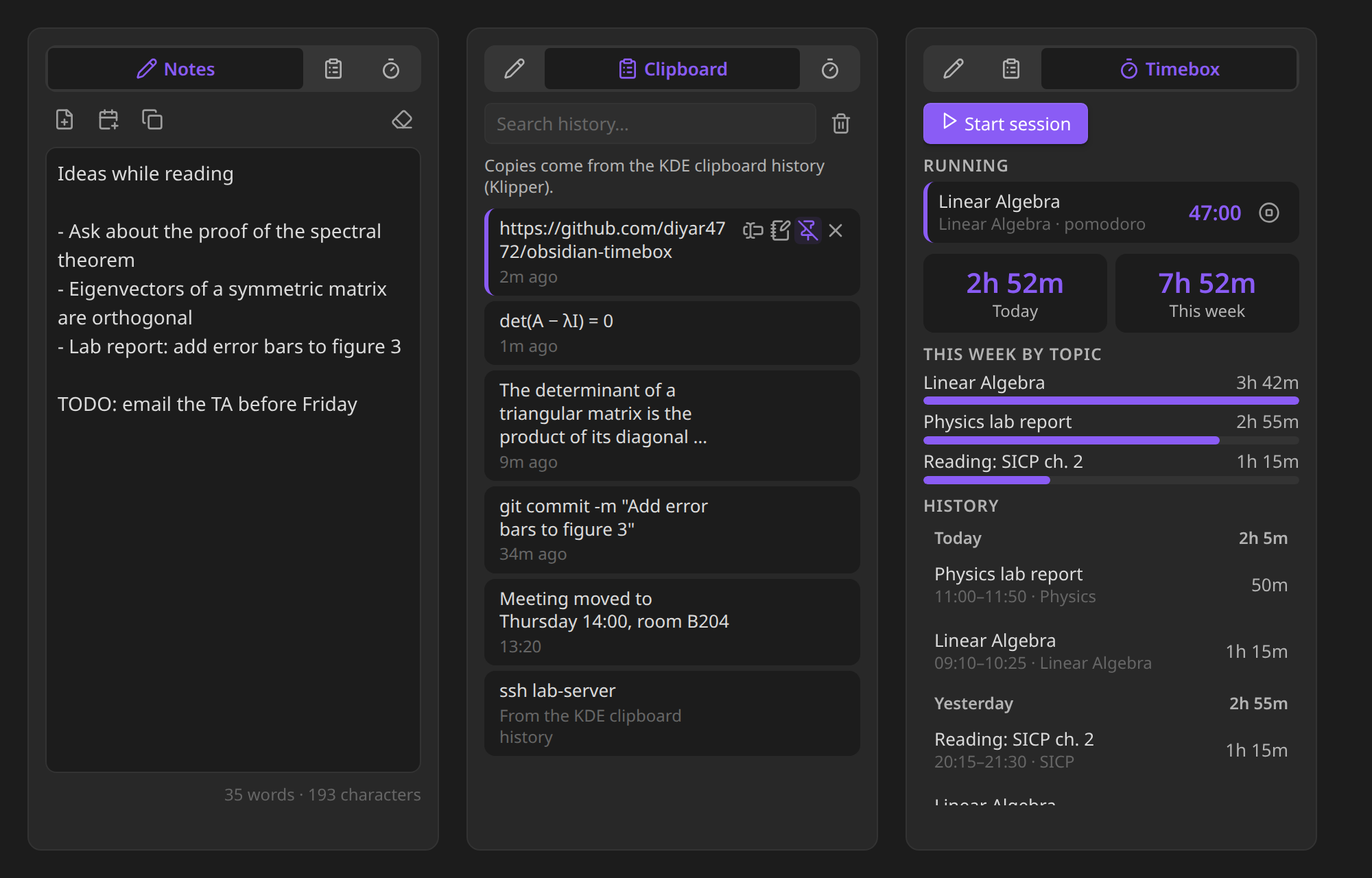
A small, tabbed panel for Obsidian's sidebar: a scratch page for quick thoughts, your clipboard history, and your Timebox sessions. It sits under the Calendar, in the space that is usually empty.

Latest release Downloads

The three tabs of Notepad in the dark theme: a scratch page with a few notes, a clipboard history with a pinned link, and the Timebox tab with a running session, today's and this week's totals, time per topic and the history of finished sessions

Installation

In Obsidian, open Settings → Community plugins → Browse, search for Notepad and select Install, then Enable.

The panel opens under the Calendar view in the right sidebar (or in its own spot in the right sidebar if Calendar isn't installed). Drag it anywhere you like. To bring it back after closing it, use the notebook icon in the left ribbon or the Notepad: Open command.

Notes

A scratch page for things you want to keep in mind while you're busy with something else. It saves itself as you type and is still there after a restart.

  • Save as note turns it into a note (in a folder you choose).
  • Add to today's daily note appends it to the daily note the Calendar plugin opens, and creates that note from your template if it doesn't exist yet.
  • Copy and Clear (click twice, so nothing is lost by accident).
  • Select text in any note and choose Add to notepad from the right-click menu to collect it here.

Clipboard

A history of the text you copy, newest first.

  • Click an entry to copy it again.
  • Insert it at the cursor in your note, add it to the scratch page, pin it to keep it at the top (pinned entries are never removed), or remove it.
  • Search the history.

On Windows and macOS every copy is recorded while Obsidian is running, in any app. On mobile, copies made inside Obsidian are recorded.

KDE Plasma: the full clipboard history

On KDE Plasma, Notepad reads the history of Klipper, the clipboard in the system tray (Meta+V). Klipper sees every copy, even while Obsidian is in the background, so:

  • copies you make in other apps show up right away, also on Wayland;
  • when Obsidian starts, copies you made while it was closed are added. Their copy time isn't known, so they're marked From the KDE clipboard history. The very first time, Klipper's whole history comes in.

Klipper itself leaves out copies that password managers mark as secret. Notepad uses Klipper automatically when it's running; turn this off with Use the KDE clipboard history in the settings.

Obsidian from Flathub (Flatpak): the sandbox has to be allowed to talk to Klipper. Run this once in a terminal, then restart Obsidian:

flatpak override --user --talk-name=org.kde.klipper md.obsidian.Obsidian

Notepad can't do this for you: an app inside the Flatpak sandbox can't change its own permissions, so this one step is yours. The Clipboard tab shows the command when it's needed. To take the permission back later, run flatpak override --user --no-talk-name=org.kde.klipper md.obsidian.Obsidian.

Linux without Klipper

On a Wayland session without Klipper (for example GNOME), Obsidian only sees the clipboard while its window is focused: copies made in other apps in the meantime aren't seen one by one, and only the last one is recorded when you switch back. Copies made inside Obsidian are always recorded. Linux on X11 doesn't have this limit.

Timebox

Timebox is a companion plugin: it tracks study and work sessions inside your notes. When you start a session, a timebox block with the topic and start time goes into the note; when you finish, the end time and duration are written into it. It has an optional pomodoro cycle with alerts.

Notepad's Timebox tab gives those sessions a home in the sidebar:

  • Running sessions with a live timer and a stop button. Stopping goes through Timebox, so the block in your note is updated exactly as if you had clicked Finish there.
  • Start session starts one in the note you were last working in, with Timebox's own command.
  • Today and This week totals, counting up while a session runs.
  • This week by topic: where your time went.
  • History: finished sessions of the last days, grouped by day with daily totals. Click one to jump to its block.

Notepad reads the sessions with Timebox's own parser, so both plugins always agree on what counts as a session, and it never changes the blocks itself. Without Timebox, the tab says so and the other tabs work on their own.

Colors and themes

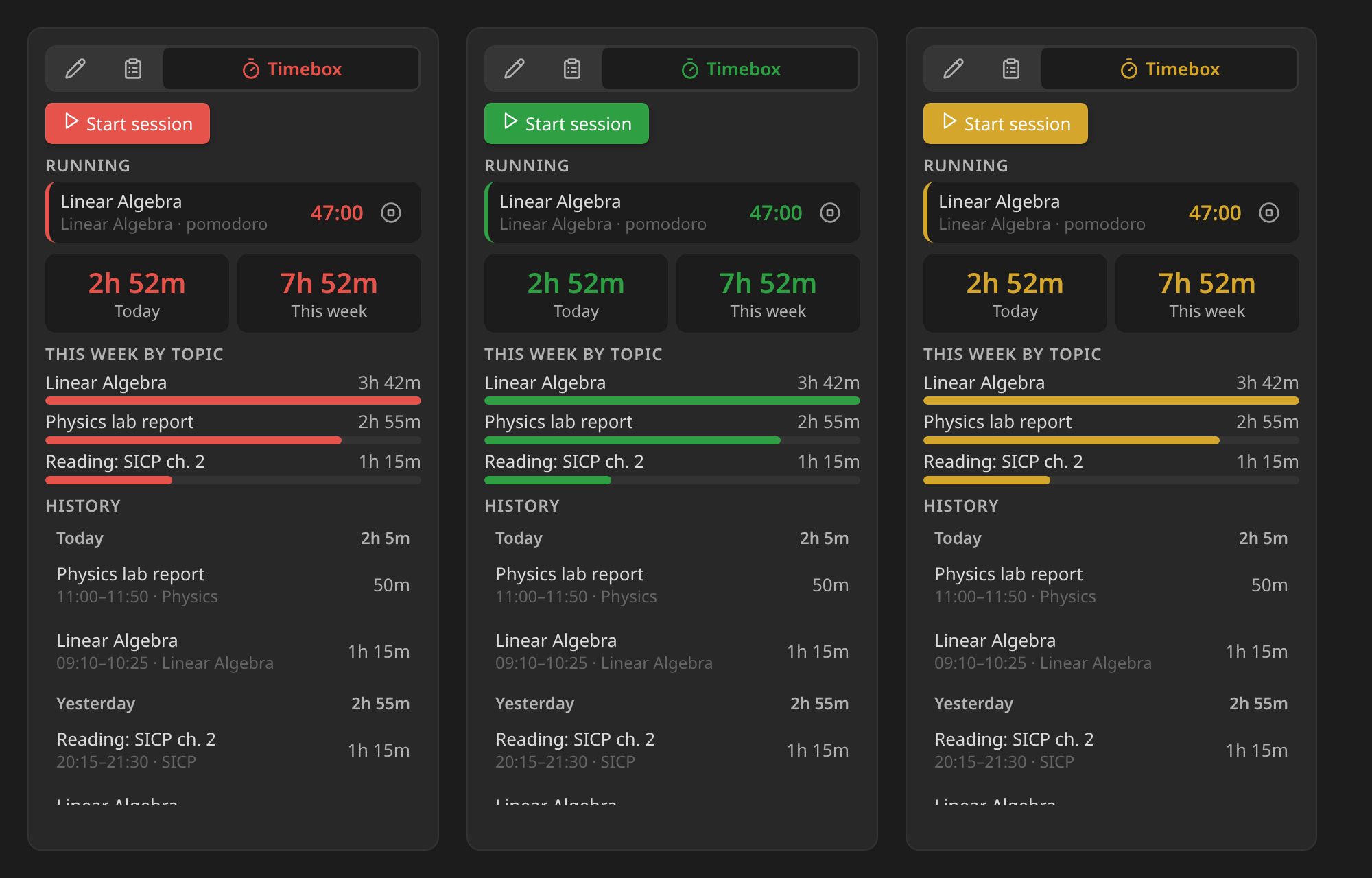
Notepad follows your theme, light or dark. If you like, pick your own accent, background and text colors in the settings; reset any of them to go back to the theme's.
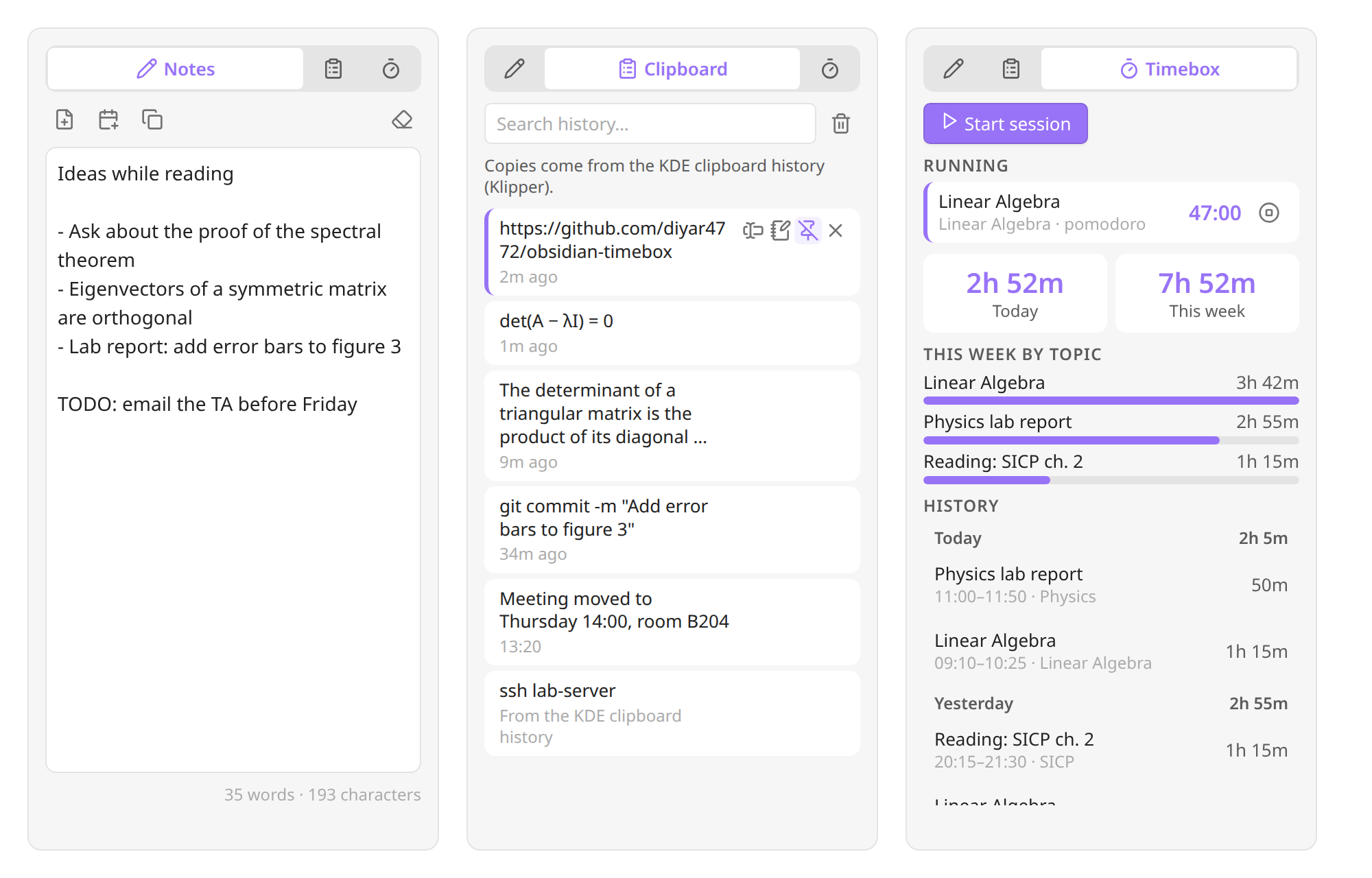
Notepad's three tabs in the light theme

The Timebox tab with three different accent colors: red, green and yellow

Settings

  • Tabs: show or hide each tab. With a single tab, the tab bar disappears.
  • Notes: save folder, open the note after saving, clear the page after saving, font size.
  • Clipboard: record on or off, history size (pinned entries don't count), how often the clipboard is checked, and on Linux, use the KDE clipboard history.
  • Timebox: how many days of history to list.
  • Colors: accent, background and text color.

Every setting can be found with Obsidian's settings search.

Commands

  • Open
  • Show notes tab, Show clipboard tab, Show timebox tab
  • Add selection to scratch page (also in the editor's right-click menu as Add to notepad)

None of them has a default hotkey; assign your own under Settings → Hotkeys.

Works with your other plugins

  • Timebox: see Timebox.
  • Calendar and Daily notes: Add to today's daily note uses the folder, date format and template of the Daily notes core plugin, so it lands in the note Calendar opens. A new daily note gets its template with {{date}}, {{time}}, {{title}}, {{yesterday}}, {{tomorrow}} and {{date:FORMAT}} filled in, like the core plugin does.
  • Your own plugins and scripts: app.plugins.plugins.notepad.api offers appendToScratch(text), getScratch() and getClipboardHistory().

Privacy and permissions

Notepad makes no network requests. Everything it keeps is in the plugin's data.json inside your vault (.obsidian/plugins/notepad/).

  • Clipboard: on desktop Notepad reads the system clipboard to build the history, and writes to it when you copy an entry back. Copies that a password manager marks as secret (KeePassXC, Bitwarden, 1Password and others that use the standard hint on Windows, macOS and Linux) aren't recorded, and neither are copies longer than 100,000 characters. The history is stored as plain text, so if your vault is synced, the history travels with it. Turn recording off or clear the history if that matters to you.
  • KDE clipboard history: on Linux, Notepad runs the gdbus command line tool to read Klipper's history over D-Bus and to listen for its changes. Nothing else is run.
  • Reading your notes: to find Timebox sessions, the Timebox tab reads your notes once, the first time you open it, and then only re-reads notes that change.
  • Writing: Notepad only creates or changes notes when you ask it to (save as note, add to daily note, insert into note).

Requirements

Obsidian 1.13 or newer, on desktop or mobile. On older versions of Obsidian, version 1.0.1 of Notepad is installed instead.

Development

npm install
npm run dev    # watch build
npm test       # core and plugin tests
npm run build  # type check + production build

Developer notes are in CLAUDE.md.

License

MIT © Samed Yolcu

Similar Plugins

info
• Similar plugins are suggested based on the common tags between the plugins.
TimeStamper
5 years ago by Martin Eder
A plugin for Obsidian to quickly insert customized date- and time-stamps to the currently active note
Auto Hide
4 years ago by skelato1
This Obsidian plugin enables you to collapse (and expand) the sidebar easier.
Super Simple Time Tracker
4 years ago by Ellpeck
Multi-purpose time trackers for your notes!
Copy document as HTML
4 years ago by mvdkwast
Obsidian plugin: copy document as HTML, including images
WakaTime
4 years ago by WakaTime
Obsidian.md plugin for automatic time tracking and metrics generated from your Obsidian usage activity.
Cycle In Sidebar
4 years ago by Houcheng
Cycle through tabs of left/ right sidebar panel
Obsidian-compatible Watcher for ActivityWatch
4 years ago by Grimmauld
Obsidian plugin to track user activity with ActivityWatch
Soomda
4 years ago by Michael Lee
🙈 Soomda — An Obsidian plugin that lets you quickly hide your sidebars.
Links
4 years ago by MiiKey
manipulate & manage obisidian links
Image To Lskypro
3 years ago by NekouTarou
支持直接上传图片到图床Lsky,基于https://github.com/renmu123/obsidian-image-auto-upload-plugin.git改造。
Copy Inline Code
3 years ago by Ondrej Zavodny
RescueTime
3 years ago by Tatsuya Hayashi
A RescueTime integration plugin to view your activity logs in Obsidian.
Publish URL
3 years ago by Hananoshika Yomaru
copy the publish url to clipboard
ManicTime
3 years ago by Finkit d.o.o.
Copy Image
3 years ago by Felipe D.S. Lima
Easily copy image to clipboard by right clicking image.
Paste From History
3 years ago by Daniel Karakka
Obsidian plugin that adds the ability to paste text from Obsidian's clipboard history.
Fastimer
3 years ago by vkostyanetsky
Intermittent fasting tracker plugin for Obsidian
Custom Sidebar Icons
3 years ago by RavenHogWarts
Custom Icons
Timekeep
2 years ago by Jacobtread
Obsidian task time tracking
Checkbox Time Tracker
2 years ago by UD
Checkbox Time Tracker for Obsidian
Relative Timestamps
2 years ago by Charles Young
Recursive Copy
2 years ago by datawitch
Recent Files
6 years ago by Tony Grosinger
Display a list of most recently opened files
Extract Highlights
6 years ago by Alexis Rondeau
Manage your highlights in Obsidian by easily creating, removing and exporting them.
JSONifier
6 years ago by Kjell Connelly
Markdown Formatting Assistant
6 years ago by Reocin
This Plugin provides a simple WYSIWYG Editor for Markdown and in addition a command line interface. The command line interface facilitate a faster workflow.
Show Current File Path
6 years ago by Ravi Mashru
Obsidian plugin to show the file path of the current file in the status bar
Image auto upload
5 years ago by renmu123
auto upload image with picgo
Stopwatch
5 years ago by Tokuhiro Matsuno
Sidebar Expand on Hover
5 years ago by Tousif Iqbal Anik (toiq)
This Obsidian plugin expands or collapses the sidebar based on mouse hovering on the ribbons.
Grandfather
5 years ago by Danny Hernandez
A simple Obsidian plugin to display the time and date on the status bar
Image Uploader
5 years ago by Creling
Toggl Track
5 years ago by Maxime Cannoodt
A Toggl integration plugin for the popular knowledge base application Obsidian.
Hide Sidebars on Window Resize
5 years ago by NomarCub, Michael Hanson
A simple Obsidian plugin to hide the sidebars when the window gets narrow.
Window Collapse
5 years ago by Guilherme Quental
Relative Find
5 years ago by phibr0
Advanced Copy
2 years ago by leschuster
An Obsidian plugin to copy Markdown and transform it into HTML, Anki, or any custom format. Create custom profiles with versatile templates tailored to your workflow.
Fetch Prayer Times
2 years ago by Ecys
Fetches times from Aladhan API and inserts into a table.
Focus Time
2 years ago by AstraDev
Focus Time is a plugin that helps you track how much time you spend on each note.
Export to HTML
2 years ago by kalvn
Export a note as HTML in the clipboard or in a file.
Smart Context
2 years ago by 🌴 Brian
Hanko
2 years ago by Telehakke
Obsidian plugin.
Confluence Converter
2 years ago by Addo Zhang
An Obsidian Plugin for Confluence
Paste Image Into Property
2 years ago by Nito
Chronotyper
2 years ago by BambusControl
Obsidian plugin for tracking note edit time
Command Line
2 years ago by Steven Stallion
Copy command lines from your notes to the clipboard.
Simple File Info
2 years ago by Lukas Capkovic
Quick Peek Sidebar
2 years ago by Bradley Wyatt
Open and close the Obsidian sidebars on hover.
Image Embedder
2 years ago by Natalie Sumbo
Rainbow-Colored Sidebar
a year ago by Kevin Woblick
Automatically color your sidebar like a rainbow. No configuration needed. 18 themes included.
Convert Base64 to PNG
a year ago by Nykko Lin
Converts base64-encoded images to local PNG files for Obsidian.
Paste Image Rename and Convert
a year ago by iaos
An obsidian plugin that renames pasted images and covert formats
SolidTime Integration
a year ago by proniclabs
Obsidian SolidTime Integration Plugin
Countdown To
a year ago by Gui Cattani
A countdown/progress Obsidian widget using progressbar.js
Scratchpad
a year ago by KVH
An open source Obsidian plugin for quick note-taking and freehand drawing.
Sonkil
a year ago by ohyoungpark
Clipboard Manager
a year ago by Ayush Raj
The clipboard obsidian plugin
Paste as file link
a year ago by Matthias Büge
This plugin is used to paste a text from the clipboard as a link to an existing obsidian note
Ghost Text
a year ago by lawrencefeng17
Fix Line Endings on Copy
a year ago by KiwiJanus
Cliplet
a year ago by namikaze-40p
An Obsidian plugin that serves as a clipboard and snippet manager — your own, separate from the OS clipboard.
Lark Style CountDown Timer
a year ago by Zhaoyang Yu
Tag Timer
10 months ago by quantavil
The Tag Timer is a versatile plugin for Obsidian that allows you to seamlessly track the time you spend on specific tasks or sections within your notes.
Timelog
10 months ago by Eddie Blundell
Time logging plugin for obsidian
Floating Headings
9 months ago by k0src
Displays a floating, collapsible outline of a note's headings on the right side of the editor. Expands on hover, click to navigate.
Role Switch
8 months ago by Zafrem
This program is a tool that recognizes and makes task switching easier, even though multitasking is difficult.
TikToker
8 months ago by ameyxd
A Tiktok parser and saver for Obsidian
WebDAV Explorer
8 months ago by 蓝星晓夜
WebDAV Server Explorer.
Tree Modal
6 months ago by krannich
Obsidian plugin: open files from the file explorer in a modal preview
Project Manager
6 months ago by stepankropachev
Project management inside Obsidian. Table, Gantt and Kanban over plain Markdown notes, with a local API for agents and scripts.
Cornell Marginalia
6 months ago by Latazadehomero
A lightweight Obsidian plugin designed for students who use the Cornell Note-taking System.
Hide Folders
5 months ago by jonasdoesthings
Toggle the visibility of folders in the Obsidian.MD file navigator based on name-patterns
TaskNotes
4 months ago by callumalpass
Task and time-tracking management with calendar integration for Obsidian
Live Life Recording
4 months ago by goryugocast
Operate tasks directly in Markdown with start/finish records, routine insertion, and a lightweight daily summary for Obsidian.
Find Orphaned Images
4 months ago by josmarcristello
Find Orphaned Images is an Obsidian plugin designed to help you keep your vault clean and organized by identifying and managing images that are not linked anywhere in your notes.
GTD Tasks
3 months ago by unpreditable
Copy Contents
3 months ago by Richard Jones
Copy or export file and folder contents - perfect for LLMs
Sidebar Keyboard Navigation
3 months ago by denvolok
Obsidian plugin to smoothly navigate File Explorer using keyboard only.
Sidet
3 months ago by Jiao Yingxing
流畅自然的 AI 对话体验,移动端也出色。A smooth, natural AI chat experience that also works great on mobile.
Day Planner
3 months ago by ivan-lednev
An Obsidian plugin for day planning with a clean UI and a simple task format
Claude Sidebar
3 months ago by derek-larson14
Run Claude Code, Codex, and other agent CLIs in Obsidian
Prisma Calendar
3 months ago by Matej Vavro Productivity
Prisma is not just a calendar plugin. It turns any note with a date into a flexible planning system inside Obsidian. There are no rigid schemas or predefined structures — just your data, your rules, fully under your control. It lets you see your entire vault through time.
Telegram Sidebar
3 months ago by reallygood83
Time Things
3 months ago by plasmabit
Know when your note was was last updated. Track how much time you spent writing. Keep an eye on the clock.
Mobile Sidebar Notes
3 months ago by ckep1
Open notes & new tabs in the sidebar on the Obsidian mobile app.
Operon
3 months ago by Hasan Yılmaz
Task management system for humans and agents in Obsidian.
TaskChute Plus
3 months ago by hiroyaiizuka
Execute Taskchute for Obsidian
Alternative Explorer
3 months ago by sk-obsidian
Alternative Explorer is an Apple Notes–style sidebar for browsing folders and notes in Obsidian. Switch between an expandable folder tree and a notes list — a compact alternative to the built-in File Explorer.
WorkBuddy
3 months ago by Jason
obsidian plugin for workbuddy
WorkLife Calendar
2 months ago by RavenLife
Say goodbye to chaos. A smart calendar, task tracker, time tracking, habit tracking, and finance management — all in one beautiful, connected space.
Abele
2 months ago by dudaanton
An Obsidian plugin that adds a lot of functionality I personally find missing.
Wiki Companion
2 months ago by Mo A
A minimalist, read-only calendar for Obsidian, built on the frontmatter you already have.
Simple Meeting Sidebar
2 months ago by Wren
Apple Calendar meetings in your sidebar and daily notes.
Floating Quick Note
2 months ago by sabosman
Floating Quick Note is an Obsidian plugin that lets you open a small, detached note window that stays on top of your other apps. It is great for taking notes during meetings or while you are working in other programs without having to switch back and forth to Obsidian.
ICOR for Life - PDF Annotation
2 months ago by Thomas Roedl
Highlight text or draw a box on a PDF and get a note in the vault for it, with a deep link back, a card on any canvas by drag and drop, and a sidebar of every highlight in the open PDF. Part of the ICOR for Life suite.
Format Convert Copy
2 months ago by shallow1992
Obsidian plugin to convert Markdown text or active notes into Slack, Discord, and WhatsApp formats, or copy as raw Markdown with one tap.
BrainCore LifeOS
2 months ago by 囍樂
BrainCore 侧边栏不仅是一个展示面板,更是你整个 Obsidian 知识库的“核心呼吸机”。它由 6 大模块组成,涵盖了时间感知、极速收集、工作流转、习惯养成与知识内化。一切信息从这里输入,最终也会在这里沉淀。
Abyss Tasks
a month ago by flowing-abyss
Task management for Markdown tasks in Obsidian.