Quick Peek Sidebar

by Bradley Wyatt
5
4
3
2
1
Score: 38/100

Description

The Quick Peek Sidebar plugin provides an intuitive way to access sidebars by automatically expanding them when you hover near the edges of the window. It supports both left and right sidebars, with options to enable them individually or sync their behaviour. Users can fine-tune the trigger area, animation speed, and delays for expanding or collapsing. The plugin also offers an overlay mode to make sidebars slide over the main content instead of pushing it, along with settings to control their maximum width. These features are especially useful for users who prefer a cleaner workspace but still need quick access to sidebar tools.

Reviews

No reviews yet.

Stats

33
stars
2,981
downloads
6
forks
369
days
101
days
101
days
3
total PRs
1
open PRs
0
closed PRs
2
merged PRs
17
total issues
10
open issues
7
closed issues
0
commits

Latest Version

3 months ago

Changelog

Fixes

  • #11 : cannot rename folders

Added

  • #12 Hotkey to manually close/open just left sidebar, just right sidebar, or both sidebars
  • #5 Setting to disable auto close/open when the app is not in focus. It will ignore the mouse position if out of focus.

README file from

Github

Quick Peek Sidebar

Github All Releases

Automatically expand and collapse the left/right or both sidebars when hovering over the edge of the window.
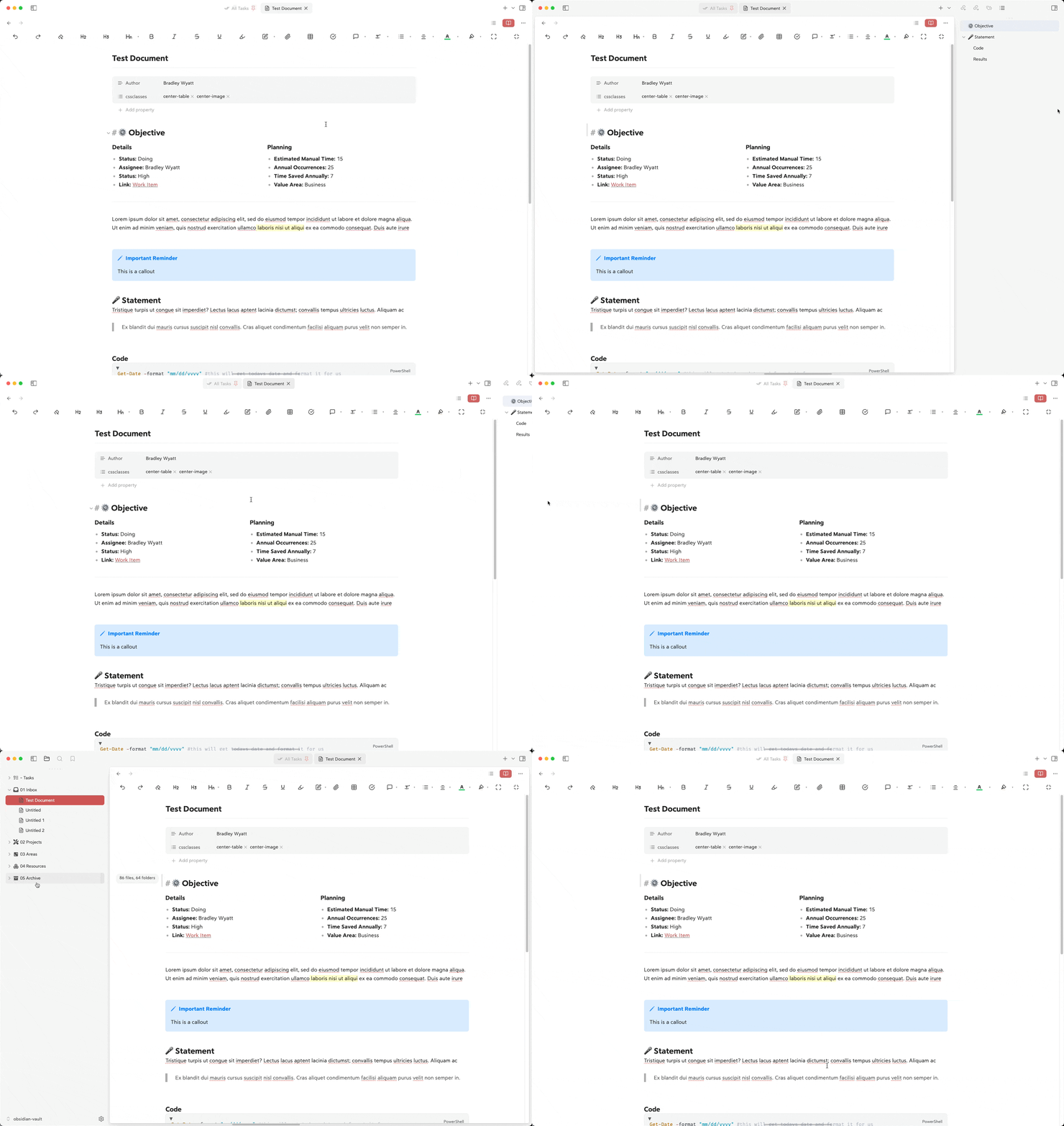
Demo video

Features

  • Expands the left sidebar when hovering over the left edge of the window
  • Expands the right sidebar when hovering over the right edge of the window
  • Configurable hover trigger areas (pixel distance from edges)
  • Set the expand/collapse animation speed
  • Option to overlay the sidebars on top of the main content
  • Set maximum width for the left and right sidebars
  • Configurable delay before expanding
  • Configurable delay before collapsing
  • Option to sync left and right sidebars (expand/collapse both together)

Configuration

You can customize the following settings in the plugin options:
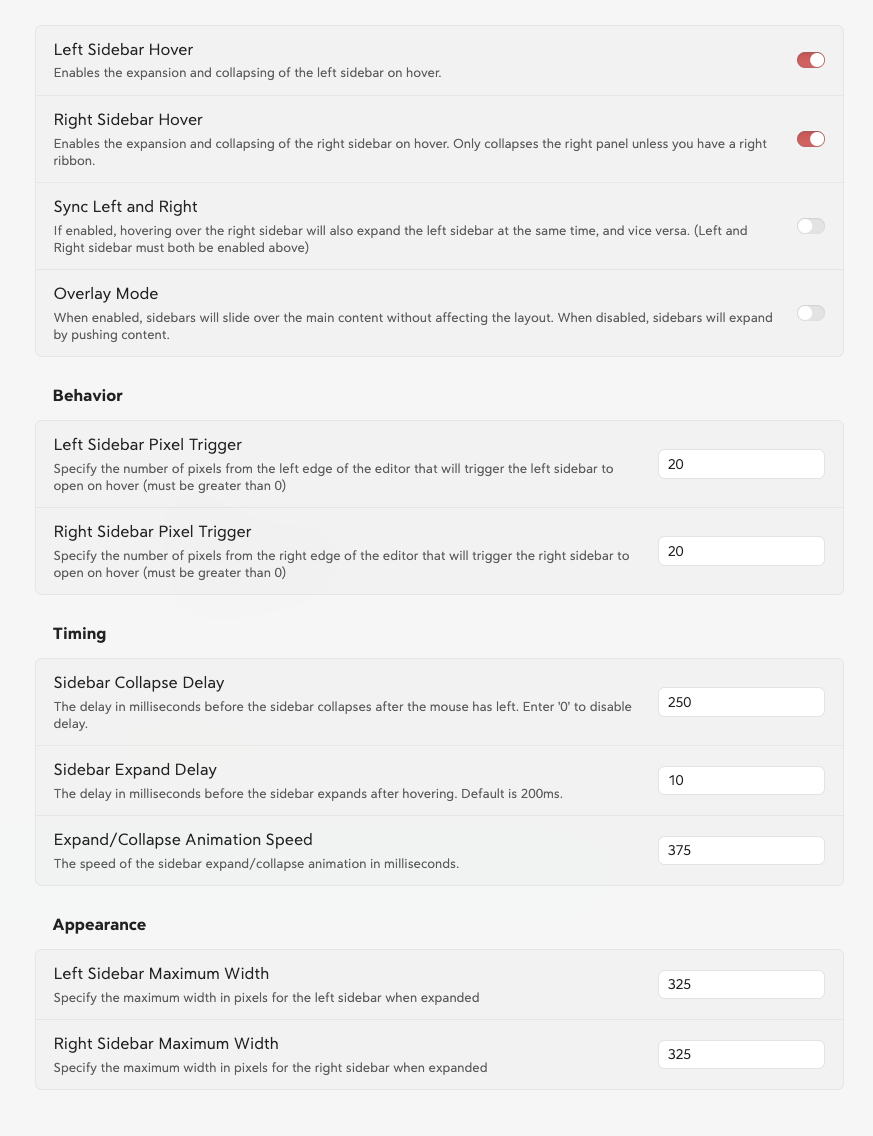
Plugin Settings

Here is the sidebar settings formatted in the requested table style:

Sidebar Settings

General

Setting Description Default
Left Sidebar Hover Enables the expansion and collapsing of the left sidebar on hover. Enabled
Right Sidebar Hover Enables the expansion and collapsing of the right sidebar on hover. Enabled
Sync Left and Right Expands both sidebars simultaneously when one is hovered (requires both to be enabled). Disabled
Overlay Mode Sidebars slide over the main content instead of pushing it. Disabled
Double Click Pin Sidebar Double click to keep sidebar open. Double click again to unpin it Disabled

Behavior

Setting Description Default
Left Sidebar Pixel Trigger Pixels from the left edge that trigger the sidebar to open on hover. 20
Right Sidebar Pixel Trigger Pixels from the right edge that trigger the sidebar to open on hover. 20

Timing

Setting Description Default
Sidebar Collapse Delay Delay in ms before the sidebar collapses after the mouse leaves. 250
Sidebar Expand Delay Delay in ms before the sidebar expands after hovering. 10
Expand/Collapse Animation Speed Speed of the sidebar expand/collapse animation in ms. 375

Appearance

Setting Description Default
Left Sidebar Maximum Width Maximum width in pixels for the left sidebar. 325
Right Sidebar Maximum Width Maximum width in pixels for the right sidebar. 325

Installation

  1. Open Obsidian Settings
  2. Navigate to Community Plugins and disable Safe Mode
  3. Click Browse and search for "Quick Peek Sidebar"
  4. Install the plugin
  5. Enable the plugin in your Community Plugins list

Manual Installation

  1. Download the latest release from the releases page
  2. Extract the files into your vault's .obsidian/plugins/quick-peek-sidebar/ directory
  3. Reload Obsidian
  4. Enable the plugin in your Community Plugins list

Development

Want to contribute or modify the plugin? Here's how to get started with the source code:

  1. Create a directory for your GitHub projects:

    cd path/to/somewhere
    mkdir Github
    cd Github
    
  2. Clone the repository:

    git clone https://github.com/bwya77/obsidian-quick-peek-sidebar.git
    
  3. Navigate to the plugin directory:

    cd open-sidebar-on-hover
    
  4. Install dependencies:

    npm install
    
  5. Start development build mode:

    npm run dev
    

    This command will keep running in the terminal and automatically rebuild the plugin whenever you make changes to the source code.

  6. You'll see a main.js file appear in the plugin directory - this is the compiled version of your plugin.

Testing Your Changes

To test your modifications:

  1. Create a symbolic link or copy your plugin folder to your vault's .obsidian/plugins/ directory
  2. Enable the plugin in Obsidian's community plugins settings
  3. Use the developer console (Ctrl+Shift+I) to check for errors and debug

Making Contributions

  1. Fork the repository
  2. Create a new branch for your feature
  3. Make your changes
  4. Submit a pull request with a clear description of your changes

Contributions

clairefro

  • Added: ability to expand and collapse the right sidebar on hover instead of over the ribbon

License

MIT License. See LICENSE for full text.

Similar Plugins

info
• Similar plugins are suggested based on the common tags between the plugins.
Auto Hide
4 years ago by skelato1
This Obsidian plugin enables you to collapse (and expand) the sidebar easier.
Cycle In Sidebar
3 years ago by Houcheng
Cycle through tabs of left/ right sidebar panel
Soomda
3 years ago by Michael Lee
🙈 Soomda — An Obsidian plugin that lets you quickly hide your sidebars.
Metadata Hider
2 years ago by Benature
Hide metadata property if its value is empty
Hugo codeblock highlight
2 years ago by aarol
Highlights lines in code blocks using Hugo's hl_lines syntax
Custom Sidebar Icons
2 years ago by RavenHogWarts
Custom Icons
Vault Name
2 years ago by @gapmiss
An Obsidian.md plugin for customizing and displaying the vault name (title) in the side navigation file explorer, similar to pre 1.6.0 versions of Obsidian.
Explorer Hider
2 years ago by Mara-Li
Hide folder & files from the explorer using a plugin and a bit of CSS :>
Markdown Formatting Assistant
5 years ago by Reocin
This Plugin provides a simple WYSIWYG Editor for Markdown and in addition a command line interface. The command line interface facilitate a faster workflow.
Icon Swapper
5 years ago by mgmeyers
Allows swapping out Obsidian's icons
Sidebar Expand on Hover
5 years ago by Tousif Iqbal Anik (toiq)
This Obsidian plugin expands or collapses the sidebar based on mouse hovering on the ribbons.
Electron Window Tweaker
5 years ago by mgmeyers
Hide Sidebars on Window Resize
5 years ago by NomarCub, Michael Hanson
A simple Obsidian plugin to hide the sidebars when the window gets narrow.
Window Collapse
5 years ago by Guilherme Quental
Color Folders and Files
a year ago by Mithadon
Obsidian plugin to customize the appearance of folders and files through a context menu with color picker and style options.
Image Preview on Icon Hover
a year ago by rama1997
Plugin for Obsidian that add image popups when hovering over various icons in the user interface
Simple File Info
a year ago by Lukas Capkovic
Rainbow-Colored Sidebar
a year ago by Kevin Woblick
Automatically color your sidebar like a rainbow. No configuration needed. 8 themes included.
Scratchpad
10 months ago by KVH
An open source Obsidian plugin for quick note-taking and freehand drawing.
UnLime
9 months ago by shandyba
Obsidian Unmentioned Links toggle
Mobile Sidebar Notes
6 months ago by Chris Kephart
Open notes & new tabs in the sidebar on the Obsidian mobile app.
Disable Tabs
4 months ago by David V. Kimball
Disables having more than one tab open at a time Obsidian.
Floating Headings
3 months ago by k0src
Displays a floating, collapsible outline of a note's headings on the right side of the editor. Expands on hover, click to navigate.
TikToker
a month ago by ameyxd
Save TikTok videos as markdown notes with embedded content and metadata extraction.
WebDAV Explorer
a month ago by 蓝星晓夜
WebDAV Explorer: Connect to WebDAV server, preview files directly in web view, and generate links through simple drag-and-drop.
