Qiaomu Publish

by 向阳乔木
5
4
3
2
1
Score: 50/100

Description

The Qiaomu Publish plugin formats Markdown notes for WeChat Official Account articles with a live preview while keeping the source in the vault. It offers 42 searchable themes, styles saved per note and reusable typography defaults. Formatted copying, standalone HTML and long PNG exports work without an account. Code highlighting includes line numbers, while formulas and Mermaid diagrams become images. Covers can use a specified image, the first article image or generated title artwork. With account credentials, API permissions and IP allowlisting, it sends WeChat drafts through direct access, a relay or qmblog Bridge. Direct and relay connections can update existing drafts, but Bridge creates new ones only. Desktop handoffs to X Articles, Zhihu and Xiaohongshu require Qiaomu Clipper in Chrome and signing into the platform. The interface is Chinese. Public publication remains manual and missing images block copying, export and draft submission.

Reviews

No reviews yet.

Stats

39
stars
146
downloads
5
forks
2
days
1
days
1
days
13
total PRs
0
open PRs
0
closed PRs
13
merged PRs
0
total issues
0
open issues
0
closed issues
48
commits

Latest Version

a day ago

Changelog

0.3.2:直连时查询并复制公网 IP

  • 选择「当前设备直连」后,可在设置和首次连接窗口查询公网 IPv4,一键复制到公众号后台的 API IP 白名单。
  • 测试连接遇到白名单错误时,优先显示微信返回的出口 IP;换网络或切换 VPN 后可重新查询。
  • 查询仅在点击时访问 ipify,不发送公众号凭据或文章。查询失败仍可测试公众号连接。
  • 调整窄窗口的表单滚动,保留完整的底部操作按钮。

已在 macOS Obsidian 验证公网查询、系统剪贴板、两处连接入口和浅深色/窄窗口显示。代理分流时查询结果仅供参考,以微信返回的地址和连接测试为准;IPv6 查询、手机真机和用户填写白名单后的真实公众号操作未验收。

在 Obsidian「设置 → 第三方插件 → 检查更新」升级。手动安装下载同版本的 main.js、manifest.json、styles.css,保留 data.json。

README file from

Github

Qiaomu Publish

一篇笔记,不该排版两次。

在 Obsidian 写好,预览排版,再交给公众号、X、知乎或小红书。

Write in Obsidian. Preview, then prepare drafts for WeChat, X, Zhihu and Xiaohongshu.

中文 · English

Release Checks License

从官方社区安装 · 功能演示 · 版本更新 · 反馈问题

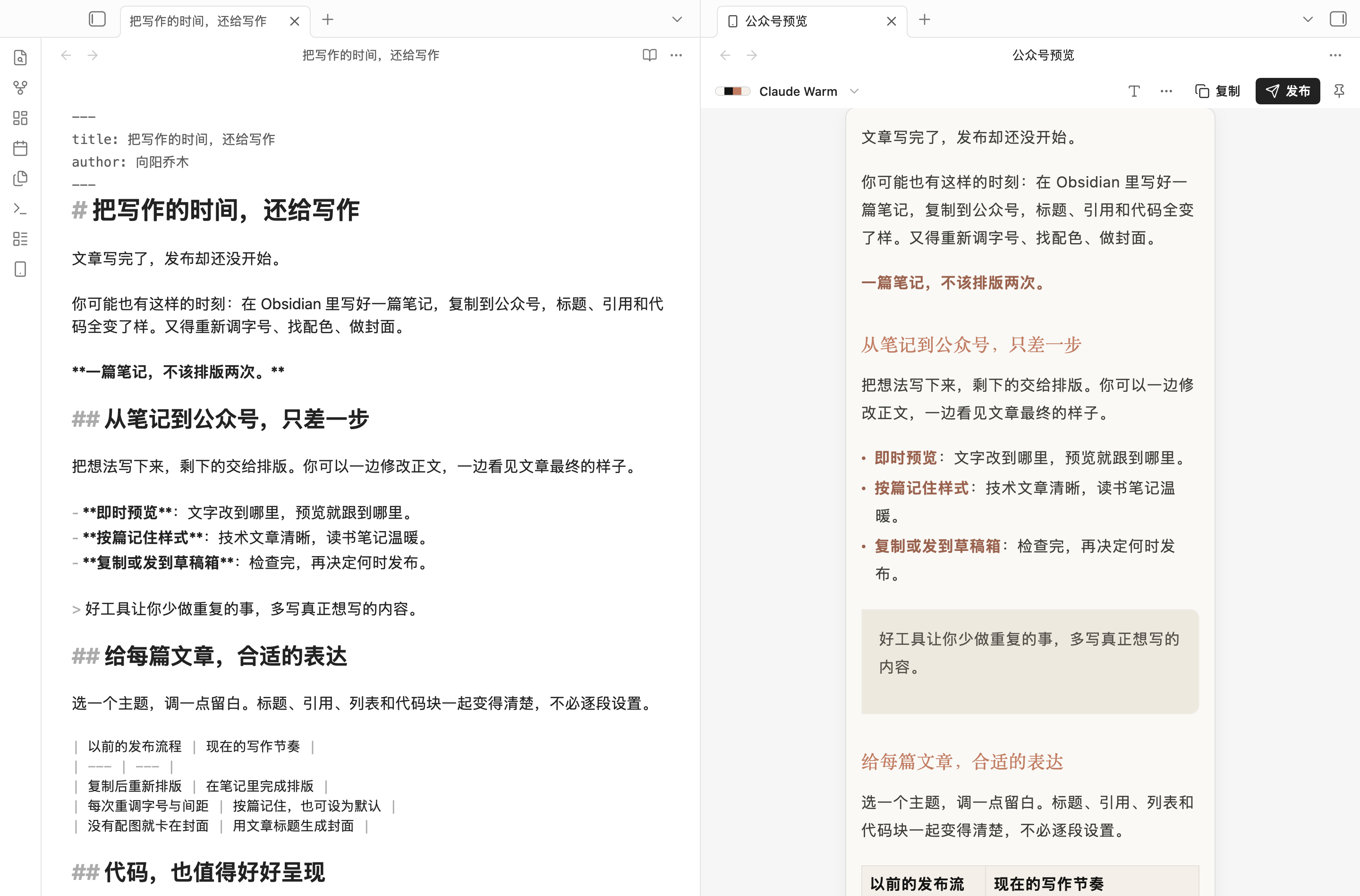
左边写 Markdown,右边实时预览公众号排版

你已经把文章写好了,却还得复制到另一个编辑器,重新调标题、行距、引用和代码,再找一张封面。

Qiaomu Publish 把这些步骤留在写作现场。 适合用 Obsidian 写公众号的作者、整理读书笔记的知识创作者,以及经常分享代码、公式和图表的人。笔记继续保存在自己的库里,排版按篇记住,下次接着写就好。

不连接公众号,也能先用。 安装后打开一篇笔记,即可预览、调整排版、复制格式和导出文件。发送草稿时再配置账号。

安装

需要 Obsidian 1.11.4 或更高版本。

前往 Obsidian 官方社区安装 →

  1. 打开官方页面,点击 Add to Obsidian,在 Obsidian 中选择 安装 → 启用。
  2. 打开笔记,在命令面板运行 「实时预览当前笔记的公众号排版」。

也可以直接在 Obsidian 的「设置 → 第三方插件 → 浏览」中搜索 Qiaomu Publish,安装并启用。

后续更新可在「设置 → 第三方插件」中检查并安装,无需手动替换文件。

  1. 从 GitHub Releases 下载同一版本的 main.js、manifest.json、styles.css。
  2. 在你的库中创建 .obsidian/plugins/qiaomu-publish/,将三个文件放进去。
  3. 重启 Obsidian,在「设置 → 第三方插件」启用 Qiaomu Publish。

手动更新时替换这三个文件,保留 data.json。

看看它怎么帮你

01 / 写完就能看见文章的样子

42 个内置主题,从温暖的阅读风格到简洁的技术文档、深色排版。主题列表可搜索;正文、列表、引用、表格和代码一起变化。预览跟随笔记修改,支持同步滚动。

你可能遇到的麻烦 装上之后
复制出去,排版全乱了 在 Obsidian 先看效果,复制时带上同一份内联样式
每篇文章都从头调字号、间距 按篇保存,也能把满意的样式设为默认
纯文字文章卡在做封面 自动生成标题封面,文字、背景、字体都能调整
技术文章的代码、公式、图表难搬运 代码高亮与行号;MathJax 公式、Mermaid 图转成图片
改完又生成一份重复草稿 直连与乔木中转可更新笔记对应的原草稿
还想把文章发给朋友或存档 导出 HTML 或长图 PNG

02 / 调整排版,直接看结果

点工具栏的 「T」,调整正文字号、行距、段落间距、左右留白、字体与主色。还可设置首行缩进、代码配色、行号、图片说明、链接脚注和自定义 CSS。
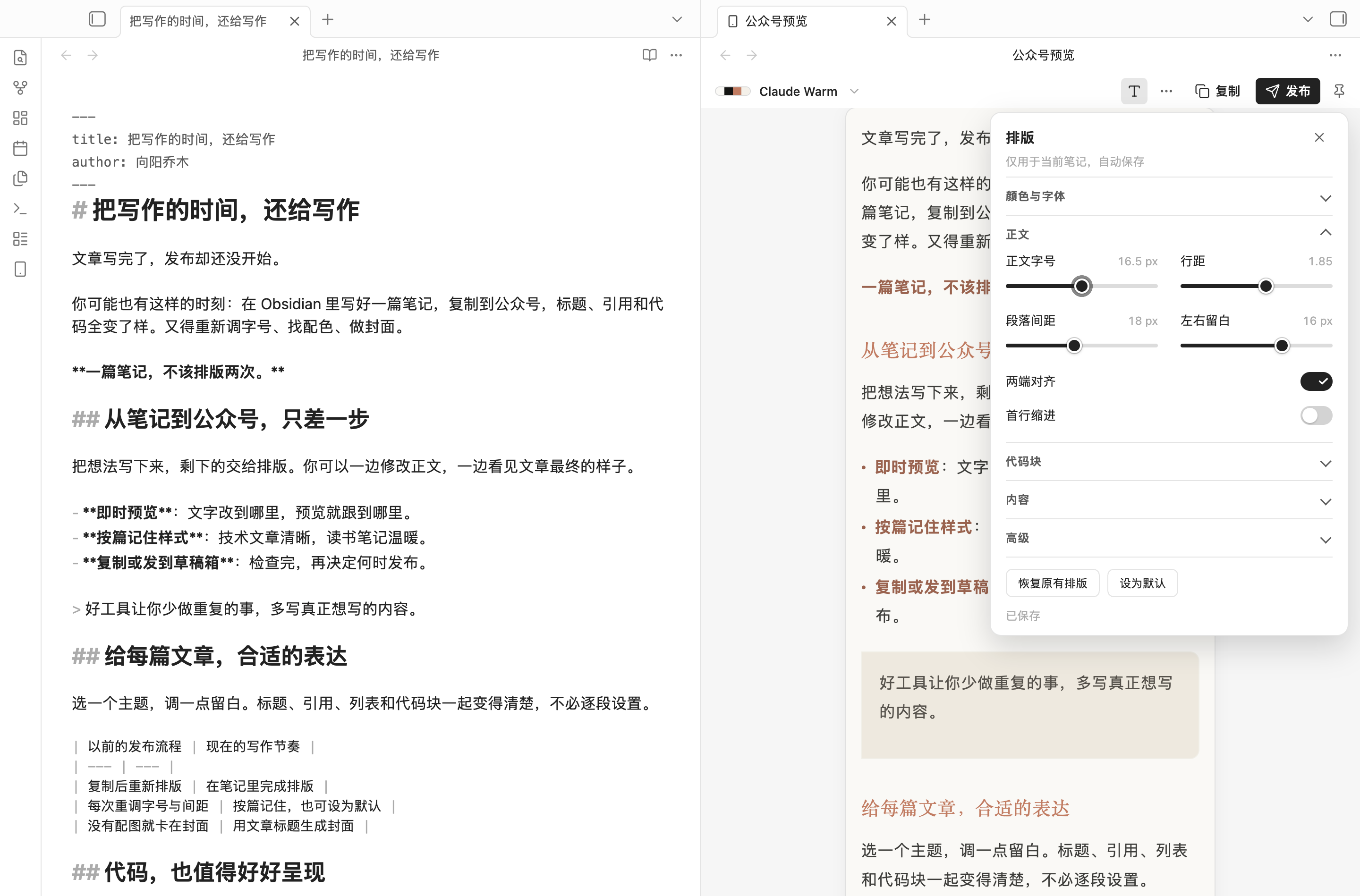
排版面板:调整字号、行距和留白,立即预览并自动保存

设置保存在插件里,只作用于当前笔记;正文和笔记属性不会因调整排版而被改写。重命名笔记或文件夹时,排版设置会一起保留。
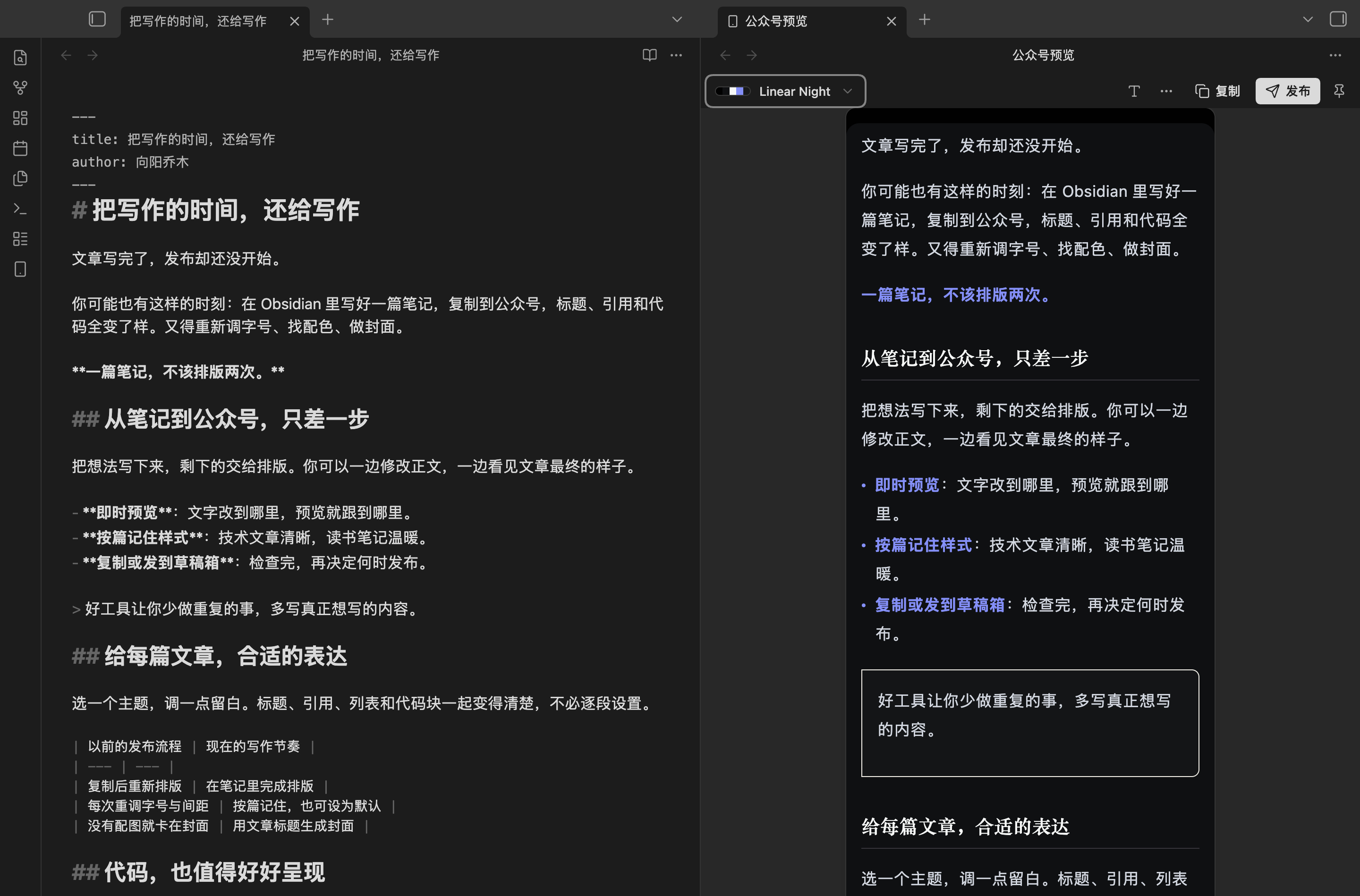
Linear Night 深色主题的真实预览

深色样式和公众号客户端的显示效果可能有差异,发送后请在公众号后台核对。

03 / 封面和草稿,在同一个窗口完成

没有配图的笔记会生成标题封面。可以单独写一句更短的封面文字,选择背景、字体、字号和颜色,再检查标题、作者、摘要和右侧预览。
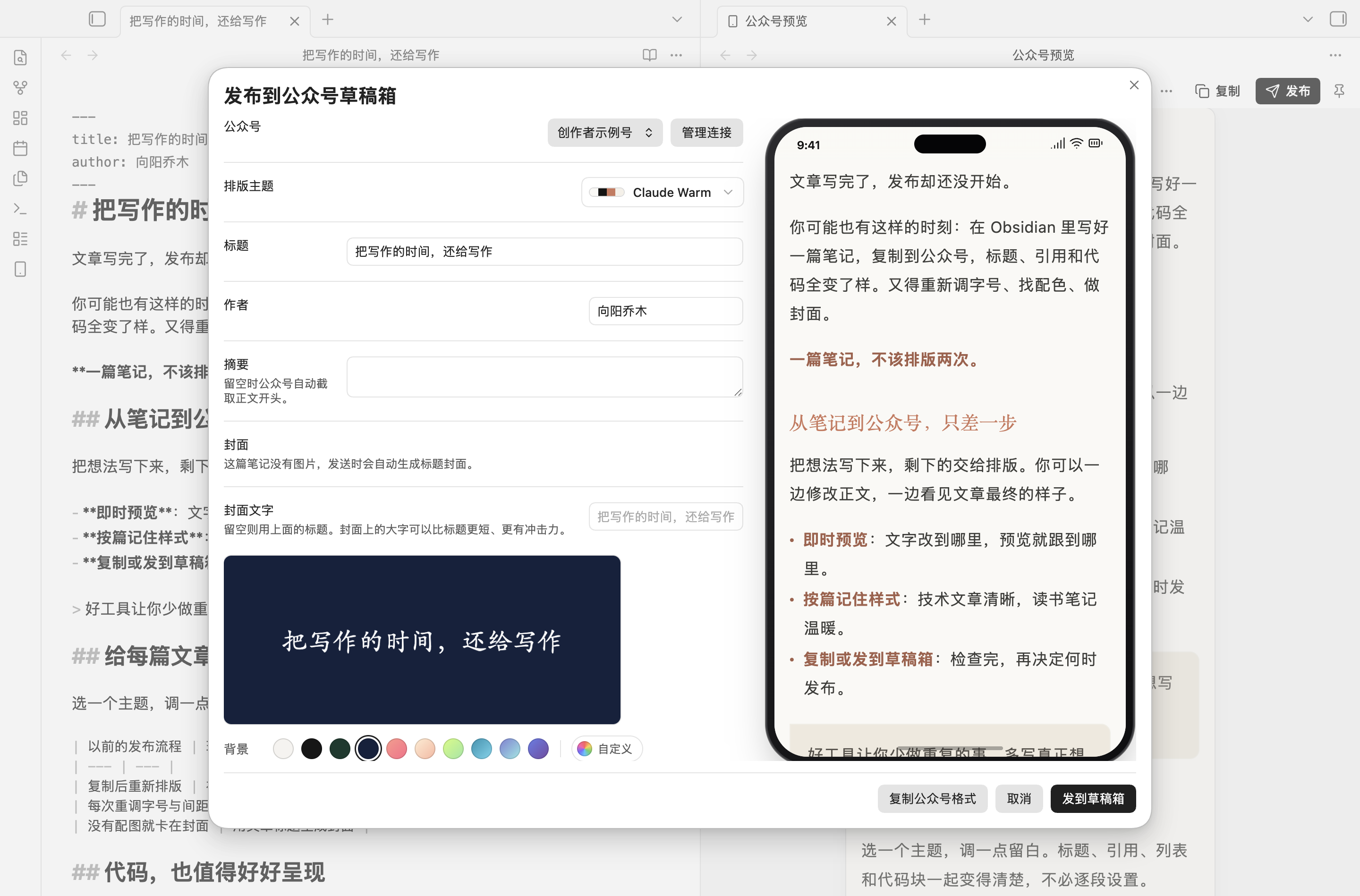
标题封面编辑与草稿发送窗口

有封面图片时,插件优先使用笔记的 cover / 封面 属性,否则选取正文第一张图片。发送成功后,可把草稿 ID 记回笔记;再次发送默认更新原稿。最终发布仍由你在公众号后台完成。

04 / 一份内容,多种交付方式

  • 复制公众号格式:复制排版与嵌入的本地图片。粘贴到公众号编辑器后仍需检查图片;需要自动上传图片时请选择「发送草稿」。
  • 发送草稿:正文图片和封面通过所选账号连接上传。
  • 导出 HTML:带内联样式与嵌入图片,适合保存和分享。
  • 导出长图 PNG:适合发给朋友或作为文章预览。超长文章会降低分辨率,并给出提示。

支持 Obsidian 图片嵌入、Markdown 行内与引用式图片、库内 HTML 图片及嵌入笔记的附件。相同附件重复引用只上传一次;本地静态 SVG 自动转成 PNG。无法找到的图片会阻止复制、导出和发送,并提示修正引用。动画 SVG 会明确报错,请先导出为目标平台支持的动图格式;不需要动画时可导出 PNG。公众号正文图片接口只承诺 JPG / PNG,GIF 的实际接受情况仍需核对。

查看这篇演示笔记导出的长图。导出遇到无法读取的远程图片时会提示处理,避免悄悄漏图。

05 / 发到 X、知乎和小红书

桌面版发布窗口可切换平台,需要在同一台电脑的 Chrome 中安装 Qiaomu Clipper 1.18.7 或更新版,并登录所选平台。手机端保留公众号功能。

平台 插件准备的内容 交接后的状态
X 文章 可单独编辑的 Markdown、正文图片和封面 写入文章编辑器,检查后再发布;账号需有 X 文章权限
知乎 标题、正文、图片和题图 创建文章草稿,检查后再发布
小红书 3:4 图文卡片、标题、正文和话题 预填创作平台;请检查后点「暂存离开」或「发布」

封面支持从本机或笔记图片选择、裁剪,也可生成文字封面。X / 知乎窗口里的正文修改只作用于本次发送。小红书提供六种卡片模板,支持配色、分页和移除单张卡片;图文卡片是静态图片,GIF 动画不会保留在卡片中。X / 知乎的 GIF 在大小限制内保留原文件,超限时提示先压缩,不会悄悄转成 JPEG。

发送会打开系统默认浏览器。如果 Clipper 在另一个浏览器中,可在等待期间点「复制链接」,粘贴到已装扩展且已登录的平台浏览器。插件不代替你公开发布。

要发到草稿箱,再连接公众号

在发布窗口或「设置 → Qiaomu Publish → 公众号」添加连接。需要公众号的 AppID、AppSecret、相应接口权限,以及正确的 API IP 白名单。

连接方式 适合谁 需要准备
固定 IP 的乔木中转 希望减少换网络后重配白名单的用户 按插件显示的出口 IP 配置白名单;凭据经 HTTPS 传到中转
当前设备直连 希望直接调用微信接口的用户 查询并复制当前公网出口 IP,加入公众号白名单后测试连接
自建 qmblog Bridge 已有 Bridge 部署的用户 Bridge 地址和访问令牌;当前只支持新建草稿

可以管理多个公众号,发送时明确选择目标。插件无法替账号开通微信接口权限;连接失败时会区分密钥、白名单、接口权限和服务错误。

乔木中转已开放普通用户接入,无需人工登记 AppID。使用自己的 AppID、AppSecret,并将插件显示的固定出口 IP 加入公众号 API 白名单即可测试连接;微信账号仍需具备所调用接口的权限。

使用乔木中转上传图片、同步草稿时,数据需要经过乔木维护的服务器再传给微信,会消耗服务器带宽;图片需要格式转换或压缩时,还会占用计算资源。每日额度和短时请求保护用于控制运行成本、减少异常请求对其他用户的影响,让共享服务保持稳定。

共享中转目前为每个普通用户的公众号提供 每天 200 次中转请求,按 UTC 00:00(北京时间 08:00)重置;测试连接、上传每张图片和创建或更新草稿均计入请求次数,不等于每天 200 篇文章。200 次是目前设定的共享服务额度,与微信各接口本身的调用额度分开,并非服务器性能的硬上限。使用量较大时,可以选择当前设备直连或填写兼容的自建中转/Bridge 地址,不占用乔木共享中转额度。

选择「当前设备直连」后,可点击「查询公网 IP」并复制到公众号后台的 API IP 白名单。显示的是公网出口 IPv4,不是 192.168.x.x 等局域网地址。换网络或切换 VPN 后请重新查询;代理分流时,查询服务与微信看到的出口可能不同。如果测试连接返回白名单错误,插件会优先显示微信返回的 IP,供复制后重新测试。

---
title: 把写作的时间,还给写作
author: 向阳乔木
digest: 一篇笔记,从写作到公众号草稿。
wechat_theme: claude-warm
cover: "附件/文章封面.jpg"
cover_text: 把时间还给写作
source_url: https://example.com/article
---

title/标题、author/作者、digest/摘要、cover/封面、cover_text/封面文字、wechat_account/公众号、wechat_theme/公众号主题、source_url/原文链接 均可使用。cover_text 只影响自动生成的封面。

开启「记录到笔记属性」后,成功发送会写入 wechat_media_id、wechat_draft_at 和 wechat_account。样式优先级为:当前笔记保存的排版 → 笔记主题属性 → 插件默认。

你的内容与凭据

  • 笔记、排版设置留在本地库中。AppSecret 和 Bridge 令牌使用 Obsidian SecretStorage,不写入同步的插件 data.json。
  • 发送草稿会将正文、图片与封面交给所选连接。乔木中转会接收 AppID、AppSecret 和发布内容,以调用微信 API;它是可选连接方式。公开共享接入码不是私密凭据。
  • X、知乎、小红书交接时,插件临时在 127.0.0.1 开启一个随机端口,只服务本次发送;Clipper 使用一次性凭证取得正文和图片,再在已登录的平台页面上传。任务结束即关闭端口,不使用公众号中转、不接收平台密码。浏览器链接中的一次性凭证在交接后移除,请勿分享等待中的交接链接。
  • 预览中的远程图片会向原网站请求;导出会下载并嵌入远程图片。刷新白名单 IP、测试连接、读取 Bridge 账号和打开「关于」中的二维码也会联网。纯本地文字排版不需要网络。
  • 直连的「查询公网 IP」仅在点击时访问 ipify 的 HTTPS IPv4 查询服务;不发送 AppID、AppSecret 或文章内容,不保存查询结果。查询失败不阻止直接测试公众号连接。
  • 首次启用且尚无本插件设置时,会只读同一库中旧版 Qiaomu Agent 的公众号配置来迁移,不改写 Agent 数据。
  • 插件只发送草稿,不执行群发。音视频及网页嵌入需在公众号后台手动补充。自定义字体取决于阅读设备,不承诺所有手机显示相同字体。

验证与开发

0.2.0 已在隔离 macOS Obsidian 中检查预览、浅深色、窄面板、键盘调节、设置持久化、真实文件导出,以及从 0.1.2 的升级保留。草稿创建、更新与笔记写回使用本地受控服务验证;不把它等同于真实微信账号验收。iOS / Android 真机尚未覆盖。

npm ci
npm run check   # TypeScript、回归测试、生产构建
npm run dev     # 开发监听

本地图片修复验收 · 0.2.0 验收记录 · 第三方许可 · 提交问题

作者

向阳乔木 · 公众号 「向阳乔木推荐看」

工具 · 博客 · 推荐 · X @vista8 · GitHub

MIT License. 排版主题名称用于描述视觉风格,与相应品牌无关联。


English

Qiaomu Publish turns your Obsidian notes into formatted WeChat Official Account articles. Keep writing in Markdown, preview the article beside your note, and choose whether to copy the formatted content, export a file, or send it to an account’s draft box. No account is needed for previewing, formatting, copying or exporting.

Choose from 42 searchable themes, adjust typography and spacing, and keep a different appearance for each note. Code highlighting, formula and Mermaid image conversion, generated title covers, standalone HTML and long PNG exports help reduce repetitive publishing work. Direct and Qiaomu relay connections can update the existing draft instead of creating duplicates.

Install from the official Obsidian community listing: click Add to Obsidian, then Install → Enable. You can also search for Qiaomu Publish under Settings → Community plugins → Browse. Use Community plugins to check for future updates. Manual installation from GitHub Releases remains available as a fallback. Obsidian 1.11.4 or later is required. The current plugin interface is Chinese.

Sending drafts requires an eligible WeChat Official Account, API credentials and IP allowlisting. Credentials use Obsidian SecretStorage; the optional relay receives them and article content over HTTPS. Remote images and explicit connection operations use the network. The plugin never mass-publishes articles.

Desktop checks include actual previews, exports, settings persistence and upgrade preservation. Draft creation and updates were tested against a controlled local service; live WeChat delivery and mobile hardware are not covered by those checks. Read the full English guide for installation, privacy, limitations and verification. MIT licensed.

Similar Plugins

info
• Similar plugins are suggested based on the common tags between the plugins.
Publish to WordPress for Obsidian
5 years ago by devbean
An obsidian plugin for publishing docs to WordPress.
Publish to Steemit
5 years ago by anpigon
Post directly to your Steemit from Obsidian.
Telegraph Publish
5 years ago by Reorx
Publish your Obsidian note to a Telegraph page.
Enveloppe
4 years ago by Mara-Li
Enveloppe helps you to publish your notes on a GitHub repository from your Obsidian Vault, for free!
Micro.publish
4 years ago by Otavio Cordeiro
Micro.publish is an Obsidian plugin to publish notes directly to Micro.blog, written in TypeScript
Webpage HTML Export
4 years ago by Nathan George
Export html from single files, canvas pages, or whole vaults. Direct access to the exported HTML files allows you to publish your digital garden anywhere. Focuses on flexibility, features, and style parity.
O2
4 years ago by haril song
Converts obsidian markdown syntax to other platforms.
Mixa
4 years ago by Mixa Team
Publish your notes and blog posts directly from Obsidian with Mixa
File Publisher
4 years ago by Devin Sackett
Quail
3 years ago by Lyric
An Obsidian Plugin for Quail.ink. This is a clone repo of https://github.com/quail-ink/obsidian-quail
Nostr Writer
3 years ago by James McGauran
Publish seamlessly from Obsidian to Nostr
Writeas Blog Publisher
3 years ago by encima
Pickly PageBlend
3 years ago by Dmitrii Mitrichev
The easiest way to share your Obsidian notes
screen.garden
3 years ago by screengarden, LLC
Realtime collaboration and web editing for Obsidian.
Permalink Opener
3 years ago by @kepano
Obsidian plugin to open URLs based on a permalink or slug in the note properties. For use with Jekyll, Hugo, Eleventy, Astro, Obsidian Publish, and other publishing tools.
Halo
3 years ago by Ryan Wang
Publish your Obsidian documents to Halo.
Moon server publisher
3 years ago by Roman Provazník
Publish URL
3 years ago by Hananoshika Yomaru
copy the publish url to clipboard
Omg.publish
3 years ago by May Meow
An obsidian plugin to create statuslog posts right from obsidian notes.
Dynamic Text Concealer
3 years ago by Matt Cole Anderson
Obsidian.md Plugin to conceal or replace user configured text patterns in Live Preview and Read Mode.
MBlog Publish
3 years ago by Jerry
Orion Publish
3 years ago by Sean Collings
NotesOn Publish
3 years ago by Andrey Shapkin
Plugin to Obsidian.md
Livecodes Playground
3 years ago by @gapmiss
Open-source client-side code editor plugin for Obsidian.md - powered by LiveCodes.io
Hugo Publish
3 years ago by kirito
write blog in obsidian, pubulish to hugo site.
Google Blogger
3 years ago by Hugo Sansaqua
A plugin for publishing Obsidian documents to Blogger.
Infostacker Note Publish
2 years ago by Taskscape LTD, Patryk Nowak, Kacper Pabianiak
Infostacker plugin for Obisidian
Wechat Public Platform
2 years ago by Blake Chan
Obsidian Wechat public Plugin (微信公众平台) is a plugin to release article from your Obsidian Vault to WeChat, Baidu baiJiahao or other platforms.
Note to MP
2 years ago by Sun Booshi
Publish to DEV
2 years ago by Peter Strøiman
Obsidian plugin to publish to dev.to
Dataview Publisher
2 years ago by UD
Output markdown from your Dataview queries and keep them up to date. You can also be able to publish them.
Messager
2 years ago by Rainyluo
send messages through wechat/http api/email to obsidian
Vitepress Publisher
2 years ago by mistj
Obsidian Vitepress Plugin is a flexible tool that allows you to easily preview and compile your .md files using VitePress or other static site generators (Hugo, Hexo, Docusaurus) in Obsidian.
Vault to blog
2 years ago by barkstone2
Automation tool of making react SPA blog by obsidian vault.
Edit mode switch
2 years ago by Mara-Li
Add a button in file header to switch between LP & Source while editing
Contextual Typography
6 years ago by mgmeyers
Smart Typography
5 years ago by mgmeyers
Converts quotes to curly quotes, dashes to em dashes, and periods to ellipses
Embedded Code Title
5 years ago by tadashi-aikawa
It is an Obsidian plugin which can embeds title to code blocks.
OzanShare Publish
5 years ago by Ozan Tellioglu
This plugin allows you to publish your markdown notes with a single click directly from your Obsidian vault.
Publish and GitHub URL
5 years ago by kometenstaub
Copy or open the Obsidian Publish URL of a note. You can also open its Git commit history on GitHub.
Typefully
2 years ago by Sébastien Dubois
Integrate Typefully within Obsidian
Magiedit
2 years ago by Matteo Gassend
AmpliFlow Page Publisher
2 years ago by Patrik Björklund
The offifical AmpliFlow obsidian page publisher.
Export to HTML
2 years ago by kalvn
Export a note as HTML in the clipboard or in a file.
Publish to Discourse
2 years ago by woodchen
Obsidian plugin for publishing articles to forums built with Discourse. obsidian插件, 用于把文章发布到使用discourse搭建的论坛.
Forms
2 years ago by Sorin Mircea
YourPulse - Your Writing Activity Visualised
2 years ago by Jiri Sifalda
YourPulse.cc - Obsidian.md plugin that turns your vault into a reflection of your creativity, and put your writing on steroids 💪
Mode manager
2 years ago by dk949
Better management of reading/editing modes in obsidian
Enhanced Publisher
a year ago by Cube
增强的Obsidian发布插件,支持图片自动存储、HTML预览和发布到微信公众号等内容平台
Yuque Publish
a year ago by oylbin
obsidian plugin to publish document to yuque
Typecho
a year ago by Chen
obsidian同步Typecho
MP Preview
a year ago by Yeban
一个帮助你快速将 Obsidian 笔记转换为微信公众号格式的插件。
YAML Table
a year ago by dainakai
Zhihu
a year ago by dgg
Zhihu on Obsidian | 知乎 Obsidian 插件
Publish Note to Mowen Note
a year ago by ziyou
This is a mowen plugin for Obsidian (https://obsidian.md)
umbPublisher
a year ago by Owain Williams
An Obsidian Plugin that allows you to push notes to Umbraco 15+ as content nodes
Content OS
a year ago by eharris128
Post to LinkedIn from within Obsidian
Custom Theme Studio
a year ago by @gapmiss
An Obsidian.md plugin to create and tweak custom themes with live CSS editing, element styling, and instant previews. All without leaving Obsidian.
Adapt to Current View
a year ago by greetclammy
Obsidian plugin to set different accent colors for Reading view, Live Preview and Source view.
Typographer
a year ago by René Coignard
Enhances typography with smart quotes, custom text replacements and auto-pairing characters.
Better Link Clicker
9 months ago by Eniverz
An Obsidian plugin that modifies the default link click event.
Negative Heading
7 months ago by Ashan Devine
Plugin for Adding Discord Style Negative Headings to Obsidian
Wechat Converter
4 months ago by davidlam-oss
Obsidian 公众号排版(支持自定义 CSS和公众号贴图)、飞书云同步与多平台(小红书、知乎等)发布插件。Markdown 转微信文章 / Feishu docs / 知乎、小红书、今日头条等草稿,支持数学公式、本地图片、GIF 和 Mermaid。
MP Publisher
3 months ago by joeytoday
自定义主题预览,并发布到公众号草稿箱。
Digital Garden
3 months ago by oleeskild
Local Fonts
3 months ago by flowing-abyss
Load and use local fonts in Obsidian.
Mobile PDF Exporter
2 months ago by Murat
One-click selectable preview PDF export plugin for Obsidian mobile and desktop.
Dayframe
2 months ago by Ganessh Kumar R P
🖼️ like a picture frame but for your daily notes.
Better Live Preview Image
2 months ago by Dong Yang
Better Live Preview image editing for Obsidian
Bi Ji Tong Bu
2 months ago by 笔记同步助手
Bi Ji Tong Bu (笔记同步助手) for Obsidian — marketplace edition (no self-update; full disclosures)
Wechatian
2 months ago by laruence
WeChat ↔ Obsidian bridge plugin: receive messages/media into your vault, send from agents via a file-based outbox — through the official ilink gateway
TableTune
2 months ago by niizhou
Tune your Obsidian tables: drag column/row borders to resize; sizes remembered per table; content-aware defaults; clean single-scrollbar reading view.
Table Resize
a month ago by lishuai1993
调整obsidian中表格宽度的插件
Print Studio
a month ago by 5krus
Turn your markdown notes into polished PDFs and printed pages. Add a letterhead, paginate documents, keep your study highlights, add page borders, create presets and much more!
yh-mp-preview
17 days ago by angelwdx
一个帮助你快速将 Obsidian 笔记转换为微信公众号格式的插件。
Rentry integration
2 days ago by akatopo
Rentry integration plugin for Obsidian