China BRAT

by 快速安装插件
5
4
3
2
1
Score: 50/100

Description

Category: Coding & Technical Tools

The China BRAT plugin installs another plugin from a directory URL by fetching manifest.json, main.js and an optional styles.css without using ZIP archives. It accepts HTTPS endpoints, with plain HTTP allowed only for localhost, and can derive the parent directory when a manifest URL is pasted. Before writing files, it checks the manifest ID and version, restricts unsafe ID characters, compares minAppVersion with the running app and rejects an empty main script. A missing stylesheet is accepted only after a 404 or 410 response, while other server errors stop the install. It writes the fetched files into the target plugin directory, loads and enables the plugin, then confirms that loading succeeded. Hosts must expose unpacked plugin files at stable paths because ready made ZIP links are not supported.

Reviews

No reviews yet.

Stats

0
stars
78
downloads
0
forks
5
days
5
days
5
days
0
total PRs
0
open PRs
0
closed PRs
0
merged PRs
0
total issues
0
open issues
0
closed issues
1
commits

RequirementsExperimental

  • An HTTPS directory URL that serves unpacked manifest.json and main.js files

README file from

Github

China BRAT

An Obsidian plugin that installs another plugin from a plain URL. Inspired by BRAT, it does one thing only: fetch a plugin's files from a directory URL and enable it — and it deliberately does not use zip archives. If the host serves the files under their own paths, the client is just three GET requests and needs no decompression code at all.

The build is ~3 KB (about 1.8 KB gzipped) with no styles.css, so the very first install still goes through on a slow connection.
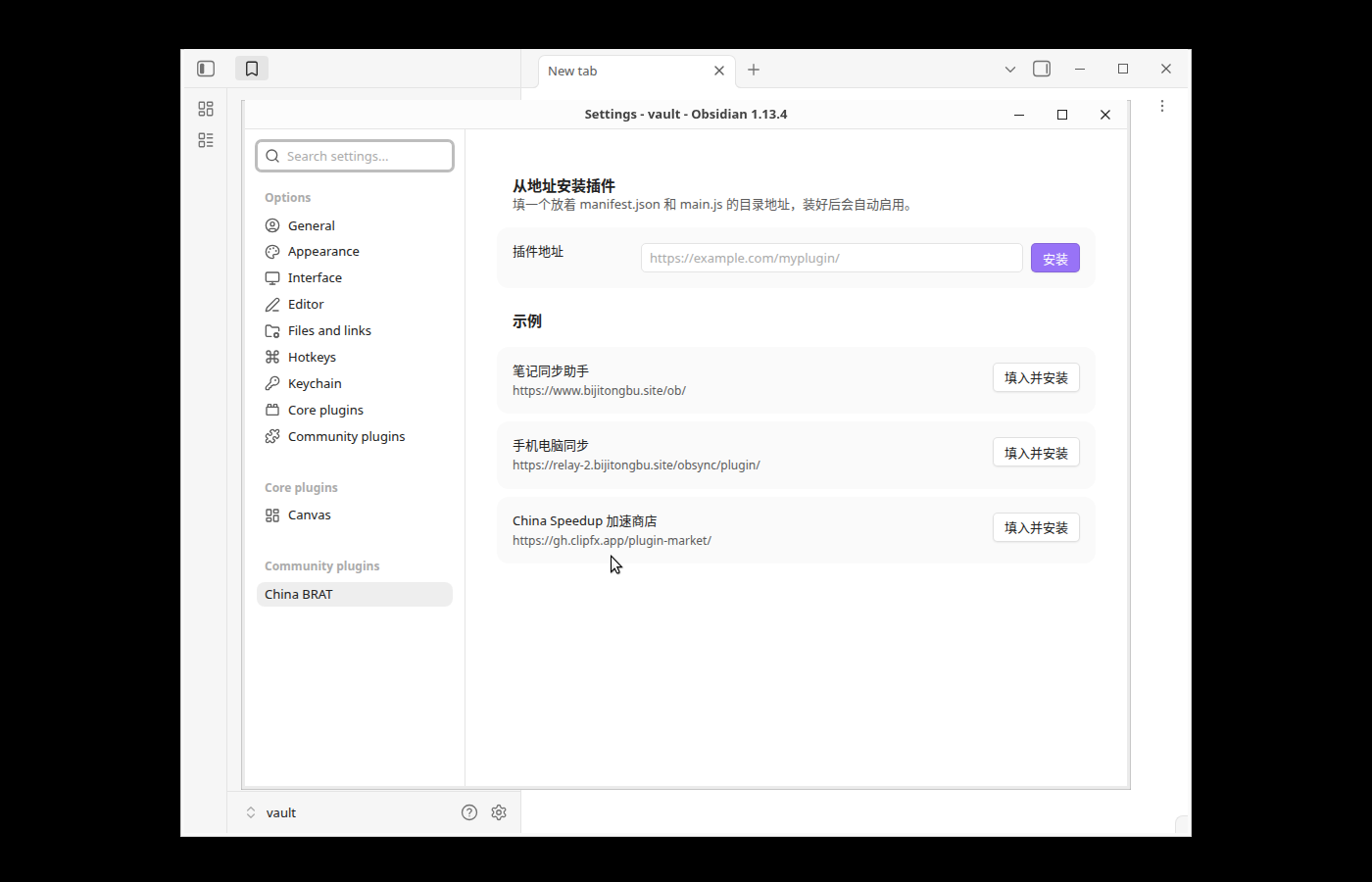
Settings tab

Usage

Settings → Community plugins → China BRAT:

  1. Paste a directory URL that hosts the target plugin's manifest.json and main.js (styles.css is optional), e.g. https://example.com/myplugin/.
  2. Press Install. The files are written to .obsidian/plugins/<id>/, then the plugin is loaded and enabled.

Pasting the .../manifest.json URL works too — the file name is stripped and the parent directory is used.

Three example endpoints are built in; one click fills the field and installs:

Add-on URL
笔记同步助手 (Note Sync Helper) https://www.bijitongbu.site/ob/
手机电脑同步 (Phone/Desktop Sync) https://relay-2.bijitongbu.site/obsync/plugin/
China Speedup https://gh.clipfx.app/plugin-market/

HTTPS only (localhost excepted). Installing code is executing code, and plain HTTP can be swapped out by anyone on the same network.

Why not zip

A zip path would need a decompression implementation inside the plugin — roughly a third of the bundle — plus a dependency on DecompressionStream. When the host lays the three files out by path (which the three example endpoints already do, since that is how their own updaters work), the client shrinks to three GETs: smaller, compatible with older runtimes, and each file is cached separately by the CDN. The trade-off is that the host has to serve unpacked files; a ready-made zip link cannot be installed.

What is validated before anything is written

  • The URL must be HTTPS (plain HTTP is allowed for localhost during development).
  • manifest.json must parse and carry a valid id and version. The id becomes part of the path on disk, so only [A-Za-z0-9_.-] is accepted and it may not start with ..
  • A minAppVersion newer than the running app aborts the install, so a working copy is never overwritten with one that cannot load.
  • main.js may not be empty.
  • styles.css counts as "this add-on has no stylesheet" only on a real 404/410, in which case a leftover stylesheet from the previous version is removed; 500/403 raise an error instead, so a flaky network cannot delete a working stylesheet.
  • After writing, the install is confirmed to have actually loaded. If it did not, an error is shown rather than a false success.

Network use and privacy

  • The only network requests are GET requests to the URL you type in (or to one of the three example URLs when you press their button), for manifest.json, main.js and styles.css.
  • Nothing is uploaded, there is no telemetry, no account, and no paid feature.
  • The three preset URLs are the public update endpoints of three add-ons written by the same author; they are shown as one-click examples and are never contacted unless you press the button.

A note for reviewers

Obsidian exposes no public API for writing an add-on to disk and enabling it, so — like BRAT — this plugin uses app.plugins (loadManifests, disablePlugin, enablePluginAndSave, plugins). Those four members are the only undocumented API used; everything else is public API (requestUrl, Vault.adapter, requireApiVersion, Notice, Setting). There is no self-update mechanism: this plugin never downloads or replaces its own main.js, and when the URL you enter happens to point at this plugin's own id it writes the files and asks you to restart rather than hot-swapping itself.

Development

npm install
npm run lint       # eslint-plugin-obsidianmd — the same static scan the review bot runs
npm run build      # emits main.js (runs tsc first)

Installing this plugin

Copy main.js and manifest.json from Releases into <vault>/.obsidian/plugins/chinabrat/, restart Obsidian, and enable it under community plugins. Release assets are built by GitHub Actions and carry build provenance attestations, so you can verify them with:

gh attestation verify main.js --repo notesynchelper/chinabrat

License

MIT


中文说明

粘一个地址就能装插件。 灵感来自 BRAT,但只做「从直链装一个插件」这一件事,并且刻意 不走 zip——源站把插件文件按路径摊开放,客户端就退化成三个 GET,不用带任何解压代码。 产物 3 KB 出头(gzip 后约 1.8 KB),没有 styles.css,第一次装的时候网络差也拉得下来。

用法

设置 → 第三方插件 → China BRAT

  1. 在「插件地址」里填一个目录地址,该目录下放着要装的插件的 manifest.jsonmain.jsstyles.css 可选),例如 https://example.com/myplugin/
  2. 点「安装」。文件写进 .obsidian/plugins/<插件 id>/,然后自动加载并启用。

直接粘 .../manifest.json 也行,会自动去掉文件名当目录用。设置页内置三个示例地址,点 「填入并安装」一键装上(笔记同步助手 / 手机电脑同步 / China Speedup 加速商店)。

只接受 httpslocalhost 除外):装插件等于执行代码,明文 http 会被同网段的人掉包。

为什么不是 zip

zip 方案得在插件里塞一份解压实现,约占体积的三分之一,还要依赖 DecompressionStream。 只要源站把三个文件摊开放(上面三个示例的自更新端点本来就是这么放的),客户端就只剩三个 GET:体积更小、老版本也能跑、每个文件还能被 CDN 分别缓存。代价是源站要配合摊开文件, 拿到一个现成 zip 链接是装不了的。

装了会做什么检查

  • 地址必须是 https(本机开发放行 http)
  • manifest.json 必须能解析,且 id / version 合法;id 会拼进写盘路径,所以只允许 [A-Za-z0-9_.-] 且不能以 . 开头
  • minAppVersion 高于当前 Obsidian 就拒绝写盘(不会把能用的版本覆盖成装不上的)
  • main.js 不能是空的
  • styles.css 只有真的 404/410 才当作「这个插件没有样式」,此时会顺手删掉上一版残留的旧样式; 500/403 一律报错,免得网络抖动把已装好的样式删了
  • 装完确认 Obsidian 真的加载起来了,没加载起来就报错,不会假报成功

Similar Plugins

info
• Similar plugins are suggested based on the common tags between the plugins.
Lock Screen
5 years ago by Eric Biewener
Plugins Galore
4 years ago by dylanpizzo
This is an Obsidian plugin to allow easily sideloading other plugins.
Open Related Url
4 years ago by Dan Pickett
Copy Search URL
4 years ago by Carlo Zottmann
A plugin for Obsidian (https://obsidian.md) that adds a menu entry to its search view for copying the Obsidian search URL.
URL Namer
4 years ago by zfei
Plugin Update Tracker
4 years ago by Steven Swartz
Know when installed obsidian plugins have updates and evaluate the risk of upgrading
Plugin Groups
4 years ago by Mocca101
A plugin that allows you to easily group and manage your other plugins in Obsidian.
Plugin Manager
3 years ago by ohm-en
Allows better management of Obsidian.md plugins.
HackerOne
3 years ago by neolex
A plugin to get our hackerone reports data into obsidian
Shukuchi
3 years ago by tadashi-aikawa
Shukuchi is an Obsidian plugin that enables you to teleport to links (URL or internal link).
Style Importer
3 years ago by Josh Rouwhorst
Obsidian.md plugin to import a stylesheet from a URL to the snippets folder.
gpgCrypt
3 years ago by Tjado Mäcke
Seamlessly encrypts your notes using GPG. Supports smartcards for enhanced security! 🔒📝📎
Permalink Opener
3 years ago by @kepano
Obsidian plugin to open URLs based on a permalink or slug in the note properties. For use with Jekyll, Hugo, Eleventy, Astro, Obsidian Publish, and other publishing tools.
Remotely Secure
3 years ago by sboesen
fork of remotely-save with security upgrades
Global Markdown Encryption
3 years ago by shlemiel
a plugin for encrypting obsidian markdowns in-memory, single password based.
Publish URL
3 years ago by Hananoshika Yomaru
copy the publish url to clipboard
Global Proxy
3 years ago by windingblack
🚀 Obsidian Global Proxy is an Obsidian plugin that makes it easy to configure web proxies and use proxies throughout Obsidian.
Instapaper
3 years ago by Instapaper
Official Instapaper plugin for Obsidian
Evernote Decryptor
3 years ago by rcmdnk
Obsidian Plugin for encrypted data imported from Evernote
Password Protection
3 years ago by Qing Li
This is a password plugin for protecting your private notes and diary, no encrypt, no decrypt.
Plugin Reloader
2 years ago by Benature
manual reload plugins
Differential ZIP Backup
2 years ago by vorotamoroz
Crypt It
2 years ago by fyears
Obsidian plugin allowing users to right click on a file to generate an encryption version of the file using a password.
Paste URL into selection
6 years ago by Denis Olehov
Paste URLs into selected text "notion style"
Meld Encrypt
6 years ago by meld-cp
Hide secrets in your Obsidian.md vault
Extract url content
5 years ago by Stephen Solka
Plugin to extract markdown out of urls
Garble Text
5 years ago by kurakart
Obsidian plugin for exposing Obsidian's garbleText() function
Hover External Link
5 years ago by Jamie Brynes
Small plugin to add tooltips on hovering external links
Publish and GitHub URL
5 years ago by kometenstaub
Copy or open the Obsidian Publish URL of a note. You can also open its Git commit history on GitHub.
Peekaboo
2 years ago by Wang Guoshi
An Obsidian plugin protects your privacy by setting a password to hide notes.
Blur Mode
2 years ago by dangehub
Blur Mode - Blur elements on the obsidian interface for presentations or screenshots|模糊模式 - 对obsidian界面上的元素进行模糊处理以便演示或截图
Password Audit
2 years ago by Sai Prashanth Pulisetti
Password Audit Plugin
Better Plugins Manager
2 years ago by zero
Plugin Update Locker
2 years ago by Lemon695
It can prevent specified plugins in Obsidian from updating, ensuring that these plugins run stably on a specific version and avoiding compatibility issues or feature changes caused by updates.
Age Encrypt
2 years ago by Metin Ur
A plugin for Obsidian that provides age-based encryption for your notes.
CmdSearch
a year ago by SpaceshipCaptain
Private Mode
a year ago by markusmo3
HTTP Link Maker
a year ago by Kenneth Christensen
Create HTTP links for Obsidian notes that work on all your devices
Simple Steam Auth
7 months ago by dreamscached
🔑 Generate Steam Guard codes right in your Obsidian vault.
Personal Assistant
3 months ago by edonyzpc
A plugin that harnesses AI agents and streamlining techniques to help you automatically manage Obsidian.
MCP Connector
19 days ago by istefox
Your Obsidian vault, exposed to Claude and any MCP client. Runs inside Obsidian, on-device semantic search, no cloud round-trip, no binary to download.
Community Install Manager
15 days ago by Konstantin Volobuev
Allows you to use `community-plugins.js` to search for and automatically install plugins when you launch `obsidian`.