Memodack

by Pavlo Kobyliatskyi
5
4
3
2
1
Score: 54/100

Description

The Memodack plugin helps users memorize words and phrases directly within Obsidian by integrating translation and text-to-speech features. It provides a simple syntax for defining words and their translations, allowing users to study language content efficiently. The plugin supports Google Cloud Translation and Text-to-Speech services, enabling users to quickly translate and hear words with a customizable hotkey. Users can practice their vocabulary using an interactive flashcard-style mode, accessible from the ribbon menu or command palette.

Reviews

No reviews yet.

Stats

4
stars
2,222
downloads
0
forks
627
days
345
days
345
days
0
total PRs
0
open PRs
0
closed PRs
0
merged PRs
0
total issues
0
open issues
0
closed issues
29
commits

Latest Version

a year ago

Changelog

  • Hide help text if it matches the question

README file from

Github

Memodack

Forget expensive apps like Quizlet, Readlang, and others. Memodack is a simpler, free alternative built just for memorizing language parts. Learn anytime, anywhere — offline, on mobile or desktop.
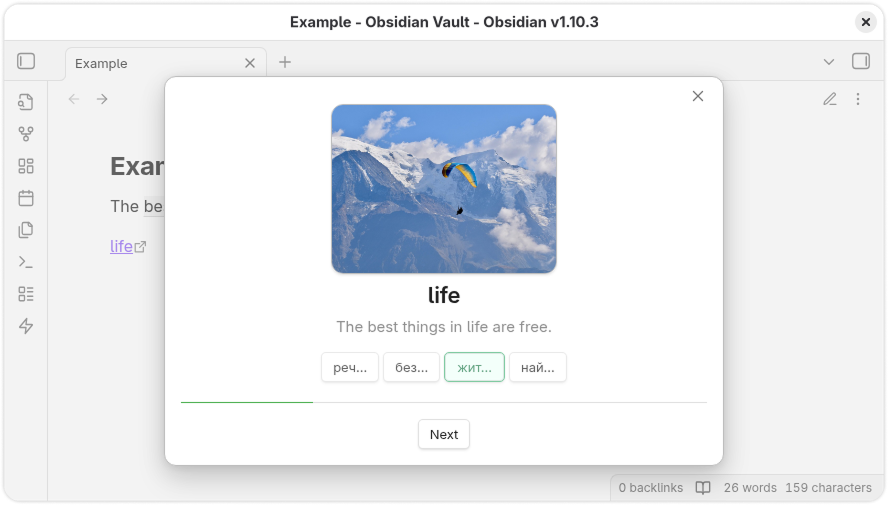
alt text

Demo

Content

Installation

  1. Launch Obsidian.
  2. Navigate to Settings > Community Plugins.
  3. Search for Memodack.
  4. Install and enable the plugin.

Hotkeys

For quick translation and conversion into the plugin’s syntax, set up hotkeys for the Memodack: Translate command. For example, you can assign Alt + T. After that, select a word or several words and activate the shortcut.

Syntax

The plugin uses its own syntax:

{value|translation}

If you want to provide multiple translations, separate them with a semicolon ;:

{value|translation; translation; translation}

If you want to attach an image to a word, simply create a link to the image directly in the document, as shown in the Example. This can be either a file stored in Obsidian itself or a link to an external resource.

The link name must be exactly the same as the word:

[<value>](...)

Practice

To activate Practice mode, click the lightning icon in the left ribbon menu.

You can also select at least 4 words and then press the lightning icon to work exclusively with those words.

Settings

Open the plugin settings.

General

General settings are essential for translation and voiceover to function properly.

Provider

Providers supply translation and text-to-speech services.

Google

To use Google services, you need to register on GCP and enable the following APIs:

Api Key

After registering in GCP, create an API Key in the Credentials section.
Paste it into the corresponding field in the plugin settings.

Custom

To connect your own free service, run Translator.

Api URL

Once Translator is running, copy its address and paste it into the appropriate field in the plugin settings (if it is not already there).

Connection

After configuring the connection, press the Check button to test it. Notification messages will inform you of the connection status.

Language

Configure the languages you want to work with.

Native

Select the language you understand.

Document

Choose the language of the document.

Voiceover

Sound settings.

Playback

Adjust the playback speed here.

Actions

Actions related to parts of speech.

Pressing

When clicking on a part of speech, you can enable voiceover.

Extra

Additional options.

Divider

Translations may include multiple variants separated by ;. When this option is enabled, only one translation will be randomly selected.

Truncate

Trim part of the translation output.

Optimization

All voiceovers are cached.

Cache

You can clear the cache by pressing the Clear button.

Similar Plugins

info
• Similar plugins are suggested based on the common tags between the plugins.
Spaced Repetition
6 years ago by Stephen Mwangi
Fight the forgetting curve by reviewing flashcards & entire notes on Obsidian
Flashcards
6 years ago by Alex Colucci
🎴 An Anki plugin for Obsidian.md
Bible Reference
3 months ago by tim-hub
Take Bible Study notes easily in the popular note-taking app Obsidian, with automatic verse and reference suggestions.
HiNote
2 years ago by Kai
Add comments to highlighted notes, use AI for thinking, and flashcards for memory.
Text to Speech
5 years ago by Johannes Theiner
Text to speech for Obsidian. Hear your notes.
Voice
3 months ago by Chris Oguntolu
🔊 The Obsidian Voice plugin lets you listen to your written content being read aloud—mobile-friendly audiobook-like experience. 🎧
Cornell Marginalia
6 months ago by Latazadehomero
A lightweight Obsidian plugin designed for students who use the Cornell Note-taking System.
Edge TTS
2 years ago by Travis
Free, high quality text-to-speech for your Obsidian notes, leveraging Microsoft Edge's Read Aloud API.
LearnKit
4 months ago by William Guy
A native study system for your Obsidian vault. LearnKit turns notes into durable knowledge with flashcards, spaced repetition, reviews, tests, and AI tools.
DeepL
4 years ago by Till Friebe
DeepL for Obsidian.
Aloud
3 years ago by Adrian Lyjak
Obsidian TTS Plugin
Aosr
4 years ago by linanwx
Aosr is Another Obsidian plugin for Spaced Repetition.
Yanki
2 years ago by Eric Mika
Obsidian plugin to sync flashcards from a folder in your vault to Anki. Pure Markdown syntax. No fuss.
Repeat
4 years ago by Andre Perunicic
Review notes using periodic or spaced repetition.
Youglish
6 years ago by Noureddine Haouari
Use YouTube to improve your pronunciation. YouGlish plugin gives you fast, unbiased answers about how words is spoken by real people and in context.
Anki Sync
5 years ago by debanjandhar12
Obsidian plugin to make flashcards and sync them to Anki
Decks
9 months ago by Xherdi Lika
An Obsidian Flashcards plugin
Flashcards LLM
3 years ago by Marco Pampaloni
Use Large Language Models (such as ChatGPT) to automatically generate flashcards from obsidian notes
Note Synchronizer
4 years ago by Songchen Tan
Synchronizes Obsidian notes to Anki in a breeze 💨️
Qiaomu AI RSS
2 months ago by 向阳乔木
在 Obsidian 中阅读乔木 RSS、中文 AI 改写与翻译,并保存为 Markdown 笔记。
Augmented Canvas
3 years ago by Léopold Szabatura
Supercharge your Obsidian canvas experience with AI features.
Awesome Flashcard
4 years ago by AwesomeDog
Handy Anki integration for Obsidian.
Auto Anki
3 years ago by ad2969
Using AI to automate card creation for Spaced Repetion in Anki
Vocabulary Cards
3 years ago by Eugene Myazin
An easy way to display vocabulary words as flashcards and as a list
braincache
4 years ago by XSPGMike
braincache obsidian plugin
Flashcard Learning
4 years ago by Gaétan Muck
Obsidian plugin. Uses flashcard system to learn things across own notes.
Eleven Labs
3 years ago by Mark Charles
QB Reader Parser
3 years ago by Jacob Barta
QBReader parsing for quiz bowl answerlines
Flashcard Generator
3 years ago by ChloeDia
Obsidian Plug-in to automatically create a set of questions/answers on your notes !
Chatty
a year ago by Sadnan Saquif
A simple plugin for Obsidian that allows you to listen to your notes using text-to-speech. Uses the browser's built-in speech synthesis capabilities and your default system voices.
Text2Audio
3 years ago by Haifeng Lu
Convert text to audio.
VaultAI
a year ago by Tharushka Dinujaya
An AI chatbot plugin for Obsidian using the Gemini API for note summarization, content generation, and more. Enhance your workflow with AI assistance like the Notion AI bot.
Mochi Cards Exporter
6 years ago by kalbetre
Mochi Cards Exporter Plugin for Obsidian
Memorization
3 years ago by Joseph Cochran
Better Recall
2 years ago by FlorianWoelki
A better spaced repetition and recall plugin for Obsidian inspired by Anki.
Anki Integration
2 years ago by Noah Boos AKA Rift
Create flashcards from your notes with a seamless interface, structuring them with metadata and syncing effortlessly via AnkiConnect.
Simple Anki Sync
a year ago by Lukas Mayr
Mochi Cards Pro
3 years ago by Hayden Carpenter
Create flashcards on Mochi.cards using the API provided by Mochi's Pro subscription in Obsidian.
Dictionary translator
3 years ago by Grover
我可以帮助你翻译单词或句子,听新单词或句子的录音,甚至录下自己的发音,以内部链接的形式保存到你的笔记中。
Blue Star
2 years ago by Wang Guoshi
A plugin for Obsidian that generates Anki flashcards in various ways.
Multilingual
3 years ago by leolazou
An plugin for Obsidian that translates note names to ease linking across many languages.
Zhongwen Reader
a year ago by natipt
This is a Chinese hover dictionary and vocabulary-building plugin for ObsidianMD.
Come Through
a year ago by mntno
An Obsidian plugin for creating and reviewing flashcards.
Quran Life
a month ago by Imed Ghomari
Language Made Easy
a month ago by PandoraReads
Language Made Easy — Immersive language learning for Obsidian. 沉浸式英语学习工作台:阅读时即时查词、FSRS 间隔重复闪卡、字幕同步的视频跟读、AI 智能解析——全部在同一个地方完成
Dictionary Lexicon
9 months ago by Alvin
Look up words and improve vocabulary by using flash card style cards.
Deck To Anki
a month ago by 熊猫别熬夜
Deck To Anki 是 Obsidian 中用来快速制作成Anki牌组的插件,通过 AnkiConnect 将笔记推送到 Anki。可以单向同步、更新、修改卡片,以及反向定位到 Obsidian 卡片所在的笔记、标题、块。
FleurPDF
3 months ago by JC5
Smart PDF reading and annotation plugin for Obsidian with AI-powered features
Simple Quiz
2 years ago by Ivan Kalmar
Creating simple quizzes.
Japanese note taking helper
a year ago by OverFitter
FleurEPUB
2 months ago by JC5
AI-AnkiSync
2 years ago by goev
Textfresser
2 years ago by clockblocker
Obsidian plugin to automatically fill in the gaps of your Deutsch
Monokakido Copilot
a year ago by NoHeartPen
Double press the Option key to search with Dictionaries by Monokakido.This plugin is not affiliated with MONOKAKIDO Co. Ltd. (JAPAN).
OpenWords
a year ago by insile
用于英语学习中背单词与单词管理的 Obsidian 插件
Papyrus
2 years ago by André Silva, Daniel Guerra, Diogo Ferreira, Eduardo Barrancos
Kindle Vocab
a year ago by Truong Gia Bao
Generate the markdown version of your Vocabulary Builder in Kindle, and put it in your Obsidian Vault.
Voice Briefing
a month ago by reallygood83
MCQ Tracker
13 days ago by Isaac Friedenson
Extract practice questions from .pdfs into individual .md files, practice questions from your notes, grade answers, and track time, confidence and spaced review in note properties.
Easy Recall
3 months ago by Geno Zhou
Universal UI Translator
2 months ago by feifei
Student Repo
2 years ago by Feirong.zfr
学生知识库助手(Student Repository Helper)是一个面向学生或学生家长的Obsidian 插件,这款插件旨在解决学生在学习阶段面临的资料管理难题,将学习过程中产生的各类重要资料,如试卷、笔记、关键文档、绘画手工作品等,进行系统性的数字化整合与管理,并利用 AI 助手定期进行学习分析总结。随着时间的推移,它将助力你逐步搭建起一座专属你自己的知识宝库,这座宝库将伴随你一生,成为你知识成长与积累的见证。
Anki Helper
9 months ago by Dusk