
README file from
GithubDeck To Anki
中文文档:README.zh.md
Overview
Deck To Anki is an Obsidian community plugin that turns notes into Anki decks via AnkiConnect. Write cards in Obsidian (heading trees, lists, single-file cards, or filename-as-front), preview and select them in the sync panel, then push, update, or delete notes in Anki. Optional backlinks jump back to the source note, heading, or block.
Features
- Notes as cards — author Q&A cards in Obsidian without a separate card editor
- Five parse modes —
head/list/card/title/file - Reversible templates — built-in
ob-deck-basic++for flipped review - Rich content — images, math, tables, fenced code (Prism highlighting), and tags
- Wiki links & embeds —
[[note]]and![[media]]support - Backlinks — open the source in Obsidian from Anki (ObURI / Advanced URI)
- Image compression — optional compress-on-sync (vault files unchanged)
Requirements: Obsidian ≥ 1.7.2, Anki + AnkiConnect.
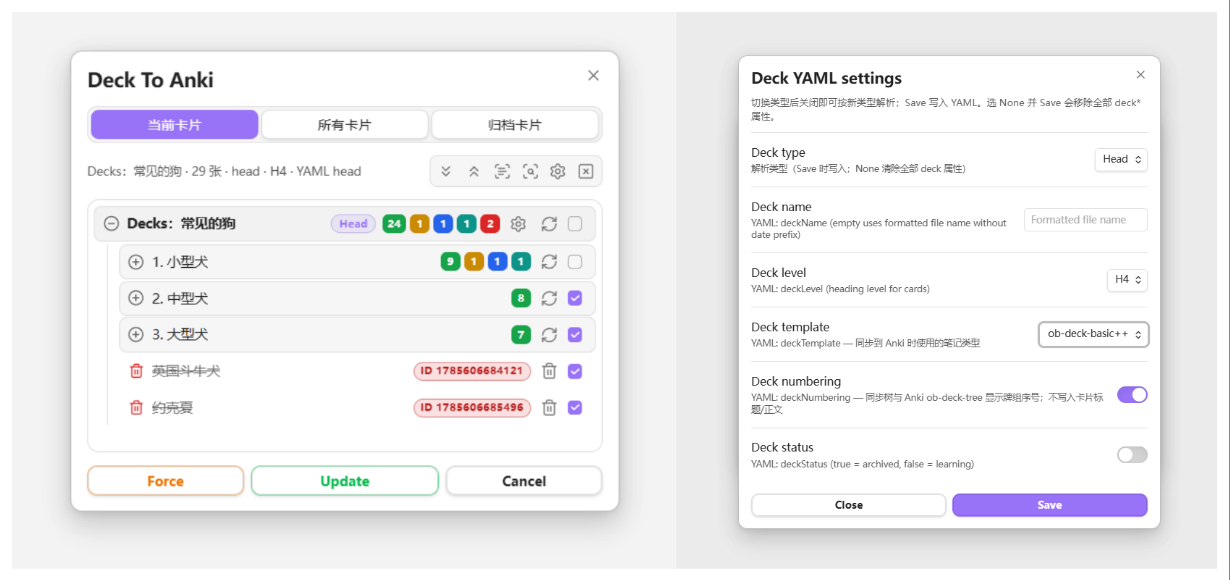
Quick start
Prerequisites
- Install and enable the Deck To Anki plugin
- Install and run Anki with AnkiConnect (default
http://127.0.0.1:8765)
Suggested AnkiConnect config:
{
    "apiKey": null,
    "apiLogPath": null,
    "ignoreOriginList": [],
    "webBindAddress": "127.0.0.1",
    "webBindPort": 8765,
    "webCorsOriginList": [
        "http://localhost",
        "app://obsidian.md"
    ]
}
Open the sync panel
- Click the Anki ribbon icon, or
- Run the command Deck To Anki
Preview parsed cards, select what to sync, check differences against Anki, then run Update / Force. You can copy examples/Deck-To-Anki-演示.md into your vault for a quick trial.
Sync panel
Open the panel from the ribbon or the Deck To Anki command.
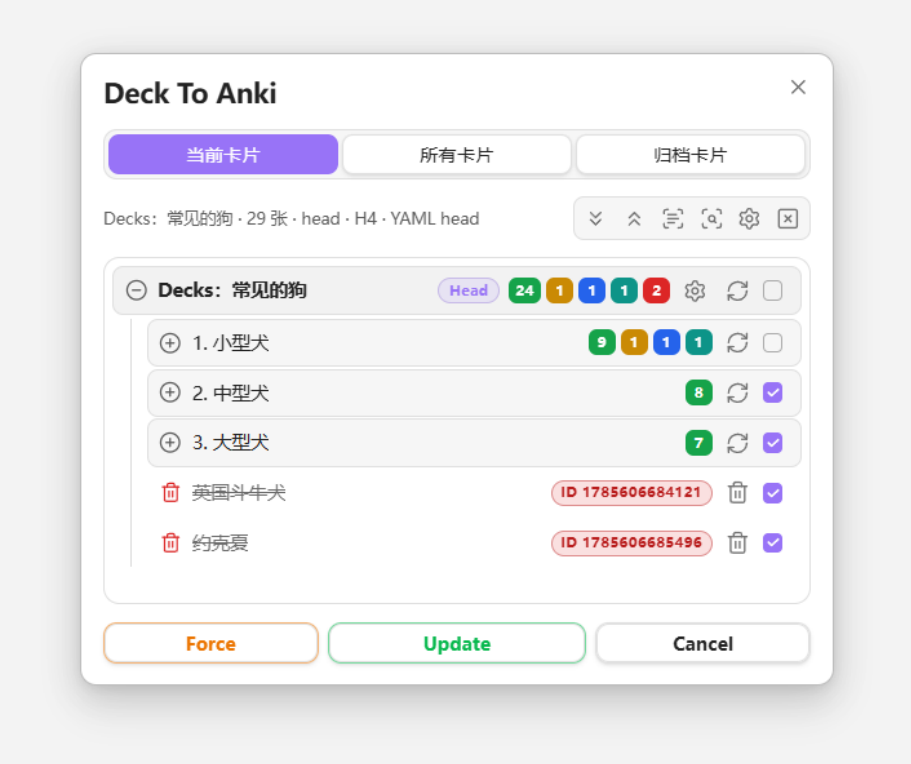
- Current cards: parse the active note
- All cards / Archived cards: scan notes with
deckTypeinside the configured scan scope - Toolbar: expand/collapse, select all, check, refresh, Force, Update
- Row actions: preview, deck YAML settings, sync one card, checkbox
Check-related options live under Settings → Sync → Check.
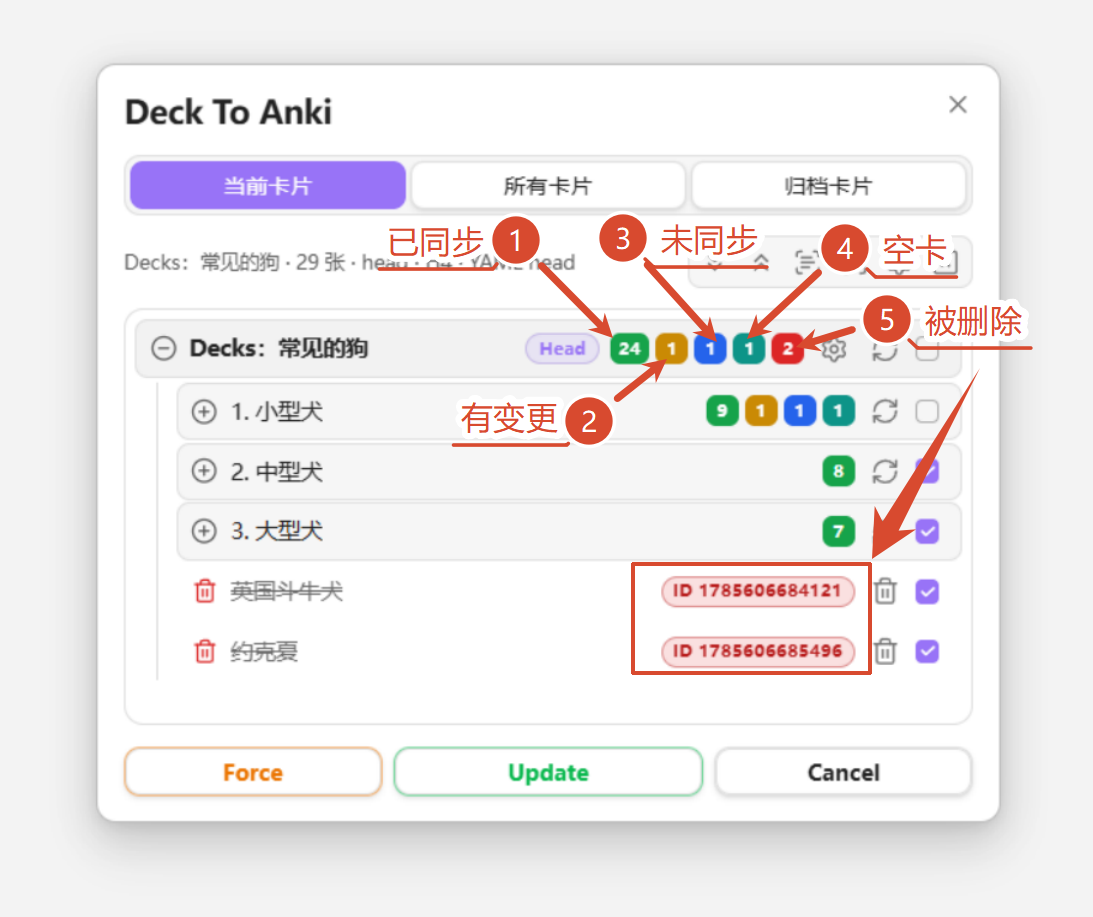
Check status colors
| Status | Color | Meaning |
|---|---|---|
| Synced | 🟩 green | Matches Anki |
| Modified | 🟥 red | Local differs from Anki |
| Unsynced | 🟨 yellow | Not yet pushed to Anki |
| Anki only | 🟦 blue | Present in Anki, missing locally |
| empty | 🩵 cyan | Empty back (unchecked by default after parse) |
| Unchecked | 🩶 gray | Not compared with Anki yet |
Card preview
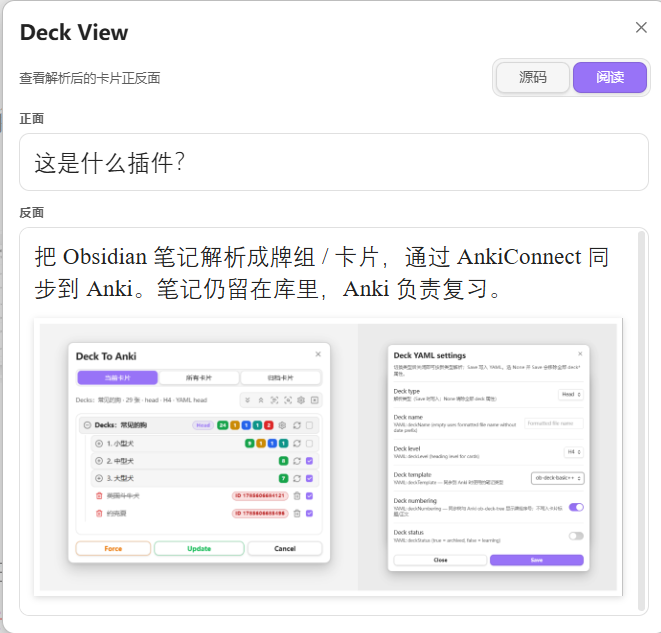
Use the Deck View button on a card row to preview the rendered card.
Parse modes
| Mode | Description | Note id location |
|---|---|---|
| Head (default) | Heading at the configured level is the front; body is the back. A lone --- line can split front/back further. |
<!--ID: n--> |
| List | Top-level list item is the front; indented content is the back (one indent level removed). | Trailing ^deckID on the list line |
| Card | After YAML, a lone --- splits front/back; one card per note. |
YAML deckID |
| Title | Filename is the front; body after YAML is the back; one card per note. | YAML deckID |
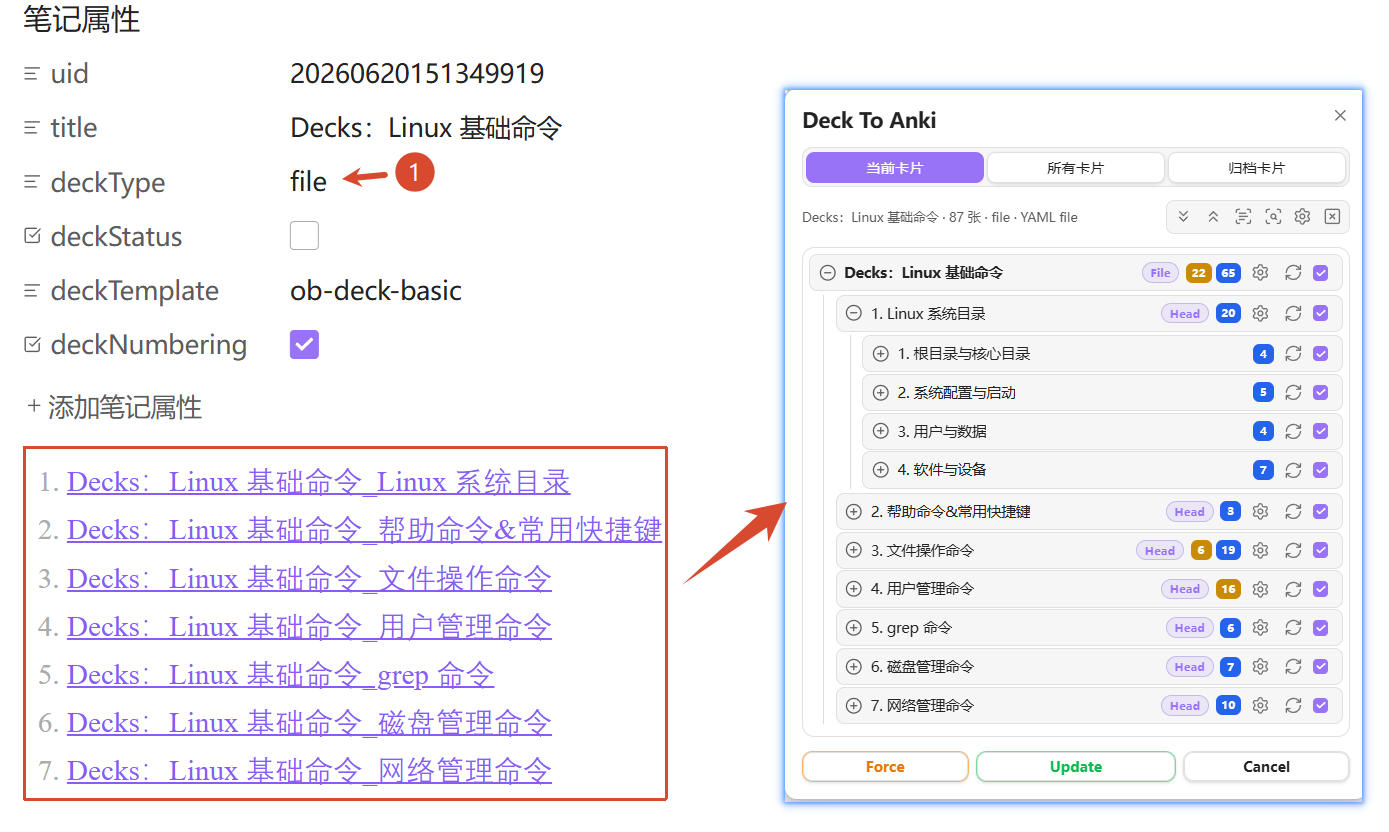
| File | Parent note organizes child notes via wiki links; children parse as head/list/card/title. | Depends on child mode |
File mode is for chapter-style decks. Nested File mode is not supported (a child note cannot itself use File mode):
Deck YAML properties
Deck settings are stored in note YAML and can be edited from the deck row settings panel:
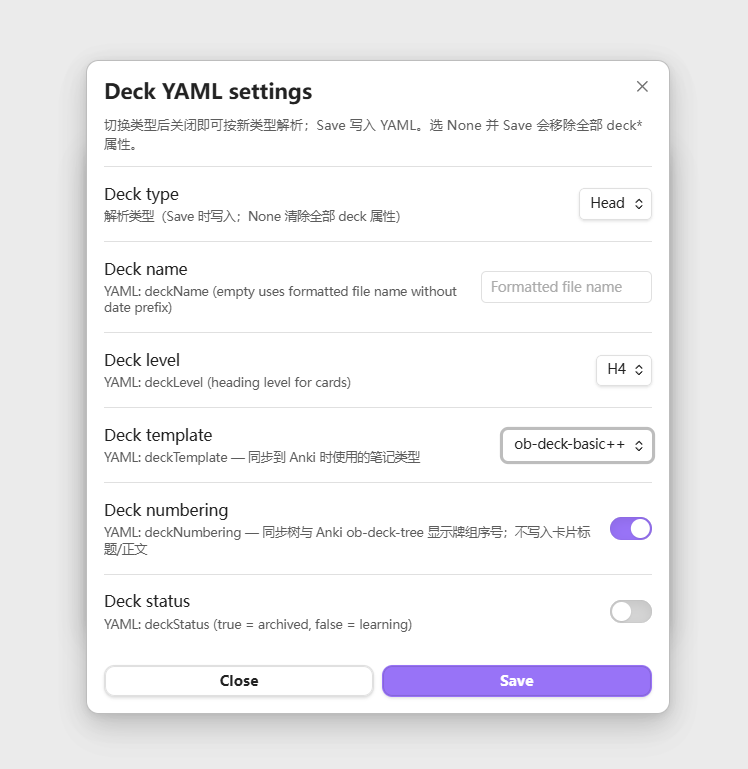
| Field | Description |
|---|---|
deckType |
head / list / card / title / file |
deckName |
Display name (optional) |
deckLevel |
Head: heading level used as card front (1–6) |
deckStatus |
false studying; true archived |
deckFile |
File mode: parent index note |
deckTemplate |
Anki note type id |
deckNumbering |
Whether to sync deck numbering into the tree field |
deckID |
Card / Title mode: Anki note id |
Settings
- General: default parse mode, heading level, wiki links, Deck View, scan scope
- Sync: AnkiConnect URL, deck numbering, check options, image compression
- Fields: tags / backlink / deck-tree fields and backlink scheme
- Templates: built-in and custom Anki card templates (Front / Back / CSS)
General
Under Settings → General (per-note YAML can override):
- Default deck mode —
head/list/card/title/file(default Head) - Default heading level — used in Head mode when
deckLevelis absent (default H4) - Parse wiki links — convert
[[links]]into clickable backlinks (does not affect![[media]]) - Deck View default — source / reading
Scan scope (All / Archive tabs only):
- Include folders — empty = entire vault; multi-select, includes subfolders
- Ignore folders — exclude from results
- Tag filter — keep notes with any listed tag;
ankialso matchesanki/deck
Sync
Requires Anki + AnkiConnect (default http://127.0.0.1:8765).
- AnkiConnect URL
- Status checks — auto-check when opening panels / selecting cards; optionally require a check before sync
- Image compression — compress uploads only; vault files stay untouched; adjustable quality and cache clear
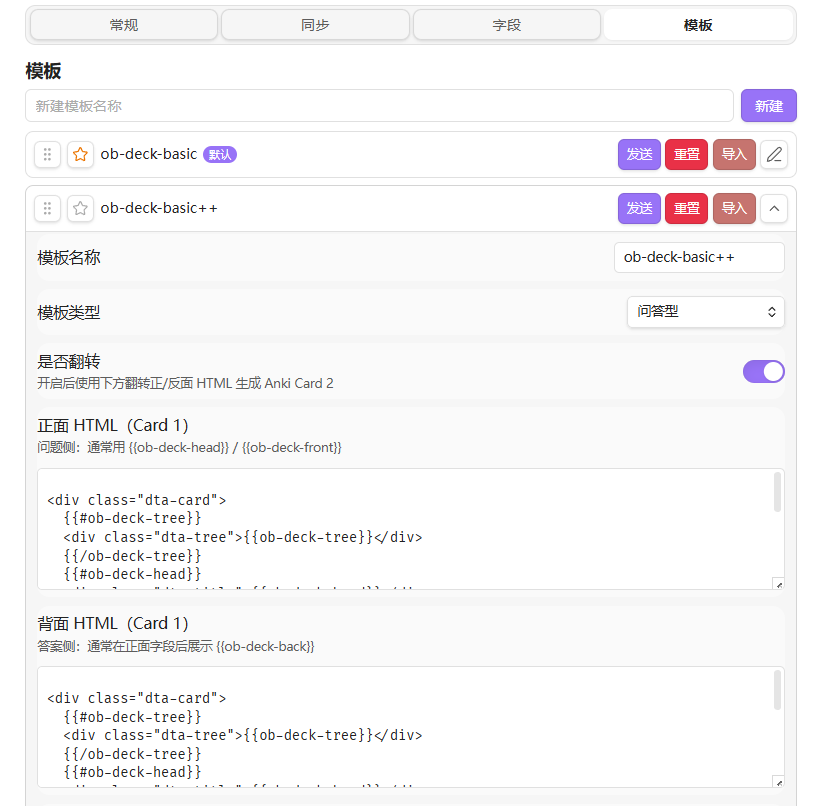
Templates
Defaults include ob-deck-basic and reversible ob-deck-basic++. Customize Front / Back HTML and CSS.
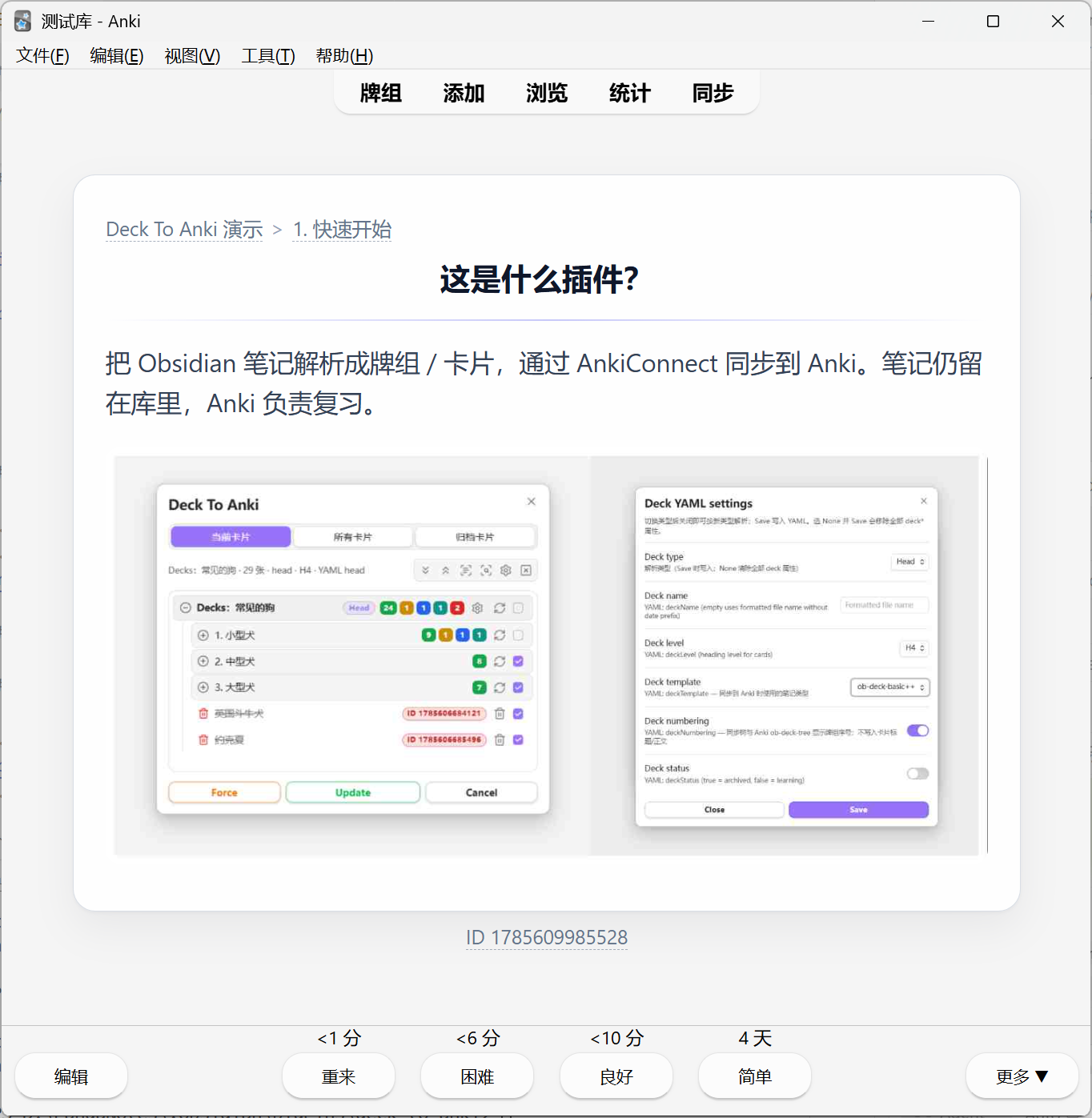
Default look in Anki:
Fields
Under Settings → Fields:
- Sync tags — write
ob-deck-tagsand sync Anki note tags - Card backlink — write
ob-deck-backlink(Head → heading, List → block, Card → file) - Deck tree — write
ob-deck-tree; optional clickable crumbs - Backlink scheme —
none/oburi/aduri(Advanced URI)
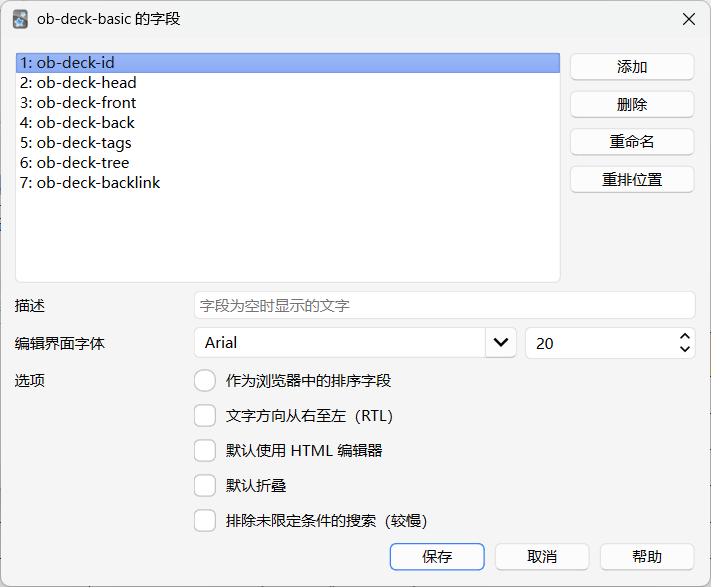
| Field | Description |
|---|---|
| ob-deck-id | Note identity field (first model field for AnkiConnect) |
| ob-deck-head | Card title / navigation heading; stored separately from front body |
| ob-deck-front | Front body |
| ob-deck-back | Back body |
| ob-deck-tags | Obsidian tags; can sync as Anki tags |
| ob-deck-tree | Deck path crumbs |
| ob-deck-backlink | Backlink to the Obsidian card (heading / block / file) |
Commands
| Command | Action |
|---|---|
| Deck To Anki | Open the sync modal |
| Open sync sidebar | Open the sync sidebar view |
| Clear all deckIDs in current file | Remove deck IDs from the active note |
| Clear all deckIDs and deck YAML in current file | Remove deck IDs and deck YAML properties |
Install
BRAT
Add this repository with BRAT:
PandaNocturne/obsidian-deck-to-anki
Manual
- Download the latest release from Releases
- Place
main.js,manifest.json, andstyles.cssin:
<Vault>/.obsidian/plugins/deck-to-anki/
- Reload Obsidian and enable Deck To Anki under Settings → Community plugins
Build from source
npm install
npm run build
Artifacts: main.js, manifest.json, styles.css at the plugin root.
Development
npm install
npm run dev    # watch build
npm run build  # production build
npm run lint
Release checklist:
- Bump
version/minAppVersioninmanifest.json npm version <new>(updatesversions.json)npm run buildgit push origin <tag>gh release create <tag> main.js manifest.json styles.css
License
See LICENSE in the repository.