
README file from
Github




Reference Map
Reference Map is a plugin for Obsidian that helps you manage and create/discover references and citations. It provides a sidebar view to manage cited/citing references of your bibliography. You can use it to create a reference map for a paper(s). You can also quickly look up published documents related to a subject using the search functionality.
More information is available on the Wiki page.
Contents
Requirements
- Obsidian with community plugins enabled
Installation
From Community Plugins
The plugin is available in the Obsidian's Community Plugin Tab via:
Settings → Community Plugins → Browse → Search for "Reference Map"
Manual Installation
- Download the latest release from here and unzip it.
- Copy the
obsidian-reference-mapfolder to your vault's.obsidian/pluginsfolder. - Reload Obsidian.
- Enable the plugin in the community plugins section.
You can also use the BRAT plugin to install the latest release.
Usage
This README.md file contains the basic description of the plugin. For a detailed guide please refer to the Wiki page.
Main features:
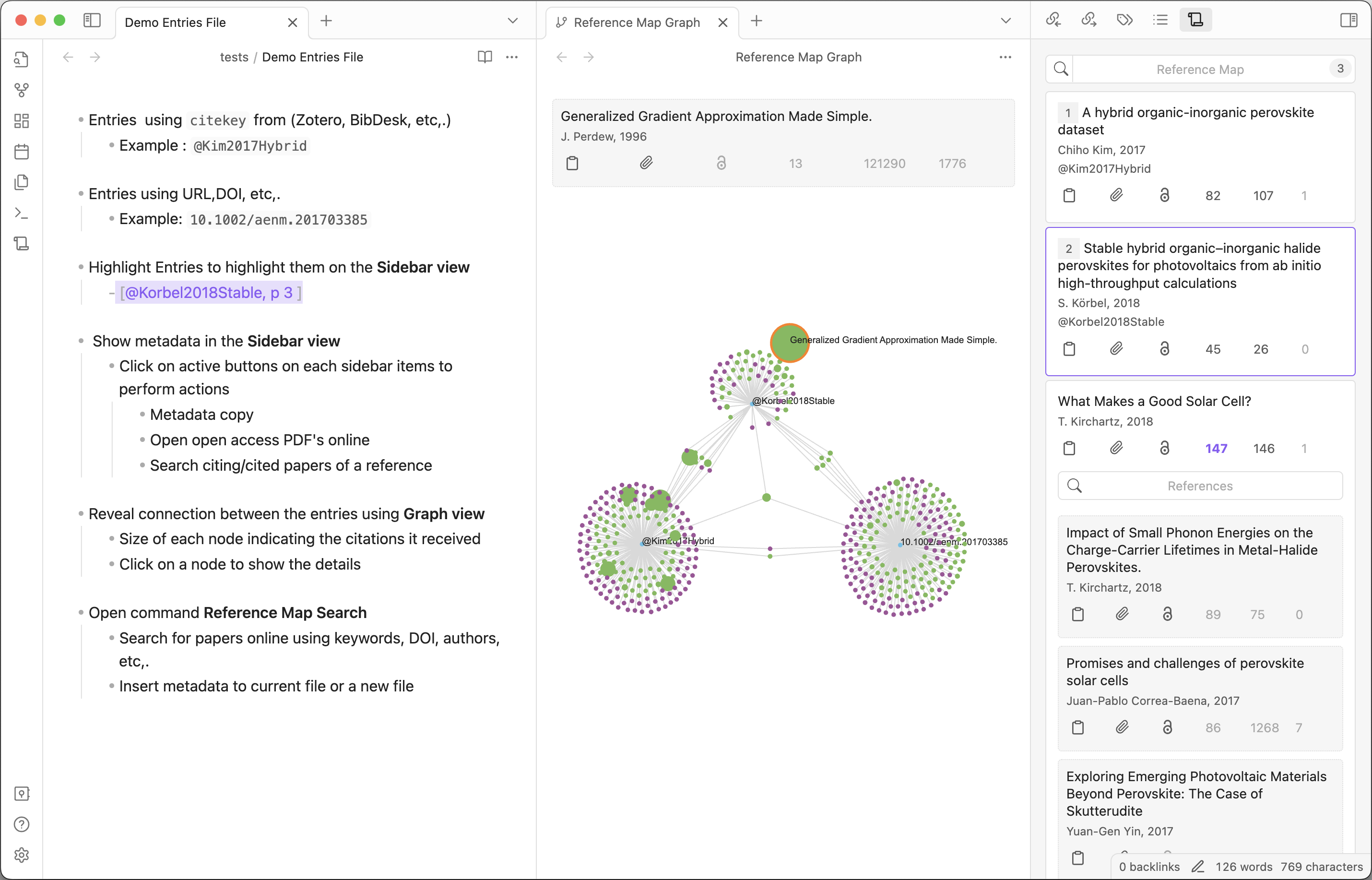
- Reference Map Sidebar - View details of your references in the current document.
- Reference Map Search - Search for references online to create or insert details.
- Reference Map Graph - A graph view showing all the references and their citing/cited references and connection between them.
Reference Map Sidebar
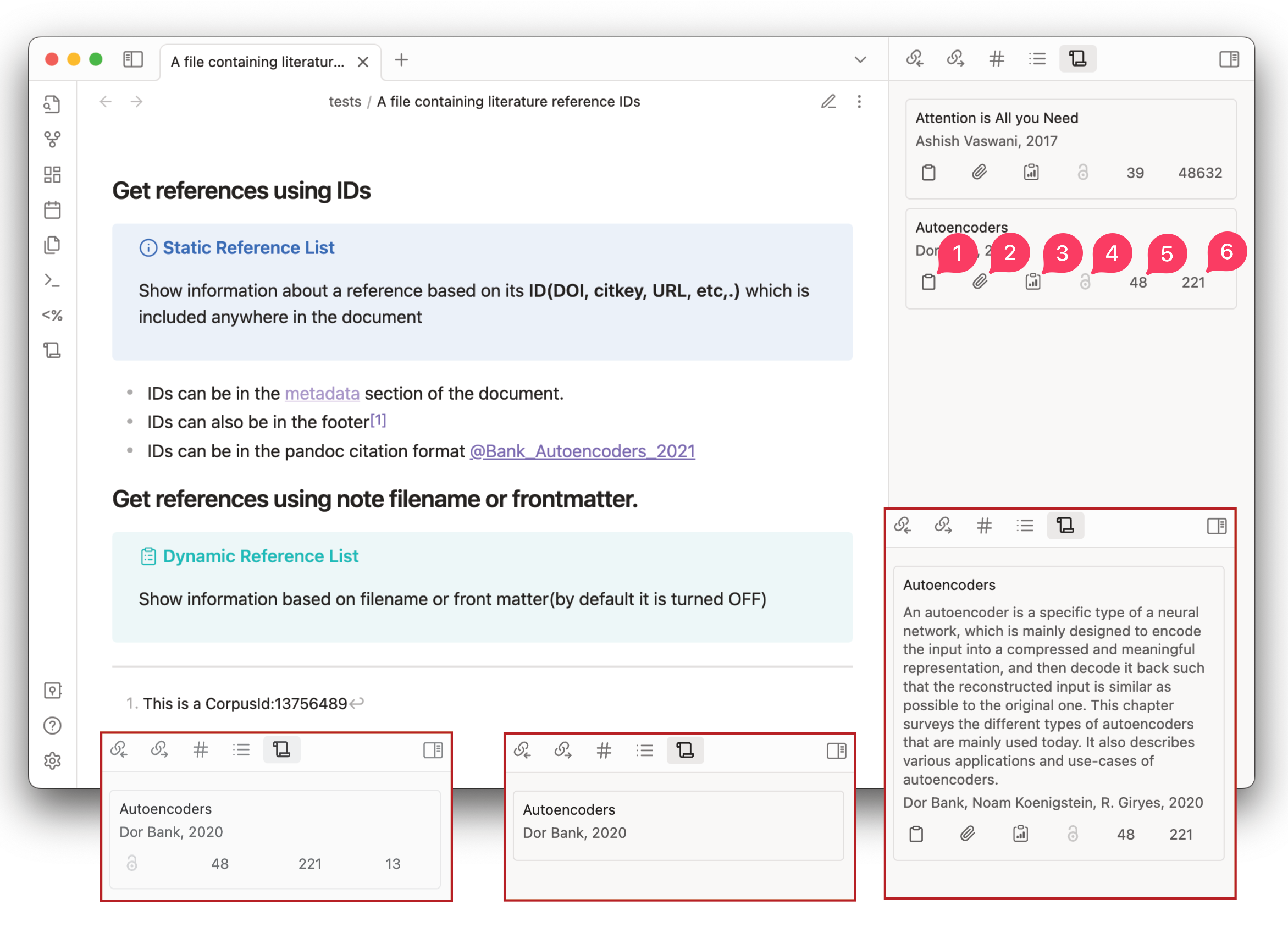
Reference Map Sidebar View contains Index cards and citing/cited cards.
Index Cards are detected from the markdown document using ID's(see the Static Reference List section below)
Citing/cited cards show a searchable and sortable list of cited and citing papers of a reference contained in the index card.
Each Index card or citing/cited card in the view will show the following information:
| Button | Section | Description | On Click |
|---|---|---|---|
| text | Title | Title of the paper | Open the paper in Semantic Scholar |
| Abstract | Abstract of the paper (Default=OFF) | - | |
| text | Authors | Authors of the paper | Open the author's details in Semantic Scholar |
| Year | Year of publication | - | |
| text | citekey | Pandoc citekey (Default=OFF) | Open reference in the Zotero Library |
| (1) | Metadata copy | User defined format of metadata. Default=bibtex of the paper |
Copy the <bibtex> to the clipboard (If Batch copy is enabled it will copy <bibtex> for all the cited paper) |
| (2) | Metadata copy | User defined format of metadata Default=Formatted metadata details |
Copy the <metadata> to the clipboard (If Batch copy is enabled it will copy <metadata> for all the cited paper) |
| (3) | Metadata copy | User defined format of metadata. Default=Reference title as wikilink (Default=OFF) |
Copy the <wikilink> to the clipboard (If Batch copy is enabled it will copy <wikilink> for all the cited paper) |
| (4) | Open Access PDF of the paper | Open the Open Access PDF of the paper if it is present for a reference | |
| (5) | Reference count | Number of references | Open a searchable list of all cited papers (References) |
| (6) | Citation count | Number of citations | Open a searchable list of all citing papers (Citations) |
| Influential citation count | Number of influential citations (Default=OFF) | - |
You can customize the content of metadata buttons(1,2,3) according to your workflow, possible variables for the metadata template for the buttons copy/create contents are listed in the settings tab
Batch operations are exclusive to Index Cards
Static Reference List
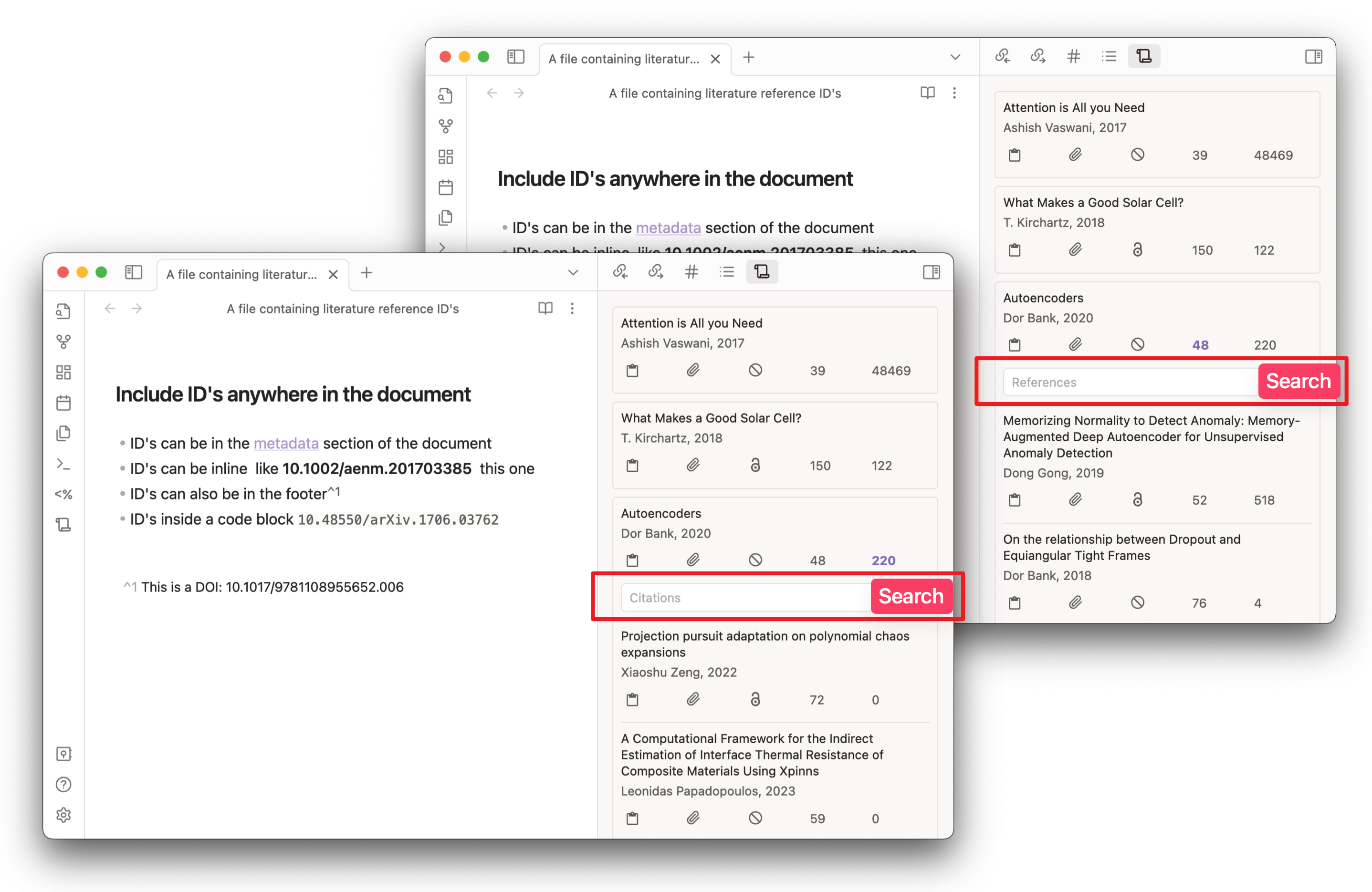
Reference IDs (DOI, arxiv, corpusID, URL, citeKey, etc,.) that are found in the current document are listed in the Reference Map view. Valid IDs can be added anywhere in the document and they will be detected.
The following types of IDs are supported:
| ID Syntax | Description | Example |
|---|---|---|
DOI:<doi> |
A Digital Object Identifier. | DOI:10.18653/v1/N18-3011 or 10.18653/v1/N18-3011v1 |
@<citekey> |
Zotero citekey(Default=OFF)* | @smith2019attention |
ARXIV:<id> |
arXiv.org | ARXIV:2106.15928 |
MAG:<id> |
Microsoft Academic Graph | MAG:112218234 |
PMID:<id> |
PubMed/Medline | PMID:19872477 |
PMCID:<id> |
PubMed Central | PMCID:2323736 |
URL:<url> |
URL from sites | URL:https://arxiv.org/abs/2003.05991 |
CorpusId:<id> |
Semantic Scholar numerical ID | CorpusId:215416146 |
*To enable CiteKey support(for Zotero or for other reference managers), Activate Pull from zotero option and select a library OR one has to provide a Bibtex CSL JSON(Better BibTex Zotero Plugin feature, auto updates with changes in the library) or CSL JSON(Generic CSL library from any reference manager) file or BibTeX file with .bib extension. Once enabled in the settings, the plugin can recognize the citekey entries.
[!IMPORTANT]
Make sure in Zotero library DOI field(or the URL field) contains a valid ID. Otherwise metadata from the local Library is shown in the sidebar(with no metadata from online sources)
For Static Reference List, selecting the ID in the markdown file will highlight the corresponding card in the Reference Map Sidebar view.
Dynamic Reference List
The Reference Map Sidebar view can also be configured to show a list of references that correspond to the filename of the note or frontmatter keywords. Check out the settings tab to configure the plugin behaviour
Example: For a file named Attention is all you need.md cards will be displayed for references that match Attention+all+need.
For frontmatter keywords, you can configure a keyword to be used for reference search. By default, the keyword is keywords.
Example: For a frontmatter given as follows:
---
keywords: autoencoders, machine learning
---
Cards will be displayed for references that match autoencoders+machine+learning.
Note that since new references are added to the database regularly the dynamic list might not stay the same each time you open the file. Especially for generic keywords like machine learning, deep learning, history etc.
This feature can be used for keeping up to date with the latest research in a specific field as well
Reference Map Search
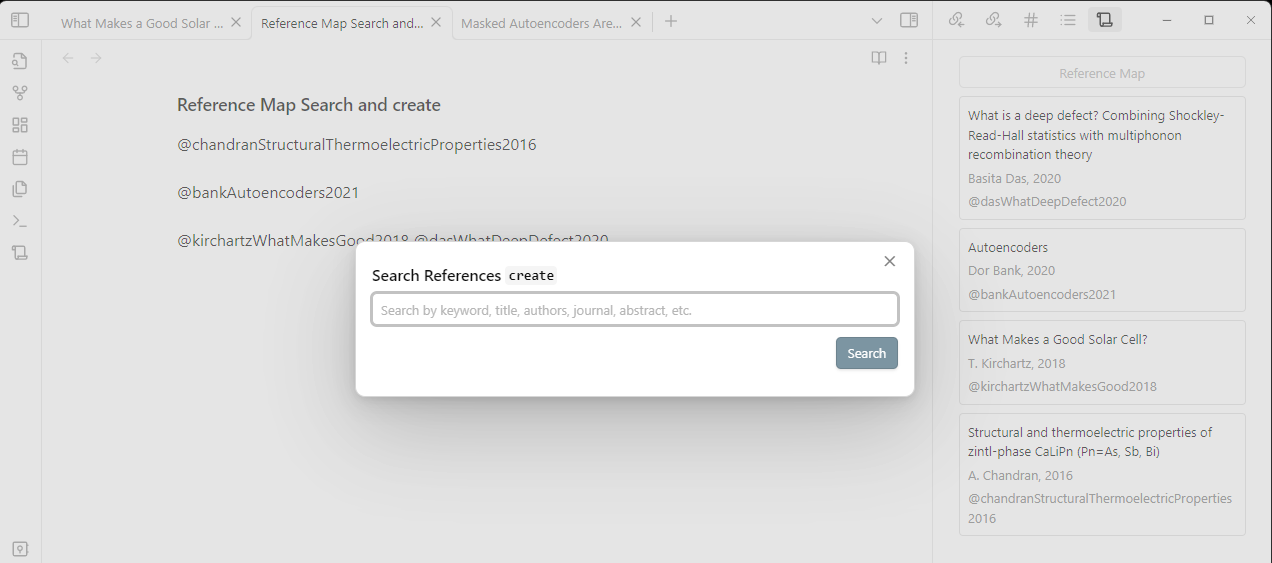
Search for references and citations online to create or insert details. You can locate the commands by opening the Obsidian command palette (Ctrl/Cmd + P) and typing Reference Map. By default no hotkeys are se for the commands, but you can easily add them in the Hotkeys tab.
If you select a text in the current document and then issue the command the selected text will be used as the search query.
| Command | Description | Hotkey |
|---|---|---|
| Reference Map: Search and Insert | Search for references online to insert details in the current document. | - |
| Reference Map: Search and Create | Search for references online to create a new markdown file using the details | - |
You can configure the template for both commands in the settings tab.
Reference Map Graph
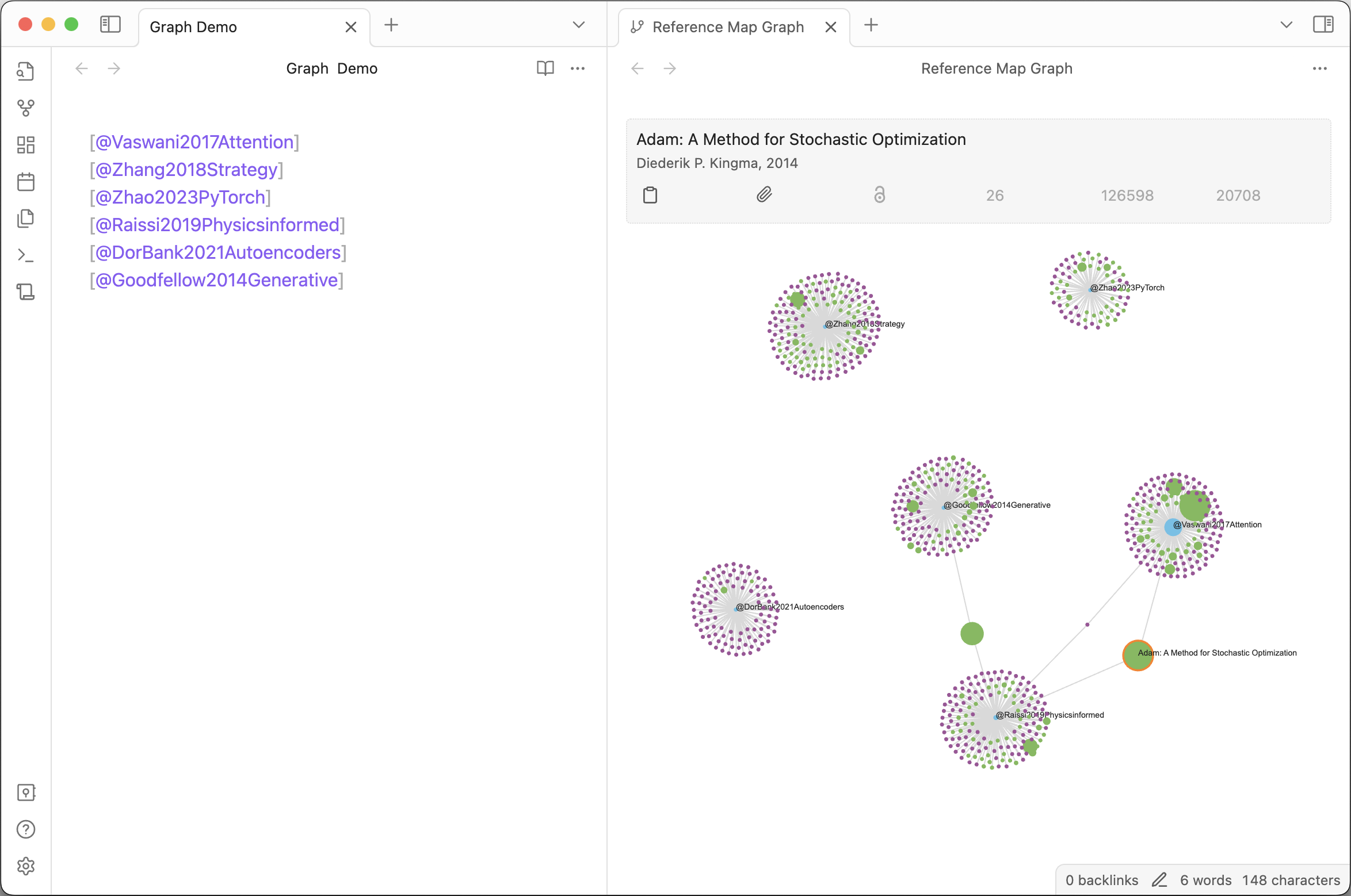 Open command palette and run
 Reference Map: Open Literature Graph to open the graph view. Reveal connection between the entries. Size of each node indicating the citations it received
- Click on a node to show the details on top of the graph
- Hover to show the title.
- Pan to zoom in/out (you can also use node right click to zoom in/out)
- Drag to move the graph
- Drag a node to move it around and fix it in place
[!IMPORTANT]
Reference map graph will show details of published papers. It will not show details for entries corresponding to videos, webpages, twitter, etc,. in your local library but it is shown in the sidebar view.
Configuration
If you want to configure the style of the view you can use the Obsidian-style-settings plugin.
The settings tab contains options to configure the behaviour of the plugin.
Please feel free to open an issue if you find any bugs or have any suggestions at GitHub Issues Page