Citations

by Jon Gauthier
5
4
3
2
1
Score: 55/100

Description

Category: 3rd Party Integrations

The Citations plugin is a game-changer for Obsidian users who work with academic references. With this plugin, you can seamlessly integrate your bibliography with Obsidian's editing experience. The plugin supports BibTeX/BibLaTeX and CSL-JSON formats, making it compatible with popular reference managers like Zotero. Once set up, the plugin offers four convenient features: creating literature notes, inserting references, inserting content, and inserting citations. You can even customize the title and content templates to suit your needs. This plugin is a must-have for anyone who wants to stay organized and focused while working on research papers or articles.

Reviews

  • Tom ANDREYS
    Reviewed on Jan 10th, 2026
    Même s'il marche très bien pour certains, il n'est plus mis à jour donc les risques de non-compatibilité augmentent avec chaque mise à jour Obsidian. De plus, Zotero Integration remplit la même chose mais rajoute des fonctions en +

Stats

1317
stars
220,128
downloads
106
forks
1,974
days
692
days
1,319
days
32
total PRs
14
open PRs
6
closed PRs
12
merged PRs
251
total issues
157
open issues
94
closed issues
0
commits

Latest Version

4 years ago

Changelog

After far too long a delay, I'm releasing a new version with some critical bugfixes, largely thanks to the excellent developer community of Obsidian / Obsidian Citation Plugin.

Bugfixes:

  • Explicitly mark desktop-only support for now (#105 )
  • Fix off-by-one year citations (#142 , #40) -- thanks @valmaev !
  • Add titleShort template variable (#148 ) -- thanks @valmaev !
  • Fix link insertion bug: newer versions of CodeMirror moved the cursor to the start of the citation rather than the end (#138) -- thanks @Klemet !

README file from

Github

obsidian-citation-plugin

This plugin for Obsidian integrates your academic reference manager with the Obsidian editing experience.
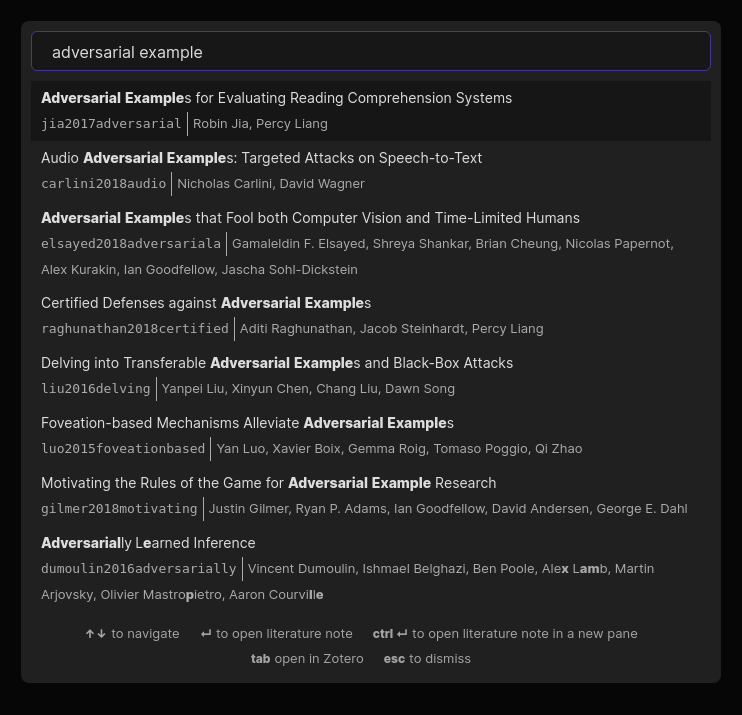
The plugin supports reading bibliographies in BibTeX / BibLaTeX .bib format and CSL-JSON format.

Setup

You can install this plugin via the Obsidian "Third-party plugin interface." It requires Obsidian 0.9.20 or higher.

Once the plugin is installed, you must provide it with a bibliography file:

  • If you use Zotero with Better BibTeX:
    • Select a collection in Zotero's left sidebar that you want to export.
    • Click File -> Export library .... Select Better BibLaTeX or Better CSL JSON as the format. (We recommend using the BibLaTeX export unless you experience performance issues. The BibLaTeX format includes more information that you can reference from Obsidian, such as associated PDF attachments, but loads more slowly than the JSON export.)
    • You can optionally choose "Keep updated" to automatically re-export the collection -- this is recommended!
  • If you use other reference managers, check their documentation for BibLaTeX or CSL-JSON export support. We plan to officially support other managers in the future.

Now open the Obsidian preferences and view the "Citations" tab. Paste the path to the exported file (.bib or .json, depending on the format you chose) in the text field labeled "Citation export path." After closing the settings dialog, you should now be able to search your references from within Obsidian!

Usage

The plugin offers four simple features at the moment:

  1. Open literature note (Ctrl+Shift+O): automatically create or open a literature note for a particular reference. The title, folder, and initial content of the note can be configured in the plugin settings.
  2. Insert literature note reference (Ctrl+Shift+E): insert a link to the literature note corresponding to a particular reference.
  3. Insert literature note content in the current pane (no hotkey by default): insert content describing a particular reference into the current pane. (This can be useful for updating literature notes you already have but which are missing reference information.)
  4. Insert Markdown citation (no hotkey by default): insert a Pandoc-style citation for a particular reference. (The exact format of the citation can be configured in the plugin settings.)

Templates

You can set up your own template for both the title and content of literature notes. The following variables can be used:

* {{citekey}}
* {{abstract}}
* {{authorString}}
* {{containerTitle}}
* {{DOI}}
* {{eprint}}
* {{eprinttype}}
* {{eventPlace}}
* {{page}}
* {{publisher}}
* {{publisherPlace}}
* {{title}}
* {{titleShort}}
* {{URL}}
* {{year}}
* {{zoteroSelectURI}}

For example, your literature note title template can simply be @{{citekey}} and the content template can look like:

---
title: {{title}}
authors: {{authorString}}
year: {{year}}
---
{{abstract}}

License

MIT License.

Contributors

Similar Plugins

info
• Similar plugins are suggested based on the common tags between the plugins.
Topic Linking
4 years ago by Liam Magee
An Obsidian plugin for finding and linking topics in a vault.
Zotero Desktop Connector
4 years ago by mgmeyers
Insert and import citations, bibliographies, notes, and PDF annotations from Zotero into Obsidian.
Pandoc Reference List
4 years ago by mgmeyers
Display a formatted reference in Obsidian's sidebar for each pandoc citekey in the active document.
Zotero Bridge
4 years ago by Shmavon Gazanchyan
Obsidian plugin to integrate with Zotero
Zotero Link
4 years ago by Shmavon Gazanchyan
Obsidian plugin to insert link to Zotero item
Pretty BibTeX
3 years ago by Sandro Figo
A plugin for Obsidian that shows raw BibTeX bibliography entries in a prettier way. (https://obsidian.md)
Reference Map
3 years ago by Anoop K. Chandran
Reference and citation map for literature review and discovery
Zotero Sync
3 years ago by Frithjof Gressmann
A Zotero Sync client for Obsidian
ZotLit
3 years ago by AidenLx
A third-party project that aims to facilitate the integration between Obsidian.md and Zotero, by providing a set of community plugins for both Obsidian and Zotero.
Simple Citations
2 years ago by masaki39
Add & update simple literature notes from Zotero.
Copy as LaTeX
4 years ago by mo-seph
Quick plugin to be able to copy/paste from Obsidian/Markdown into a Latex document
Latex Exporter
a year ago by Matthew S. Scott
Paste Quote
a year ago by Jacob Williams
Helps with formatting and citing quotes when pasting into Obsidian.
logos-refs
a year ago by Joey Kilgore
Easily take refs from Logos into Obsidian
BibLib
a year ago by Callum Alpass
Obsidian-based reference and literature note manager.
Citation Callouts
9 months ago by Michael Marvive
Obsidian Plugin that formats a quote with a citation in a custom callout
Bibtex Entry View
9 months ago by Kyoungdeuk
Load the bibtex entry of a given bibkey from a given bib file and show the entry in the code block of bibkey.
LiteCite
8 months ago by ras0q
A lightweight Obsidian plugin that creates citation notes from a BibTeX / BibLaTeX file
BibTeX Scholar
7 months ago by Qilong Liu
Make your literature review and writing contextual and frictionless—right inside your Obsidian vault!