Entity Linker

by Ankush-Chander
5
4
3
2
1
Score: 61/100

Description

Category: 3rd Party Integrations

The Entity Linker plugin enhances research workflows in Obsidian by linking terms or note titles to corresponding standard entities from databases like Wikidata, Wikipedia, and OpenAlex. Users can link selected text or active note titles to entities via OpenAlex API, creating dedicated entity notes. This plugin simplifies referencing scholarly works and organizing knowledge. It also supports additional functionality like adding email for faster API access and integrates seamlessly with other plugins like Wikidata Importer and Wikipedia. The tool is ideal for researchers and academics looking to streamline entity management in their notes.

Reviews

No reviews yet.

Stats

10
stars
1,077
downloads
0
forks
821
days
32
days
32
days
2
total PRs
0
open PRs
0
closed PRs
2
merged PRs
2
total issues
0
open issues
2
closed issues
4
commits

Latest Version

a month ago

Changelog

Concepts and entities are now filed separately, and linking a selection inserts the link instead of just opening a note.

Behavior changes

These change what existing commands do. Read before upgrading.

  • Link active note to entity now annotates the active note. It previously created or updated a separate note in the entity folder named after the matched entity, leaving the note you invoked it from untouched. It now writes the resolved properties into the frontmatter of the active note and creates nothing.
  • Link selection to entity now replaces the selection with a link to the resolved note, and no longer opens that note in a new tab. Turn off Insert link at selection to restore the previous open-in-new-tab behavior.
  • Properties that resolve to nothing are no longer written. Notes previously accumulated empty wikidata:, mag:, umls_cui: and wikipedia: keys whenever a source had no value for them.
  • An existing property that is blank is now treated as absent and filled in. This applies regardless of the Overwrite existing properties setting; a blank value carries no information, so filling it is not an overwrite. Notes left with empty ids by earlier versions get completed on the next lookup. Properties with an actual value are still preserved unless you enable overwriting.

New

  • Concept folder setting. OpenAlex hits are scholarly concepts and the Wikipedia/Wikidata fallback returns named entities, so each is now filed to its own folder. Leave Concept folder empty to keep everything in the entity folder, as before — existing single-folder setups are unaffected until you set it.
  • Existing notes are reused instead of duplicated. Before creating anything, the plugin resolves the name against the whole vault, so a note you already filed by hand is reused rather than duplicated into the entity folder under a different folder or casing.
  • Aliased links. When the canonical name differs from the text you selected, the inserted link is aliased — select PTQ, match "Post-training quantization", and you get [[Post-training quantization|PTQ]] so your prose reads as written.
  • Record aliases setting. Adds the searched term and canonical name to the note's aliases, so both resolve to it. Existing aliases are merged, never replaced.

Fixed

  • Entity notes with \, / or : in the name failed to be created. Obsidian rejects those characters, and the create call had no error handling, so the failure surfaced only as an unhandled rejection in the console. Names are now sanitized — also stripping #, ^, [, ] and |, which are legal file names but break wikilinks, and *, ", <, > and ?, which Windows rejects — and the unsanitized name is kept as an alias.
  • Link active note to entity behaved differently from the command palette and the right-click menu. The two entry points passed opposite values for the same flag. Both now share one code path.
  • Links are no longer inserted into stale positions. The lookup is an async round-trip and the cursor can move while the suggestion modal is open, so the original range is re-verified against the selected text before anything is written. If it moved, the note is still created and updated, and a notice is shown.
  • Link insertion uses generateMarkdownLink, so it honors your wikilink-vs-markdown and shortest-path preferences.

Settings added

Setting Default
Concept folder empty (falls back to the entity folder)
Insert link at selection on
Record aliases on

Installation

Download main.js, manifest.json and styles.css from the assets below and place them in <your-vault>/.obsidian/plugins/entity-linker/. The auto-generated source archives do not contain the built main.js.

README file from

Github

Entity Linker

Entity linker is an Obsidian plugin links research terms to corresponding standard entities(wikidata, wikipedia, openalex)

Usage

This plugin has two commands:

  1. Link selection to entity, which suggests entities using the selected text as search term. On choosing a suggestion it resolves the entity note (creating it if it does not exist yet) and replaces the selection with a link to it. If the canonical name differs from the text you selected, the link is aliased ([[Post-training quantization|PTQ]]) so your prose reads as written.
  2. Link active note to entity, which suggests entities using the active note's title as search term, and writes the resolved properties into the frontmatter of the note you are in. It never creates a separate note.

Before creating anything, the plugin looks for an existing note of that name anywhere in the vault, so a note you already filed by hand is reused rather than duplicated under a different folder or casing.

Settings

Setting Effect
Polite email Sent to the OpenAlex API for faster, more consistent responses.
Entity folder Where notes for named entities (the Wikipedia/Wikidata results) are created.
Concept folder Where notes for OpenAlex concept results are created. Leave empty to keep everything in the entity folder.
Overwrite existing properties If checked, existing properties are overwritten instead of preserved.
Insert link at selection Replace the selected text with a link to the note instead of opening it in a new tab.
Record aliases Add the searched term and canonical name to the note's aliases so both resolve to it.

Properties that resolve to nothing are skipped rather than written as blanks, so a note never accumulates empty wikidata: / mag: / umls_cui: keys.

Demo

Entity linking via selection as well as active note
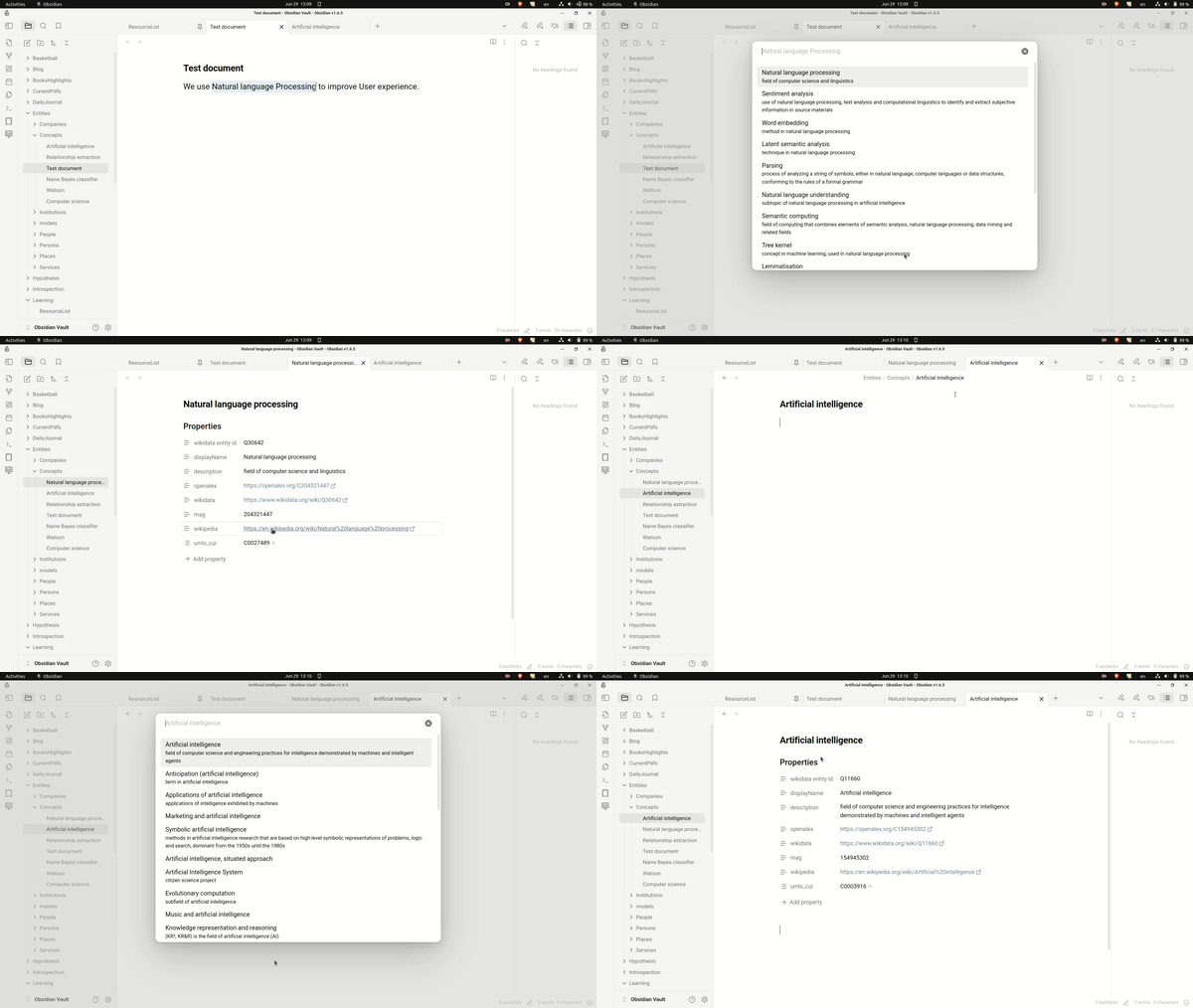
Entity linker demo

How it works

The plugin queries the OpenAlex concepts API for the search term. OpenAlex concepts are scholarly topics, so those hits are filed to the concept folder. When OpenAlex returns nothing, the plugin falls back to resolving the term against Wikipedia/Wikidata, and those hits — typically people, organisations and other named things — are filed to the entity folder.

Installation

From github
  1. Go to the Releases page.
  2. From the latest release, download main.js, manifest.json and styles.css from the Assets section. The auto-generated "Source code" archives will not work: main.js is a build artifact and is not committed.
  3. Create the folder /your-vault/.obsidian/plugins/entity-linker/ if it does not already exist.
  4. Move the three downloaded files into that folder.
  5. Enable the plugin in Obsidian:
    • Open Obsidian, go to Settings > Community Plugins.
    • Make sure Restricted mode is off.
    • Search installed plugins for entity-linker.
    • Click Enable.
From within Obsidian

You can install this plugin within Obsidian by doing the following:

  1. Open Settings > Community plugins.
  2. Make sure Restricted mode is off.
  3. Click Browse.
  4. Search for Entity Linker.
  5. Click Install.
  6. Once installed, click Enable.

For development

Compilation
  1. Clone this repo inside path/to/your/dev/vault/.obsidian/plugins.
  2. npm i or yarn to install dependencies
  3. npm run build to compile, or npm run dev to start compilation in watch mode.

Roadmap

  • First release
  • Add fuzzy logic
  • Add direct search

FAQs

  1. Why is email(optional) asked in settings?
    We use OpenAlex API for fetching metadata. Their API is rate limited. If you add your email in the request, your requests goes into polite pool which has much faster and more consistent response times.

Recommendations

  1. Obsidian Wikidata Importer pulls data from the Wikidata database into your Obsidian notes
  2. Obsidian Wikipedia gets the first section of Wikipedia and pastes it into your active note.

Acknowledgement

  1. Many thanks to Shaun Martin for File Suggestion Component which this plugin relies on.
  2. Thanks to OpenAlex team for providing free for use API over scholarly works.
  3. Thanks to Obsidian team for upholding malleability in the product that allows people to add and share new features. without hassle.

Similar Plugins

info
• Similar plugins are suggested based on the common tags between the plugins.
Topic Linking
5 years ago by Liam Magee
An Obsidian plugin for finding and linking topics in a vault.
Bible Linker
5 years ago by Jakub Kuchejda
Obsidian.md plugin that allows you to link multiple bible verses easily
Note Auto Creator
4 years ago by Simon T. Clement
An Obsidian plugin for automatically creating notes when linking to non-existing notes
Reference Map
4 years ago by Anoop K. Chandran
Reference and citation map for literature review and discovery
YouVersion Linker
3 years ago by Jaanonim
Obsidian plugin that automatically link bible verses to YouVersion bible.
Multiple Notes Outline
3 years ago by iiz
Jira Linker
3 years ago by Steven Zilberberg
This is a plugin to the Obsidian software which adds a quick amendment to a user's note to their configured Jira instance for references to jira and internal info pages
Scholar
3 years ago by Shannon Shen
Streamline Research Workflow in Obsidian
Bible linker Pro
3 years ago by Floydv149
Quadro
3 years ago by Chris Grieser (aka pseudometa)
Obsidian Plugin for social-scientific Qualitative Data Analysis (QDA). An open alternative to MAXQDA and atlas.ti, using Markdown to store data and research codes.
LinkMagic
2 years ago by AndyReifman
Azure DevOps Linker
2 years ago by Steven Zilberberg
This is a plugin to the Obsidian software which adds a quick amendment to a user's note to their configured Jira instance for references to Azure DevOps and internal info pages
You and Your Research
2 years ago by Neo Zhang
Journey
6 years ago by Alexis Rondeau
Discover the story between your notes in Obsidian
Carry-Forward
5 years ago by Jacob Levernier
An Obsidian Notes plugin for generating and copying block IDs, and copying lines with a link to the copied line
Jura Links
2 years ago by Lukas Collier & Emi Le
Verlinke deine Normangaben, Aktenzeichen oder Fundstellen in deiner Obsidian Notiz mit Gesetzesanbietern.
BookNav
2 years ago by jemberton
A plugin for ObsidianMD that enables book style navigation links in a note.
MOC Link Helper
2 years ago by Bogdan Codreanu
This obsidian plugins allows you to quickly see which notes you need to include in your MOC.
Folder Links
2 years ago by Stefan Rausch
Obsidian Plugin that enables using links to folders.
External File Linker
2 years ago by Kay606
Glasp
2 years ago by Glasp
Obsidian plugin to import highlights and notes from Glasp
Automatic Linker
2 years ago by Kodai Nakamura
One Step Wiki Link
2 years ago by Busyo
用于 Obsidian 一步插入当前界面匹配到的所有外链(维基链接)
Symbol linking
a year ago by Evan Bonsignori ; Mara-Li
Adds ability to link with any trigger in Obsidian. Each trigger can limit linking to specific folders or file.
EasyLink
a year ago by isitwho
Select text in your obsidian editor to find the most similar content from other notes and easily create links.
Papers
a year ago by William Liang
An obsidian plugin to retrieve and import research papers.
Canvas Link to Group
a year ago by TGRRRR
Plugin for Obsidian Canvas enabling direct links to specific groups within canvas files for improved navigation
Connections
8 months ago by Eric Van Cleve
Vaultend
2 months ago by Daewon Hwang
AI-powered vault maintenance for Obsidian — auto-tag, link, and clean up your notes with privacy controls and full undo.