Line Commands

by charliecm
5
4
3
2
1
Score: 63/100

Description

Category: Productivity Tools

The Line Commands plugin is a game-changer for Obsidian users who often find themselves working with multiple lines of text. This plugin adds five new commands to your toolbar, allowing you to quickly select, copy, cut, paste before, and paste after individual lines of text. Whether you're on desktop or mobile, these commands make it easy to manipulate your text without having to manually select entire blocks of code. With the "cut lines" command, you can now easily move lines around with precision, even on small mobile screens.

Reviews

  • Evie Hartman
    Reviewed on Feb 26th, 2026
    No review text provided.

Stats

15
stars
2,912
downloads
2
forks
893
days
0
days
6
days
8
total PRs
0
open PRs
0
closed PRs
8
merged PRs
3
total issues
0
open issues
3
closed issues
7
commits

Latest Version

7 days ago

Changelog

  • Added "Insert line above" and "Insert line below" commands, continuing list/task/indent markers
  • Fixed "Paste before line" and "Paste after line" not reliably placing the cursor at the end of the pasted text

README file from

Github

Obsidian Line Commands

An Obsidian plugin that adds the following commands:

  • Select lines: Selects the lines under the selection or cursor.
  • Copy lines: Copies the lines under the selection or cursor.
  • Cut lines: Cuts the lines under the selection or cursor.
  • Paste before line: Pastes the clipboard text in the line above the cursor.
  • Paste after line: Pastes the clipboard text in the line below the cursor.
  • Insert line above: Inserts a new, empty line above the cursor line, continuing any list or checkbox marker.
  • Insert line below: Inserts a new, empty line below the cursor line, continuing any list or checkbox marker.
  • Duplicate lines: Copies the lines under the selection and pastes them in the line below the cursor.
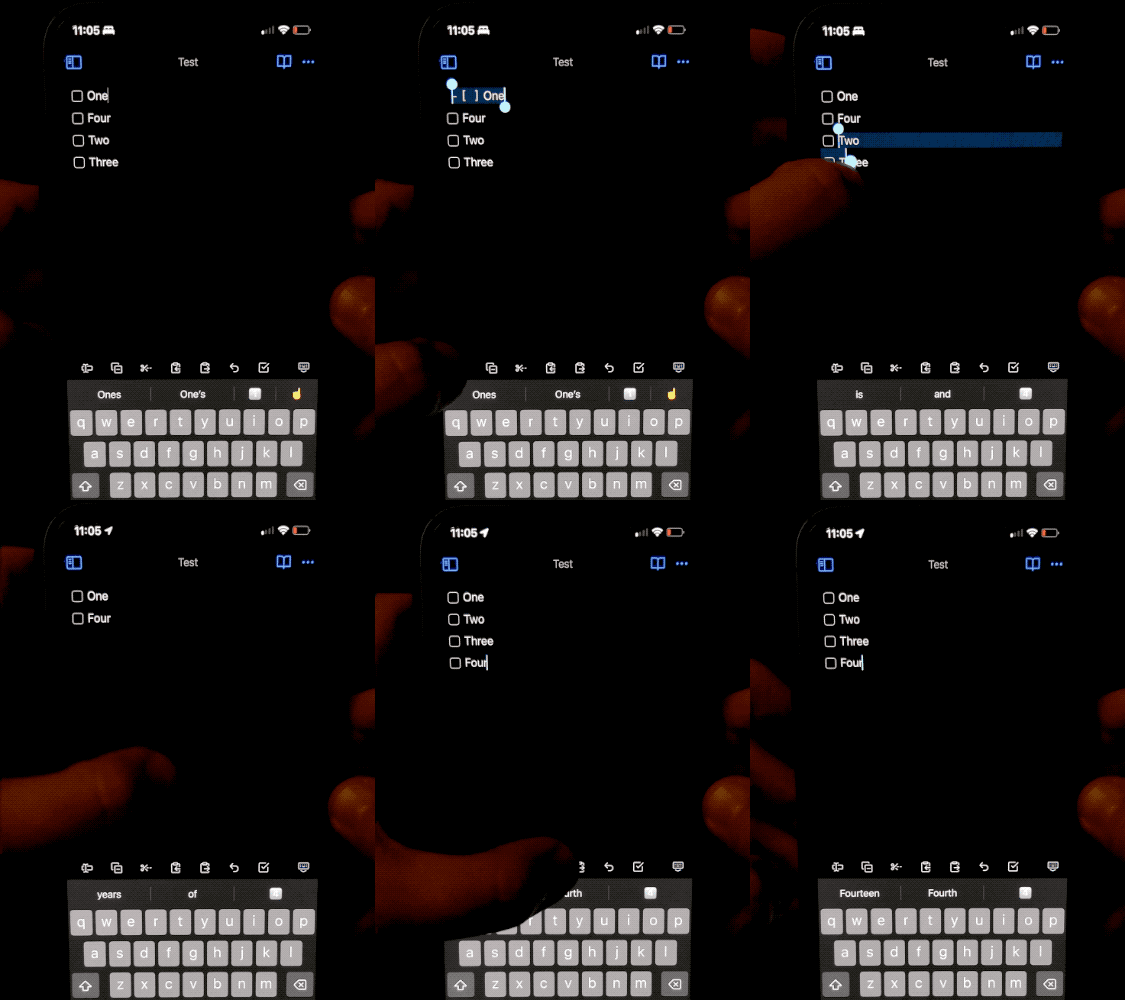
Demo video

I wrote this plugin because I wanted a quick way to cut a line on mobile. However, the default cut command doesn't behave the way it does on desktop (cutting the entire line under the cursor when there's no selection). Therefore, the “cut lines” command makes it easier for me to move lines quickly without needing to painstakingly select lines accurately with my fingers.

You can add these commands to your toolbar on mobile to easily access them.

How to Install

From inside Obsidian…

  1. Go to Settings → Community plugins.
  2. Disable Safe mode.
  3. Click Browse, search for Line Commands, and click Install.
  4. Click the toggle button to enable the plugin.

For manual installation, download this repo and copy over main.js and manifest.json to your vault: VaultFolder/.obsidian/plugins/obsidian-line-commands/.

Development

  1. Clone this repo.
  2. npm install to install dependencies.
  3. npm run dev to start compilation in watch mode.
  4. bash install-built.sh /path/to/your/vault -d to create symbolic links of built files to your vault for quick development.

Release

  1. Run npm run build.
  2. Run npm version [patch/minor/major] to bump version in manifest.json and versions.json.
  3. Add changes in CHANGELOG.md.
  4. Add a new version tag and push it.
    git tag -a 1.0.1 -m "1.0.1"
    git push origin 1.0.1
    
  5. Go to “Releases” in GitHub and edit the latest release (created by GitHub Actions). Insert the changelog texts in the description and ensure main.js and manifest.json are attached.
  6. Click “Publish release”.

Support

If you really like this plugin and want to support its development, please consider buying me a coffee 🙂 Thanks!

Similar Plugins

info
• Similar plugins are suggested based on the common tags between the plugins.
Advanced URI
5 years ago by Vinzent
Advanced modes for Obsidian URI
Alt-Click to Copy
3 years ago by Veer Sheth
Automation
2 years ago by Benature
BackItUp
2 years ago by Hammad Javed
🟣 Quickly make a copy or snapshot of a note in Obsidian.
Buttons
5 years ago by Sam Morrison
Buttons in Obsidian
Callout Copy Buttons
a year ago by Aly Thobani
An Obsidian plugin that adds copy buttons to callout blocks in your notes.
Chorded Hotkeys
4 years ago by Trey Connor Meyers
Type multiple letters at the same time to trigger text insertion, template insertion, or command execution.
Code Blocks commands
a year ago by dragonish
Provide commands to insert code blocks with markup, and support triggering commands with backticks.
Command Block List
2 years ago by Ryota Ushio
Hide unwanted commands from the command palette in Obsidian.
Command Tracker
2 years ago by namikaze-40p
An Obsidian plugin that tracks the number of times the command is used.
Commander
2 months ago by jsmorabito
Commander - Obsidian Plugin | Add Commands to every part of Obsidian's user interface
Commando
3 years ago by qaptoR
Obsidian Plugin for automatically repeating commands with loop iterations
Copy as HTML
5 years ago by Bailey Jennings
A simple plugin that copies the selected text to your clipboard as HTML
Copy as source
2 years ago by @gapmiss
Select and copy source HTML in reading view in Obsidian.md
Copy document as HTML
4 years ago by mvdkwast
Obsidian plugin: copy document as HTML, including images
Copy Search URL
4 years ago by Carlo Zottmann
A plugin for Obsidian (https://obsidian.md) that adds a menu entry to its search view for copying the Obsidian search URL.
Copy Section
2 years ago by skztr
Obsidian.md plugin adding a Copy button to the top of Headed sections
Duplicate line
a year ago by Marcin Sztolcman
Plugin for Obsidian: duplicate current line, or selection.
Enhance Copy Note
a month ago by kzhovn
Plugin which enhances the copy command for Obsidian.
Enhanced Copy
2 years ago by Mara-Li
A obsidian plugin that allows to copy in markdown in reading view or canvas read-only view, creating profile and transform the text during copy.
Fix Line Endings on Copy
10 months ago by KiwiJanus
Gay Toolbar
19 days ago by chaskane
Colorful, customizable toolbar for Obsidian, designed for mobile.
Image to HTML
a year ago by 0x1DA9430
A plugin for Obsidian that converts pasted images to HTML format instead of Obsidian's wikilink or Markdown format
Inline Code Copy
a year ago by Hongchen Lin
LINE Notes Sync
a year ago by onikun94
Local REST API with MCP
3 months ago by Adam Coddington
A secure REST API and Model Context Protocol (MCP) server for your vault.
Magiedit
2 years ago by Matteo Gassend
Markdown Tabs
a month ago by xhuajin
Create and render a Tabs component in your notes.
Note Toolbar
a month ago by chrisgurney
Flexible, context-aware toolbars for your notes in Obsidian.
Open Plugin Settings
3 years ago by Mara-Li
Create a command that open the settings tabs of a registered plugin (because I was bored to open the parameters).
Paste as Embed
2 years ago by Matt Laporte
Obsidian plugin to paste contents of clipboard into a new note, and embed it in the active note.
Paste as file link
a year ago by Matthias Büge
This plugin is used to paste a text from the clipboard as a link to an existing obsidian note
Paste As Html
4 years ago by maotong06
Paste From History
3 years ago by Daniel Karakka
Obsidian plugin that adds the ability to paste text from Obsidian's clipboard history.
Paste Mode
5 years ago by Jacob Levernier
Obsidian Notes plugin for pasting text and blockquotes to the cursor's current level of indentation.
Paste Reformatter
a year ago by Keath Milligan
A plugin for Obsidian that reformats pasted HTML and plain text content, giving you precise control over how content is transformed when pasted into your notes.
Paste transform
2 years ago by Timofey Koolin
Paste URL into selection
6 years ago by Denis Olehov
Paste URLs into selected text "notion style"
Ribbon Folder
16 days ago by limniemdung
obsidian plugin ribbon folder
Shell commands
5 years ago by Jarkko Linnanvirta
Execute system commands via hotkeys or command palette in Obsidian (https://obsidian.md). Some automated events are also supported, and execution via URI links.
Templater
6 years ago by SilentVoid
A template plugin for obsidian
Text expand
6 years ago by MrJackphil
A simple text expand plugin for Obsidian.md
URI Commands
5 years ago by kzhovn
Execute URIs from the command palette