Structured Copy: Files & Folders

by SchmidA
5
4
3
2
1
Score: 52/100

Description

The Structured Copy: Files & Folders plugin enhances organization in Obsidian by allowing users to copy the contents of files and folder structures in a clean JSON format. This plugin maintains the hierarchical arrangement of folders and includes file contents, making it ideal for backing up notes, sharing structured data, analyzing content organization, and migrating data to other systems. It features timestamped outputs, duplicate removal, and the ability to copy single files, multiple selections, or entire folders. Users can paste the structured JSON output into any compatible editor or tool for further use.

Reviews

No reviews yet.

Stats

5
stars
840
downloads
0
forks
480
days
520
days
520
days
0
total PRs
0
open PRs
0
closed PRs
0
merged PRs
0
total issues
0
open issues
0
closed issues
36
commits

Latest Version

a year ago

Changelog

Fixes missing plugin compliance

README file from

Github

Recursive Item Copy Plugin for Obsidian

Purpose

The Recursive Item Copy plugin for Obsidian enhances your note-taking and organization experience by allowing you to easily copy the contents of files and folders in a structured JSON format. This plugin is particularly useful for:

  • Backing up specific parts of your vault
  • Sharing structured content with others
  • Analyzing the structure and content of your notes
  • Migrating content to other systems or applications
Features

  • Copy the contents of a single file, multiple files, or entire folder structures
  • Preserve the hierarchical structure of folders and files
  • Include file contents in the copied data
  • Output data in a clean, structured JSON format
  • Timestamp each copy operation for easy tracking
  • Remove duplicate entries when copying multiple items

How to Use

  1. Installation

    • Open Obsidian Settings
    • Go to "Community Plugins" and disable Safe Mode
    • Click "Browse" and search for "Recursive Item Copy"
    • Install the plugin and enable it
  2. Copying File or Folder Contents

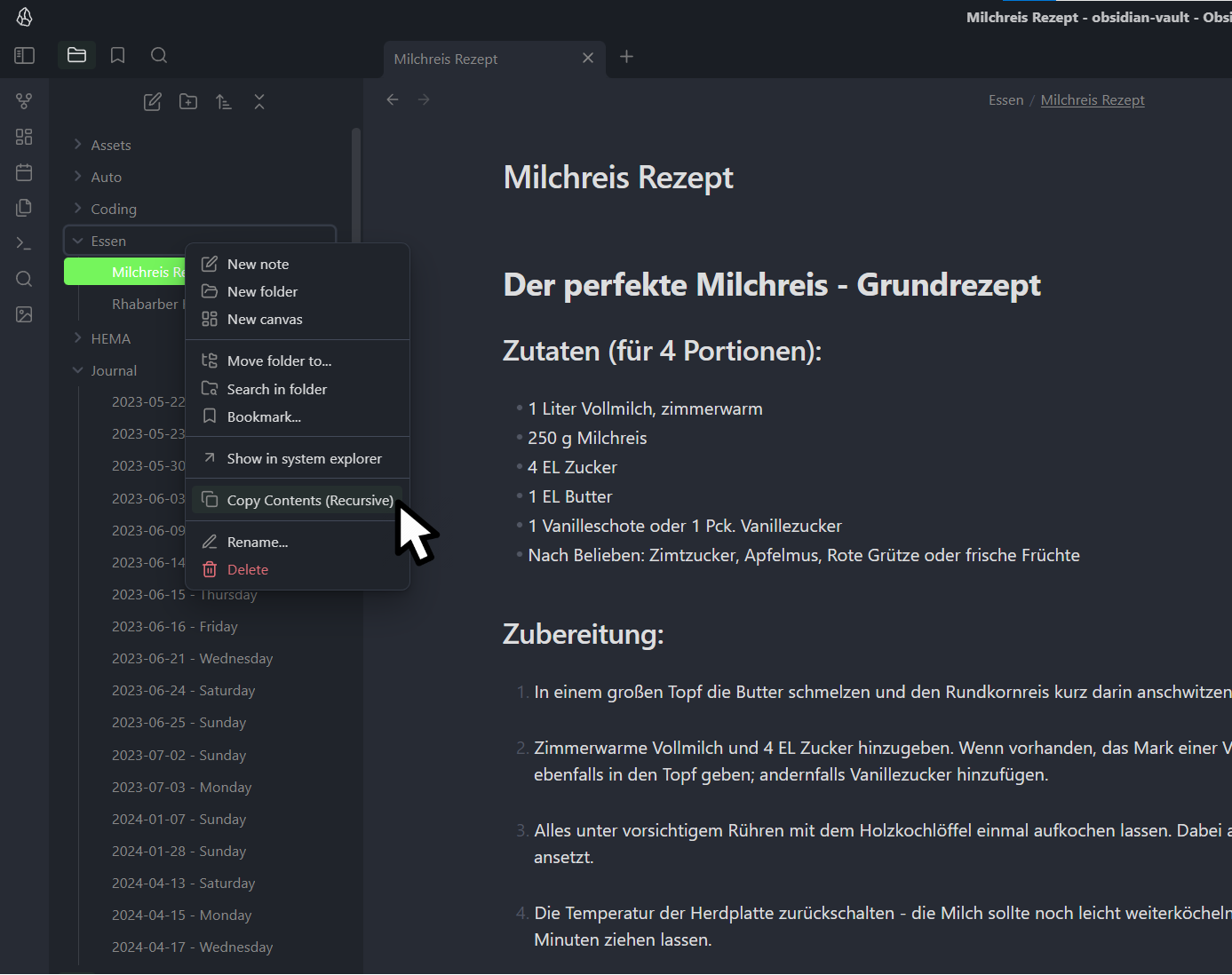
    • Right-click on any file or folder in your Obsidian vault
    • In the context menu, click on "Copy Contents (Recursive)"
    • For multiple selections, use the "Copy Contents of Selected Items (Recursive)" option
    • The plugin will process the selected item(s) and copy the structured data to your clipboard
  3. Using the Copied Data

    • Paste the copied content into any text editor or application that accepts JSON
    • The copied data will include the full path of each item, its content (for files), and maintain the folder structure (for folders)

Output Format

The copied data is in JSON format and includes:

  • items: An array of copied files and folders
    • type: Either "file" or "folder"
    • path: The full path of the item in your vault
    • content: The content of the file (for file types)
  • timestamp: The date and time when the copy was made

Example output:

{
  "items": [
    {
      "type": "folder",
      "path": "Essen"
    },
    {
      "type": "file",
      "path": "Essen/Milchreis Rezept.md",
      "content": "# Der perfekte Milchreis - Grundrezept\n\n## Zutaten (für 4 Portionen):\n\n- 1 Liter Vollmilch, zimmerwarm\n- 250 g Milchreis\n..."
    },
    {
      "type": "file",
      "path": "Essen/Rhabarber Kuchen Rezept.md",
      "content": "### Zutaten\n\n#### Für die Streusel\n\n- 125 Gramm Butter kalt in Stückchen\n- 125 Gramm Weizenmehl\n..."
    }
  ],
  "timestamp": "2024-08-24T19:41:50.729Z"
}

Use Cases

  1. Backup: Quickly create a structured backup of specific parts of your vault.
  2. Sharing: Share a structured representation of your notes, including content and organization.
  3. Analysis: Use the JSON output to analyze the structure and content of your notes programmatically.
  4. Migration: Use the structured output to migrate your notes to other systems or applications.

Technical Details

The plugin is implemented in TypeScript and uses Obsidian's Plugin API. Key components include:

  • ItemType enum to distinguish between file and folder types
  • FileSystemItem interface to represent both files and folders
  • CopyInfo interface for the final copy information structure
  • Methods for handling file menu events, processing file contents, and managing folder structures

Feedback and Support

If you encounter any issues or have suggestions for improvements, please visit our GitHub repository [insert link here] to submit an issue or contribute to the project.

Enjoy recursive copying of your Obsidian content!

Similar Plugins

info
• Similar plugins are suggested based on the common tags between the plugins.
Binary File Manager
4 years ago by qawatake
An Obsidian plugin to manage binary files
Screwdriver
4 years ago by vorotamoroz
Paste image rename
4 years ago by Reorx
Renames pasted images and all the other attachments added to the vault
Folder Focus Mode
4 years ago by grochowski
Focus file explorer on chosen folder and its files and subdirectories, while hiding all the other elements.
File Hider
4 years ago by Oliver Akins
A plugin for https://obsidian.md that allows hiding specific files and folders from the file explorer.
Open File by Magic Date
4 years ago by simplgy
HTML Reader
4 years ago by Nuthrash
This is a plugin for Obsidian (https://obsidian.md). Can open document with .html and .htm file extensions.
Update Relative Links
4 years ago by val
Trash Explorer
3 years ago by Per Mortensen
Restore and delete files from the Obsidian .trash folder
File chucker
3 years ago by Ken Lim
File Order
3 years ago by lukasbach
Obsidian plugin to reorder files with drag-and-drop by customizing a number-prefix in the filenames
Android nomedia
3 years ago by JakeisAwesome
When syncing Obsidian with Android you will see a lot of media associated with your vaults. This will add the .nomedia file to ever folder in your Vault.
Telegram Sync
3 years ago by Burtasov Volodymyr
Transfer messages and files from Telegram to Obsidian
Note archiver
3 years ago by thenomadlad
Edit History
3 years ago by Antonio Tejada
Obsidian Edit History Plugin, automatically save all the edit history of a note, browse and restore previous versions
Syncthing Integration
3 years ago by LBF38
Obsidian plugin for Syncthing integration
Update frontmatter modified date
3 years ago by Alan Grainger
Automatically update a frontmatter/YAML modified date field
Webdav File Explorer
3 years ago by red0orange
Copy Metadata
3 years ago by wenlzhang
An Obsidian plugin to copy metadata to clipboard and insert it into file name.
Auto Archive
3 years ago by Shane Burke
Auto Archive plugin for Obsidian
Merge Notes
3 years ago by fnya
Merge Notes is Plugin for Obsidian
VSCode Editor
3 years ago by Sun Xvming
Edit Code Files like VSCode in Obsidian.
Auto Filename
2 years ago by rcsaquino
Auto Filename is an Obsidian.md plugin that automatically renames files in Obsidian based on the first x characters of the file, saving you time and effort.
Remove Empty Folders
2 years ago by fnya
Remove Empty Folders for Obsidian
Git File Explorer
2 years ago by Mateus Molina
Simple Image Inserter
2 years ago by Joey Holtzman
Add images from the file system into Obsidian notes through a built-in file explorer
Vault Transfer
2 years ago by ImaginaryProgramming
Transfers a note from one vault to another.
S3agle
2 years ago by Turner Monroe (turnercore)
File Preview
2 years ago by Huajin
Add file preview contents under file in file explorer.
Guid Renamer
2 years ago by Taskscape LTD, Kacper Pabianiak
Renames the currently selected file by providing a unique file name based on GUID pattern
NSFW filter
2 years ago by catvatar
Obsidian Plugin adding a button to toggle visiblity of NSFW notes
sync-db-os
2 years ago by ketd
Recursive Copy
2 years ago by datawitch
External File Card
2 years ago by James-Yu
A plugin for Obsidian showing a card displaying basic information of a file in pre-defined folders.
Link indexer
5 years ago by Yuliya Bagriy
Unique attachments
5 years ago by Dmitry Savosh
Obsidian plugin. Renames attachments, making their names unique.
Luhman
5 years ago by Dylan Elliott
Better File Link
5 years ago by Marc Julian Schwarz
A plugin for the note taking app Obsidian to add better external file links to your notes.
Update time on edit
5 years ago by beaussan
Cloudinary Uploader
4 years ago by Jordan Handy
An uploader for Obsidian to Cloudinary
Reveal Active File Button
4 years ago by Clare Macrae
Obsidian plugin to add a button to the top of the Obsidian File Explorer, to reveal the active file.
Cloud Storage
2 years ago by Jiajun Ma
Obsidian Cloud Storage is a powerful and user-friendly plugin designed to seamlessly integrate cloud storage capabilities into your Obsidian workflow. This plugin allows you to effortlessly upload your attachments to the cloud, freeing up local storage space and enabling easy sharing and access across all your devices.
Recently Added Files
a year ago by Lemon695
List files by last added, includes pictures, pdfs, etc.
Insert Multiple Attachments
a year ago by mnaoumov
Obsidian Plugin that allows to insert multiple attachments at a time
Inbox Organiser
a year ago by Jamie Hurst
Obsidian plugin to capture any new notes into an inbox and periodically prompt to organise these into other folders within the vault.
Local Any Files
a year ago by ShermanTsang
A obsidian plugin used to extract and download files in your obsidian note.
Tencent COS for Imgur
a year ago by bobostudio
🔥 Obsidian 腾讯云 COS 图床插件
External Rename Handler
a year ago by mnaoumov
Obsidian Plugin that handles external renames made outside of the app
New Filename
a year ago by Amin Sennour
Simple plugin to change the default name for a new note from "Untitled" to a UUID.
New Note Fixer
a year ago by mnaoumov
Obsidian Plugin that unifies the way non-existing notes are created when clicking on their links
Media Companion
a year ago by Nick de Bruin
VaultSync
a year ago by Justin Bird
Obsidian plugin to link your vault to a cloud storage provider.
Simple Archiver
a year ago by Mike Farr
An Obsidian plugin that enables you to quickly archive a single note or an entire folder of notes.
Rename File to Selection
a year ago by Aava
Rename your file to the current text selection.
CSV Lite
a year ago by Jay Bridge
Simple enough for csv, no more fancy function you need to learn and think!
Markdown Hijacker
a year ago by Yongmini
Beyond the Vault. One hub for every Markdown, everywhere
Remote Fetch
8 months ago by Shaharyar
WebDAV Explorer
a month ago by 蓝星晓夜
WebDAV Explorer: Connect to WebDAV server, preview files directly in web view, and generate links through simple drag-and-drop.
Graphic Organizer
a month ago by Nick Le Guillou - Superhuman Curiosity
Interactive tree view for visualizing and managing your vault's file hierarchy.