
README file from
GithubTrakt for Obsidian
This project syncs your Trakt checkins to a file in Obsidian with date-specific backlinks. This can help you keep track of movies you've seen as well as when you've seen them.
Example
You open up the command palette and run the Trakt Sync: Sync watched history command. It then fetches data and places it in a file called Trakt Rating History.md in a bulleted list.
Gave 8/10 to Season 2, Episode 1 of [Abbott Elementary](https://trakt.tv/shows/abbott-elementary): ["Development Day"](https://trakt.tv/shows/abbott-elementary/seasons/2/episodes/1) on [[2024-10-22]]
Finished watching Season 1, Episode 2 of [The Secret Lives of Mormon Wives](https://trakt.tv/shows/the-secret-lives-of-mormon-wives) on [[2024-09-22]]
Usage
Option 1: Local Data Export (Recommended / Free Users)
Due to Trakt's restrictions on third-party OAuth apps for free accounts, you can sync your data without any API keys:
- Go to Trakt Settings → Data and click Export now.
- Download the
.zipexport file and drop it anywhere into your Obsidian vault. - Open the command palette in Obsidian and run Trakt: Import from local Trakt export ZIP (or click Import from ZIP in the plugin settings).
- The plugin automatically detects the newest
trakt*.zipfile in your vault, extracts your watch history and ratings, and generates your watch log without requiring external network requests.
Option 2: Trakt API / OAuth Sync
If you have a Trakt VIP subscription or a registered developer application:
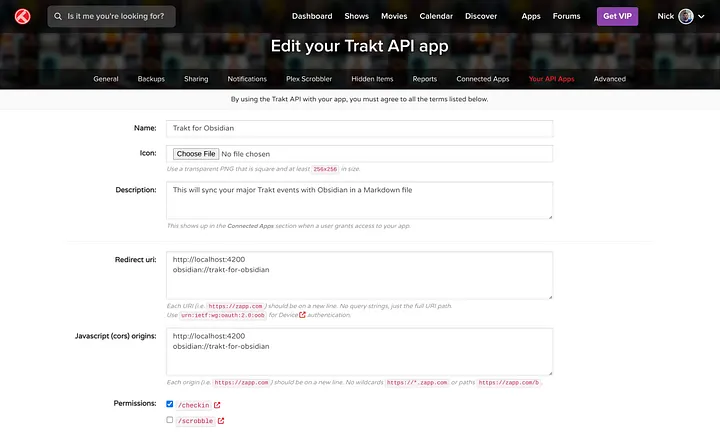
- Create a developer app in Trakt with redirect URI
obsidian://trakt. - Add your Client ID and Client Secret in the plugin settings, then click Connect.
- Run the Trakt Sync: Sync watched history (via Trakt API) command from the command palette.
This plugin could use your feedback and help to make it a success!