Private AI

by GB
5
4
3
2
1
Score: 47/100

Description

Category: Learning & Knowledge Management

The Private AI Chat plugin enables secure, local AI-powered conversations with your notes using a privacy-first approach. It connects to a locally running LM Studio server, ensuring that all processing happens on your own device without sending data to external services. You can query your vault naturally, with the plugin automatically searching relevant notes and citing them in responses. It allows narrowing the AI's focus to specific open notes for targeted insights and supports performance tuning through adjustable models, search parameters, and token limits. Cross-platform compatibility for Mac and Windows makes it widely accessible, while easy setup and model swapping simplify usage.

Reviews

  • Milica Bogdanovic
    Reviewed on Apr 6th, 2026
    Great plugin! Switched to this from Co***t plugin after having many problems with context window of a lot of models. Somehow in Private AI everything worked so far, without errors. It seems to be very fast. My only desire is that the developer would implement automatic note creation from a conversation - it would be most useful!
  • Lewy
    Reviewed on Mar 23rd, 2026
    Works great and using the latest version of llama
  • Jonathan Micklos
    Reviewed on Mar 3rd, 2026
    This is a great plugin to have to locally make sense of my second Brain without all the risk/overhead of a remote model! Thanks for putting this out there!!!!
  • Gizmo Bot
    Reviewed on Mar 2nd, 2026
    I hooked it up and in about two minutes and it just... works. It’s wild being able to actually chat with my vault.
  • Brick
    Reviewed on Feb 24th, 2026
    No review text provided.
  • Stefan Lafloer
    Reviewed on Feb 23rd, 2026
    one of the best AI plugins for Obsidian. RAG indexing works great. Using it with local LM Studio server and Gemma3-4b perfectly!!
  • Van
    Reviewed on Feb 23rd, 2026
    This plugin is a lifesaver. I love how it keeps all my notes private and how easy it is to set up. I have tons of personal notes, thoughts, and plans in Obsidian already. And I was looking for a way to unlock their power using AI. Private AI helps me find my notes, chat with them, and synthesize new ideas. This works so well that I'm migrating all my notes elsewhere into Obsidian even faster now. My notes are finally useful, and private! Big thanks to the dev!
  • Gabe Brown
    Reviewed on Feb 23rd, 2026
    I use it everyday, it's awesome, and private.

Stats

57
stars
4,500
downloads
8
forks
285
days
16
days
71
days
35
total PRs
6
open PRs
9
closed PRs
20
merged PRs
24
total issues
5
open issues
19
closed issues
0
commits

RequirementsExperimental

  • LM Studio installed and running locally

Latest Version

2 months ago

Changelog

test: add MigrationRunner unit tests (#54),
🔒 fix: verify absence of XSS vulnerabilities in RAG progress code (#51),
test: add tests for EmbeddingService (#49),
Verify image file obsolescence fix in RAGService (#34),
fix: add logging to empty catch block in MigrationRunner (#40),
refactor(db): use error logging for WAL mode setup failures (#42),
feat: add comprehensive unit tests for LoggingUtility (#46),
Add GitHub Action to run tests on PR and merge to main (#47),
ci: add CodeQL vulnerability scanning workflow (#48),
🧹 improve code health by enhancing error logging (#45),
🧹 fix(db): add error logging to empty catch block in UnifiedVectorDatabase (#44),
perf: optimize deduplication of search results in ChatView (#35)

README file from

Github

Private AI Chat for Obsidian

Your most sensitive notes, your private thoughts — other AI plugins send them to someone's servers. Private AI doesn't.

  • ✅ Your notes stay on your device
  • ✅ Use local LLMs like gpt-oss, Qwen3, Gemma4, DeepSeek, Mistral and many more, locally on your own hardware
  • ✅ No data is transmitted to external services
  • ✅ No analytics or tracking

Compatible With: LM Studio

Getting Started + Setup

  • Goto Community Plugins
  • Search Private AI and click Install
  • Click Enable

Enjoy!

Features

  • Easy Setup: Easy setup and model swapping with LM Studio
  • Cross Platform: Supports for most modern Mac and Windows machines
  • Integrated Vault Search: Automatically search your Obsidian vault for relevant information to provide contextual responses and cite specific notes from your vault
  • Open Tab Context: Focus your conversation on specific notes for focused insights
  • Performance Tuning: Customize models, search parameters, token limits, and more to tune performance for your hardware
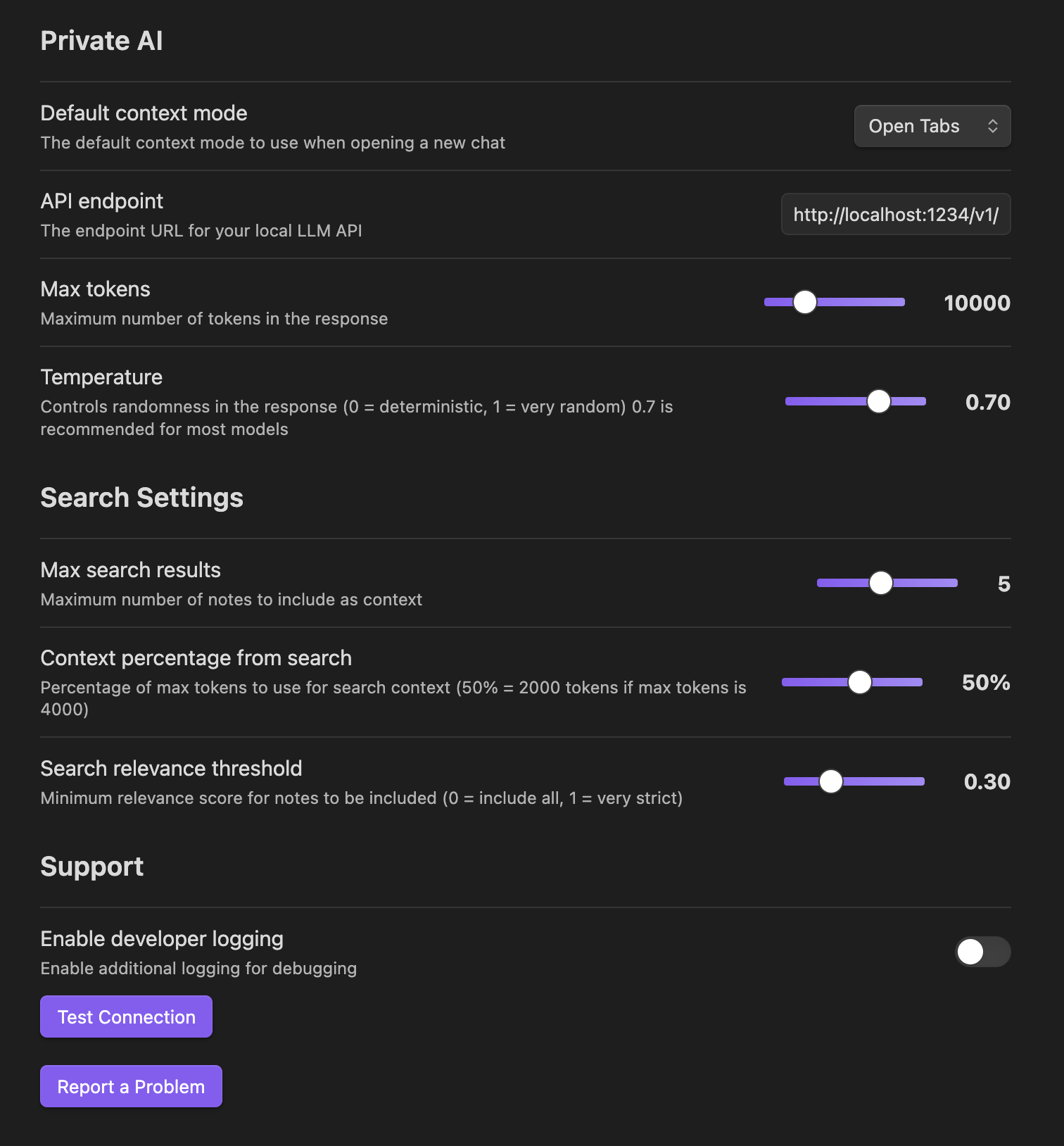
Easy and powerful configuration

Example Queries

  • "I have to have a difficult conversation with a friend, read my journal entry about the situation and help me come up with a good way to talk to my friend compassionately"
  • "My partner was a jerk to me, help me look at other alternative reasons why they may have reacted the way they did"
  • "Talk to this journal entry like a good friend"
  • "When did I first meet Jacob?"
  • "What did frank talk about at our meeting on Obsidian plugins?"
  • "What did I write about machine learning?"
  • "What are my thoughts on productivity systems?"

Development

Contributing

Contributions are welcome! Please feel free to submit issues and pull requests.

Attributions

This project respects and is compatible with the original licenses of all code and dependencies used:

Development Tools

  • esbuild - MIT License - Used for bundling the plugin
  • TypeScript - Apache-2.0 License - Used for type safety
  • Obsidian API - MIT License - Official Obsidian plugin API

Dependencies

All development dependencies are used under their respective open-source licenses (MIT, Apache-2.0, ISC, BSD) and are properly externalized in the build process.

Third-Party Services

This plugin integrates with local LLM services but does not include any of their code:

  • LM Studio - Proprietary - Local LLM interface

License

This project is licensed under the MIT License.

Similar Plugins

info
• Similar plugins are suggested based on the common tags between the plugins.