
README file from
GithubPure OLED Rainbow
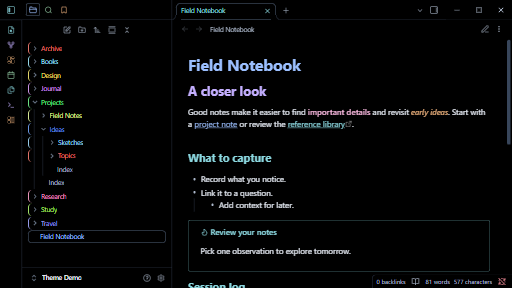
Pure black and pure white Obsidian surfaces with colourful folders, menus and note headings.
Source version 3.2.0. Modes supported: Dark and light. Tested in Obsidian 1.15.1 on Windows.
The 20-colour sequence rotates by sibling order and shifts according to the parent folder. Colours remain stable as you browse. Sorting or moving folders can change their place in the sequence.
Preview

Install manually
- Download
manifest.jsonandtheme.cssfrom release 1.0.0. - Put both files in
.obsidian/themes/Pure OLED Rainbow/in your vault. - Open Settings > Appearance and select Pure OLED Rainbow. Choose a supported base colour scheme.
See the original design plan. MIT license.