
README file from
GithubTrailside
A calm, flat theme for Obsidian, in light and dark, inspired by Basecamp's style.
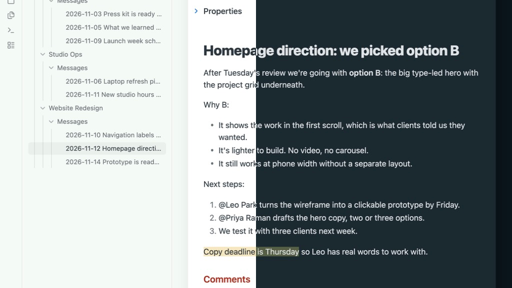
- Pale mint around the edges, white pages, blue-grey text instead of black.
- Each note sits on a page that floats over the background, with a soft shadow. On phones, notes fill the screen as usual.
- Heavy, tight note titles. Section headings (
##) in brick red, or pale peach in dark mode. - Flat cards and callouts with 8px corners and a hairline border.
- Pill-shaped tags on a warm cream background.
- Property names in a warm gold-brown, or soft blue-grey in dark mode.
- Green checkboxes with slightly rounded corners. Done to-dos turn grey but aren't crossed out.
- Matching styles for Bases tables, cards and kanban boards.
Trailside uses your system font. It doesn't change your font size, so the size slider in Settings → Appearance still works.
Pairs well with Bulletin, which pulls Basecamp message boards into your vault. In Bulletin's notes, Trailside shows the title once and lays comments out as a thread, each one under a thin line.
Trailside isn't made by or affiliated with 37signals or Basecamp.
Install
In Obsidian, open Settings → Appearance, choose Manage next to Themes, and search for Trailside.
To install it by hand instead:
- Copy
manifest.jsonandtheme.cssinto<your vault>/.obsidian/themes/Trailside/. - In Obsidian, open Settings → Appearance and choose Trailside under Themes.
Needs Obsidian 1.9 or newer.