Terminal2K

by isax785
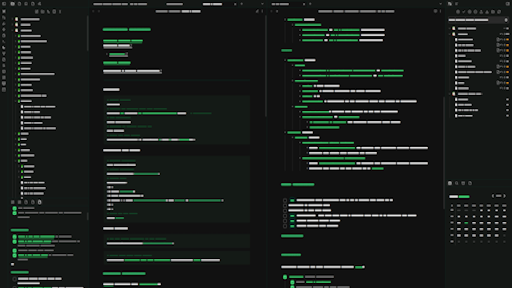
Screenshot of the Terminal2K Obsidian theme
5
4
3
2
1

Description

This theme supports Dark Mode
This theme supports Light Mode

README file from

Github

Terminal2K

Step Back in Time, Power Up Your Productivity

Craving a departure from the ordinary? Yearning for the focused simplicity of a classic command-line interface? White Prompt injects that iconic monochrome aesthetic, with vibrant green accents, straight into your Obsidian workflow.

This theme is meticulously crafted to provide a distraction-free writing and organizing experience, echoing the legendary terminals of yesteryear with its crisp white text on a deep black background and highlighted with electric green for emphasis on bold, italic, and inline code.

Key Features You'll Love

  • Authentic Retro Look: Immerse yourself in a genuine terminal feel with sharp white text against a pure black backdrop.
  • Enhanced Focus: A clean, minimal design to laser-focus your attention on what truly matters.
  • Optimal Readability: Carefully chosen colors that ensure comfortable reading for extended sessions.
  • Continuous Evolution: Expect ongoing updates and improvements, driven by community feedback!

Ready to Command Your Notes with a Retro Flair?

To install the theme:

  • Open Obsidian Settings
  • Go to Appearance and click Manage
  • Under community themes search for "Terminal2K" and click Use

Enjoy!✨