
README file from
GithubSynthwave Pro
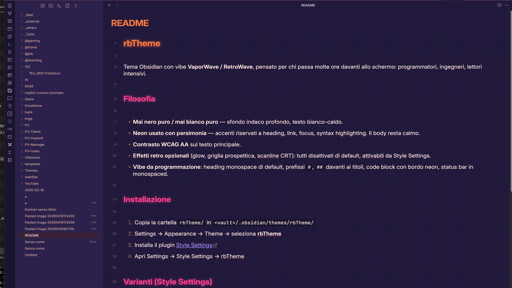
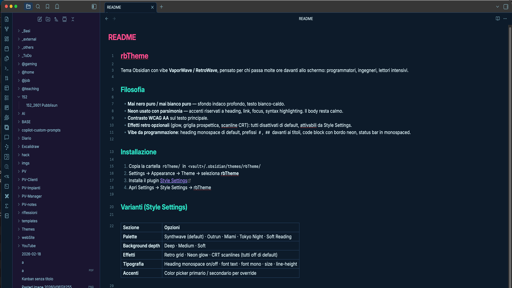
An Obsidian theme with a VaporWave / RetroWave vibe, built for people who spend long hours at the screen: programmers, engineers, heavy readers.
Philosophy
- Never pure black, never pure white — deep indigo background, warm off-white text.
- Neon used sparingly — accents reserved for headings, links, focus and syntax highlighting. Body copy stays calm.
- WCAG AA contrast on body text.
- Optional retro effects (glow, perspective grid, CRT scanlines): all off by default, toggle from Style Settings.
- Programmer feel: monospace headings by default,
#/##prefixes on titles, code blocks with neon left border, monospaced status bar.
Installation
- Copy the
obsidian-synthwave-pro/folder into<vault>/.obsidian/themes/obsidian-synthwave-pro/ - Settings → Appearance → Theme → select Synthwave Pro
- Install the Style Settings plugin
- Open Settings → Style Settings → Synthwave Pro
Variants (Style Settings)
| Section | Options |
|---|---|
| Palette | Synthwave (default) · Outrun · Miami · Tokyo Night · Soft Reading |
| Background depth | Deep · Medium · Soft |
| Effects | Retro grid · Neon glow · CRT scanlines (all off by default) |
| Typography | Monospace headings on/off · text font · mono font · size · line-height |
| Accents | Color picker for primary / secondary override |
Usage hints
- Long coding sessions →
Tokyo NightorSoft Readingpalette, glow off, depth medium. - Maximum retrowave vibe →
Synthwave+ grid on + glow on (mind the headache after an hour). - Long reading →
Soft Reading, line-height 1.7, mono headings off.
Structure
obsidian-synthwave-pro/
├── manifest.json
├── theme.css
├── LICENSE
├── README.md
└── README_it.md
Callouts & checkboxes preview
The blocks below render with full styling only inside Obsidian. GitHub renders a subset of callouts (NOTE / TIP / IMPORTANT / WARNING / CAUTION) and shows custom task markers as plain checkboxes.
Callouts
[!NOTE] Standard note Default block. Useful for general info that doesn't need extra emphasis. Syntax:
> [!NOTE]
[!TIP] Useful tip Use callouts to organize notes visually. They can be nested. Syntax:
> [!TIP]
[!IMPORTANT] Important Crucial information for understanding what follows. Syntax:
> [!IMPORTANT]
[!WARNING] Warning Pay attention — this could cause confusion if ignored. Syntax:
> [!WARNING]
[!CAUTION] Caution Proceed carefully. A wrong action here may cause data loss or major errors. Syntax:
> [!CAUTION]
[!ABSTRACT] Summary Ideal for executive summaries.
[!SUMMARY]is an alias. Syntax:> [!ABSTRACT]or> [!SUMMARY]
[!INFO] Info Technical details or supporting data. Syntax:
> [!INFO]
[!QUOTE] Quote "The best way to predict the future is to create it." Syntax:
> [!QUOTE]
[!SUCCESS] Success A process completed correctly or a hypothesis was verified. Syntax:
> [!SUCCESS]
[!QUESTION] Question Open question highlighted as such. Syntax:
> [!QUESTION]
[!FAILURE] Failure Something didn't work as expected, or a test failed. Syntax:
> [!FAILURE]
[!DANGER] Danger High risk. Use only for critical warnings. Syntax:
> [!DANGER]
[!BUG] Bug Track known software bugs in your notes. Syntax:
> [!BUG]
[!EXAMPLE] Example
- Start with
> [!TYPE]- Add content on following lines. Syntax:
> [!EXAMPLE]
Collapsible callout
Add a - after the type to make it collapsed by default.
[!TIP]- Click to expand Hidden until clicked. Good for long details or exercise solutions. Syntax:
> [!TIP]-
Custom checkboxes
Base states
- To-do (default)
[ ] - Completed
[x] - Completed (uppercase)
[X] - [-] Cancelled / N/A
[-]
Priority & urgency
- [!] URGENT — immediate action
[!] - [>] Delegated to someone else
[>] - [<] Postponed / scheduled
[<] - [/] In progress
[/]
Ideas & creativity
- [*] Brilliant idea / favourite
[*] - [l] Insight / lightbulb
[l] - [B] Brainstorming
[B] - [Y] Reflection / thought
[Y]
Doubts & verification
- [?] Open question
[?] - [w] To review
[w] - [V] Verified
[V]
Development & tech
- [b] Bug to fix
[b] - [f] Feature request / flag
[f] - [k] Key / password / critical
[k] - [S] Secure / locked
[S] - [c] Cloud / sync
[c]
Time & organization
- [t] Target / goal
[t] - [D] Deadline / date
[D] - [O] Estimated time
[O] - [z] Snoozed
[z] - [R] To refresh
[R]
Communication & info
- [i] General info
[i] - [n] Numeric note
[n] - [Q] Open discussion
[Q] - [u] User involved
[u] - [m] Place / map
[m]
Misc
- [p] Pin / fixed
[p] - [d] To delete / trash
[d] - [C] Recycle / review
[C] - [E] External link / web
[E] - [F] Hot / trending
[F] - [H] Home / main
[H] - [J] Celebration
[J] - [K] Tool
[K] - [L] Reading / study
[L] - [M] Finance / cost
[M] - [N] Quick note
[N] - [P] Pin (variant)
[P] - [T] Ticket / support
[T] - [U] High priority (up)
[U] - [W] Manual work
[W] - [a] Audio / recorded
[a] - [e] Email to send
[e] - [s] Saved / bookmark
[s]
Author
Ing. Roberto Bissanti — aerospace engineer applied to renewable energy innovation (vertical-axis wind turbines, small wind systems, shape-memory alloys), based in Palermo, Sicily. Also a software developer for the cases the spreadsheet can't reach.
Mac user since 1989 — old enough to remember when "dark mode" meant the screen was off. The eyes are no longer twenty, hence Synthwave Pro.
Issues, ideas and PRs are welcome on github.com/robertobissanti/obsidian-synthwave-pro.
License
MIT — use, fork, modify.
Credits
- Visual inspiration: Obsidian SynthWave by Marco Luzi.
Third-party assets
- Lucide icons (ISC License) — used for custom checkbox glyphs.