
README file from
GithubPaper feel
A calm, paper-like app theme for Obsidian, in light and dark, for desktop and mobile. Easy on the eyes, with an unmistakable difference between heading levels, between folders and notes, and between callout types.
Two papers:
- Cream Ledger (default): warm cream paper with a subtle grain. Every heading level has its own ink.
- Recycled Stock: neutral grey paper, near-monochrome. Heading levels are told apart by typography: rules, capitals and italics.
Light and dark follow Obsidian's own setting (Settings → Appearance → Base color scheme).
| Cream Ledger, light | Cream Ledger, dark |
|---|---|
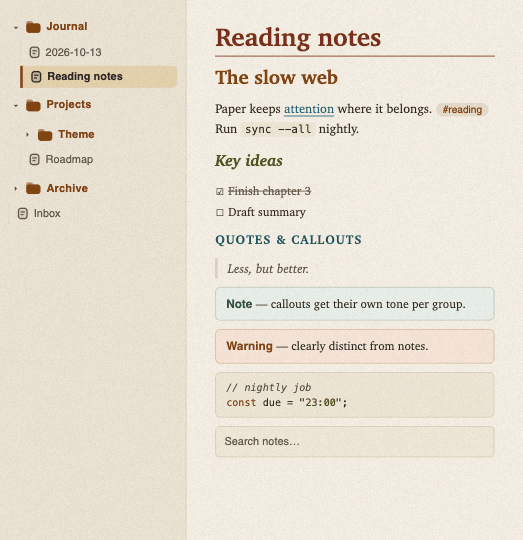 |
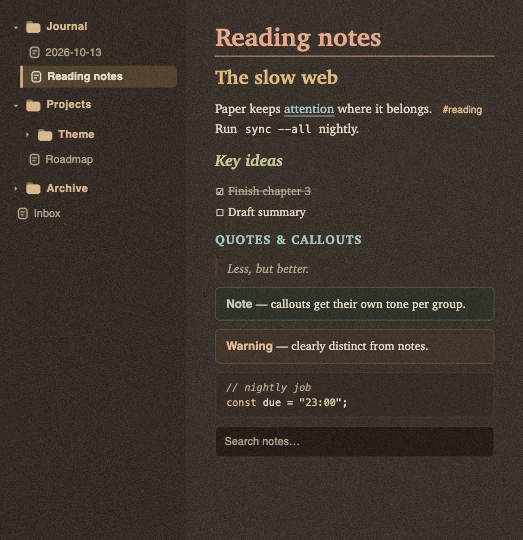 |
| Recycled Stock, light | Recycled Stock, dark |
|---|---|
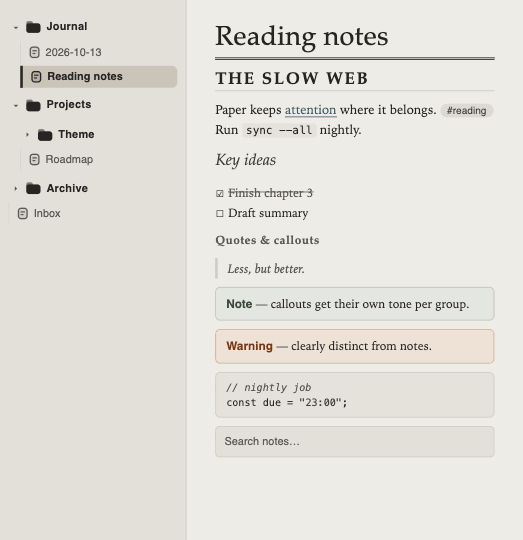 |
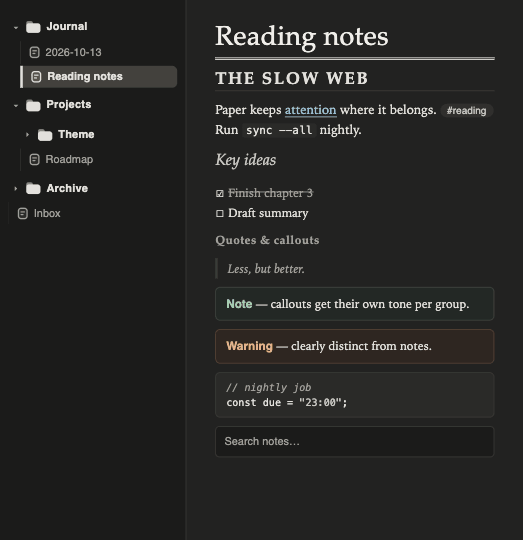 |
These images are design mockups (the paper grain is approximated).
Features
- Every text color meets WCAG AA (4.5:1) on the surface it sits on, in both papers and both modes, including code syntax and callout titles.
- Callouts in four groups with their own tint: info (note, abstract, info, todo, example, quote), warning (warning, question), danger (failure, danger, bug) and success (tip, important, success).
- File explorer: bold folders with a folder icon, muted notes with a note icon, the open note marked with a bar.
- Your accent color (Settings → Appearance → Accent color) still drives buttons, toggles and selection; headings, links and folders keep the paper's own inks.
- No remote resources, no embedded fonts, no JavaScript.
Fonts
The theme names its fonts but doesn't embed them. Each one is used when it's installed on your system; otherwise the next one in the list applies.
- Cream Ledger: Charter for body and headings.
- Recycled Stock: Iowan Old Style for body, Palatino for headings.
- Interface: Helvetica Neue. Code: Menlo.
Change body, interface and code fonts in Settings → Appearance → Font.
Settings
With the Style Settings plugin you can choose:
- Paper: Cream Ledger (default) or Recycled Stock.
- Paper texture: On (default) or Off. Cream Ledger only.
- Heading font, one field per paper.
Without the plugin the theme uses Cream Ledger with the texture on.
Installation
In Obsidian, open Settings → Appearance → Themes → Manage, search for Paper feel, then Install and use.
Manually: create the folder .obsidian/themes/Paper feel/ in your vault, copy theme.css and manifest.json from the latest release into it, and select the theme under Settings → Appearance → Themes.
Development
theme.css is generated. Edit src/theme.css (and icons/), then:
npm install      # once: stylelint and the official Obsidian config
npm run build    # src/theme.css + icons/ -> theme.css
npm run check    # contrast check (4.5:1, all palettes) + store lint (0 warnings)
The build needs Python 3 (standard library only). docs/obsidian-theme-rules.md lists the store and design rules the theme follows.