
README file from
GithubBase16 for Obsidian
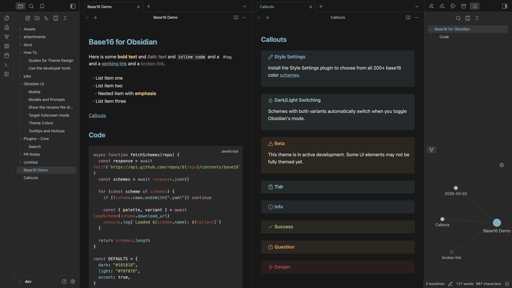
A theme for Obsidian built on the base16 color system. Includes all 200+ base16 schemes with automatic dark/light mode switching.
Install
Using BRAT
- Install the BRAT plugin
- Open BRAT settings → Add Beta Theme
- Enter
snelling-a/obsidian-base16-theme - (Optional) Install the Style Settings plugin to switch between color schemes
From Community Themes (once approved)
- Open Obsidian Settings → Appearance → Themes
- Search for "Base16" and click Install
- (Optional) Install the Style Settings plugin to switch between color schemes
Usage
The theme works out of the box with the Default Dark/Light scheme. To choose from all 200+ schemes, install the Style Settings plugin and open Settings → Style Settings → Base16. Schemes that have both dark and light variants automatically switch when you toggle Obsidian's dark/light mode.
Development
npm install
npm run update    # fetch latest schemes from tinted-theming and rebuild
npm run build     # rebuild theme.css from local schemes
Credits
- Color schemes from tinted-theming/schemes
- Style Settings integration via obsidian-style-settings