
README file from
GithubOne Oracle Developer
An Obsidian theme tuned for long-form technical writing, tight note taxonomies, and daily use by a developer who lives in the editor. Built on top of the excellent Baseline theme, with opinionated typography and a few quality-of-life fixes on top.
Now a human version from me:
I checked all themes in Obsidian, and 95% of them were total garbage. Baseline was almost perfect, but I had to make a few small tweaks here and there so it works better with lists, checklists, and tags. I also adjusted the headers and fonts. The biggest issue was the folders/files tree, which felt a bit dull. Install Baseline and this theme and compare them yourself.
More details (generated) below. Enjoy!
Preview
What's different from Baseline
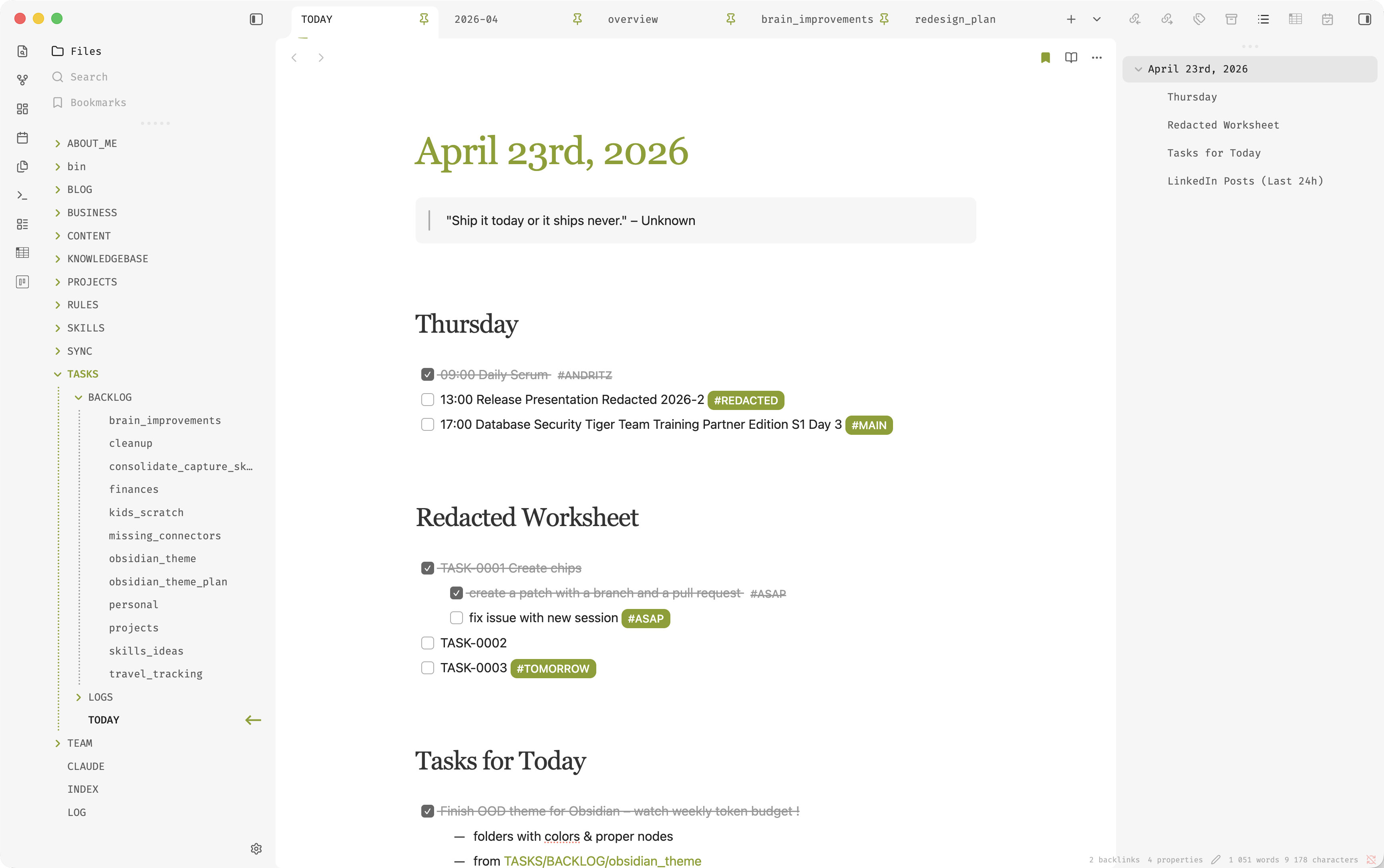
- Serif headings with a fixed scale. H1–H6 use Source Serif Pro at 3 / 2 / 1.75 / 1.5 / 1.25 / 1 rem, weight 500, line-height 1.35. Headings read like a book, not a UI component.
- Hidden frontmatter. The properties block is hidden in both Live Preview and Reading view – notes open straight to content, properties stay editable via the command palette and right sidebar.
- Em-dash list bullets. Unordered list items render with
—instead of•, in both Live Preview and Reading view. - Readable strikethrough. Completed tasks,
<del>, and<s>render in grey (#999), and struck bold text is forced back to weight 400 so it never competes with the strike line. - Accent tag pills, visible when struck. Tags render as solid accent-coloured pills with white text. Inside completed tasks they drop the pill but keep a grey foreground so
#projectstays legible. - Light-theme heading colors. H1 inherits the user's accent colour; H2–H3 render in
#333, H4–H6 in#555. Dark theme keeps Baseline defaults. - Enhanced file explorer. Dotted indentation guides, accent-coloured guide + semibold folder titles for the branch containing the active file, and a right-edge arrow marker on the active file (no border, no dot).
- Small chrome polish. Tighter tab bar with an accent underline on the active tab, accent-on-hover scrollbars, calendar month in accent.
- Everything else from Baseline. Layout flavours, input styles, callouts, tables, colour schemes, Style Settings integration, light/dark support – untouched.
Install
Manual
- In your vault, create the folder
.obsidian/themes/One Oracle Developer/. - Download
theme.cssandmanifest.jsonfrom this repo into that folder. - In Obsidian:
Settings → Appearance → Themes → One Oracle Developer.
Community themes
Once listed: Settings → Appearance → Manage → Browse → One Oracle Developer → Install and use.
Requirements
- Obsidian 1.6.0 or newer.
- Works in both light and dark modes.
- Style Settings plugin recommended (inherited from Baseline) for colour and typography tweaks.
Fonts
Headings use Source Serif Pro, falling back to Georgia → Times New Roman → the system serif. Body text uses Open Sans, falling back to system-ui → -apple-system → Segoe UI → the system sans-serif. Both families are pulled in via a Google Fonts @import at the top of the override block, so no local install is required – but a local install will render slightly faster on first paint.
Swap either family by overriding the --ood-font-heading / --ood-font-body tokens in a snippet or in Style Settings' custom CSS. The heading scale, weight, and line-height stay pinned regardless of the family you pick.
Complete list of changes
Everything below lives in a clearly fenced override block appended to Baseline's CSS, so a future Baseline update is a clean diff-merge.
Foundation
- Custom property tokens.
--ood-accent-bg-weak,--ood-accent-bg-hover,--ood-accent-underline-width,--ood-font-heading,--ood-font-body– single source of truth for tuning. - Forced accent on light theme. Baseline's
body:not(.accented-interface)rule would flatten--interactive-accentto black. Overridden withhsl(var(--accent-h) ...) !important, with a darkened hover variant viacalc(var(--accent-l) * 0.9). - Google Fonts import. Source Serif Pro + Open Sans pulled via
@import url(...)so the theme works without any local font install. - Softer blockquote background.
--blockquote-background-colornudged to a warmer, lower-contrast tint.
Content area
- First-H1 flush top. The leading H1 of a note drops its top margin and padding so the title sits tight against the tab bar.
- Heading scale pinned. H1–H6 forced to 3 / 2 / 1.75 / 1.5 / 1.25 / 1 rem with
!importantso other plugins can't push them around. - Heading weight + line-height pinned.
font-weight: 500,line-height: 1.35. Reads like a book, not a UI component. - Heading typography.
font-family: var(--ood-font-heading)+letter-spacing: -0.05remacross H1–H6 in both Live Preview and Reading view. - Light-theme heading colour. H1 =
var(--interactive-accent); H2–H3 =#333; H4–H6 =#555. Dark theme keeps Baseline defaults. - Body font.
.markdown-preview-view,.markdown-source-view, and.cm-contentall usevar(--ood-font-body)(Open Sans) so Live Preview and Reading view match.
Lists, tasks, tags
- Em-dash bullets.
—replaces•on unordered list items. Reading view useslist-style-type+::marker { color: #333 }; Live Preview hides.list-bulletand injects::before { content: "—" }. - Bold is 700.
strong, b, .cm-strongforced tofont-weight: 700 !importantso Open Sans bolds actually look bold. - Strikethrough #999.
<del>,<s>,[data-task="x"],.HyperMD-task-line[data-task="x"],.task-list-item.is-checked, andli[data-task="x"](plus their descendants) render in grey with matchingtext-decoration-color. - Struck bold de-escalates. Inside struck text,
strong/b/.cm-strongis forced back tofont-weight: 400so the strike line wins over the boldness. - Accent tag pills. Tags render as solid accent-coloured pills with white text,
font-family: var(--ood-font-body),font-size: 0.85rem,font-weight: 500,letter-spacing: normal,line-height: 1– so tags inside H1–H6 don't inherit heading serif, size, or negative tracking. - Struck tags stay legible. Inside a completed task, tags drop the pill background and render as grey
#999text so#projectremains readable without shouting. - Checked checkbox colour. On light theme, the checked checkbox glyph renders in
#666so it doesn't fight with the surrounding grey text.
Blockquotes
- Italic-serif body. Quote prose uses
var(--ood-font-heading)at 16px italic so quotes read as voice, not as a UI element. Padding is 20px left / 16px right on every line. Italic typography is scoped to prose only (blockquote > pin Reading view, non-HyperMD-list-linequote lines in Live Preview), so lists inside blockquotes still render as lists. - No left bar, soft grey fill. Reading view drops the
::beforepseudo; Live Preview zeros.HyperMD-quoteleft/right borders and hides the stacked>markers viacm-formatting. Background is restored explicitly tovar(--background-secondary). - Multi-paragraph spacing. Convention is blank
>separators (> A/>/> B). Reading view:margin-block: 0.9emon<p>children withhtml bodyspecificity to beat Baseline's.markdown-rendered preset; first/last paragraphs drop their outer margin so the blockquote's own padding-block holds. Live Preview: zeropadding-blockon.cm-line.HyperMD-quote– the empty>line's own line-height is the inter-paragraph gap. Embedded HTML<p>chunks inside blockquotes also get zeroed inner margins (with first/last reverted) so HTML quotes match native ones. - Caret height fix. Zero-width space pseudo (
content: "\200B") on every.cm-line.HyperMD-quote::beforeso the cursor on an empty>line keeps full height. Without this, CM6 has no inline content to derive caret height from once the>glyph is hidden.
Chrome
- Hidden frontmatter.
.metadata-containeris hidden withdisplay: none !importantin both Live Preview and Reading view. Properties remain editable via command palette and right sidebar. - Tab bar polish.
.workspace-tab-headergetsposition: relative+padding-block: 2px; the active tab grows a::afterpseudo underline invar(--interactive-accent)atvar(--ood-accent-underline-width)(2px). - Scrollbar accent on hover/active.
::-webkit-scrollbar-thumb:hoverand:activeflip tovar(--interactive-accent). Default thumb width unchanged. - Active-line highlight disabled.
.cm-line.cm-active { background: transparent !important }– kept as a hook for future accent-tint experiments, currently off.
Tables
- Bottom-aligned headers. Multi-line column labels sit flush with single-line ones above the data row. Reading view works directly because
<th>isdisplay: table-cell. Live Preview wraps each th in a block-level.table-cell-wrapperdiv – the wrapper is set todisplay: inline-block; vertical-align: bottom; width: 100%so the th's ownvertical-align: bottomactually moves it; the th keepsdisplay: table-cellto preserve column geometry. - Header editor blends. When editing a header cell, Obsidian hides the original wrapper and injects a second one with a live CM6 editor. Selectors are scoped with
:not([style*="display: none"])so the override doesn't un-hide the original (which would render as a duplicate above the editor). The editor's CM6 layers (.cm-s-obsidian,.cm-editor,.cm-scroller,.cm-content,.cm-line) are forced transparent so the editor blends with the header background instead of showing CM6's default dark-grey fill. - No grey flash on click.
:hover,:active,:focus,:focus-withinon<th>and.table-cell-wrapper, plus.cm-editor.cm-focusedand.cm-active/.cm-activeLineare all forced transparent so clicking a header is visually inert.
File explorer
- Accent collapse icon. The disclosure triangle picks up
var(--interactive-accent). - Dotted indentation guides.
.tree-item-childrengets--nav-indentation-guide-width: 2px,--nav-indentation-guide-color: #999, andborder-inline-start-style: dotted. - Ancestor-chain highlight. Via
.nav-folder:has(.tree-item-self.is-active), every folder on the path to the active file gets its guide invar(--interactive-accent)and its folder title infont-weight: 500+ accent colour. - Tighter nav density.
.nav-file-title,.nav-folder-titlegetpadding-block: 3pxandline-height: 1.6so deep trees stop feeling loose. - Active file mark. No border, no background dot – instead a right-aligned SVG-shaped arrow injected via
::afterso the active file reads as a cursor mark rather than a selected row.
Calendar plugin
- Today bold.
.calendar .todayrenders atfont-weight: 700. - Month accent.
.calendar .title .monthpicks upvar(--interactive-accent)while.title .yearstays inherited, so the month is the heavy visual anchor.
Companion snippets
Optional CSS snippets shipped in .obsidian/snippets/ that pair with the theme but stay opt-in. Toggle each one via Settings → Appearance → CSS snippets.
ood-left-sidebar-tabs– Files + Bookmarks left-aligned on a single row, Search rendered icon-only floating right. Overrides the theme's stacked column layout for.mod-top-left-spacecontainers; the sidebar collapse toggle stays at the top.
Author
Jan Kvetina – Oracle APEX developer, blogger at oneoracledeveloper.com.
Credits
This theme is a fork of Baseline by aaaaalexis. All the structural work – the colour system, the Style Settings schema, the light/dark balance – comes from there. This fork only layers personal typography choices and a few rendering fixes on top. If you like the bones of this theme, go star Baseline.
License
MIT. Baseline is also MIT; this fork inherits the same terms.