
README file from
GithubMuYun 慕云
A snug Obsidian theme for long-form reading, fast writing & quick navigation — with an optional companion plugin that adds JS-powered reading aids. 一款为长文阅读、高效写作、快速定位而生的 Obsidian 主题——可选配套插件提供纯主题做不到的阅读增强。
Overview 概述
EN — MuYun (慕云, "admiring the clouds") is designed around three pillars. Reading comfort: paper-like surfaces in dark "ink night" and light "morning glow" variants, body text tuned into a ~10:1 contrast comfort band instead of maximum contrast, and every accent color desaturated 30–40% with its hue preserved, so long sessions don't fatigue your eyes. Writing efficiency: the editing and reading views share the same variable set, so switching modes never causes visual jumps; an optional companion plugin adds paragraph focus and typewriter scrolling for draft work. Quick navigation: three-tier heading colors, an H2 wayfinder stripe, a file-tree skeleton with parent-chain highlight, outline dots colored by heading level, search hit highlighting, and a restrained motion system — everything is built so that with hundreds of notes you can still find your place with a glance.
中文 — MuYun(慕云)围绕三大支柱设计。阅读舒适:深色「墨蓝夜空」与浅色「晨光暖纸」两种纸感底色,正文对比度压在 ≈10:1 的舒适带而非最大值,所有强调色降饱和 30–40% 并保留色相,长时间阅读不累眼。写作高效:编辑态与阅读态共用同一套变量,模式切换零视觉跳变;可选配套插件为写稿提供段落聚焦与打字机滚动。快速定位:标题三级色阶、H2 路标条、文件树骨架与父链高亮、按标题层级着色的大纲圆点、搜索命中高亮、克制的动效系统——所有设计都为了让「几百篇笔记里一瞥定位」成立。
Highlights ✨ 亮点
- Eye-friendly color system · 护眼配色体系 — Dark "ink paper" & warm-paper light scheme; body contrast presets soft / standard / firm (~8.5 / ~10 / ~12.5:1); accents desaturated, hue preserved. 深色墨蓝纸 × 浅色晨光暖纸;正文对比度柔和 / 标准 / 扎实三档可调;强调色降饱和不偏色。
- Three-tier heading colors · 标题三级色 — H1 amber / H2 mallow purple / H3 link blue, H4–H6 stay neutral; an H2 wayfinder stripe catches the eye during fast scrolling; inline title enlarged to 2.0em with extra spacing. H1 沙金 / H2 慕云紫(带 3px 路标条)/ H3 链接蓝,H4–H6 保持正文色;内联标题 2.0em 拉开文件与章节层级。
- Navigation UI · 导航界面 — File tree: bold folder skeleton, active-file marker bar, parent-chain highlight (hovering a deep file lights up all its ancestors); outline panel with heading-colored level dots; active-tab indicator; quick-switcher selection bar; search hit highlighting; graph nodes in palette colors. 文件树:文件夹加粗、当前文件左条、悬停深层文件时祖先文件夹逐级亮起;大纲层级圆点(金/紫/蓝 = 标题色系);标签页活动色条;快速切换器选中条;搜索命中高亮;图谱节点池色。
- Callout palette system · Callout 语义色 — All semantic colors derive from one 11-color palette: note 蓝紫 / success 苔绿 / warning 陶土 / danger 暗红 / example 慕云紫 — calm, but always distinguishable at a glance. 全部语义色取自同一调色板,低饱和但一眼可辨。
- Restrained motion · 克制动效 — Hover fades, expand slide-ins, checkbox pop-in; all ≤200ms, opacity/transform only,
prefers-reduced-motionrespected, and a one-switch Efficiency mode kills every animation. 悬停渐亮、展开淡入、勾选弹入;全部 ≤200ms、只动透明度与位移;效率模式一键全关,另有单项开关与提速档。 - Print/PDF ready · 打印导出 — Exporting to PDF always yields a light paper document, even in dark mode. 暗色模式下导出 PDF 也自动转为白纸黑字。
- Mobile & narrow screens · 移动端适配 — Line width adapts below 750px, inline title steps down, interface density tightens. 窄屏自动收紧行长与密度,视觉降噪。
Screenshots 截图
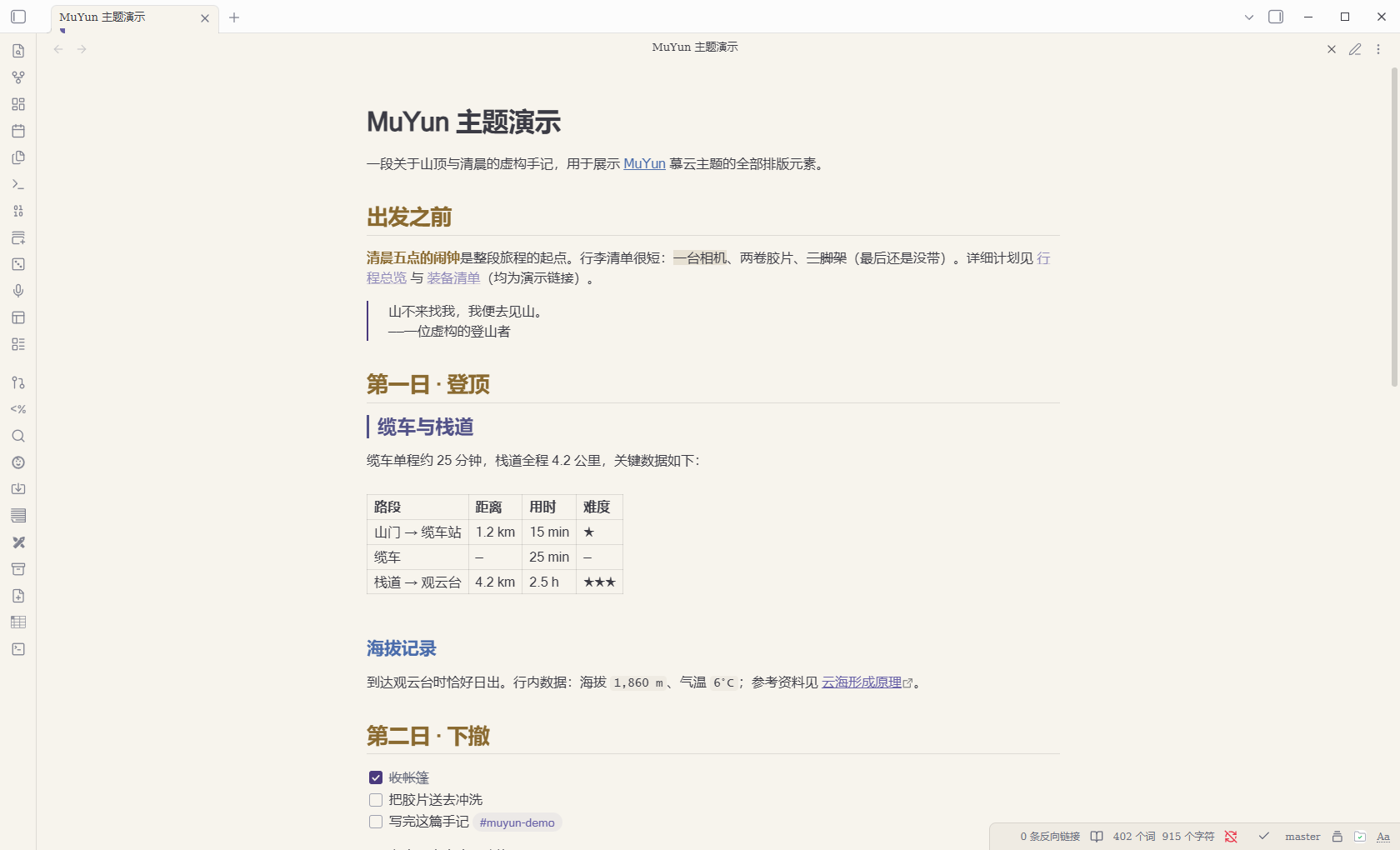
Light · 晨光暖纸
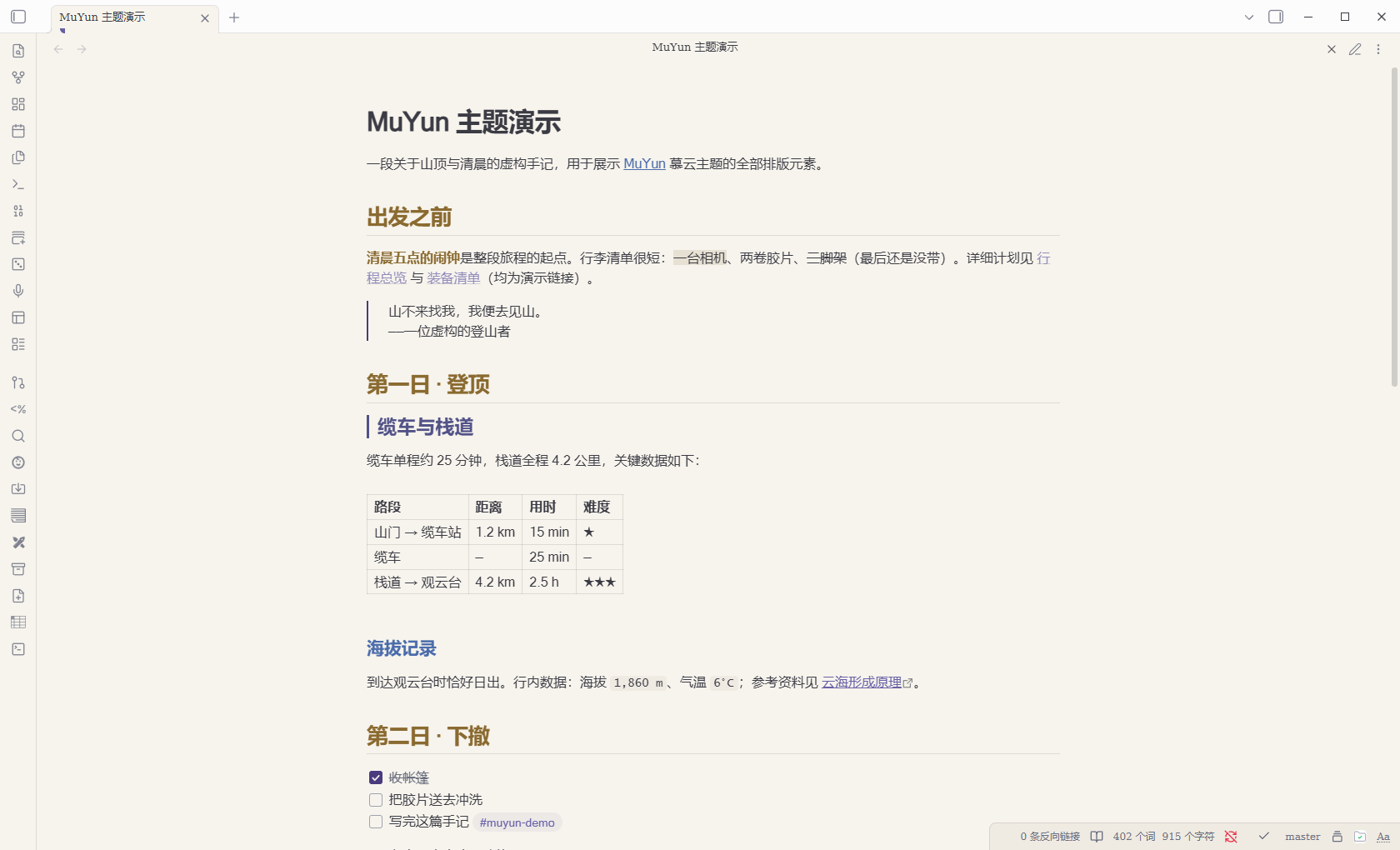
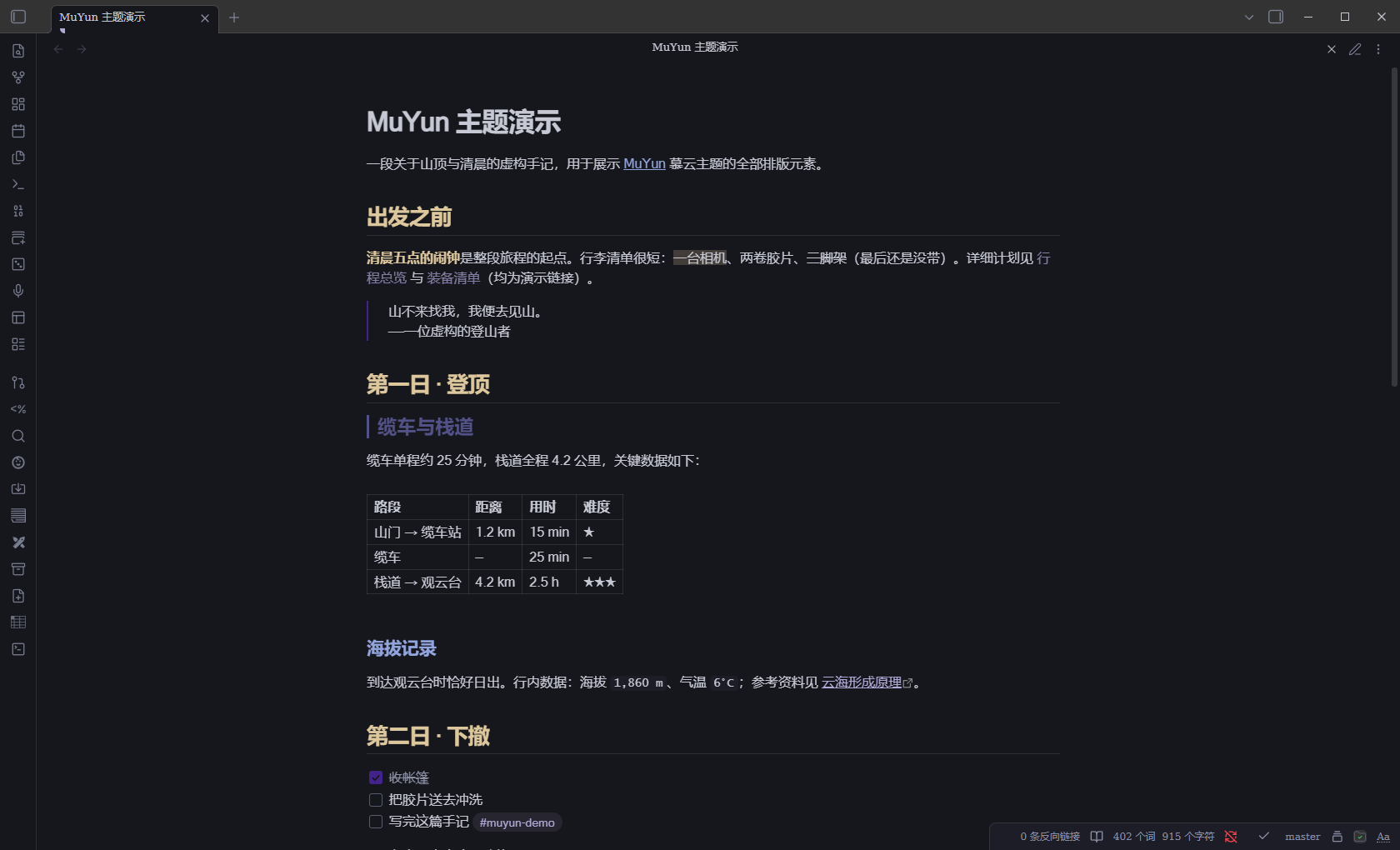
Dark · 墨蓝夜空
Install 安装
Theme 主题
- Community themes 社区目录:Settings → Appearance → Themes → Browse → search "MuYun"(目录搜索同步有数小时延迟)。设置 → 外观 → 主题 → 浏览 → 搜索 MuYun。
- Manual 手动安装:Download
manifest.jsonandtheme.cssfrom Releases, put both into<vault>/.obsidian/themes/MuYun/, then select MuYun in Settings → Appearance. 从 Releases 下载manifest.json与theme.css,放入库目录.obsidian/themes/MuYun/,再在外观设置中选择 MuYun。
Companion plugin 配套插件(可选 Optional)
The theme is pure CSS and works fully on its own. MuYun Companion adds what CSS cannot do — ten reading & writing aids, each with its own toggle. 主题本身纯 CSS、独立完整。MuYun Companion 补足 CSS 做不到的部分——十项阅读/写作增强,每项可独立开关。
What it adds 功能清单:
| Feature 功能 | Default 默认 | What it does 说明 |
|---|---|---|
| Reading progress bar 阅读进度条 (H1) | On 开 | 4px gradient bar at the top, follows scrolling. 顶部 4px 渐变细条,随滚动显示读到哪了 |
| Edge minimap 侧缘小地图 (H8) | On 开 | Heading dot-rail on the right; tracks scrolling (reading) or cursor (live preview); click to jump; read trail persisted. 右缘标题点轨,阅读态随滚动、编辑态随光标,点击跳转,已读轨迹持久化 |
| Reading spotlight 阅读聚光灯 (H2) | Off 关 | Current section lit, others dimmed — scroll-driven in reading view, cursor-driven in live preview. 当前小节全亮其余降透明:阅读态跟滚动、实时预览跟光标 |
| Resume reading 续读记忆 | On 开 | Reopens each note at the position you left (LRU 400 notes). 每篇笔记记住上次读到的位置 |
| Heading breadcrumb 标题面包屑 | On 开 | Status bar shows Chapter › Section and updates as you scroll. 状态栏实时显示当前章节路径 |
| Reading time 阅读时长估计 | On 开 | "≈N min" in the status bar (400 CJK chars/min). 状态栏显示预计阅读分钟数 |
| Reading stats 阅读统计 | Off 关 | Local daily/per-note time tracking, daily goal, weekly report, 12-week heatmap. 本地记录每日/每篇阅读时长、每日目标、周报与 12 周热图 |
| Copy section link 复制小节链接 | — | Command that copies [[Note#Section]] to the clipboard. 一键复制当前小节的维基链接 |
| Paragraph focus 段落聚焦 | Off 关 | In live preview, the paragraph around the cursor stays lit, the rest fades (writing mode). 光标所在段落全亮、其余淡出(写稿模式) |
| Typewriter scrolling 打字机滚动 | Off 关 | Keeps the cursor at the upper third of the screen, smooth-eased. 光标始终保持在屏幕上三分之一处(平滑滚动) |
How to install 安装步骤:
- Download the three files from the Companion release page:
main.js,manifest.json,styles.css. 从配套插件发布页下载这三个文件。 - Put them into
<vault>/.obsidian/plugins/muyun-companion/(create the folder if needed). 放入库目录.obsidian/plugins/muyun-companion/(没有就新建该文件夹)。 - In Obsidian: Settings → Community plugins → turn off Restricted mode if asked → enable MuYun Companion → press
Ctrl+Ronce. 设置 → 第三方插件 → 关闭安全模式(如提示)→ 启用 MuYun Companion → 按Ctrl+R重载一次。 - Optional: install Style Settings for 12 companion options + 24 theme options. 可选:安装 Style Settings 插件解锁 12 项插件参数与 24 项主题参数。
The plugin is pure local computation — no network access, no telemetry. It degrades gracefully: without it the theme loses nothing. 插件纯本地计算、零联网零遥测;不装它主题功能零损失。
Style Settings 样式设置
With Style Settings installed, 24 options unlock: link / bold / heading colors (H1–H3), inline title size, paragraph spacing, body contrast presets, line-width presets (40/46/52rem), H2 stripe toggle, zebra table stripes, image cards, tab cards, heading auto-numbering (reading view), code line numbers (reading view), legacy dark accent, efficiency mode, motion speed, and per-effect motion switches. 安装 Style Settings 后可调 24 项:链接/加粗/标题色、内联标题字号、段距、对比度三档、行宽三档、H2 路标条、斑马纹、图片卡片、标签页卡片化、标题自动编号、代码行号(后两者仅阅读视图)、深色灰紫兜底、效率模式、动效提速与单项动效开关。
The dark interactive accent follows your Obsidian global accent color by design; a "legacy MuYun purple" toggle is provided. 深色交互色默认跟随 Obsidian 全局主题色,面板提供「恢复 MuYun 灰紫」开关。
Recommended presets 推荐配置档
| Preset 档位 | Combination 组合 | For 适合 |
|---|---|---|
| Late-night reading 深夜护眼档 | Dark · Efficiency mode · spotlight off | Zero-motion long reading. 睡前长文阅读,零动效零干扰 |
| Draft sprint 写稿专注档 | Paragraph focus · typewriter scrolling · H2 stripe | First drafts. 初稿冲刺,眼不离光标 |
| Deep study 长文精读档 | Spotlight (dim 0.25) · minimap · resume · breadcrumb | Large documents. 大部头啃书,定位最大化 |
FAQ 常见问题
- Parent-chain highlight doesn't fire? 父链高亮没反应? It relies on CSS
:has()(Obsidian 1.4+ on recent Chromium). It degrades silently — update Obsidian and retry. 依赖 CSS:has()(新版内核可用),不支持时静默降级,升级 Obsidian 即可。 - Spotlight doesn't move in live preview? 实时预览聚光灯不动? It follows the cursor, not scrolling, in that mode; scroll-driven behavior lives in reading view. 实时预览下它跟随光标而非滚动;滚动跟随在阅读视图里。
- Progress bar invisible? 进度条不显示? Markdown views only, and only when content exceeds one screen. 仅 Markdown 视图且内容超过一屏时出现。
- Dark PDF? 导出 PDF 是深色的吗? Never — printing always renders light paper. 永远是白纸黑字,
@media print自动转换。 - danger Callout color? danger 标注颜色? Dark red
#7E3232— the single palette-external exception, chosen deliberately. 暗红 #7E3232,全主题唯一调色板外例外色,经拍板选定。
License
MIT © GarrettFynn(甘慕云)