
README file from
GithubMoLan
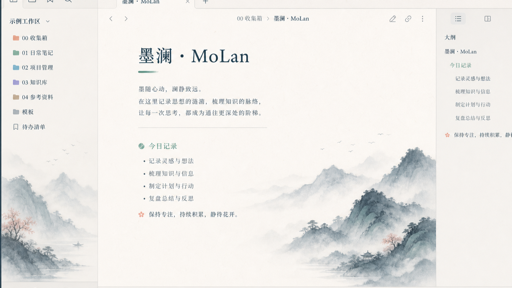
MoLan is an elegant, low-saturation Chinese ink-wash theme for Obsidian. It combines a warm rice-paper surface with ink blue, mist green, muted coral, and a small set of calm functional colors. The theme is designed for long-form writing and reading: artwork stays at the edge of panes and never sits behind the text line.
Installation
From the Obsidian Community Themes directory
- Open Settings → Appearance → Themes in Obsidian.
- Select Manage, search for MoLan, and choose Install.
- Select Use to activate the theme.
Manual installation
- Download the latest
theme.cssandmanifest.jsonfrom the GitHub Releases page. - Create the folder
<your-vault>/.obsidian/themes/MoLan/. - Put both downloaded files directly in that folder.
- In Obsidian, open Settings → Appearance → Themes, then select MoLan.
Customization
MoLan works without the Style Settings plugin and has no required Style Settings options. Use Obsidian's built-in appearance controls to switch between light and dark mode, or add a CSS snippet for more specific changes.
The most useful theme variables are defined at the top of theme.css:
| Variable | Purpose |
|---|---|
--molan-font-ui |
User-interface font stack |
--molan-font-heading |
Heading font stack |
--molan-font-code |
Code font stack |
--molan-radius-s, --molan-radius-m, --molan-radius-l |
Corner radii |
--molan-folder-0 to --molan-folder-6 |
PARA/LifeOS folder accent colors |
Example CSS snippet:
/* .obsidian/snippets/molan-overrides.css */
.theme-light {
  --molan-font-heading: Georgia, serif;
  --molan-folder-3: #4f8582;
}
Enable the snippet from Settings → Appearance → CSS snippets. If another snippet changes Obsidian color variables or pane backgrounds, disable it first when troubleshooting visual conflicts.
Features
- Full light “rice paper” and dark “night ink” color systems; neither uses pure black or white.
- Self-contained paper grain and ink-wash scenery. Key artwork is embedded as a Data URI, so it is not loaded from the network and does not depend on a local image path.
- Native CSS-mask folder glyphs with low-saturation colors for folders beginning with
0through6. - Styling for editing and reading views, sidebars, tabs, menus, settings, and mobile layouts.
- Coverage for links, tags, tasks, callouts, tables, code, search, Canvas, Graph, Bases, Calendar, Dataview, and Kanban class names.
- No external fonts, network requests, telemetry, or tracking code.
Folder color conventions
Folders with these prefixes receive a fine accent rule and a matching folder glyph:
| Prefix | Meaning | Accent |
|---|---|---|
0. or 0 |
System | muted vermilion |
1. or 1 |
Daily | muted ochre |
2. or 2 |
Inbox | moss green |
3. or 3 |
Projects | celadon |
4. or 4 |
Areas | landscape blue |
5. or 5 |
Resources | blue violet |
6. or 6 |
Archive | dusty violet |
中文说明
一套为 Obsidian 设计的低饱和水墨主题。它以宣纸白、墨青蓝与雾青绿为主,保留朱砂、赭金、藕紫等少量功能色;重点是长时间写作和阅读时的安静层次,而不是用大面积图案制造“国风”。
安装
- 在 Obsidian 打开 设置 → 外观 → 主题 → 管理,搜索并安装 MoLan。
- 安装后点击 使用 即可启用。
- 手动安装时,请将 Release 中的
theme.css与manifest.json直接放入<Vault>/.obsidian/themes/MoLan/。
自定义
无需安装 Style Settings 插件。可在 Obsidian 内置外观设置中切换明暗模式;如需微调字体、圆角或目录色,可在 CSS snippet 中覆盖 theme.css 顶部的 --molan-* 变量。若与其他 snippet 出现视觉冲突,请优先停用会改写颜色变量或窗格背景的 snippet。
设计特性
- 浅色“宣纸”与深色“夜墨”两套完整色阶,均非纯黑白。
- 水墨画面内嵌于 CSS,不访问外部网络,也不依赖本机图片路径。
- 目录拥有 CSS mask 文件夹图标,自动适配
0系统/0.系统至6归档/6.归档的低饱和功能色。 - 适配编辑模式、阅读视图、侧栏、标签页、菜单、设置页与移动端。
发布前
本仓库已按社区主题的发布结构准备:根目录包含 theme.css、manifest.json、versions.json、许可证与 16:9 预览图。发布时应创建与 manifest.json 完全一致的 GitHub Release 标签,并附上 theme.css 与 manifest.json。
许可与致谢
本主题为独立实现。开发时仅将 Retroma 用作 Obsidian 主题覆盖范围的参考,未复制其 CSS、图片或代码。
本项目采用 MIT License 开源。