
README file from
GithubPastel Dusk
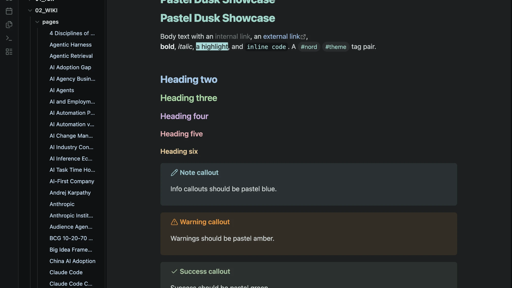
A dark-only Obsidian theme: soft, muted pastel turquoise on a deep, near-neutral dark background, with gently rounded corners. Built on top of insanum/obsidian_nord.
How it differs from stock Nord
- Dark only: light mode dropped, all focus on one polished dark look.
- Deep, near-neutral background: a dark, low-chroma base (
#1d1f20), with a darker left sidebar. - Distinct heading colours: each level its own soft pastel (turquoise, blue, green, lilac, rose, amber).
- Pastel turquoise accent: soft turquoise (
#9fd6cb) for buttons, tags, and active states. - Pastel blue links & files: links and file names in soft blue (links a touch darker, files a touch lighter).
- Soft rounded corners: gentle radii, with panes floating as cards.
- Folders vs files: file names in pastel blue, folders neutral, so the tree reads clearly.
- Soft pastel syntax & callouts: gentle, low-saturation colours.
Install
Manual:
- Create the folder
<your vault>/.obsidian/themes/Pastel Dusk/. - Copy
manifest.jsonandtheme.cssinto it. - In Obsidian: Settings → Appearance → Themes → Pastel Dusk.
Credits
- Based on "Obsidian Nord" by Eric Davis (insanum), MIT.
- Nord colour palette by Arctic Ice Studio / nordtheme.com.
Licensed under MIT.